
How to Use 12V/24V 6-Way Blade Fuse Block with LED Indicator: Examples, Pinouts, and Specs
 Design with 12V/24V 6-Way Blade Fuse Block with LED Indicator in Cirkit Designer
Introduction
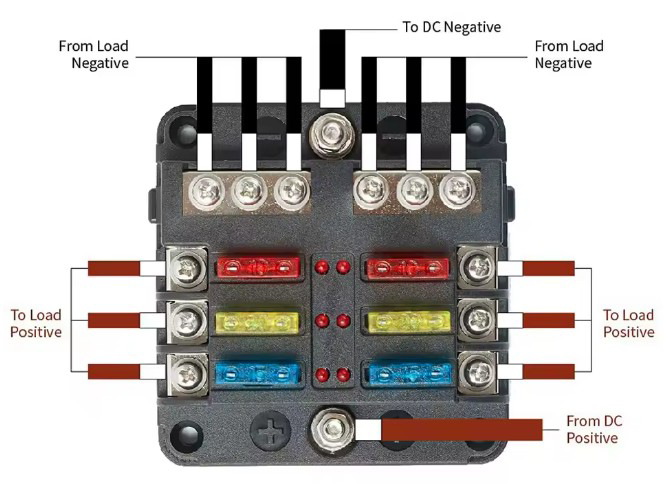
The 12V/24V 6-Way Blade Fuse Block with LED Indicator is a compact and efficient solution for managing multiple electrical circuits in automotive, marine, and other 12V or 24V systems. This fuse block can accommodate up to six standard blade fuses, providing a centralized and organized way to protect circuits from overcurrent. The built-in LED indicators simplify troubleshooting by illuminating when a fuse is blown, allowing for quick identification and replacement.
Explore Projects Built with 12V/24V 6-Way Blade Fuse Block with LED Indicator
 Open Project in Cirkit Designer
 Open Project in Cirkit Designer
 Open Project in Cirkit Designer
 Open Project in Cirkit Designer
Explore Projects Built with 12V/24V 6-Way Blade Fuse Block with LED Indicator
Open Project in Cirkit DesignerOpen Project in Cirkit DesignerOpen Project in Cirkit DesignerOpen Project in Cirkit DesignerCommon Applications and Use Cases
- Automotive electrical systems (cars, trucks, RVs)
- Marine electrical systems (boats, yachts)
- Off-grid solar power systems
- Industrial equipment and machinery
- DIY electronics projects requiring multiple fused circuits
Technical Specifications
Key Technical Details
- Operating Voltage: 12V DC or 24V DC
- Maximum Current per Circuit: 30A
- Maximum Total Current: 100A
- Fuse Type: Standard blade fuses (ATO/ATC)
- LED Indicator: Lights up when a fuse is blown
- Input Terminals: 1 positive input terminal, 1 negative input terminal
- Output Terminals: 6 positive output terminals, 6 negative output terminals
- Material: Flame-retardant plastic housing
- Mounting: Screw holes for secure installation
- Dimensions: Approximately 3.9 x 2.8 x 1.4 inches (100 x 70 x 35 mm)
Pin Configuration and Descriptions
The fuse block has a straightforward layout with input and output terminals for both positive and negative connections. Below is a detailed description:
| Pin/Terminal | Description |
|---|---|
| Positive Input | Connects to the positive terminal of the power source (12V or 24V). |
| Negative Input | Connects to the negative terminal (ground) of the power source. |
| Positive Outputs | Six terminals for connecting the positive wires of individual circuits. |
| Negative Outputs | Six terminals for connecting the negative wires of individual circuits. |
| Fuse Slots | Six slots for standard blade fuses (one per circuit). |
| LED Indicators | One LED per fuse slot; lights up when the corresponding fuse is blown. |
Usage Instructions
How to Use the Component in a Circuit
Mount the Fuse Block:
- Secure the fuse block to a flat surface using screws through the mounting holes.
- Ensure the location is dry and protected from excessive vibration or heat.
Connect the Power Source:
- Attach the positive input terminal to the positive terminal of the power source (e.g., car battery).
- Attach the negative input terminal to the negative terminal (ground) of the power source.
Install Blade Fuses:
- Insert the appropriate blade fuse into each slot based on the current rating of the connected circuit.
- Ensure the fuse rating matches the load requirements to prevent overcurrent damage.
Connect Circuits:
- Connect the positive wires of your circuits to the positive output terminals.
- Connect the negative wires of your circuits to the negative output terminals.
Test the Setup:
- Power on the system and verify that all circuits are functioning correctly.
- If a circuit is not working, check the corresponding LED indicator to see if the fuse is blown.
Important Considerations and Best Practices
- Always use fuses with the correct current rating for each circuit to avoid damage to connected devices.
- Ensure all connections are secure to prevent loose wires, which can cause electrical faults.
- Regularly inspect the fuse block for signs of wear, corrosion, or damage.
- If using in a vehicle, ensure the fuse block is mounted in a location that is easily accessible for maintenance.
Example: Connecting to an Arduino UNO
If you are using the fuse block to power multiple devices in an Arduino project, follow these steps:
- Connect the positive input terminal of the fuse block to the 12V power supply.
- Use one of the positive output terminals to power the Arduino UNO via its VIN pin.
- Use other output terminals to power additional devices (e.g., sensors, motors) connected to the Arduino.
Here is an example Arduino sketch to monitor a sensor powered through the fuse block:
// Example Arduino code to read a sensor powered via the fuse block
const int sensorPin = A0;  // Analog pin connected to the sensor
int sensorValue = 0;       // Variable to store the sensor reading

void setup() {
  Serial.begin(9600);  // Initialize serial communication
  pinMode(sensorPin, INPUT);  // Set the sensor pin as input
}

void loop() {
  sensorValue = analogRead(sensorPin);  // Read the sensor value
  Serial.print("Sensor Value: ");
  Serial.println(sensorValue);  // Print the sensor value to the Serial Monitor
  delay(1000);  // Wait for 1 second before the next reading
}
Troubleshooting and FAQs
Common Issues and Solutions
LED Indicator Does Not Light Up When a Fuse is Blown:
- Cause: The LED circuit may not be receiving power.
- Solution: Check the input connections to ensure the fuse block is properly powered.
Fuse Blows Repeatedly:
- Cause: The connected circuit may be drawing more current than the fuse rating.
- Solution: Verify the current requirements of the circuit and use a fuse with an appropriate rating.
No Power to Connected Circuits:
- Cause: Loose or incorrect wiring.
- Solution: Double-check all connections, ensuring they are secure and correctly placed.
Corrosion on Terminals:
- Cause: Exposure to moisture or harsh environments.
- Solution: Clean the terminals with a contact cleaner and consider relocating the fuse block to a drier location.
FAQs
Q: Can I use this fuse block for AC circuits?
A: No, this fuse block is designed for DC circuits only, specifically 12V or 24V systems.
Q: What happens if I install a fuse with a higher rating than required?
A: Using a fuse with a higher rating can result in insufficient protection for the circuit, potentially causing damage to connected devices.
Q: Can I use fewer than six fuses?
A: Yes, you can use as many or as few fuses as needed. Unused slots will remain inactive.
Q: Is the fuse block waterproof?
A: No, the fuse block is not waterproof. It should be installed in a dry and protected location.