
How to Use Photocell: Examples, Pinouts, and Specs
 Design with Photocell in Cirkit Designer
Introduction
A photocell, also known as a light-dependent resistor (LDR) or light sensor, is a passive electronic component that detects light levels in its environment. Its resistance decreases as the intensity of light increases, making it an ideal component for light-sensitive applications. Photocells are widely used in outdoor lighting systems, automatic streetlights, light meters, and various other devices that require light-based control.
Explore Projects Built with Photocell
 Open Project in Cirkit Designer
 Open Project in Cirkit Designer
 Open Project in Cirkit Designer
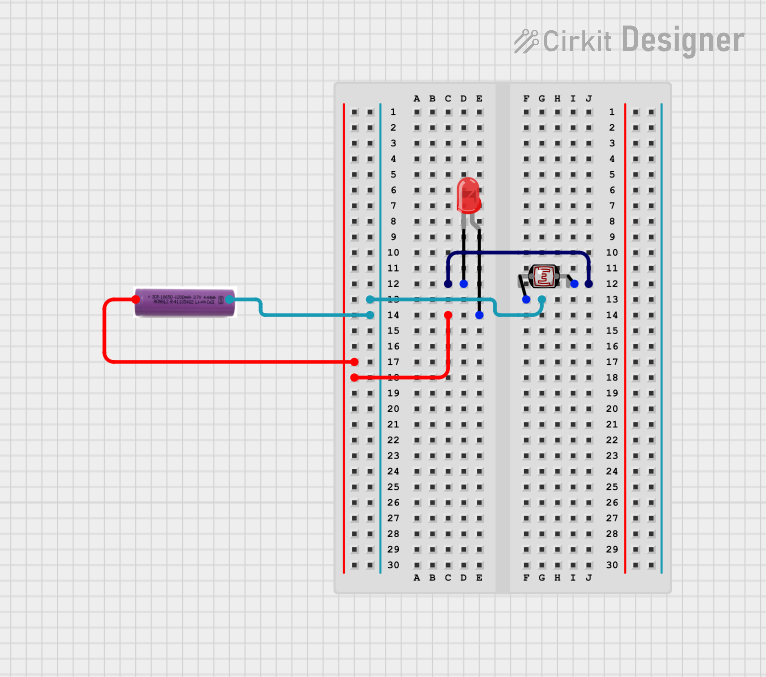 Open Project in Cirkit Designer
Explore Projects Built with Photocell
Open Project in Cirkit DesignerOpen Project in Cirkit DesignerOpen Project in Cirkit DesignerOpen Project in Cirkit DesignerCommon Applications and Use Cases
- Automatic streetlights that turn on at dusk and off at dawn
- Light-sensitive alarms and security systems
- Brightness adjustment in electronic displays
- Solar-powered devices
- Light intensity measurement tools
Technical Specifications
Below are the general technical specifications for a standard photocell. Note that specific values may vary depending on the manufacturer and model.
| Parameter | Value |
|---|---|
| Resistance (Dark) | 1 MΩ or higher |
| Resistance (Bright Light) | 1 kΩ to 10 kΩ |
| Operating Voltage | 3.3V to 5V (typical) |
| Power Dissipation | 100 mW (maximum) |
| Response Time | 20 ms to 100 ms |
| Operating Temperature | -30°C to +70°C |
Pin Configuration and Descriptions
A photocell typically has two terminals (no polarity), making it easy to integrate into circuits. Below is a description of its connections:
| Pin | Description |
|---|---|
| Pin 1 | Connects to the positive voltage or signal input |
| Pin 2 | Connects to ground or the other side of the circuit |
Usage Instructions
How to Use the Photocell in a Circuit
Basic Circuit Setup:
- Connect one terminal of the photocell to a voltage source (e.g., 5V).
- Connect the other terminal to a resistor (typically 10 kΩ) in series, and then to ground.
- The junction between the photocell and the resistor serves as the output, where the voltage varies based on light intensity.
Interfacing with an Arduino UNO:
- Connect the output of the photocell-resistor junction to an analog input pin on the Arduino (e.g., A0).
- Use the Arduino's
analogRead()function to measure the voltage and determine light levels.
Important Considerations and Best Practices
- Resistor Selection: Choose a pull-down resistor value that matches the expected light conditions for optimal sensitivity.
- Placement: Ensure the photocell is exposed to the light source for accurate readings.
- Noise Reduction: Add a capacitor (e.g., 0.1 µF) across the photocell to filter out noise in the signal.
- Voltage Levels: Ensure the operating voltage does not exceed the photocell's maximum rating to avoid damage.
Example Code for Arduino UNO
// Photocell example with Arduino UNO
// Reads light levels and prints the value to the Serial Monitor

const int photocellPin = A0; // Analog pin connected to the photocell
int lightLevel = 0;          // Variable to store the light level

void setup() {
  Serial.begin(9600); // Initialize serial communication at 9600 baud
}

void loop() {
  lightLevel = analogRead(photocellPin); // Read the analog value from the photocell
  Serial.print("Light Level: ");         // Print label for clarity
  Serial.println(lightLevel);           // Print the light level value
  delay(500);                           // Wait 500ms before the next reading
}
Troubleshooting and FAQs
Common Issues and Solutions
No Response to Light Changes:
- Cause: Incorrect wiring or damaged photocell.
- Solution: Double-check the connections and ensure the photocell is functional.
Inconsistent Readings:
- Cause: Electrical noise or unstable power supply.
- Solution: Add a decoupling capacitor across the photocell or use a regulated power source.
Low Sensitivity:
- Cause: Incorrect pull-down resistor value.
- Solution: Adjust the resistor value to better match the light conditions.
Arduino Reads Constant Values:
- Cause: Analog pin not properly connected or photocell not exposed to light.
- Solution: Verify the circuit connections and ensure the photocell is exposed to varying light levels.
FAQs
Q: Can a photocell detect specific colors of light?
A: No, a standard photocell is not color-sensitive. It detects the overall intensity of light, regardless of its color.
Q: Can I use a photocell in low-light environments?
A: Yes, but you may need to use a high-value pull-down resistor to increase sensitivity in low-light conditions.
Q: Is the photocell polarity-sensitive?
A: No, a photocell has no polarity and can be connected in either direction.
Q: How do I protect the photocell from environmental damage?
A: Use a transparent enclosure or coating to shield the photocell from moisture and dust while allowing light to pass through.
This documentation provides a comprehensive guide to understanding, using, and troubleshooting a photocell in various applications.