Cirkit Designer Logo
Cirkit Designer
Your all-in-one circuit design IDE
Home / 
Component Documentation

How to Use Si7021: Examples, Pinouts, and Specs
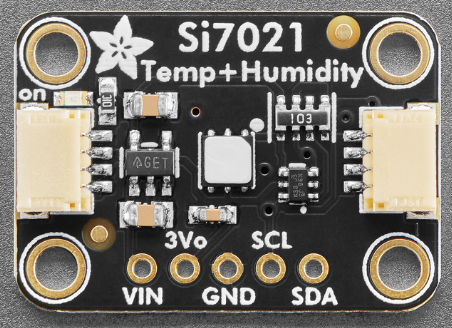

Image of Si7021
Cirkit Designer LogoDesign with Si7021 in Cirkit Designer

Introduction

The Si7021, manufactured by Adafruit (Part ID: Humidity Temp), is a digital humidity and temperature sensor designed for precise environmental monitoring. It provides accurate measurements of relative humidity and temperature while consuming minimal power, making it suitable for battery-powered and energy-efficient applications. The sensor communicates via an I2C interface, ensuring seamless integration into microcontroller-based systems.

Explore Projects Built with Si7021

Use Cirkit Designer to design, explore, and prototype these projects online. Some projects support real-time simulation. Click "Open Project" to start designing instantly!
Cellular-Enabled IoT Device with Real-Time Clock and Power Management
Image of LRCM PHASE 2 BASIC: A project utilizing Si7021 in a practical application
This circuit features a LilyGo-SIM7000G module for cellular communication and GPS functionality, interfaced with an RTC DS3231 for real-time clock capabilities. It includes voltage sensing through two voltage sensor modules, and uses an 8-channel opto-coupler for isolating different parts of the circuit. Power management is handled by a buck converter connected to a DC power source and batteries, with a fuse for protection and a rocker switch for on/off control. Additionally, there's an LED for indication purposes.
Cirkit Designer LogoOpen Project in Cirkit Designer
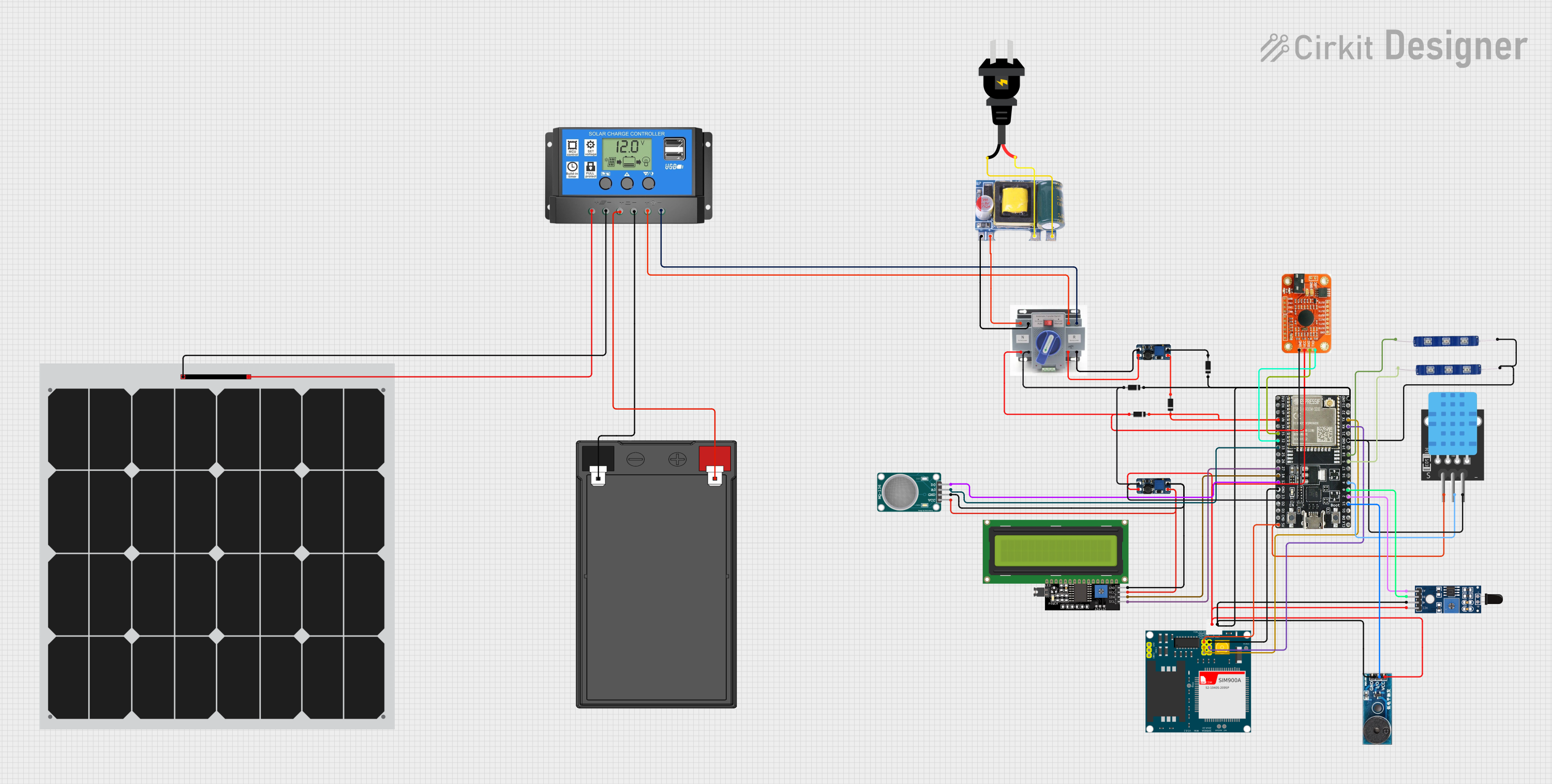
Solar-Powered Environmental Monitoring Station with GSM Reporting
Image of thesis nila po: A project utilizing Si7021 in a practical application
This is a solar-powered monitoring and control system with automatic power source selection, environmental sensing, and communication capabilities. It uses an ESP32 microcontroller to process inputs from gas, flame, and temperature sensors, and to manage outputs like an LCD display, LEDs, and a buzzer. The system can communicate via a SIM900A module and switch between solar and AC power sources using an ATS.
Cirkit Designer LogoOpen Project in Cirkit Designer
Satellite-Based Timing and Navigation System with SDR and Atomic Clock Synchronization
Image of GPS 시스템 측정 구성도_Confirm: A project utilizing Si7021 in a practical application
This circuit appears to be a complex system involving power supply management, GPS and timing synchronization, and data communication. It includes a SI-TEX G1 Satellite Compass for GPS data, an XHTF1021 Atomic Rubidium Clock for precise timing, and Ettus USRP B200 units for software-defined radio communication. Power is supplied through various SMPS units and distributed via terminal blocks and DC jacks. Data communication is facilitated by Beelink MINI S12 N95 computers, RS232 splitters, and a 1000BASE-T Media Converter for network connectivity. RF Directional Couplers are used to interface antennas with the USRP units, and the entire system is likely contained within cases for protection and organization.
Cirkit Designer LogoOpen Project in Cirkit Designer
Arduino Mega 2560 Based Security System with Fingerprint Authentication and SMS Alerts
Image of Door security system: A project utilizing Si7021 in a practical application
This circuit features an Arduino Mega 2560 microcontroller interfaced with a SIM800L GSM module, two fingerprint scanners, an I2C LCD display, an IR sensor, and a piezo buzzer. Power management is handled by a PowerBoost 1000 Basic Pad USB, a TP4056 charging module, and a Li-ion 18650 battery, with an option to use a Mini AC-DC 110V-230V to 5V 700mA module for direct power supply. The primary functionality appears to be a security system with GSM communication capabilities, biometric access control, and visual/audible feedback.
Cirkit Designer LogoOpen Project in Cirkit Designer

Explore Projects Built with Si7021

Use Cirkit Designer to design, explore, and prototype these projects online. Some projects support real-time simulation. Click "Open Project" to start designing instantly!
Image of LRCM PHASE 2 BASIC: A project utilizing Si7021 in a practical application
Cellular-Enabled IoT Device with Real-Time Clock and Power Management
This circuit features a LilyGo-SIM7000G module for cellular communication and GPS functionality, interfaced with an RTC DS3231 for real-time clock capabilities. It includes voltage sensing through two voltage sensor modules, and uses an 8-channel opto-coupler for isolating different parts of the circuit. Power management is handled by a buck converter connected to a DC power source and batteries, with a fuse for protection and a rocker switch for on/off control. Additionally, there's an LED for indication purposes.
Cirkit Designer LogoOpen Project in Cirkit Designer
Image of thesis nila po: A project utilizing Si7021 in a practical application
Solar-Powered Environmental Monitoring Station with GSM Reporting
This is a solar-powered monitoring and control system with automatic power source selection, environmental sensing, and communication capabilities. It uses an ESP32 microcontroller to process inputs from gas, flame, and temperature sensors, and to manage outputs like an LCD display, LEDs, and a buzzer. The system can communicate via a SIM900A module and switch between solar and AC power sources using an ATS.
Cirkit Designer LogoOpen Project in Cirkit Designer
Image of GPS 시스템 측정 구성도_Confirm: A project utilizing Si7021 in a practical application
Satellite-Based Timing and Navigation System with SDR and Atomic Clock Synchronization
This circuit appears to be a complex system involving power supply management, GPS and timing synchronization, and data communication. It includes a SI-TEX G1 Satellite Compass for GPS data, an XHTF1021 Atomic Rubidium Clock for precise timing, and Ettus USRP B200 units for software-defined radio communication. Power is supplied through various SMPS units and distributed via terminal blocks and DC jacks. Data communication is facilitated by Beelink MINI S12 N95 computers, RS232 splitters, and a 1000BASE-T Media Converter for network connectivity. RF Directional Couplers are used to interface antennas with the USRP units, and the entire system is likely contained within cases for protection and organization.
Cirkit Designer LogoOpen Project in Cirkit Designer
Image of Door security system: A project utilizing Si7021 in a practical application
Arduino Mega 2560 Based Security System with Fingerprint Authentication and SMS Alerts
This circuit features an Arduino Mega 2560 microcontroller interfaced with a SIM800L GSM module, two fingerprint scanners, an I2C LCD display, an IR sensor, and a piezo buzzer. Power management is handled by a PowerBoost 1000 Basic Pad USB, a TP4056 charging module, and a Li-ion 18650 battery, with an option to use a Mini AC-DC 110V-230V to 5V 700mA module for direct power supply. The primary functionality appears to be a security system with GSM communication capabilities, biometric access control, and visual/audible feedback.
Cirkit Designer LogoOpen Project in Cirkit Designer

Common Applications

  • Environmental monitoring systems
  • HVAC (Heating, Ventilation, and Air Conditioning) systems
  • Weather stations
  • IoT (Internet of Things) devices
  • Industrial and home automation

Technical Specifications

Key Technical Details

Parameter Value
Supply Voltage 1.9V to 3.6V
Typical Operating Voltage 3.3V
Current Consumption 150 µA (typical)
Humidity Range 0% to 100% RH
Humidity Accuracy ±3% RH (typical)
Temperature Range -40°C to +125°C
Temperature Accuracy ±0.4°C (typical)
Communication Interface I2C
I2C Address 0x40 (default)

Pin Configuration

The Si7021 sensor is typically available on a breakout board with the following pinout:

Pin Name Description
VIN Power supply input (1.9V to 3.6V)
GND Ground
SDA I2C data line
SCL I2C clock line

Usage Instructions

Connecting the Si7021 to an Arduino UNO

To use the Si7021 with an Arduino UNO, follow these steps:

  1. Connect the VIN pin of the Si7021 to the 3.3V pin on the Arduino.
  2. Connect the GND pin of the Si7021 to the GND pin on the Arduino.
  3. Connect the SDA pin of the Si7021 to the A4 pin on the Arduino (I2C data line).
  4. Connect the SCL pin of the Si7021 to the A5 pin on the Arduino (I2C clock line).

Arduino Code Example

Below is an example Arduino sketch to read humidity and temperature data from the Si7021 sensor:

#include <Wire.h>
#include "Adafruit_Si7021.h"

// Create an instance of the Si7021 sensor
Adafruit_Si7021 sensor = Adafruit_Si7021();

void setup() {
  Serial.begin(9600); // Initialize serial communication
  Serial.println("Si7021 Sensor Test");

  // Initialize the sensor
  if (!sensor.begin()) {
    Serial.println("Sensor not found. Check wiring!");
    while (true); // Halt execution if sensor is not detected
  }
  Serial.println("Sensor initialized successfully.");
}

void loop() {
  // Read humidity and temperature
  float humidity = sensor.readHumidity();
  float temperature = sensor.readTemperature();

  // Print the readings to the Serial Monitor
  Serial.print("Humidity: ");
  Serial.print(humidity);
  Serial.println(" %");

  Serial.print("Temperature: ");
  Serial.print(temperature);
  Serial.println(" °C");

  delay(2000); // Wait 2 seconds before the next reading
}

Important Considerations

  • Ensure the sensor is powered within its operating voltage range (1.9V to 3.6V).
  • Avoid exposing the sensor to extreme conditions (e.g., condensation or high humidity for prolonged periods) to maintain accuracy.
  • Use pull-up resistors (typically 4.7kΩ) on the SDA and SCL lines if they are not already included on the breakout board.

Troubleshooting and FAQs

Common Issues and Solutions

  1. Sensor not detected by the Arduino:

    • Verify the wiring connections, especially the SDA and SCL lines.
    • Ensure the I2C address (default: 0x40) matches the one used in your code.
    • Check if pull-up resistors are required on the I2C lines.
  2. Incorrect or fluctuating readings:

    • Ensure the sensor is not exposed to rapid temperature or humidity changes.
    • Avoid placing the sensor near heat sources or in direct sunlight.
    • Verify that the power supply voltage is stable and within the specified range.
  3. Code compilation errors:

    • Ensure the Adafruit Si7021 library is installed in the Arduino IDE. You can install it via the Library Manager.

FAQs

Q: Can the Si7021 measure dew point?
A: The Si7021 does not directly measure dew point, but you can calculate it using the humidity and temperature readings with appropriate formulas.

Q: Is the Si7021 waterproof?
A: No, the Si7021 is not waterproof. Avoid exposing it to water or condensation.

Q: Can I use the Si7021 with a 5V microcontroller?
A: Yes, but you must use a logic level shifter to step down the I2C signals to 3.3V, as the Si7021 operates at 3.3V logic levels.

By following this documentation, you can effectively integrate the Si7021 sensor into your projects for reliable humidity and temperature measurements.