
How to Use LC^2CMOS Quad SPST: Examples, Pinouts, and Specs
 Design with LC^2CMOS Quad SPST in Cirkit Designer
Introduction
The ADG442 is a low-power, quad single-pole single-throw (SPST) switch designed by Analog Devices using LC²CMOS technology. This component is optimized for efficient control of both analog and digital signals, offering low on-resistance and low leakage currents. It is ideal for applications requiring high precision and low power consumption.
Explore Projects Built with LC^2CMOS Quad SPST
 Open Project in Cirkit Designer
 Open Project in Cirkit Designer
 Open Project in Cirkit Designer
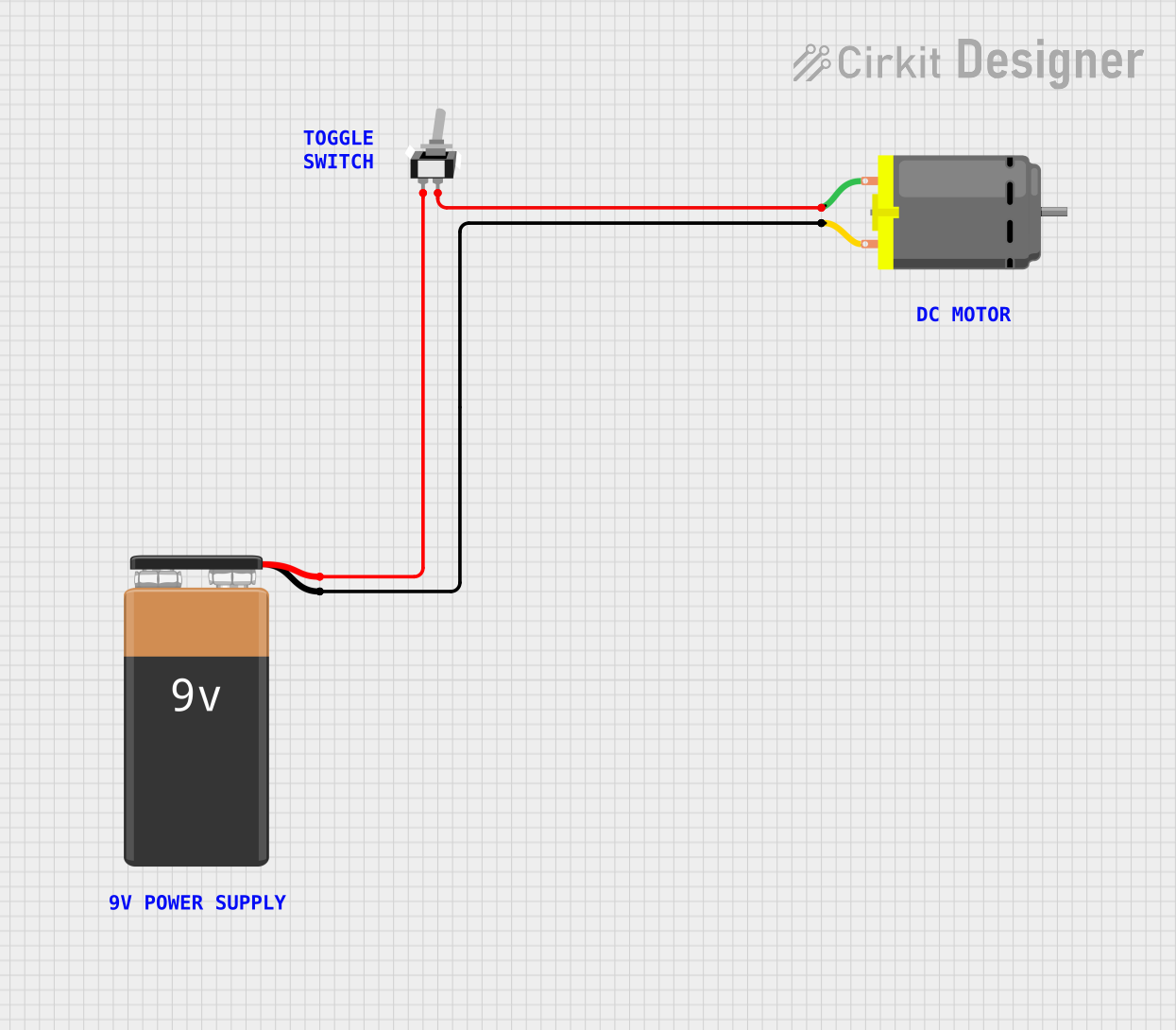 Open Project in Cirkit Designer
Explore Projects Built with LC^2CMOS Quad SPST
Open Project in Cirkit DesignerOpen Project in Cirkit DesignerOpen Project in Cirkit DesignerOpen Project in Cirkit DesignerCommon Applications
- Signal routing in data acquisition systems
- Analog and digital signal switching
- Audio and video signal processing
- Communication systems
- Test and measurement equipment
Technical Specifications
Key Technical Details
| Parameter | Value |
|---|---|
| Supply Voltage Range | ±5 V to ±15 V (dual supply) or 5 V to 30 V (single supply) |
| On-Resistance (RON) | 45 Ω (typical) at ±15 V supply |
| Leakage Current | 0.01 nA (typical) at 25°C |
| Switching Time | 120 ns (typical) |
| Power Dissipation | 0.001 µW (typical, low power operation) |
| Operating Temperature Range | -40°C to +85°C |
| Package Options | 16-lead PDIP, SOIC, or TSSOP |
Pin Configuration and Descriptions
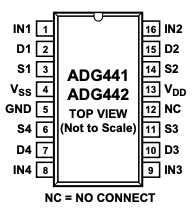
The ADG442 is available in a 16-pin package. Below is the pin configuration and description:
| Pin Number | Pin Name | Description |
|---|---|---|
| 1 | IN1 | Control input for switch 1 |
| 2 | D1 | Drain terminal for switch 1 |
| 3 | S1 | Source terminal for switch 1 |
| 4 | IN2 | Control input for switch 2 |
| 5 | D2 | Drain terminal for switch 2 |
| 6 | S2 | Source terminal for switch 2 |
| 7 | VSS | Negative supply voltage (or GND for single supply) |
| 8 | GND | Ground |
| 9 | S3 | Source terminal for switch 3 |
| 10 | D3 | Drain terminal for switch 3 |
| 11 | IN3 | Control input for switch 3 |
| 12 | S4 | Source terminal for switch 4 |
| 13 | D4 | Drain terminal for switch 4 |
| 14 | IN4 | Control input for switch 4 |
| 15 | VDD | Positive supply voltage |
| 16 | NC | No connection |
Usage Instructions
How to Use the ADG442 in a Circuit
Power Supply Configuration:
- Connect the VDD pin to the positive supply voltage (e.g., +15 V for dual supply or +5 V for single supply).
- Connect the VSS pin to the negative supply voltage (e.g., -15 V for dual supply) or ground for single-supply operation.
- Ensure the GND pin is connected to the circuit ground.
Control Inputs:
- The INx pins (IN1, IN2, IN3, IN4) control the state of the corresponding switches.
- Apply a logic HIGH (≥2.4 V for a 5 V supply) to close the switch (connect Sx to Dx).
- Apply a logic LOW (≤0.8 V for a 5 V supply) to open the switch (disconnect Sx from Dx).
Signal Connections:
- Connect the signal source to the Sx pin and the load to the Dx pin for each switch.
- Ensure the signal voltage levels are within the supply voltage range to avoid damage.
Bypass Capacitors:
- Place decoupling capacitors (e.g., 0.1 µF) close to the VDD and VSS pins to reduce noise and improve stability.
Example: Using ADG442 with Arduino UNO
The ADG442 can be controlled using digital pins on an Arduino UNO. Below is an example code to toggle one of the switches:
// Define control pin for switch 1
const int controlPin1 = 7;

void setup() {
  // Set the control pin as an output
  pinMode(controlPin1, OUTPUT);
}

void loop() {
  // Close the switch by setting the control pin HIGH
  digitalWrite(controlPin1, HIGH);
  delay(1000); // Keep the switch closed for 1 second

  // Open the switch by setting the control pin LOW
  digitalWrite(controlPin1, LOW);
  delay(1000); // Keep the switch open for 1 second
}
Important Considerations and Best Practices
- Ensure the input signal voltage does not exceed the supply voltage range.
- Use proper decoupling capacitors to minimize noise.
- Avoid exceeding the maximum current rating of the switches to prevent damage.
- For high-frequency signals, consider the switch's capacitance and on-resistance to minimize signal distortion.
Troubleshooting and FAQs
Common Issues and Solutions
Switch Not Responding to Control Signal:
- Verify that the control signal voltage levels meet the logic HIGH and LOW thresholds.
- Check the power supply connections and ensure proper voltage levels.
Signal Distortion or Attenuation:
- Ensure the signal voltage is within the specified range.
- Check for excessive load capacitance or impedance mismatches.
Excessive Power Consumption:
- Verify that the supply voltage is within the recommended range.
- Ensure no excessive current is flowing through the switches.
Leakage Current Too High:
- Check for contamination or moisture on the PCB.
- Ensure the operating temperature is within the specified range.
FAQs
Q: Can the ADG442 handle bidirectional signals?
A: Yes, the ADG442 supports bidirectional signal flow between the source (Sx) and drain (Dx) terminals.
Q: What is the maximum signal frequency the ADG442 can handle?
A: The ADG442 is suitable for low- to medium-frequency signals. For high-frequency applications, consider the switch's on-resistance and capacitance to ensure minimal signal degradation.
Q: Can I use the ADG442 with a single power supply?
A: Yes, the ADG442 can operate with a single supply voltage (e.g., 5 V to 30 V). Connect VSS to ground in this configuration.
Q: How do I protect the ADG442 from overvoltage?
A: Use clamping diodes or transient voltage suppressors (TVS) to protect the device from voltage spikes exceeding the supply range.