
How to Use SparkFun GNSS L1/L5 Breakout - NEO-F10N, SMA: Examples, Pinouts, and Specs
 Design with SparkFun GNSS L1/L5 Breakout - NEO-F10N, SMA in Cirkit Designer
Introduction
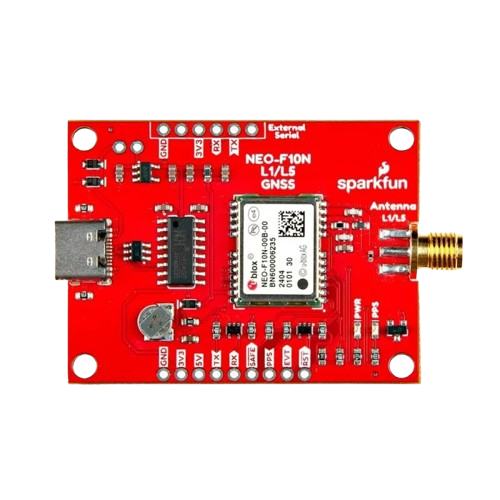
The SparkFun GNSS L1/L5 Breakout - NEO-F10N, SMA (GPS-24114) is a high-precision Global Navigation Satellite System (GNSS) module designed for applications requiring accurate positioning and timing. It features the u-blox NEO-F10N module, which supports dual-band GNSS reception (L1 and L5) for enhanced accuracy and reliability. This breakout board is equipped with an SMA connector for an external antenna, making it suitable for a wide range of applications, including autonomous vehicles, drones, surveying, and IoT devices.
Explore Projects Built with SparkFun GNSS L1/L5 Breakout - NEO-F10N, SMA
 Open Project in Cirkit Designer
 Open Project in Cirkit Designer
 Open Project in Cirkit Designer
 Open Project in Cirkit Designer
Explore Projects Built with SparkFun GNSS L1/L5 Breakout - NEO-F10N, SMA
Open Project in Cirkit DesignerOpen Project in Cirkit DesignerOpen Project in Cirkit DesignerOpen Project in Cirkit DesignerCommon Applications
- High-precision navigation for drones and autonomous vehicles
- Surveying and mapping
- Timing synchronization for communication systems
- IoT devices requiring accurate geolocation
- Research and development in GNSS technologies
Technical Specifications
Key Technical Details
| Parameter | Specification |
|---|---|
| GNSS Module | u-blox NEO-F10N |
| Frequency Bands | L1 (1575.42 MHz), L5 (1176.45 MHz) |
| Positioning Accuracy | Down to 0.3 meters (with RTK corrections) |
| Update Rate | Up to 10 Hz |
| Input Voltage | 3.3V (regulated) |
| Power Consumption | ~30 mA (typical) |
| Antenna Connector | SMA (external antenna required) |
| Communication Interfaces | UART, I2C |
| Operating Temperature | -40°C to +85°C |
| Dimensions | 25.4 mm x 25.4 mm |
Pin Configuration and Descriptions
| Pin Name | Pin Number | Description |
|---|---|---|
| GND | 1 | Ground connection |
| 3.3V | 2 | Power supply input (3.3V regulated) |
| TX | 3 | UART Transmit (data output from the module) |
| RX | 4 | UART Receive (data input to the module) |
| SDA | 5 | I2C Data Line |
| SCL | 6 | I2C Clock Line |
| PPS | 7 | Pulse Per Second output for timing applications |
| RST | 8 | Reset pin (active low) |
Usage Instructions
How to Use the Component in a Circuit
- Power Supply: Connect the 3.3V pin to a regulated 3.3V power source and the GND pin to the ground.
- Antenna Connection: Attach an external GNSS antenna to the SMA connector for optimal signal reception.
- Communication Interface:
- For UART communication, connect the TX and RX pins to the corresponding UART pins on your microcontroller.
- For I2C communication, connect the SDA and SCL pins to the I2C bus of your microcontroller.
- Optional Connections:
- Use the PPS pin for precise timing applications.
- Connect the RST pin to a GPIO pin on your microcontroller for manual resets if needed.
Important Considerations and Best Practices
- Antenna Placement: Ensure the external antenna has a clear view of the sky for optimal satellite reception.
- Power Supply: Use a clean and stable 3.3V power source to avoid noise and interference.
- UART/I2C Selection: Configure your microcontroller to use the appropriate communication protocol.
- RTK Corrections: For high-precision applications, use Real-Time Kinematic (RTK) corrections with a compatible base station.
Example Code for Arduino UNO
Below is an example of how to interface the SparkFun GNSS L1/L5 Breakout with an Arduino UNO using UART communication:
#include <SoftwareSerial.h>

// Define RX and TX pins for SoftwareSerial
SoftwareSerial mySerial(4, 3); // RX = Pin 4, TX = Pin 3

void setup() {
  Serial.begin(9600); // Initialize hardware serial for debugging
  mySerial.begin(9600); // Initialize software serial for GNSS module

  Serial.println("SparkFun GNSS L1/L5 Breakout Example");
}

void loop() {
  // Check if data is available from the GNSS module
  if (mySerial.available()) {
    // Read and print GNSS data to the Serial Monitor
    while (mySerial.available()) {
      char c = mySerial.read();
      Serial.print(c);
    }
  }
}
Note: Ensure the GNSS module's baud rate matches the mySerial.begin() value (default is 9600).
Troubleshooting and FAQs
Common Issues and Solutions
No GNSS Fix:
- Ensure the external antenna is properly connected and has a clear view of the sky.
- Check the power supply for stability and correct voltage.
- Verify the module's configuration and communication settings.
No Data Output:
- Confirm the TX and RX connections between the GNSS module and the microcontroller.
- Ensure the baud rate in your code matches the module's default baud rate (9600).
Intermittent Signal Loss:
- Avoid placing the antenna near sources of interference, such as Wi-Fi routers or metal objects.
- Use a high-quality GNSS antenna for better performance.
FAQs
Q: Can I use this module indoors?
A: While the module may work indoors near windows, optimal performance requires a clear view of the sky.
Q: What type of antenna should I use?
A: Use an active GNSS antenna with an SMA connector for best results.
Q: How do I enable RTK corrections?
A: RTK corrections require additional hardware (e.g., a base station) and configuration. Refer to the u-blox NEO-F10N datasheet for detailed instructions.
Q: Can I power the module with 5V?
A: No, the module requires a regulated 3.3V power supply. Use a voltage regulator if your system operates at 5V.