
How to Use Honeywell Vista 20P: Examples, Pinouts, and Specs
 Design with Honeywell Vista 20P in Cirkit Designer
Introduction
The Honeywell Vista 20P is a versatile and reliable security control panel designed for both residential and commercial applications. It serves as the central hub for a comprehensive security system, supporting up to 48 zones and offering advanced features such as remote access, programmable outputs, and compatibility with a wide range of sensors and devices. Its robust design and flexibility make it a popular choice for creating customized security solutions.
Explore Projects Built with Honeywell Vista 20P
 Open Project in Cirkit Designer
 Open Project in Cirkit Designer
 Open Project in Cirkit Designer
 Open Project in Cirkit Designer
Explore Projects Built with Honeywell Vista 20P
Open Project in Cirkit DesignerOpen Project in Cirkit DesignerOpen Project in Cirkit DesignerOpen Project in Cirkit DesignerCommon Applications and Use Cases
- Home security systems with multiple zones
- Small to medium-sized business security setups
- Integration with smart home automation systems
- Remote monitoring and control of security systems
- Fire and intrusion detection systems
Technical Specifications
Key Technical Details
| Specification | Value |
|---|---|
| Zones Supported | Up to 48 (8 hardwired, expandable to 48) |
| Partitions | 2 partitions + 1 common partition |
| Keypads Supported | Up to 8 |
| User Codes | 48 user codes |
| Communication Protocols | PSTN, IP (with optional module) |
| Power Supply | 16.5V AC, 40VA transformer |
| Backup Battery | 12V, 4Ah or 7Ah lead-acid battery |
| Programmable Outputs | 2 onboard, expandable with modules |
| Remote Access | Supported via Total Connect or similar |
| Dimensions | 12.5" x 14.5" x 3" |
Pin Configuration and Descriptions
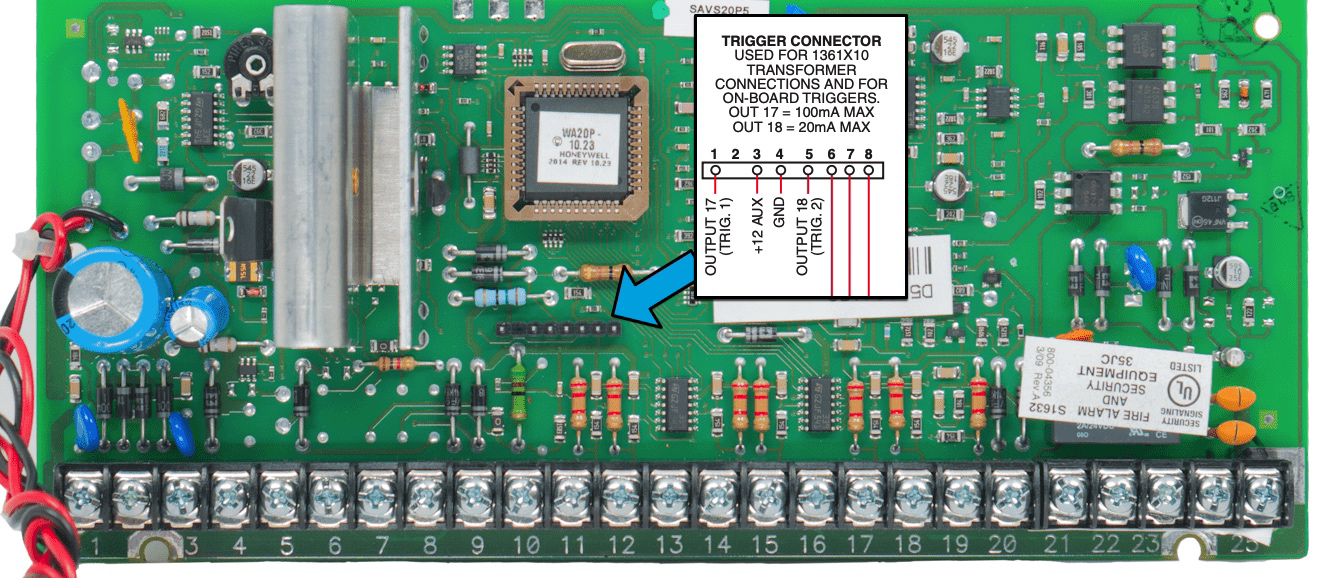
The Honeywell Vista 20P has a terminal strip for connecting various components. Below is a description of the key terminals:
| Terminal Number | Description |
|---|---|
| 1, 2 | AC power input (16.5V AC transformer) |
| 3, 4 | Backup battery connection |
| 4, 5 | Bell output (12V DC, 2A max) |
| 6, 7 | Auxiliary power output (12V DC, 600mA max) |
| 8, 9 | Keypad data bus (AUX and DATA IN) |
| 10, 11 | Keypad data bus (DATA OUT and GND) |
| 12, 13 | Zone 1 (hardwired zone) |
| 14, 15 | Zone 2 (hardwired zone) |
| 16, 17 | Zone 3 (hardwired zone) |
| 18, 19 | Zone 4 (hardwired zone) |
| 20, 21 | Zone 5 (hardwired zone) |
| 22, 23 | Zone 6 (hardwired zone) |
| 24, 25 | Zone 7 (hardwired zone) |
| 26, 27 | Zone 8 (hardwired zone) |
Usage Instructions
How to Use the Component in a Circuit
- Power Connection: Connect the 16.5V AC transformer to terminals 1 and 2. Attach a 12V backup battery to terminals 3 and 4 for uninterrupted operation during power outages.
- Zone Wiring: Connect sensors (e.g., motion detectors, door/window contacts) to the appropriate zone terminals. For example, use terminals 12 and 13 for Zone 1.
- Keypad Connection: Wire the keypad to the data bus terminals (8, 9, 10, and 11). Multiple keypads can be connected in parallel.
- Output Devices: Connect sirens or other output devices to the bell output terminals (4 and 5). Ensure the total current does not exceed 2A.
- Programming: Use the keypad to program the system. Refer to the programming guide for detailed instructions on setting up zones, user codes, and other features.
- Remote Access: Install an optional IP or cellular module to enable remote monitoring and control via Honeywell's Total Connect service.
Important Considerations and Best Practices
- Power Supply: Ensure the transformer and backup battery are properly rated to handle the system's power requirements.
- Wiring: Use appropriate gauge wires for all connections, especially for long runs.
- Zone Resistors: Install end-of-line resistors (typically 2k ohms) on hardwired zones to ensure proper supervision.
- Testing: Test all zones and outputs after installation to verify proper operation.
- Firmware Updates: Keep the system firmware up to date for compatibility with new devices and features.
Arduino Integration
While the Honeywell Vista 20P is not directly compatible with Arduino, it is possible to interface the two systems using relays or communication modules. Below is an example of how to monitor a zone using an Arduino:
// Example: Monitor a Vista 20P zone with Arduino
// Connect the zone output to Arduino digital pin 2 via a pull-up resistor

const int zonePin = 2; // Pin connected to the Vista 20P zone output

void setup() {
  pinMode(zonePin, INPUT_PULLUP); // Configure pin as input with pull-up
  Serial.begin(9600); // Initialize serial communication
}

void loop() {
  int zoneState = digitalRead(zonePin); // Read the zone state
  if (zoneState == LOW) {
    Serial.println("Zone triggered!"); // Zone is active
  } else {
    Serial.println("Zone secure."); // Zone is inactive
  }
  delay(500); // Wait 500ms before next reading
}
Troubleshooting and FAQs
Common Issues and Solutions
System Not Powering On
- Cause: Transformer or battery not connected properly.
- Solution: Verify connections to terminals 1, 2, 3, and 4. Check the transformer and battery voltage.
Zones Not Responding
- Cause: Faulty wiring or missing end-of-line resistors.
- Solution: Inspect zone wiring and ensure resistors are installed correctly.
Keypad Not Communicating
- Cause: Incorrect wiring or address conflict.
- Solution: Verify connections to terminals 8, 9, 10, and 11. Ensure each keypad has a unique address.
Siren Not Activating
- Cause: Overloaded bell output or incorrect wiring.
- Solution: Check the siren wiring and ensure the total current does not exceed 2A.
Remote Access Not Working
- Cause: Missing or misconfigured IP/cellular module.
- Solution: Install and configure the appropriate module. Verify network settings.
FAQs
Can I expand the system beyond 48 zones?
- No, the Vista 20P supports a maximum of 48 zones, including both hardwired and wireless zones.
What type of sensors are compatible with the Vista 20P?
- The system supports a wide range of sensors, including motion detectors, door/window contacts, glass break sensors, and smoke detectors.
How long does the backup battery last?
- The backup battery can typically power the system for 4-24 hours, depending on the load and battery capacity.
Can I integrate the Vista 20P with a smart home system?
- Yes, with the appropriate modules, the Vista 20P can integrate with smart home platforms for enhanced functionality.
Is professional installation required?
- While the system can be installed by experienced DIY users, professional installation is recommended for optimal performance and compliance with local codes.