
How to Use Voltage Regulator 5V - 5A: Examples, Pinouts, and Specs
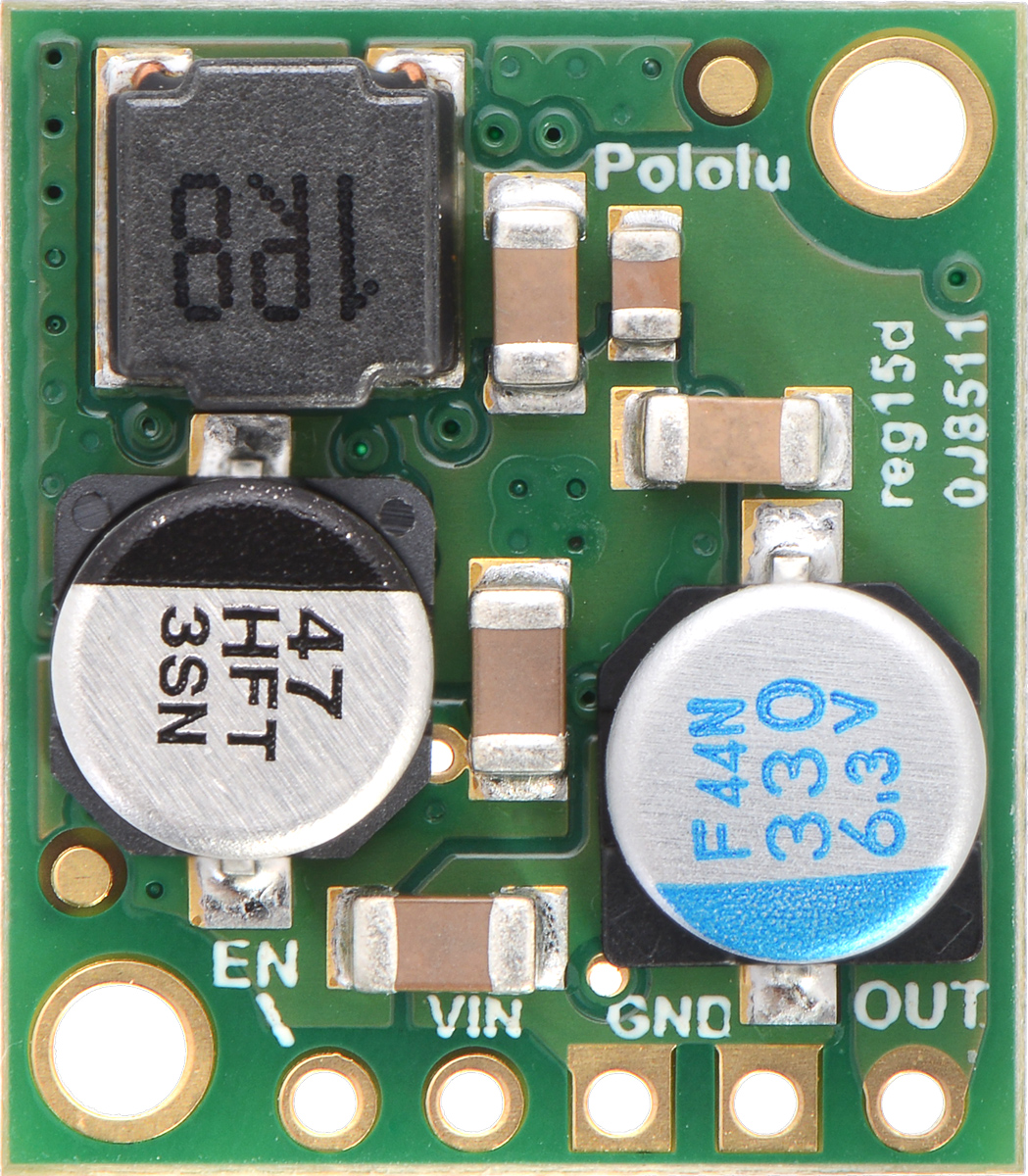
 Design with Voltage Regulator 5V - 5A in Cirkit Designer
Introduction
The Pololu D24V50F5 Voltage Regulator is a high-performance device designed to provide a stable 5V output voltage with a maximum current capacity of 5A. This regulator is ideal for powering sensitive electronic circuits and devices that require a consistent 5V supply, even when the input voltage fluctuates. Its compact design and robust performance make it suitable for a wide range of applications.
Explore Projects Built with Voltage Regulator 5V - 5A
 Open Project in Cirkit Designer
 Open Project in Cirkit Designer
 Open Project in Cirkit Designer
 Open Project in Cirkit Designer
Explore Projects Built with Voltage Regulator 5V - 5A
Open Project in Cirkit DesignerOpen Project in Cirkit DesignerOpen Project in Cirkit DesignerOpen Project in Cirkit DesignerCommon Applications and Use Cases
- Powering microcontrollers, such as Arduino, Raspberry Pi, and ESP32.
- Supplying stable voltage to sensors, motors, and communication modules.
- Battery-powered systems where voltage regulation is critical.
- Robotics, drones, and other embedded systems requiring high current at 5V.
Technical Specifications
Below are the key technical details of the Pololu D24V50F5 Voltage Regulator:
| Parameter | Value |
|---|---|
| Manufacturer | Pololu |
| Part ID | D24V50F5 |
| Output Voltage | 5V ± 2% |
| Maximum Output Current | 5A |
| Input Voltage Range | 5.8V to 36V |
| Efficiency | Up to 95% (depending on load) |
| Quiescent Current | < 1 mA |
| Operating Temperature | -40°C to +85°C |
| Dimensions | 1.0" × 1.0" × 0.4" (25 × 25 × 10 mm) |
| Weight | 3.5 g |
Pin Configuration and Descriptions
The Pololu D24V50F5 has three main pins for input and output connections:
| Pin Name | Description |
|---|---|
| VIN | Input voltage pin (5.8V to 36V) |
| GND | Ground pin (common ground for input/output) |
| VOUT | Regulated 5V output pin |
Usage Instructions
How to Use the Component in a Circuit
Connect the Input Voltage (VIN):
- Ensure the input voltage is within the range of 5.8V to 36V.
- Connect the positive terminal of your power source to the VIN pin.
- Connect the negative terminal of your power source to the GND pin.
Connect the Output Voltage (VOUT):
- Connect the VOUT pin to the positive terminal of your load (e.g., microcontroller, sensor).
- Connect the GND pin to the ground of your load.
Verify Connections:
- Double-check all connections to ensure proper polarity and avoid short circuits.
Power On:
- Turn on the power source and measure the output voltage at the VOUT pin to confirm it is 5V.
Important Considerations and Best Practices
- Heat Dissipation: The regulator may heat up under high current loads. Ensure proper ventilation or use a heatsink if necessary.
- Input Voltage Range: Do not exceed the maximum input voltage of 36V, as this may damage the regulator.
- Capacitors: For optimal performance, connect a capacitor (e.g., 10 µF) across the input and output pins to reduce noise and improve stability.
- Current Limitation: Ensure the connected load does not exceed the 5A current limit to prevent overheating or damage.
Example: Using with Arduino UNO
Below is an example of how to use the Pololu D24V50F5 to power an Arduino UNO:
Circuit Connections
- Connect the VIN pin of the regulator to a 12V DC power source.
- Connect the GND pin of the regulator to the ground of the power source and Arduino.
- Connect the VOUT pin of the regulator to the 5V pin of the Arduino UNO.
Sample Code
// Example code to blink an LED on Arduino UNO powered by Pololu D24V50F5
// Ensure the regulator is providing a stable 5V to the Arduino's 5V pin.

const int ledPin = 13; // Built-in LED pin on Arduino UNO

void setup() {
  pinMode(ledPin, OUTPUT); // Set the LED pin as an output
}

void loop() {
  digitalWrite(ledPin, HIGH); // Turn the LED on
  delay(1000);               // Wait for 1 second
  digitalWrite(ledPin, LOW);  // Turn the LED off
  delay(1000);               // Wait for 1 second
}
Troubleshooting and FAQs
Common Issues and Solutions
No Output Voltage:
- Cause: Incorrect input voltage or loose connections.
- Solution: Verify that the input voltage is within the 5.8V to 36V range and check all connections.
Overheating:
- Cause: Excessive current draw or poor ventilation.
- Solution: Ensure the load does not exceed 5A and improve airflow around the regulator.
Output Voltage Fluctuations:
- Cause: Insufficient input voltage or noise in the power supply.
- Solution: Add capacitors (e.g., 10 µF or higher) across the input and output pins.
Regulator Not Working After Power Surge:
- Cause: Input voltage exceeded 36V, causing damage.
- Solution: Replace the regulator and ensure the input voltage is within the specified range.
FAQs
Q: Can I use this regulator with a 3.7V LiPo battery?
A: No, the input voltage must be at least 5.8V. Consider using a boost converter for lower input voltages.Q: Is the regulator protected against reverse polarity?
A: No, reverse polarity can damage the regulator. Always double-check your connections.Q: Can I use this regulator to power multiple devices?
A: Yes, as long as the total current draw does not exceed 5A.Q: Does the regulator have short-circuit protection?
A: Yes, the Pololu D24V50F5 includes built-in short-circuit and over-temperature protection.
By following this documentation, you can effectively integrate the Pololu D24V50F5 Voltage Regulator into your projects and ensure reliable performance.