
How to Use DC power supply adapter: Examples, Pinouts, and Specs
 Design with DC power supply adapter in Cirkit Designer
Introduction
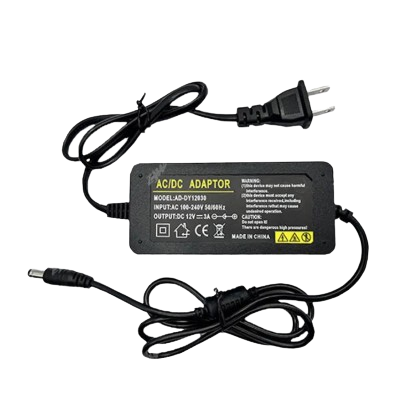
A DC power supply adapter is a device that converts alternating current (AC) from a wall outlet into direct current (DC) to power electronic devices. It is a critical component in many electronic systems, providing a stable and regulated DC voltage to ensure proper operation of connected devices. DC power supply adapters are commonly used in consumer electronics, embedded systems, and prototyping environments.
Explore Projects Built with DC power supply adapter
 Open Project in Cirkit Designer
 Open Project in Cirkit Designer
 Open Project in Cirkit Designer
 Open Project in Cirkit Designer
Explore Projects Built with DC power supply adapter
Open Project in Cirkit DesignerOpen Project in Cirkit DesignerOpen Project in Cirkit DesignerOpen Project in Cirkit DesignerCommon Applications and Use Cases
- Powering microcontrollers, such as Arduino or Raspberry Pi boards
- Supplying power to LED strips, sensors, and small motors
- Charging batteries for portable devices
- Providing power to routers, modems, and other networking equipment
- Used in laboratory setups for testing and prototyping circuits
Technical Specifications
Below are the general technical specifications for a typical DC power supply adapter. Note that specific values may vary depending on the model and manufacturer.
Key Technical Details
- Input Voltage: 100-240V AC, 50/60Hz
- Output Voltage: Common values include 5V, 9V, 12V, 24V DC
- Output Current: Ranges from 0.5A to 5A or higher, depending on the adapter
- Power Rating: Typically between 5W and 120W
- Connector Type: Barrel jack (e.g., 5.5mm outer diameter, 2.1mm inner diameter) or USB
- Polarity: Center-positive (most common) or center-negative
- Efficiency: 80% or higher for modern adapters
- Protection Features: Overvoltage, overcurrent, and short-circuit protection
Pin Configuration and Descriptions
For a barrel jack connector, the pin configuration is as follows:
| Pin Name | Description |
|---|---|
| Outer Sleeve | Ground (GND) |
| Inner Pin | Positive DC voltage (V+) |
For USB-based DC power adapters, the pin configuration is as follows:
| Pin Name | Description |
|---|---|
| VCC | Positive DC voltage (e.g., 5V) |
| GND | Ground |
| D+ | Data line (used for USB communication) |
| D- | Data line (used for USB communication) |
Usage Instructions
How to Use the Component in a Circuit
- Select the Appropriate Adapter: Ensure the output voltage and current rating of the adapter match the requirements of your device or circuit.
- Check Polarity: Verify the polarity of the adapter's connector (center-positive or center-negative) and ensure it matches the input polarity of your device.
- Connect to the Device: Plug the adapter's connector into the power input jack of your device.
- Power On: Plug the adapter into a wall outlet and turn on the device, if applicable.
Important Considerations and Best Practices
- Voltage Matching: Using an adapter with a higher voltage than required can damage your device, while a lower voltage may cause improper operation.
- Current Rating: The adapter's current rating should be equal to or greater than the device's current requirement. An adapter with insufficient current capacity may overheat or fail.
- Polarity Check: Always confirm the polarity of the adapter and the device to avoid damage.
- Heat Management: Ensure the adapter has proper ventilation to prevent overheating during prolonged use.
- Quality and Certification: Use certified adapters (e.g., UL, CE) to ensure safety and reliability.
Example: Using a DC Power Supply Adapter with an Arduino UNO
To power an Arduino UNO using a 12V DC adapter:
- Connect the barrel jack of the adapter to the Arduino's power input port.
- Ensure the adapter provides 12V DC with a current rating of at least 500mA.
- Plug the adapter into a wall outlet. The Arduino's power LED should light up, indicating it is powered.
Arduino Code Example
If you are using the adapter to power an Arduino UNO for a simple LED blink project, here is the code:
// This code blinks an LED connected to pin 13 of the Arduino UNO.
// Ensure the Arduino is powered using a DC adapter with the correct voltage.

void setup() {
  pinMode(13, OUTPUT); // Set pin 13 as an output pin
}

void loop() {
  digitalWrite(13, HIGH); // Turn the LED on
  delay(1000);            // Wait for 1 second
  digitalWrite(13, LOW);  // Turn the LED off
  delay(1000);            // Wait for 1 second
}
Troubleshooting and FAQs
Common Issues Users Might Face
Device Not Powering On:
- Cause: Incorrect voltage or polarity.
- Solution: Verify the adapter's output voltage and polarity match the device's requirements.
Adapter Overheating:
- Cause: Overloading the adapter by connecting a device that draws more current than the adapter's rating.
- Solution: Use an adapter with a higher current rating.
Intermittent Power Loss:
- Cause: Loose or damaged connector.
- Solution: Inspect the connector for damage and ensure a secure connection.
Device Malfunctioning:
- Cause: Insufficient current supply or voltage fluctuations.
- Solution: Use a high-quality, regulated adapter with adequate current capacity.
FAQs
Q1: Can I use a 9V adapter for a device that requires 12V?
A1: No, using a lower voltage adapter may cause the device to malfunction or not power on.
Q2: How do I determine the polarity of my adapter?
A2: Look for a polarity diagram on the adapter's label. Most adapters are center-positive.
Q3: Can I use a higher current-rated adapter than my device requires?
A3: Yes, as long as the voltage matches, a higher current-rated adapter is safe to use. The device will only draw the current it needs.
Q4: Is it safe to leave the adapter plugged in when not in use?
A4: While most modern adapters are energy-efficient, unplugging them when not in use can save energy and reduce wear.