
How to Use SHT 30: Examples, Pinouts, and Specs
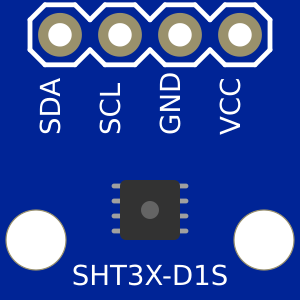
 Design with SHT 30 in Cirkit Designer
Introduction
The SHT 30 is a digital humidity and temperature sensor that provides accurate measurements for both parameters. It is designed with a high level of precision and reliability, making it ideal for applications such as environmental monitoring, HVAC systems, weather stations, and IoT devices. The sensor communicates via an I2C interface, allowing for easy integration into microcontroller-based systems.
Explore Projects Built with SHT 30
 Open Project in Cirkit Designer
 Open Project in Cirkit Designer
 Open Project in Cirkit Designer
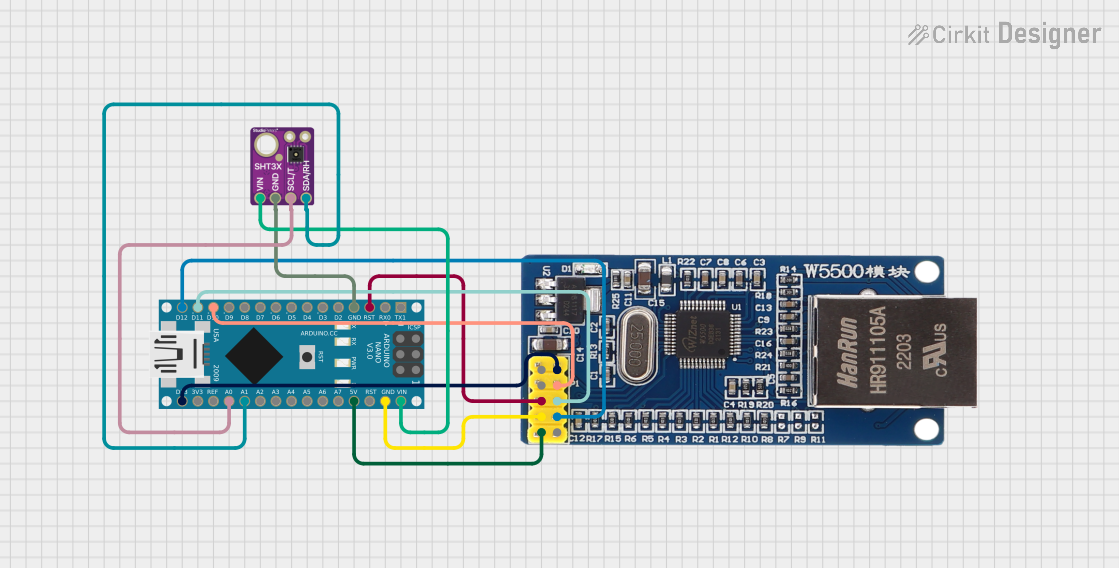 Open Project in Cirkit Designer
Explore Projects Built with SHT 30
Open Project in Cirkit DesignerOpen Project in Cirkit DesignerOpen Project in Cirkit DesignerOpen Project in Cirkit DesignerTechnical Specifications
The SHT 30 sensor is compact and efficient, with the following key technical details:
Key Specifications
| Parameter | Value |
|---|---|
| Supply Voltage | 2.4V to 5.5V |
| Average Current | 2 µA (at 1 measurement per second) |
| Measurement Range (Humidity) | 0% to 100% RH |
| Measurement Range (Temperature) | -40°C to 125°C |
| Accuracy (Humidity) | ±2% RH |
| Accuracy (Temperature) | ±0.3°C |
| Communication Interface | I2C |
| I2C Address (Default) | 0x44 |
| Operating Temperature | -40°C to 125°C |
| Response Time (Humidity) | 8 seconds |
Pin Configuration
The SHT 30 sensor typically comes in a 4-pin configuration. Below is the pinout description:
| Pin Number | Pin Name | Description |
|---|---|---|
| 1 | VDD | Power supply (2.4V to 5.5V) |
| 2 | GND | Ground |
| 3 | SCL | I2C Clock Line |
| 4 | SDA | I2C Data Line |
Usage Instructions
How to Use the SHT 30 in a Circuit
- Power Supply: Connect the VDD pin to a 3.3V or 5V power source and the GND pin to ground.
- I2C Communication: Connect the SCL and SDA pins to the corresponding I2C pins on your microcontroller. Use pull-up resistors (typically 4.7kΩ) on the SCL and SDA lines if not already present.
- Address Selection: The default I2C address of the SHT 30 is 0x44. Ensure no other devices on the I2C bus share this address, or modify the address if supported by your module.
- Data Reading: Use an appropriate library or write custom code to read temperature and humidity data from the sensor.
Important Considerations and Best Practices
- Placement: Avoid placing the sensor in areas with direct sunlight or near heat sources, as this may affect accuracy.
- Ventilation: Ensure proper airflow around the sensor for accurate humidity readings.
- Power Supply: Use a stable power source to avoid noise or fluctuations that could impact measurements.
- I2C Pull-Up Resistors: Verify that pull-up resistors are present on the I2C lines to ensure proper communication.
Example Code for Arduino UNO
Below is an example of how to use the SHT 30 sensor with an Arduino UNO. This code uses the Adafruit_SHT31 library, which simplifies communication with the sensor.
#include <Wire.h>
#include "Adafruit_SHT31.h"

// Create an instance of the SHT31 sensor
Adafruit_SHT31 sht31 = Adafruit_SHT31();

void setup() {
  Serial.begin(9600); // Initialize serial communication
  while (!Serial) delay(10); // Wait for serial port to connect

  // Initialize the SHT31 sensor
  if (!sht31.begin(0x44)) { // Default I2C address is 0x44
    Serial.println("Couldn't find SHT31 sensor!");
    while (1) delay(1); // Halt execution if sensor is not found
  }
  Serial.println("SHT31 sensor initialized.");
}

void loop() {
  // Read temperature and humidity
  float temperature = sht31.readTemperature();
  float humidity = sht31.readHumidity();

  // Check if readings are valid
  if (!isnan(temperature) && !isnan(humidity)) {
    Serial.print("Temperature: ");
    Serial.print(temperature);
    Serial.println(" °C");

    Serial.print("Humidity: ");
    Serial.print(humidity);
    Serial.println(" %");
  } else {
    Serial.println("Failed to read from SHT31 sensor!");
  }

  delay(2000); // Wait 2 seconds before the next reading
}
Troubleshooting and FAQs
Common Issues
Sensor Not Detected:
- Cause: Incorrect wiring or I2C address mismatch.
- Solution: Double-check the wiring and ensure the correct I2C address (default is 0x44).
Inaccurate Readings:
- Cause: Sensor placement near heat sources or poor ventilation.
- Solution: Relocate the sensor to a well-ventilated area away from heat sources.
I2C Communication Errors:
- Cause: Missing or incorrect pull-up resistors on the I2C lines.
- Solution: Add 4.7kΩ pull-up resistors to the SCL and SDA lines if not already present.
FAQs
Can the SHT 30 operate at 5V?
- Yes, the SHT 30 supports a supply voltage range of 2.4V to 5.5V.
What is the default I2C address of the SHT 30?
- The default I2C address is 0x44. Some modules may allow changing the address to 0x45.
How often can I take measurements?
- The sensor can take measurements as frequently as once per second. For lower power consumption, reduce the measurement frequency.
Is the SHT 30 waterproof?
- No, the SHT 30 is not waterproof. Use a protective enclosure if deploying in humid or wet environments.
By following this documentation, you can effectively integrate and use the SHT 30 sensor in your projects.