Introduction
The Selec RPS60-12-CE is a reliable AC/DC power supply designed to convert alternating current (AC) from the mains into a stable 12-volt direct current (DC) output. This component is widely used in powering electronic devices, industrial control systems, LED lighting, and other low-voltage applications. Its compact design and robust performance make it suitable for both professional and hobbyist projects.
Common Applications
- Powering microcontrollers, sensors, and other electronic modules
- Industrial automation and control systems
- LED lighting systems
- Security and surveillance equipment
- DIY electronics projects
Technical Specifications
Below are the key technical details of the Selec RPS60-12-CE:
Pin Configuration and Descriptions
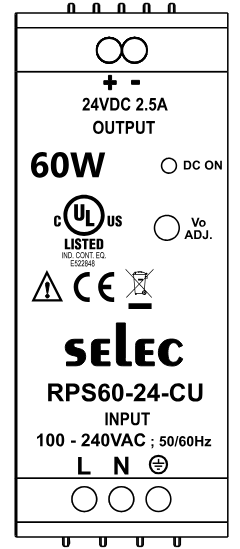
The Selec RPS60-12-CE features screw terminals for easy wiring. Below is the pin configuration:
Usage Instructions
How to Use the Component in a Circuit
Wiring the Input:
- Connect the
L terminal to the live wire of the AC mains.
- Connect the
N terminal to the neutral wire of the AC mains.
- Ensure proper insulation and secure connections to avoid electrical hazards.
Wiring the Output:
- Connect the
+V terminal to the positive input of your load (e.g., a microcontroller or LED strip).
- Connect the
-V terminal to the ground of your load.
Powering On:
- After verifying all connections, plug the power supply into the mains and switch it on.
- Measure the output voltage using a multimeter to ensure it is 12V DC before connecting sensitive devices.
Important Considerations and Best Practices
- Safety First: Always disconnect the power supply from the mains before making any wiring changes.
- Load Requirements: Ensure the total current draw of connected devices does not exceed 5A.
- Ventilation: Install the power supply in a well-ventilated area to prevent overheating.
- Polarity: Double-check the polarity of the output connections to avoid damaging your devices.
- Fusing: Consider adding a fuse on the input side for additional protection.
Example: Connecting to an Arduino UNO
The Selec RPS60-12-CE can be used to power an Arduino UNO. Below is an example setup:
- Connect the
+V terminal to the Arduino's VIN pin.
- Connect the
-V terminal to the Arduino's GND pin.
Here is a simple Arduino sketch to blink an LED when powered by the Selec RPS60-12-CE:
// Blink an LED connected to pin 13
// Ensure the Arduino is powered via the VIN and GND pins

void setup() {
  pinMode(13, OUTPUT); // Set pin 13 as an output
}

void loop() {
  digitalWrite(13, HIGH); // Turn the LED on
  delay(1000);            // Wait for 1 second
  digitalWrite(13, LOW);  // Turn the LED off
  delay(1000);            // Wait for 1 second
}
Troubleshooting and FAQs
Common Issues and Solutions
No Output Voltage:
- Cause: Incorrect wiring or no AC input.
- Solution: Verify the AC input connections and ensure the mains power is on.
Overheating:
- Cause: Insufficient ventilation or excessive load.
- Solution: Ensure proper airflow around the power supply and reduce the load to within the 5A limit.
Voltage Fluctuations:
- Cause: Unstable AC input or faulty power supply.
- Solution: Check the AC input for stability. If the issue persists, replace the power supply.
Device Not Powering On:
- Cause: Incorrect polarity or loose connections.
- Solution: Double-check the output connections and ensure correct polarity.
FAQs
Q: Can I use this power supply for a 24V device?
A: No, the Selec RPS60-12-CE provides a fixed 12V output and is not suitable for 24V devices.
Q: Is this power supply suitable for outdoor use?
A: No, this power supply is not weatherproof and should only be used in indoor environments.
Q: Can I connect multiple devices to the output?
A: Yes, as long as the total current draw does not exceed 5A.
Q: Does it have short-circuit protection?
A: Yes, the Selec RPS60-12-CE includes built-in short-circuit and overload protection.
By following this documentation, you can safely and effectively use the Selec RPS60-12-CE in your projects.

 Open Project in Cirkit Designer