
How to Use MiCS-5524: Examples, Pinouts, and Specs
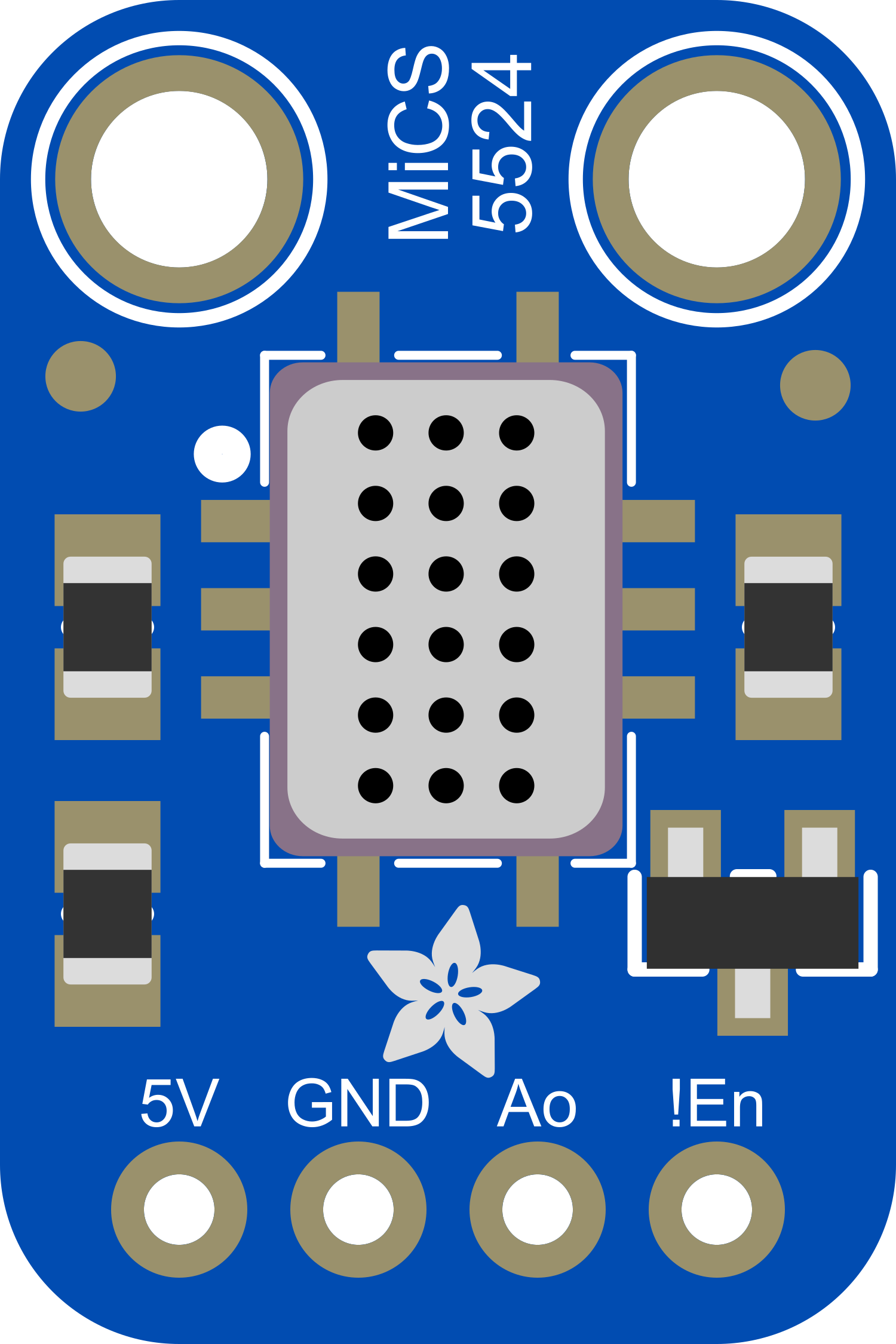
 Design with MiCS-5524 in Cirkit Designer
Introduction
The MiCS-5524, manufactured by Adafruit (Part ID: MiCS-5524), is a versatile gas sensor module designed to detect various gases, including carbon monoxide (CO), methane (CH4), and propane (C3H8). This sensor provides an analog output signal proportional to the concentration of the detected gases, making it ideal for applications such as air quality monitoring, gas leak detection, and safety systems.
Explore Projects Built with MiCS-5524
 Open Project in Cirkit Designer
 Open Project in Cirkit Designer
 Open Project in Cirkit Designer
 Open Project in Cirkit Designer
Explore Projects Built with MiCS-5524
Open Project in Cirkit DesignerOpen Project in Cirkit DesignerOpen Project in Cirkit DesignerOpen Project in Cirkit DesignerCommon Applications
- Indoor air quality monitoring
- Gas leak detection in industrial and residential settings
- Environmental monitoring systems
- Safety alarms for hazardous gas detection
Technical Specifications
The MiCS-5524 gas sensor module has the following key technical specifications:
| Parameter | Value |
|---|---|
| Operating Voltage | 5V DC |
| Heater Voltage (VH) | 1.5V ± 0.1V |
| Heater Current (IH) | 56mA ± 5mA |
| Power Consumption | ~280mW |
| Operating Temperature | -20°C to +50°C |
| Gas Detection Range | 1–1000 ppm (CO), 1–1000 ppm (CH4), |
| 1–1000 ppm (C3H8) | |
| Sensitivity | Analog output proportional to gas |
| concentration | |
| Response Time | <30 seconds |
| Recovery Time | <60 seconds |
| Dimensions | 16mm x 16mm x 9mm |
Pin Configuration and Descriptions
The MiCS-5524 module has a simple pinout for easy integration into circuits:
| Pin Name | Description |
|---|---|
| VCC | Power supply input (5V DC) |
| GND | Ground connection |
| AOUT | Analog output signal proportional to gas levels |
| H+ | Heater positive terminal |
| H- | Heater negative terminal |
Usage Instructions
How to Use the MiCS-5524 in a Circuit
- Power Supply: Connect the
VCCpin to a 5V DC power source and theGNDpin to ground. - Heater Connection: Connect the
H+andH-pins to a 1.5V DC power source to power the internal heater. This is essential for the sensor to operate correctly. - Analog Output: Connect the
AOUTpin to an analog input pin of a microcontroller (e.g., Arduino UNO) to read the gas concentration as an analog voltage. - Signal Processing: Use the analog voltage from the
AOUTpin to calculate the gas concentration. Refer to the sensor's datasheet for the specific transfer function.
Important Considerations
- Preheating: Allow the sensor to preheat for at least 24 hours before taking accurate measurements.
- Ventilation: Ensure proper ventilation around the sensor to avoid saturation or false readings.
- Calibration: Calibrate the sensor in a known gas concentration environment for accurate results.
- Avoid Contaminants: Protect the sensor from dust, oil, and other contaminants that may affect its performance.
Example Code for Arduino UNO
Below is an example of how to interface the MiCS-5524 with an Arduino UNO to read the analog output:
// MiCS-5524 Gas Sensor Example Code
// This code reads the analog output of the MiCS-5524 and prints the value to the Serial Monitor.

const int sensorPin = A0; // Connect the AOUT pin of the MiCS-5524 to Arduino pin A0

void setup() {
  Serial.begin(9600); // Initialize serial communication at 9600 baud
  pinMode(sensorPin, INPUT); // Set the sensor pin as an input
}

void loop() {
  int sensorValue = analogRead(sensorPin); // Read the analog value from the sensor
  float voltage = sensorValue * (5.0 / 1023.0); // Convert the analog value to voltage

  // Print the raw sensor value and voltage to the Serial Monitor
  Serial.print("Sensor Value: ");
  Serial.print(sensorValue);
  Serial.print(" | Voltage: ");
  Serial.print(voltage);
  Serial.println(" V");

  delay(1000); // Wait for 1 second before taking the next reading
}
Notes on the Code
- The
analogRead()function reads the analog signal from the sensor and converts it to a digital value (0–1023). - The voltage is calculated based on the Arduino's 10-bit ADC resolution and 5V reference voltage.
- Use the sensor's datasheet to map the voltage to gas concentration levels.
Troubleshooting and FAQs
Common Issues and Solutions
No Output Signal
- Cause: Incorrect wiring or insufficient power supply.
- Solution: Double-check all connections and ensure the sensor is powered with 5V DC and the heater with 1.5V DC.
Inaccurate Readings
- Cause: Insufficient preheating time or lack of calibration.
- Solution: Allow the sensor to preheat for at least 24 hours and calibrate it in a known gas concentration environment.
Slow Response Time
- Cause: Poor ventilation or sensor contamination.
- Solution: Ensure proper airflow around the sensor and clean it if necessary.
Fluctuating Output
- Cause: Electrical noise or unstable power supply.
- Solution: Use decoupling capacitors near the sensor's power pins and ensure a stable power source.
FAQs
Q: Can the MiCS-5524 detect gases other than CO, CH4, and C3H8?
A: While the MiCS-5524 is optimized for CO, CH4, and C3H8, it may respond to other gases. However, the sensitivity and accuracy for unlisted gases are not guaranteed.
Q: How do I protect the sensor from environmental contaminants?
A: Use a protective enclosure with a gas-permeable membrane to shield the sensor from dust, oil, and moisture.
Q: Can I use the MiCS-5524 with a 3.3V microcontroller?
A: Yes, but you will need a level shifter to safely interface the 5V analog output with the 3.3V ADC input of the microcontroller.
Q: How often should I calibrate the sensor?
A: Calibration frequency depends on the application. For critical applications, calibrate the sensor every 6–12 months or as recommended by the manufacturer.
By following this documentation, users can effectively integrate the MiCS-5524 gas sensor into their projects and ensure reliable performance.