
How to Use PmodALS: Examples, Pinouts, and Specs
 Design with PmodALS in Cirkit Designer
Introduction
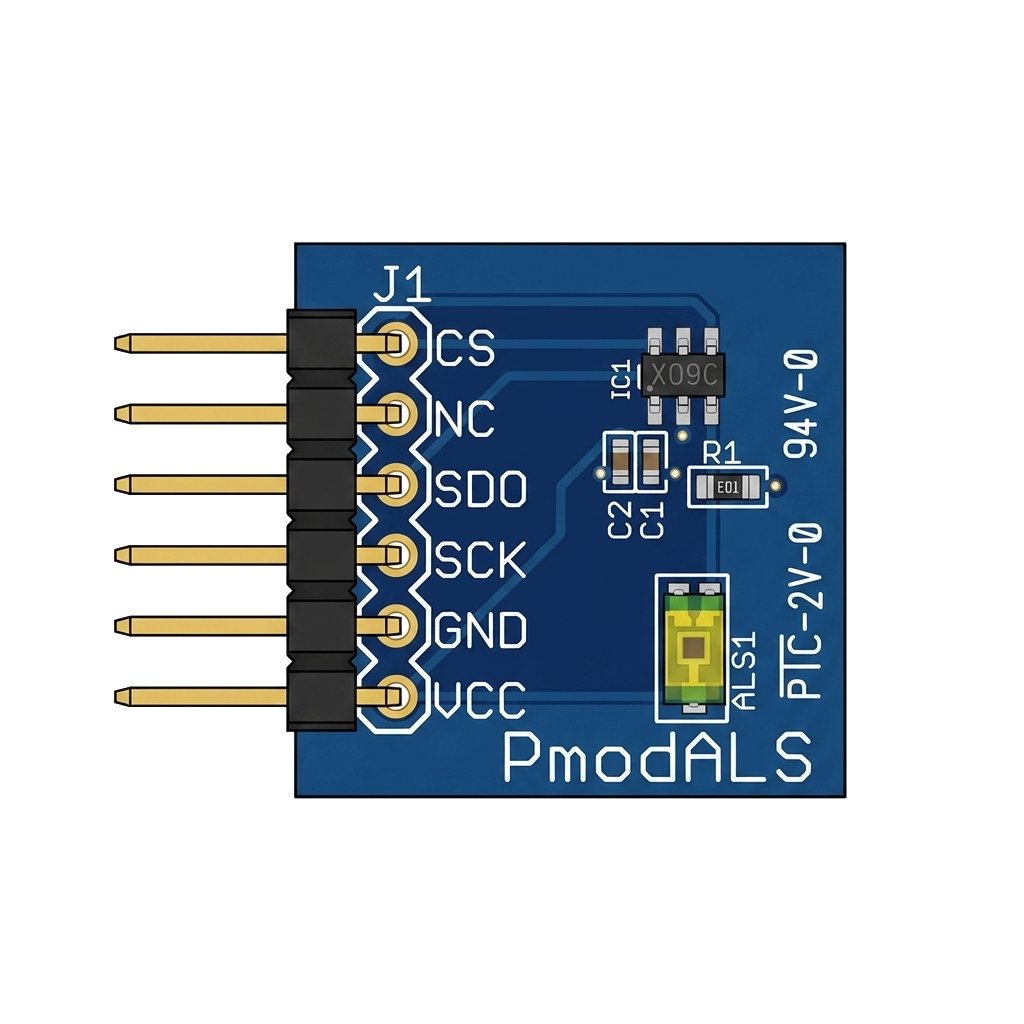
The PmodALS, manufactured by Digilent, is a compact ambient light sensor module designed to measure light intensity. It utilizes a photodiode and associated circuitry to convert ambient light levels into an analog voltage signal. This module is ideal for applications requiring light detection, such as automatic lighting systems, display brightness adjustment, and environmental monitoring.
The PmodALS is easy to integrate with microcontrollers and other digital devices, making it a versatile choice for both hobbyists and professionals.
Explore Projects Built with PmodALS
 Open Project in Cirkit Designer
 Open Project in Cirkit Designer
 Open Project in Cirkit Designer
 Open Project in Cirkit Designer
Explore Projects Built with PmodALS
Open Project in Cirkit DesignerOpen Project in Cirkit DesignerOpen Project in Cirkit DesignerOpen Project in Cirkit DesignerTechnical Specifications
The following are the key technical details of the PmodALS:
- Operating Voltage: 3.3V
- Output Voltage Range: 0V to 3.3V (proportional to light intensity)
- Interface: Analog output
- Light Sensitivity: Up to 1000 lux
- Power Consumption: Low power operation
- Dimensions: Compact form factor (0.8" × 0.8")
Pin Configuration and Descriptions
The PmodALS uses a 6-pin connector. The pin configuration is as follows:
| Pin Number | Pin Name | Description |
|---|---|---|
| 1 | VCC | Power supply input (3.3V) |
| 2 | GND | Ground |
| 3 | OUT | Analog output signal (light intensity) |
| 4 | NC | Not connected |
| 5 | NC | Not connected |
| 6 | NC | Not connected |
Usage Instructions
How to Use the PmodALS in a Circuit
- Power the Module: Connect the
VCCpin to a 3.3V power source and theGNDpin to ground. - Read the Output: Connect the
OUTpin to an analog input pin on your microcontroller or ADC (Analog-to-Digital Converter). The voltage on theOUTpin will vary proportionally with the ambient light intensity. - Process the Signal: Use your microcontroller to read the analog voltage and convert it into a meaningful light intensity value.
Important Considerations and Best Practices
- Voltage Compatibility: Ensure that your microcontroller operates at 3.3V logic levels to avoid damaging the PmodALS.
- Placement: Place the PmodALS in an area where it can accurately measure ambient light without obstructions or interference.
- Calibration: Depending on your application, you may need to calibrate the sensor to map the output voltage to specific light intensity values (e.g., lux).
Example: Connecting PmodALS to an Arduino UNO
Although the Arduino UNO operates at 5V logic, you can use a voltage divider or level shifter to safely interface with the PmodALS. Below is an example code snippet for reading the sensor's output:
// Define the analog pin connected to the PmodALS OUT pin
const int sensorPin = A0;

void setup() {
  // Initialize serial communication for debugging
  Serial.begin(9600);
}

void loop() {
  // Read the analog value from the sensor
  int sensorValue = analogRead(sensorPin);

  // Convert the analog value to voltage (assuming 3.3V reference)
  float voltage = sensorValue * (3.3 / 1023.0);

  // Print the voltage to the serial monitor
  Serial.print("Ambient Light Voltage: ");
  Serial.print(voltage);
  Serial.println(" V");

  // Add a small delay for stability
  delay(500);
}
Note: If using a 5V Arduino, ensure the OUT pin voltage does not exceed the ADC input range by using a voltage divider.
Troubleshooting and FAQs
Common Issues
No Output Signal:
- Cause: Incorrect wiring or insufficient power supply.
- Solution: Double-check the connections and ensure the module is powered with 3.3V.
Inconsistent Readings:
- Cause: Electrical noise or unstable power supply.
- Solution: Use decoupling capacitors near the power pins to stabilize the supply voltage.
Output Voltage Stuck at Maximum or Minimum:
- Cause: Sensor saturation or insufficient ambient light.
- Solution: Adjust the sensor's placement to ensure it is exposed to appropriate light levels.
FAQs
Q: Can the PmodALS be used with a 5V microcontroller?
A: Yes, but you must use a voltage divider or level shifter to ensure the OUT pin voltage does not exceed the microcontroller's ADC input range.
Q: How do I convert the output voltage to lux?
A: The PmodALS output voltage is proportional to light intensity. Refer to the module's datasheet for the exact conversion formula or perform a calibration using a known light source.
Q: Can the PmodALS detect infrared light?
A: No, the PmodALS is designed to detect visible light and is not sensitive to infrared wavelengths.
By following this documentation, you can effectively integrate the PmodALS into your projects and troubleshoot any issues that arise.