
How to Use Lithium-Ion BMS 3s: Examples, Pinouts, and Specs
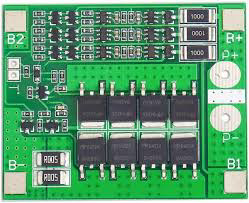
 Design with Lithium-Ion BMS 3s in Cirkit Designer
Introduction
The Lithium-Ion BMS 3s is a Battery Management System designed to manage and protect a 3-cell series lithium-ion battery pack. It ensures safe operation by monitoring and balancing cell voltages, protecting against overcharge, over-discharge, and overcurrent conditions, and monitoring temperature. This component is essential for maintaining the longevity and safety of lithium-ion battery packs.
Explore Projects Built with Lithium-Ion BMS 3s
 Open Project in Cirkit Designer
 Open Project in Cirkit Designer
 Open Project in Cirkit Designer
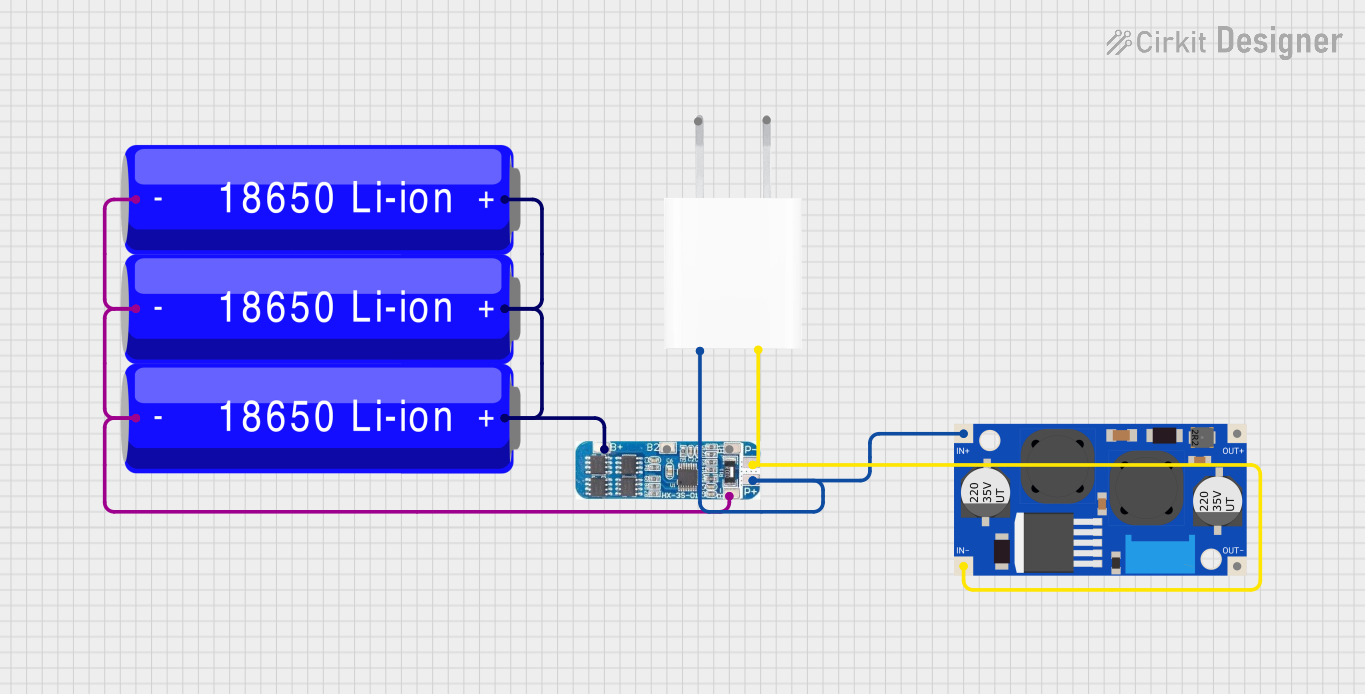 Open Project in Cirkit Designer
Explore Projects Built with Lithium-Ion BMS 3s
Open Project in Cirkit DesignerOpen Project in Cirkit DesignerOpen Project in Cirkit DesignerOpen Project in Cirkit DesignerCommon Applications and Use Cases
- Power management in electric vehicles (EVs) and e-bikes
- Energy storage systems (ESS) for solar and wind power
- Portable electronics and power banks
- Robotics and drones
- Uninterruptible Power Supplies (UPS)
Technical Specifications
The following table outlines the key technical details of the Lithium-Ion BMS 3s:
| Parameter | Value |
|---|---|
| Battery Configuration | 3-series (3s) lithium-ion cells |
| Operating Voltage Range | 9V to 12.6V |
| Overcharge Protection | 4.25V ± 0.05V per cell |
| Over-discharge Protection | 2.7V ± 0.1V per cell |
| Overcurrent Protection | 20A (typical) |
| Balancing Current | 50mA (typical) |
| Operating Temperature Range | -20°C to 60°C |
| Dimensions | 50mm x 20mm x 3mm |
Pin Configuration and Descriptions
The Lithium-Ion BMS 3s typically has the following pin configuration:
| Pin Name | Description |
|---|---|
| B- | Battery negative terminal (connect to the negative terminal of the battery pack) |
| B1 | Connection to the positive terminal of the first cell in the series |
| B2 | Connection to the positive terminal of the second cell in the series |
| B+ | Battery positive terminal (connect to the positive terminal of the battery pack) |
| P- | Power output negative terminal (connect to the load or charger negative) |
| P+ | Power output positive terminal (connect to the load or charger positive) |
Usage Instructions
How to Use the Component in a Circuit
Connect the Battery Pack:
- Connect the negative terminal of the battery pack to the
B-pin. - Connect the positive terminal of the first cell to the
B1pin. - Connect the positive terminal of the second cell to the
B2pin. - Connect the positive terminal of the battery pack to the
B+pin.
- Connect the negative terminal of the battery pack to the
Connect the Load and Charger:
- Connect the negative terminal of the load or charger to the
P-pin. - Connect the positive terminal of the load or charger to the
P+pin.
- Connect the negative terminal of the load or charger to the
Verify Connections:
- Double-check all connections to ensure they are secure and correct.
- Ensure the battery pack is within the operating voltage range of the BMS.
Power On:
- Once all connections are verified, the BMS will automatically begin monitoring and protecting the battery pack.
Important Considerations and Best Practices
- Cell Matching: Ensure all cells in the battery pack are of the same capacity, voltage, and state of charge before connecting to the BMS.
- Heat Dissipation: Avoid placing the BMS in an enclosed space without proper ventilation, as it may generate heat during operation.
- Avoid Overloading: Do not exceed the maximum current rating of the BMS to prevent damage.
- Temperature Monitoring: Ensure the operating environment is within the specified temperature range (-20°C to 60°C).
Example: Connecting to an Arduino UNO
The Lithium-Ion BMS 3s can be used with an Arduino UNO to monitor battery voltage. Below is an example code snippet:
// Example code to monitor battery voltage using Arduino UNO
// Connect the B+ pin of the BMS to an analog input pin on the Arduino
// Use a voltage divider if the battery voltage exceeds 5V

const int batteryPin = A0;  // Analog pin connected to B+ via a voltage divider
const float voltageDividerRatio = 5.7;  // Adjust based on your resistor values

void setup() {
  Serial.begin(9600);  // Initialize serial communication
}

void loop() {
  int rawValue = analogRead(batteryPin);  // Read the analog value
  float batteryVoltage = (rawValue * 5.0 / 1023.0) * voltageDividerRatio;

  // Print the battery voltage to the Serial Monitor
  Serial.print("Battery Voltage: ");
  Serial.print(batteryVoltage);
  Serial.println(" V");

  delay(1000);  // Wait for 1 second before the next reading
}
Note: Use a voltage divider circuit to scale down the battery voltage if it exceeds the Arduino's 5V input limit. For example, use a 10kΩ and 47kΩ resistor to create a 5.7:1 ratio.
Troubleshooting and FAQs
Common Issues and Solutions
BMS Not Powering On:
- Cause: Incorrect wiring or loose connections.
- Solution: Verify all connections and ensure the battery pack voltage is within the operating range.
Overcurrent Protection Triggered:
- Cause: Load current exceeds the BMS's maximum current rating.
- Solution: Reduce the load current or use a BMS with a higher current rating.
Uneven Cell Voltages:
- Cause: Cells are not balanced or have different capacities.
- Solution: Pre-balance the cells before connecting to the BMS or use a balancing charger.
Excessive Heat:
- Cause: High current draw or poor ventilation.
- Solution: Ensure proper ventilation and avoid exceeding the current rating.
FAQs
Q: Can I use this BMS for a 4s battery pack?
A: No, this BMS is specifically designed for 3-series (3s) lithium-ion battery packs. Using it with a 4s pack may result in improper operation or damage.Q: Does the BMS support LiFePO4 batteries?
A: No, this BMS is designed for lithium-ion batteries. LiFePO4 batteries have different voltage thresholds and require a dedicated BMS.Q: How do I know if the BMS is balancing the cells?
A: The BMS will automatically balance the cells when their voltages differ significantly. You can measure the cell voltages to confirm balancing activity.Q: Can I use this BMS without a load connected?
A: Yes, the BMS can operate without a load, but ensure the battery pack is connected properly.
By following this documentation, you can safely and effectively use the Lithium-Ion BMS 3s in your projects.