
How to Use DC MCB 250A: Examples, Pinouts, and Specs
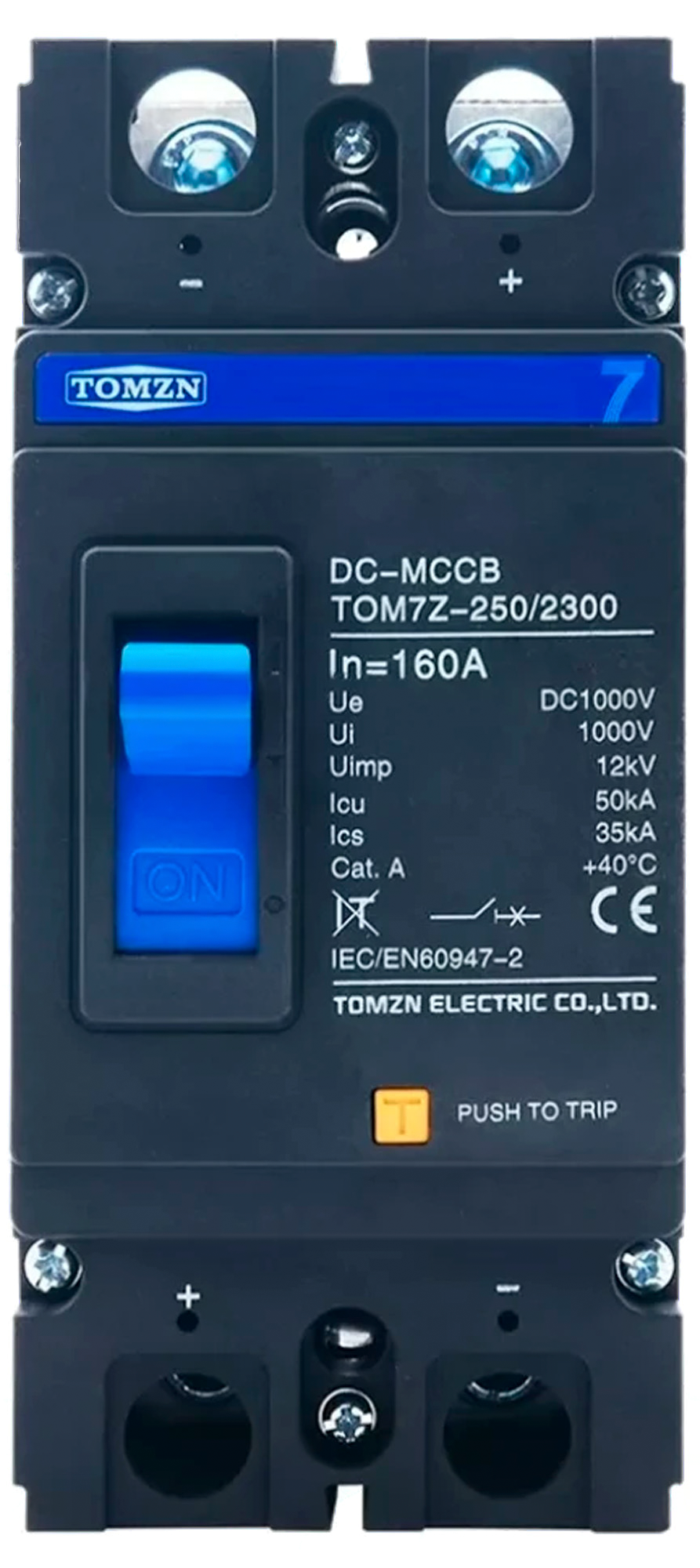
 Design with DC MCB 250A in Cirkit Designer
Introduction
The Tomzn DC Miniature Circuit Breaker (MCB) 250A is a high-performance protective device designed for use in direct current (DC) electrical systems. It is rated for a maximum current of 250 Amperes and is engineered to safeguard circuits from overloads and short circuits. This compact and reliable component is ideal for applications requiring robust circuit protection in renewable energy systems, industrial equipment, and battery-based setups.
Explore Projects Built with DC MCB 250A
 Open Project in Cirkit Designer
 Open Project in Cirkit Designer
 Open Project in Cirkit Designer
 Open Project in Cirkit Designer
Explore Projects Built with DC MCB 250A
Open Project in Cirkit DesignerOpen Project in Cirkit DesignerOpen Project in Cirkit DesignerOpen Project in Cirkit DesignerCommon Applications and Use Cases
- Solar power systems (e.g., photovoltaic arrays)
- Battery banks and energy storage systems
- Electric vehicle (EV) charging stations
- Industrial DC power distribution
- Telecommunications equipment
- Marine and RV electrical systems
Technical Specifications
The following table outlines the key technical details of the Tomzn DC MCB 250A:
| Parameter | Specification |
|---|---|
| Rated Current (In) | 250 Amperes |
| Rated Voltage (Ue) | 250V DC |
| Breaking Capacity (Icu) | 10 kA |
| Number of Poles | 2P (Double Pole) |
| Tripping Curve | C Curve |
| Operating Temperature | -25°C to +70°C |
| Mounting Type | DIN Rail (Standard 35mm) |
| Dimensions | 81mm x 36mm x 75mm |
| Housing Material | Flame-retardant thermoplastic |
| Compliance Standards | IEC/EN 60947-2, IEC/EN 60898-2 |
Pin Configuration and Descriptions
The Tomzn DC MCB 250A features a simple terminal configuration for input and output connections. The table below describes the terminals:
| Terminal | Description |
|---|---|
| Line In (+) | Positive DC input terminal |
| Line In (-) | Negative DC input terminal |
| Line Out (+) | Positive DC output terminal |
| Line Out (-) | Negative DC output terminal |
Usage Instructions
How to Use the Component in a Circuit
- Mounting the MCB: Secure the MCB onto a standard 35mm DIN rail in your electrical panel or enclosure.
- Wiring:
- Connect the positive DC input wire to the Line In (+) terminal.
- Connect the negative DC input wire to the Line In (-) terminal.
- Connect the positive DC output wire to the Line Out (+) terminal.
- Connect the negative DC output wire to the Line Out (-) terminal.
- Ensure all connections are tight and secure to prevent arcing or overheating.
- Circuit Testing:
- Before powering the circuit, verify all connections with a multimeter.
- Switch the MCB to the "ON" position to allow current flow.
- Operation:
- The MCB will automatically trip in the event of an overload or short circuit, cutting off the current to protect the circuit.
- To reset, switch the MCB to the "OFF" position, resolve the fault, and then switch it back to "ON."
Important Considerations and Best Practices
- Ensure the MCB's rated current (250A) matches the requirements of your circuit to avoid nuisance tripping or insufficient protection.
- Use appropriately sized wires and connectors to handle the high current rating.
- Avoid exposing the MCB to excessive moisture, dust, or corrosive environments.
- Regularly inspect the MCB for signs of wear, damage, or loose connections.
- For solar or battery systems, ensure proper polarity when connecting the MCB to avoid damage.
Arduino Integration
While the Tomzn DC MCB 250A is not directly interfaced with microcontrollers like the Arduino UNO, it can be used in circuits controlled by Arduino. For example, you can use the MCB to protect a DC motor or power supply in an Arduino-based project.
Here is an example of Arduino code to monitor the voltage across the MCB using a voltage sensor:
// Example code to monitor voltage across the DC MCB using an Arduino
// and a voltage sensor module (e.g., 0-25V sensor).

const int voltagePin = A0;  // Analog pin connected to the voltage sensor
float voltage = 0.0;        // Variable to store the measured voltage

void setup() {
  Serial.begin(9600);       // Initialize serial communication
  pinMode(voltagePin, INPUT); // Set the voltage pin as input
}

void loop() {
  int sensorValue = analogRead(voltagePin); // Read the analog value
  voltage = (sensorValue / 1023.0) * 25.0;  // Convert to voltage (0-25V range)

  // Print the voltage to the Serial Monitor
  Serial.print("Voltage across MCB: ");
  Serial.print(voltage);
  Serial.println(" V");

  delay(1000); // Wait for 1 second before the next reading
}
Note: This code assumes the use of a voltage sensor module with a 0-25V range. Ensure the voltage across the MCB does not exceed the sensor's maximum input voltage.
Troubleshooting and FAQs
Common Issues Users Might Face
MCB Trips Frequently:
- Cause: Overload or short circuit in the connected circuit.
- Solution: Check the load current and ensure it does not exceed 250A. Inspect the circuit for short circuits or faulty components.
MCB Does Not Trip During a Fault:
- Cause: Faulty MCB or incorrect wiring.
- Solution: Verify the wiring and ensure the MCB is functioning correctly. Replace the MCB if necessary.
Loose Connections:
- Cause: Improperly tightened terminal screws.
- Solution: Re-tighten all terminal screws and ensure secure connections.
Arcing or Overheating:
- Cause: Loose connections or undersized wires.
- Solution: Use wires rated for at least 250A and ensure all connections are tight.
Solutions and Tips for Troubleshooting
- Use a multimeter to check for continuity and proper voltage levels across the MCB terminals.
- If the MCB trips repeatedly, disconnect the load and test the MCB with no load to isolate the issue.
- Regularly inspect the MCB for physical damage, such as cracks or discoloration, which may indicate overheating or wear.
By following this documentation, users can effectively integrate and maintain the Tomzn DC MCB 250A in their DC electrical systems, ensuring reliable circuit protection and optimal performance.