Cirkit Designer Logo
Cirkit Designer
Your all-in-one circuit design IDE
Home / 
Component Documentation

How to Use Electrocookie Uno Propboard: Examples, Pinouts, and Specs
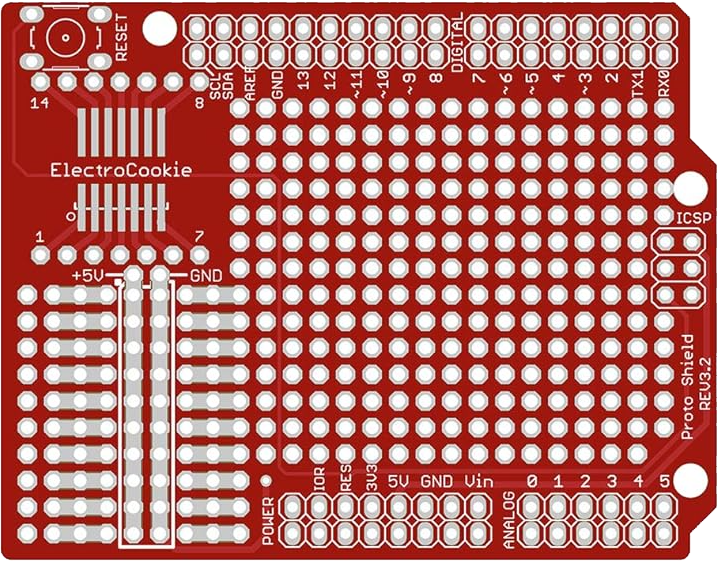

Image of Electrocookie Uno Propboard
Cirkit Designer LogoDesign with Electrocookie Uno Propboard in Cirkit Designer

Introduction

The Electrocookie Uno Propboard is a versatile prototyping board designed specifically for use with the Arduino Uno. It features a breadboard-style layout, providing easy access to power and I/O pins, making it ideal for rapid development and testing of electronic projects. This board simplifies prototyping by integrating a solderable area, power rails, and labeled pin headers, ensuring a seamless experience for both beginners and experienced developers.

Explore Projects Built with Electrocookie Uno Propboard
Use Cirkit Designer to design, explore, and prototype these projects online. Some projects support real-time simulation. Click "Open Project" to start designing instantly!
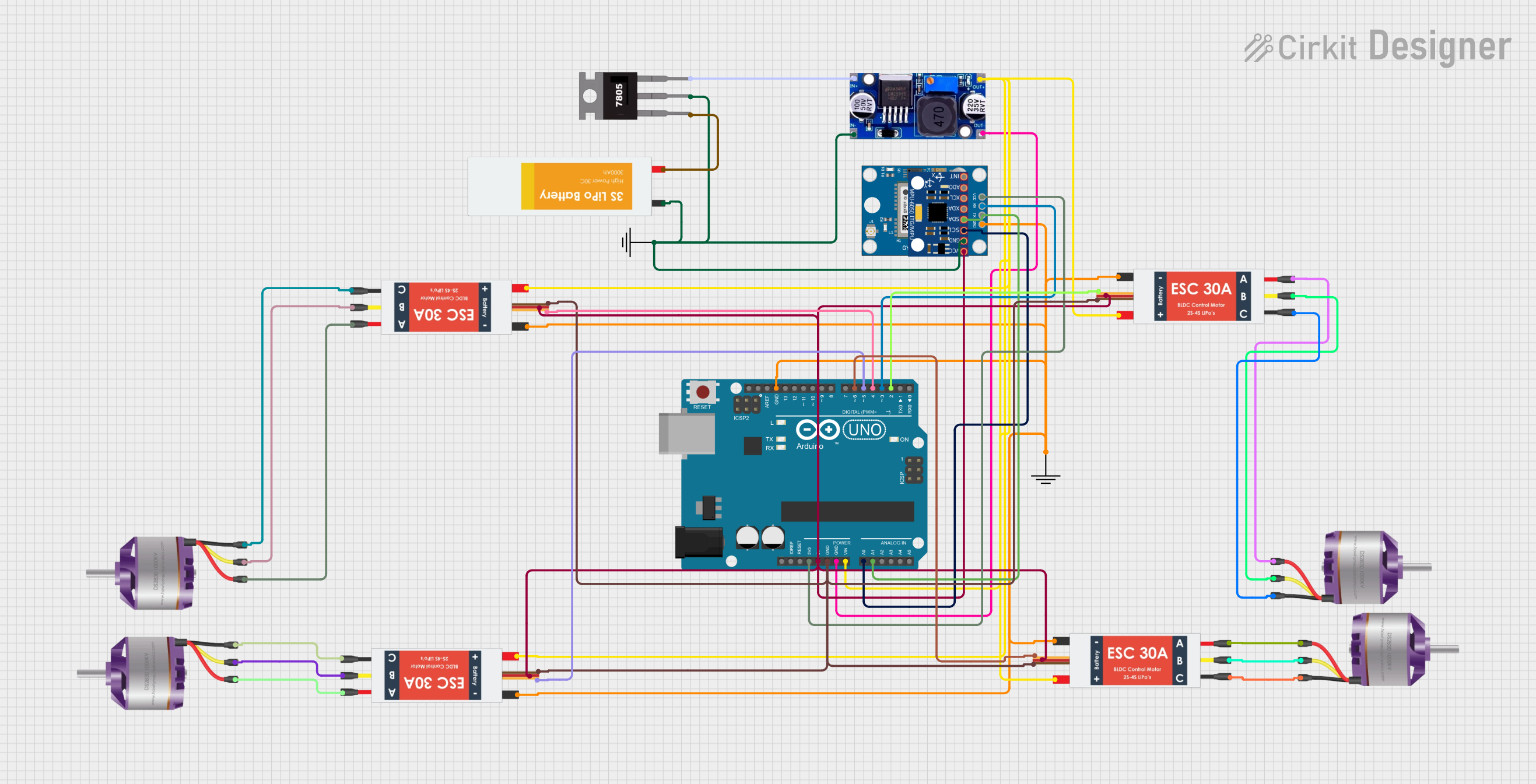
Arduino UNO Controlled Brushless Motor System with GPS and IMU
Image of quadcopter: A project utilizing Electrocookie Uno Propboard in a practical application
This circuit is a quadcopter control system featuring an Arduino UNO, four brushless motors, and four Electronic Speed Controllers (ESCs). The Arduino UNO manages the ESCs to control the motors, while additional components like a GPS module and an MPU-6050 sensor provide navigation and orientation data.
Cirkit Designer LogoOpen Project in Cirkit Designer
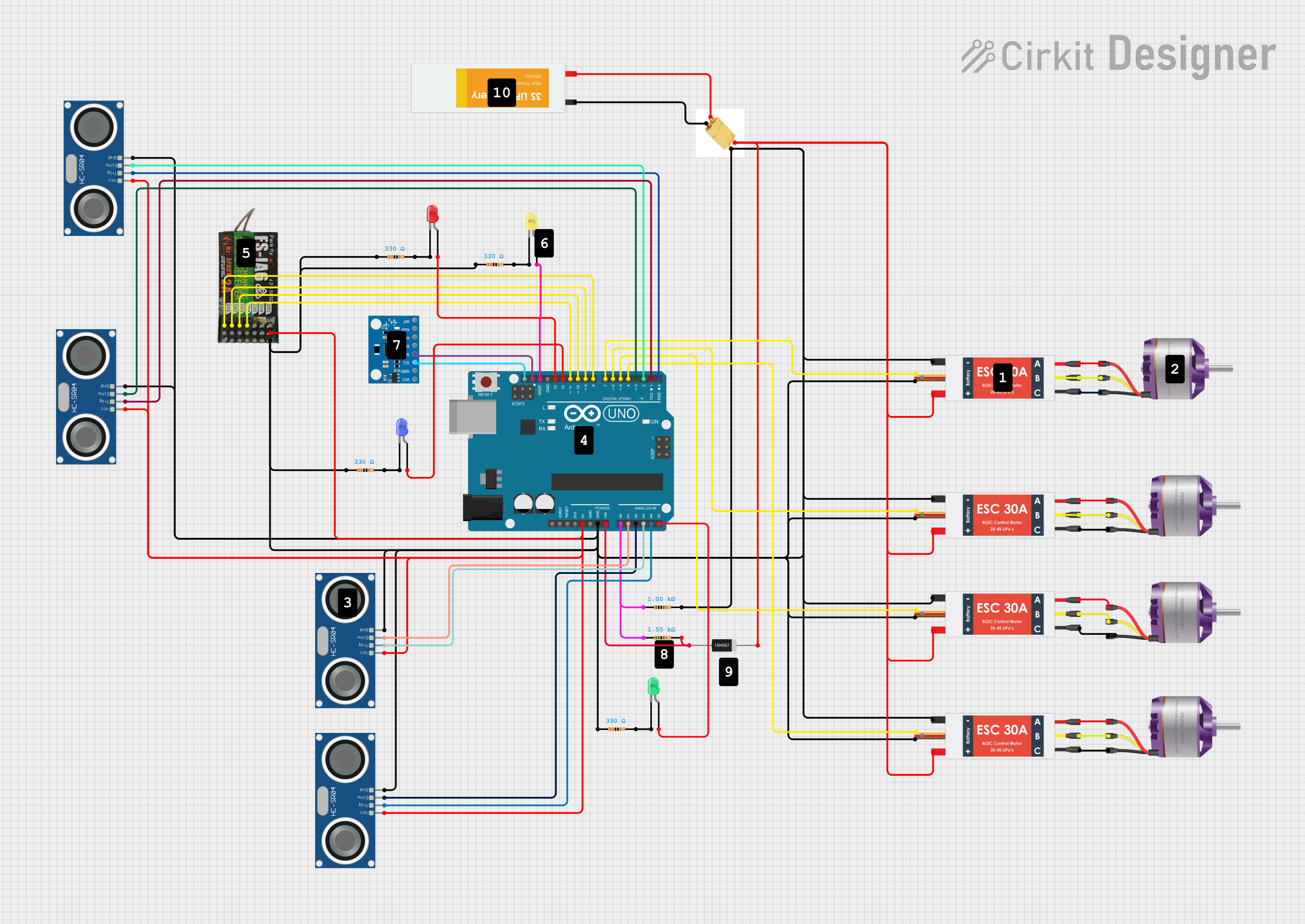
Arduino UNO-Based Quadcopter with Ultrasonic Sensors and Brushless Motors
Image of Skematik Perancangan Drone: A project utilizing Electrocookie Uno Propboard in a practical application
This circuit is designed for a quadcopter drone, featuring four Electronic Speed Controllers (ESCs) connected to four brushless motors for propulsion. An Arduino UNO microcontroller interfaces with multiple sensors, including ultrasonic sensors for obstacle detection and an MPU6050 for motion sensing, while also controlling the ESCs and receiving input from a FlySky receiver for remote control.
Cirkit Designer LogoOpen Project in Cirkit Designer
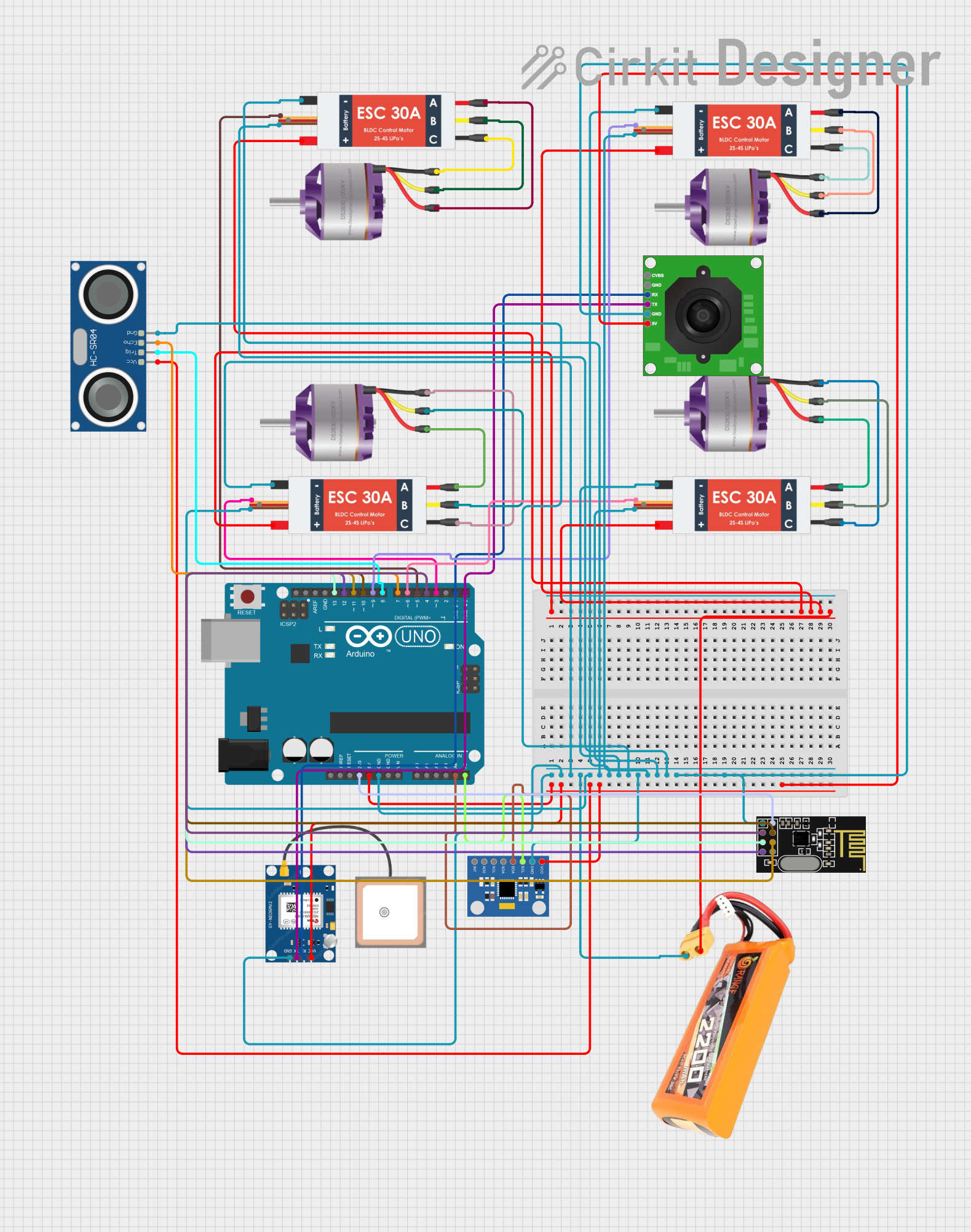
Arduino UNO Controlled Quadcopter with GPS, Ultrasonic Sensing, and Wireless Communication
Image of New Drone: A project utilizing Electrocookie Uno Propboard in a practical application
This circuit features an Arduino UNO as the central microcontroller, interfaced with a GPS module, ultrasonic sensor, accelerometer/gyroscope, TTL camera, and an NRF24L01 wireless module for communication. It controls four brushless motors through electronic speed controllers (ESCs), which are powered by a LiPo battery. The system is likely designed for a remotely controlled vehicle with telemetry and autonomous navigation capabilities.
Cirkit Designer LogoOpen Project in Cirkit Designer
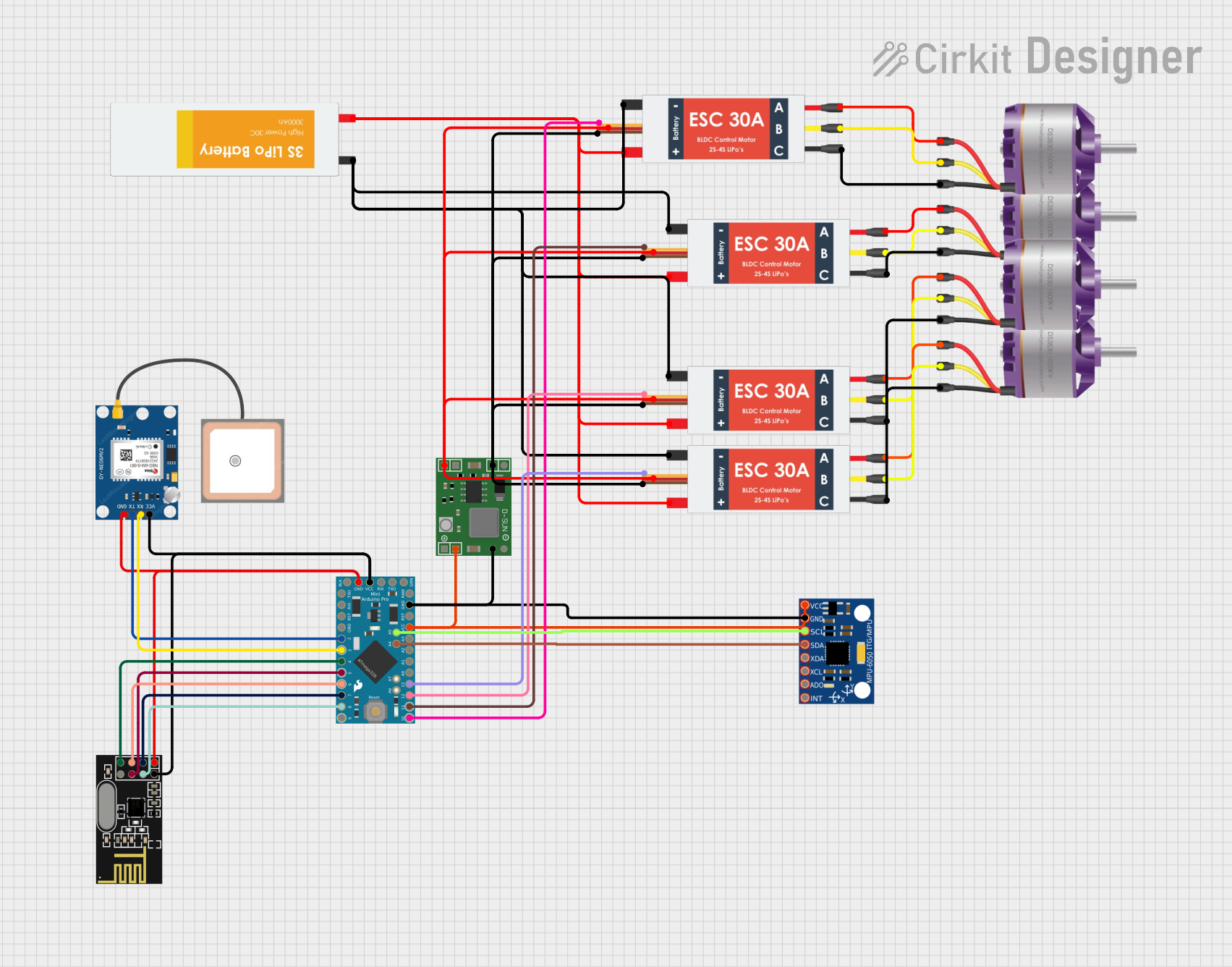
Arduino-Controlled Quadcopter with GPS and NRF24L01 Wireless Communication
Image of Octocopter Drone Circuit1: A project utilizing Electrocookie Uno Propboard in a practical application
This circuit is designed for a quadcopter control system. It features an Arduino Pro Mini as the central microcontroller, interfacing with a GPS module for positioning, an NRF24L01 module for wireless communication, and an MPU-6050 for motion sensing. Power regulation is managed by an MP1584EN board, and four electronic speed controllers (ESCs) are connected to brushless motors for propeller control.
Cirkit Designer LogoOpen Project in Cirkit Designer

Explore Projects Built with Electrocookie Uno Propboard

Use Cirkit Designer to design, explore, and prototype these projects online. Some projects support real-time simulation. Click "Open Project" to start designing instantly!
Image of quadcopter: A project utilizing Electrocookie Uno Propboard in a practical application
Arduino UNO Controlled Brushless Motor System with GPS and IMU
This circuit is a quadcopter control system featuring an Arduino UNO, four brushless motors, and four Electronic Speed Controllers (ESCs). The Arduino UNO manages the ESCs to control the motors, while additional components like a GPS module and an MPU-6050 sensor provide navigation and orientation data.
Cirkit Designer LogoOpen Project in Cirkit Designer
Image of Skematik Perancangan Drone: A project utilizing Electrocookie Uno Propboard in a practical application
Arduino UNO-Based Quadcopter with Ultrasonic Sensors and Brushless Motors
This circuit is designed for a quadcopter drone, featuring four Electronic Speed Controllers (ESCs) connected to four brushless motors for propulsion. An Arduino UNO microcontroller interfaces with multiple sensors, including ultrasonic sensors for obstacle detection and an MPU6050 for motion sensing, while also controlling the ESCs and receiving input from a FlySky receiver for remote control.
Cirkit Designer LogoOpen Project in Cirkit Designer
Image of New Drone: A project utilizing Electrocookie Uno Propboard in a practical application
Arduino UNO Controlled Quadcopter with GPS, Ultrasonic Sensing, and Wireless Communication
This circuit features an Arduino UNO as the central microcontroller, interfaced with a GPS module, ultrasonic sensor, accelerometer/gyroscope, TTL camera, and an NRF24L01 wireless module for communication. It controls four brushless motors through electronic speed controllers (ESCs), which are powered by a LiPo battery. The system is likely designed for a remotely controlled vehicle with telemetry and autonomous navigation capabilities.
Cirkit Designer LogoOpen Project in Cirkit Designer
Image of Octocopter Drone Circuit1: A project utilizing Electrocookie Uno Propboard in a practical application
Arduino-Controlled Quadcopter with GPS and NRF24L01 Wireless Communication
This circuit is designed for a quadcopter control system. It features an Arduino Pro Mini as the central microcontroller, interfacing with a GPS module for positioning, an NRF24L01 module for wireless communication, and an MPU-6050 for motion sensing. Power regulation is managed by an MP1584EN board, and four electronic speed controllers (ESCs) are connected to brushless motors for propeller control.
Cirkit Designer LogoOpen Project in Cirkit Designer

Common Applications and Use Cases

  • Rapid prototyping of Arduino-based projects
  • Educational purposes for learning circuit design and programming
  • Testing and debugging electronic circuits
  • Building permanent circuits after prototyping
  • Projects requiring easy access to Arduino Uno pins and power rails

Technical Specifications

The Electrocookie Uno Propboard is designed to complement the Arduino Uno and offers the following features:

Key Technical Details

  • Dimensions: Matches the Arduino Uno footprint (70mm x 55mm)
  • Material: High-quality FR4 PCB with solder mask and silkscreen
  • Breadboard Layout: Solderable prototyping area with 0.1-inch (2.54mm) pitch
  • Power Rails: Dedicated power and ground rails for easy power distribution
  • Pin Headers: Labeled headers for Arduino Uno I/O pins
  • Voltage Compatibility: Supports 3.3V and 5V logic levels
  • Mounting Holes: Compatible with Arduino Uno mounting points
  • Weight: Approximately 25 grams

Pin Configuration and Descriptions

The Electrocookie Uno Propboard provides labeled pin headers that correspond to the Arduino Uno's I/O pins. Below is a table describing the pin layout:

Pin Header Description
GND Ground connection for the circuit
5V 5V power output from the Arduino Uno
3.3V 3.3V power output from the Arduino Uno
VIN Input voltage supplied to the Arduino Uno (via barrel jack or VIN pin)
Digital Pins D0–D13: Digital I/O pins for general-purpose input/output
Analog Pins A0–A5: Analog input pins for reading sensor data
Power Rails Dedicated rows for distributing power (GND, 5V, and 3.3V)
Reset Reset pin for manually resetting the Arduino Uno

Usage Instructions

How to Use the Electrocookie Uno Propboard in a Circuit

  1. Attach the Propboard to the Arduino Uno: Align the mounting holes and pin headers of the Propboard with the Arduino Uno. Secure the board using screws or standoffs if needed.
  2. Connect Components: Use the solderable prototyping area to connect components such as resistors, capacitors, LEDs, and sensors. The 0.1-inch pitch makes it compatible with standard through-hole components.
  3. Distribute Power: Utilize the dedicated power rails (GND, 5V, and 3.3V) to distribute power to your components efficiently.
  4. Access I/O Pins: Use the labeled pin headers to connect wires or jumper cables to the Arduino Uno's I/O pins.
  5. Upload Code: Write and upload your Arduino sketch using the Arduino IDE to control the connected components.

Important Considerations and Best Practices

  • Avoid Short Circuits: Double-check connections on the prototyping area to ensure there are no unintended shorts.
  • Use Proper Soldering Techniques: When soldering components, ensure clean and secure joints to avoid connectivity issues.
  • Power Supply: Ensure the Arduino Uno is powered appropriately (via USB or external power supply) to provide sufficient current for your circuit.
  • Labeling: Take advantage of the labeled pin headers to avoid confusion when connecting components.
  • Testing: Test your circuit on a breadboard first (if possible) before soldering it onto the Propboard.

Example: Connecting an LED to the Propboard

Below is an example of how to connect an LED to the Electrocookie Uno Propboard and control it using an Arduino Uno:

Circuit Setup

  • Connect the longer leg (anode) of the LED to a 220-ohm resistor.
  • Solder the other end of the resistor to digital pin D13 on the Propboard.
  • Connect the shorter leg (cathode) of the LED to the GND rail.

Arduino Code

// This code blinks an LED connected to pin D13 on the Electrocookie Uno Propboard.

void setup() {
  pinMode(13, OUTPUT); // Set pin D13 as an output
}

void loop() {
  digitalWrite(13, HIGH); // Turn the LED on
  delay(1000);            // Wait for 1 second
  digitalWrite(13, LOW);  // Turn the LED off
  delay(1000);            // Wait for 1 second
}

Troubleshooting and FAQs

Common Issues and Solutions

  1. Problem: The LED does not light up.

    • Solution: Check the polarity of the LED. Ensure the anode is connected to the resistor and the cathode to GND.
    • Solution: Verify the solder joints for proper connectivity.
  2. Problem: Arduino Uno is not powering the Propboard.

    • Solution: Ensure the Arduino Uno is properly powered via USB or an external power supply.
    • Solution: Check the alignment of the Propboard with the Arduino Uno's pin headers.
  3. Problem: Components are not receiving power.

    • Solution: Verify connections to the power rails (GND, 5V, or 3.3V).
    • Solution: Ensure the Arduino Uno is supplying sufficient current for the circuit.
  4. Problem: Difficulty in soldering components.

    • Solution: Use a fine-tipped soldering iron and ensure the soldering temperature is appropriate.
    • Solution: Practice soldering on a scrap PCB before working on the Propboard.

FAQs

Q: Can I reuse the Propboard after soldering components?
A: While the Propboard is designed for permanent circuits, you can desolder components if needed. However, repeated soldering and desoldering may damage the board.

Q: Is the Propboard compatible with other Arduino boards?
A: The Propboard is specifically designed for the Arduino Uno footprint. It may not align perfectly with other Arduino models.

Q: Can I use surface-mount components on the Propboard?
A: The Propboard is primarily designed for through-hole components. However, with careful soldering, you can use surface-mount components in the prototyping area.

Q: Does the Propboard include components like resistors or LEDs?
A: No, the Propboard is a bare prototyping board. You will need to supply your own components.

By following this documentation, you can effectively use the Electrocookie Uno Propboard to prototype and build your electronic projects with ease!