
How to Use Proto Board: Examples, Pinouts, and Specs
 Design with Proto Board in Cirkit Designer
Introduction
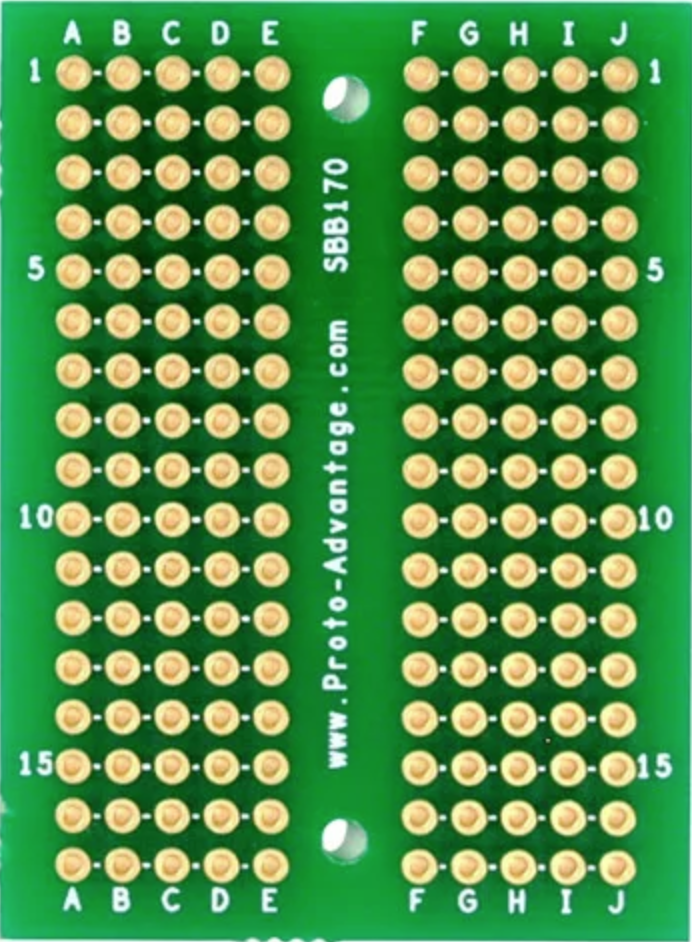
The Proto Board (SBB170), manufactured by Proto Advantage, is a reusable platform designed for prototyping electronic circuits. Commonly referred to as a breadboard, this component allows users to easily insert and remove electronic components without the need for soldering. It is an essential tool for testing and developing circuit designs, making it a staple in educational, hobbyist, and professional electronics projects.
Explore Projects Built with Proto Board
 Open Project in Cirkit Designer
 Open Project in Cirkit Designer
 Open Project in Cirkit Designer
 Open Project in Cirkit Designer
Explore Projects Built with Proto Board
Open Project in Cirkit DesignerOpen Project in Cirkit DesignerOpen Project in Cirkit DesignerOpen Project in Cirkit DesignerCommon Applications and Use Cases
- Rapid prototyping of electronic circuits
- Testing and debugging circuit designs
- Educational purposes for learning circuit assembly
- Temporary setups for proof-of-concept designs
- Experimenting with microcontroller-based projects (e.g., Arduino, Raspberry Pi)
Technical Specifications
The Proto Board (SBB170) is a compact and versatile breadboard with the following specifications:
Key Technical Details
| Parameter | Specification |
|---|---|
| Manufacturer | Proto Advantage |
| Part ID | SBB170 |
| Dimensions | 47mm x 35mm x 9mm |
| Total Tie Points | 170 |
| Power Rails | None |
| Material | ABS plastic housing, phosphor bronze contacts |
| Operating Voltage Range | 0V to 36V |
| Maximum Current | 1A per contact |
| Contact Life Span | 5,000 insertions |
Pin Configuration and Layout
The Proto Board (SBB170) features a simple layout with 170 tie points arranged as follows:
| Section | Description |
|---|---|
| Terminal Strips | 2 sets of 5-hole rows for component connections (total: 170 tie points) |
| Power Rails | Not included (external power connections required) |
| Adhesive Backing | Double-sided adhesive tape for mounting on surfaces |
| Alignment Slots | Grooves for connecting multiple proto boards side by side |
Usage Instructions
How to Use the Proto Board in a Circuit
- Insert Components: Place the leads of components (e.g., resistors, capacitors, ICs) into the tie points. Each row of 5 holes is electrically connected.
- Connect Wires: Use jumper wires to connect different rows or components. Ensure proper alignment to avoid short circuits.
- Power the Circuit: Since the SBB170 does not include power rails, connect an external power source using jumper wires or a power supply module.
- Test and Debug: Once the circuit is assembled, test its functionality. Components can be easily removed or rearranged for troubleshooting.
Important Considerations and Best Practices
- Avoid Overcurrent: Do not exceed the maximum current rating of 1A per contact to prevent damage.
- Use Proper Wire Sizes: Use 22-28 AWG solid-core wires for reliable connections.
- Secure the Board: Use the adhesive backing to mount the board on a stable surface during use.
- Avoid Excessive Force: Insert and remove components gently to prolong the life of the contacts.
- Combine Boards if Needed: For larger circuits, connect multiple SBB170 boards using the alignment slots.
Example: Connecting an LED to an Arduino UNO
Below is an example of using the Proto Board (SBB170) to connect an LED to an Arduino UNO:
Circuit Components
- 1 x Arduino UNO
- 1 x LED
- 1 x 220Ω resistor
- Jumper wires
- Proto Board (SBB170)
Circuit Diagram
- Connect the longer leg (anode) of the LED to a 220Ω resistor.
- Place the resistor's other leg into a tie point connected to Arduino pin 9.
- Connect the shorter leg (cathode) of the LED to the Arduino GND pin.
Arduino Code
// Simple LED Blink Example
// This code blinks an LED connected to pin 9 of the Arduino UNO.
// Ensure the LED is connected with a 220Ω resistor to prevent damage.

const int ledPin = 9; // Pin connected to the LED

void setup() {
  pinMode(ledPin, OUTPUT); // Set pin 9 as an output
}

void loop() {
  digitalWrite(ledPin, HIGH); // Turn the LED on
  delay(1000);               // Wait for 1 second
  digitalWrite(ledPin, LOW);  // Turn the LED off
  delay(1000);               // Wait for 1 second
}
Troubleshooting and FAQs
Common Issues Users Might Face
Loose Connections: Components or wires may not make proper contact with the tie points.
- Solution: Ensure components are fully inserted and use solid-core wires for better connections.
Short Circuits: Incorrect wiring can cause unintended connections.
- Solution: Double-check the circuit diagram and ensure no wires or components are touching unintentionally.
Overheating Components: Exceeding the current or voltage ratings can damage components.
- Solution: Verify that the circuit operates within the specified voltage and current limits.
Board Misalignment: When combining multiple boards, alignment slots may not fit perfectly.
- Solution: Ensure boards are properly aligned and securely connected.
FAQs
Q: Can I solder components to the Proto Board (SBB170)?
A: No, the SBB170 is designed for solderless prototyping. For permanent circuits, consider using a solderable perfboard.
Q: What is the maximum voltage the board can handle?
A: The board can handle up to 36V, but ensure components in the circuit are rated for the same voltage.
Q: Can I use this board with microcontrollers like Arduino or Raspberry Pi?
A: Yes, the SBB170 is ideal for prototyping circuits with microcontrollers. Use jumper wires to connect the board to the microcontroller.
Q: How do I clean the board after extended use?
A: Use a soft brush or compressed air to remove dust and debris from the tie points. Avoid using liquids.
By following this documentation, users can effectively utilize the Proto Board (SBB170) for a wide range of prototyping applications.