
How to Use MAX6682: Examples, Pinouts, and Specs
 Design with MAX6682 in Cirkit Designer
Introduction
The MAX6682, manufactured by Analog Devices, is a high-accuracy, low-power temperature sensor with a digital output. It communicates via a 2-wire I2C interface, making it easy to integrate into microcontroller-based systems. With a temperature range of -40°C to +125°C and a resolution of 0.0625°C, the MAX6682 is ideal for applications requiring precise temperature monitoring. Common use cases include industrial automation, HVAC systems, consumer electronics, and environmental monitoring.
Explore Projects Built with MAX6682
 Open Project in Cirkit Designer
 Open Project in Cirkit Designer
 Open Project in Cirkit Designer
 Open Project in Cirkit Designer
Explore Projects Built with MAX6682
Open Project in Cirkit DesignerOpen Project in Cirkit DesignerOpen Project in Cirkit DesignerOpen Project in Cirkit DesignerTechnical Specifications
The following table outlines the key technical details of the MAX6682:
| Parameter | Value |
|---|---|
| Supply Voltage (Vcc) | 3.0V to 5.5V |
| Temperature Range | -40°C to +125°C |
| Temperature Resolution | 0.0625°C |
| Accuracy | ±1°C (typical) |
| Communication Interface | I2C (2-wire) |
| Current Consumption | 250 µA (typical) |
| Output Format | 12-bit digital temperature data |
| Package | 8-pin SOIC |
Pin Configuration and Descriptions
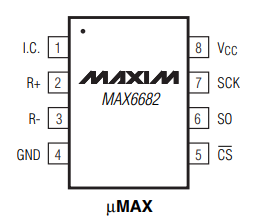
The MAX6682 is available in an 8-pin SOIC package. The pin configuration and descriptions are as follows:
| Pin Number | Pin Name | Description |
|---|---|---|
| 1 | VCC | Power supply input (3.0V to 5.5V) |
| 2 | GND | Ground |
| 3 | SDA | Serial Data Line for I2C communication |
| 4 | SCL | Serial Clock Line for I2C communication |
| 5 | ALERT | Over-temperature alert output (active low) |
| 6 | ADD0 | I2C address selection bit 0 |
| 7 | ADD1 | I2C address selection bit 1 |
| 8 | NC | No connection (leave unconnected or grounded) |
Usage Instructions
How to Use the MAX6682 in a Circuit
- Power Supply: Connect the VCC pin to a 3.0V to 5.5V power source and the GND pin to ground.
- I2C Communication: Connect the SDA and SCL pins to the corresponding I2C pins on your microcontroller. Use pull-up resistors (typically 4.7kΩ) on both SDA and SCL lines.
- Address Selection: Configure the I2C address by setting the ADD0 and ADD1 pins. These pins allow up to four unique I2C addresses.
- Alert Function: If needed, connect the ALERT pin to a microcontroller GPIO pin to monitor over-temperature conditions.
- Bypass Capacitor: Place a 0.1µF ceramic capacitor close to the VCC pin for power supply decoupling.
Important Considerations and Best Practices
- Ensure proper pull-up resistors are used on the I2C lines to maintain signal integrity.
- Avoid placing the MAX6682 near heat-generating components to ensure accurate temperature readings.
- Use a stable power supply to minimize noise and fluctuations in temperature measurements.
- If unused, leave the NC pin unconnected or tie it to ground.
Example Code for Arduino UNO
Below is an example of how to interface the MAX6682 with an Arduino UNO using the Wire library:
#include <Wire.h>

#define MAX6682_ADDRESS 0x48  // Default I2C address of the MAX6682

void setup() {
  Wire.begin();               // Initialize I2C communication
  Serial.begin(9600);         // Initialize serial communication for debugging
}

void loop() {
  float temperature = readTemperature();
  Serial.print("Temperature: ");
  Serial.print(temperature);
  Serial.println(" °C");
  delay(1000);                // Wait 1 second before the next reading
}

float readTemperature() {
  Wire.beginTransmission(MAX6682_ADDRESS);
  Wire.write(0x00);           // Point to the temperature register
  Wire.endTransmission();

  Wire.requestFrom(MAX6682_ADDRESS, 2);  // Request 2 bytes of temperature data
  if (Wire.available() == 2) {
    int msb = Wire.read();    // Most significant byte
    int lsb = Wire.read();    // Least significant byte

    // Combine MSB and LSB, then convert to temperature
    int16_t rawTemp = (msb << 8) | lsb;
    return rawTemp * 0.0625;  // Convert to Celsius (resolution is 0.0625°C)
  }
  return NAN;                 // Return NaN if data is unavailable
}
Troubleshooting and FAQs
Common Issues and Solutions
No Temperature Data Received
- Cause: Incorrect I2C address or wiring.
- Solution: Verify the I2C address and ensure proper connections for SDA and SCL lines.
Inaccurate Temperature Readings
- Cause: Heat sources near the sensor or unstable power supply.
- Solution: Relocate the sensor away from heat sources and use a decoupling capacitor on the VCC pin.
I2C Communication Errors
- Cause: Missing or incorrect pull-up resistors on SDA and SCL lines.
- Solution: Add 4.7kΩ pull-up resistors to the SDA and SCL lines.
ALERT Pin Not Functioning
- Cause: ALERT pin not connected or configured.
- Solution: Ensure the ALERT pin is connected to a GPIO pin and properly configured in the microcontroller firmware.
FAQs
Q: Can the MAX6682 operate at 3.3V?
A: Yes, the MAX6682 supports a supply voltage range of 3.0V to 5.5V, making it compatible with 3.3V systems.
Q: How do I calculate the temperature from raw data?
A: The raw 12-bit data can be converted to temperature by multiplying it by the resolution (0.0625°C).
Q: What is the maximum I2C clock speed supported?
A: The MAX6682 supports I2C clock speeds up to 400kHz (Fast Mode).
Q: Can I use multiple MAX6682 sensors on the same I2C bus?
A: Yes, you can use up to four MAX6682 sensors by configuring the ADD0 and ADD1 pins to set unique I2C addresses.