
How to Use TM3DI16 SCHNEIDER: Examples, Pinouts, and Specs
 Design with TM3DI16 SCHNEIDER in Cirkit Designer
Introduction
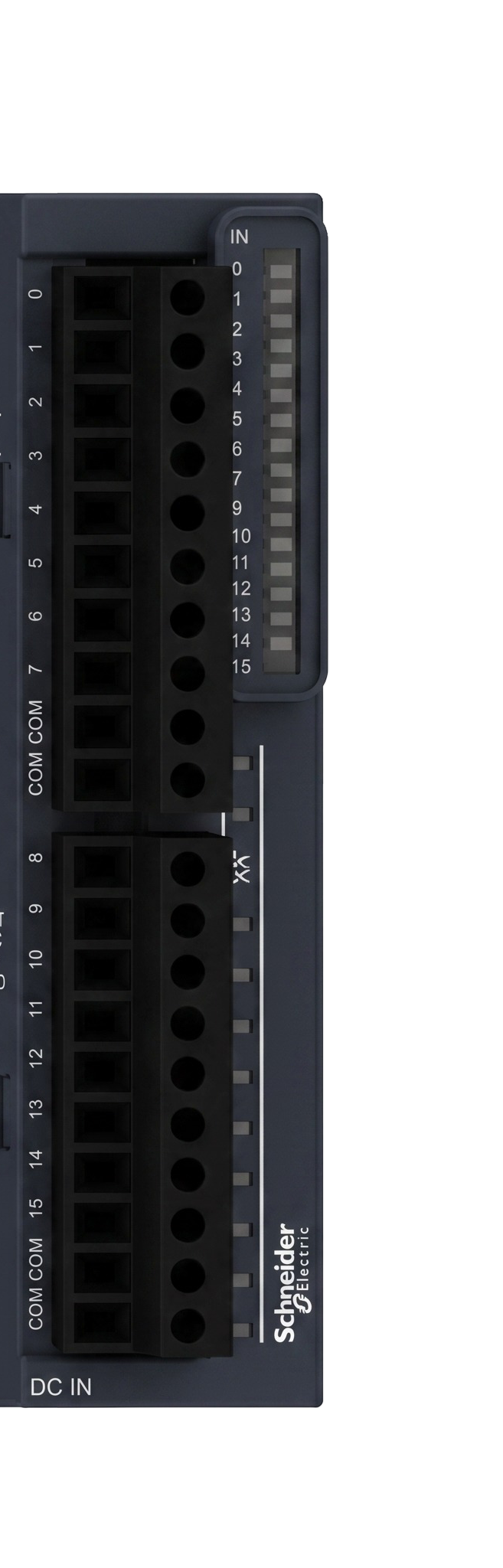
The TM3DI16 is a digital input module manufactured by Saya, designed for integration with programmable logic controllers (PLCs). This module features 16 digital input channels, enabling it to monitor on/off signals from sensors, switches, and other digital devices. It is widely used in industrial automation systems to collect and process input signals for controlling machinery and processes.
Explore Projects Built with TM3DI16 SCHNEIDER
 Open Project in Cirkit Designer
 Open Project in Cirkit Designer
 Open Project in Cirkit Designer
 Open Project in Cirkit Designer
Explore Projects Built with TM3DI16 SCHNEIDER
Open Project in Cirkit DesignerOpen Project in Cirkit DesignerOpen Project in Cirkit DesignerOpen Project in Cirkit DesignerCommon Applications and Use Cases
- Monitoring the status of sensors (e.g., proximity sensors, limit switches)
- Detecting on/off states of push buttons and toggle switches
- Collecting digital signals in industrial automation systems
- Interfacing with safety devices for machine control
- Expanding the input capacity of PLC systems
Technical Specifications
The TM3DI16 module is designed to meet the demands of industrial environments, offering reliable performance and compatibility with PLC systems.
Key Technical Details
- Number of Inputs: 16 digital input channels
- Input Voltage Range: 24 V DC (nominal)
- Input Type: Sink or source
- Input Current: 5 mA per channel (typical)
- Isolation: 500 V (channel-to-bus isolation)
- Response Time: 3 ms (typical)
- Operating Temperature: -10°C to +55°C
- Mounting: DIN rail
- Dimensions: 90 mm x 70 mm x 40 mm (H x W x D)
Pin Configuration and Descriptions
The TM3DI16 module features a terminal block for connecting input signals. The pin configuration is as follows:
| Pin Number | Label | Description |
|---|---|---|
| 1 | IN0 | Digital input channel 0 |
| 2 | IN1 | Digital input channel 1 |
| 3 | IN2 | Digital input channel 2 |
| 4 | IN3 | Digital input channel 3 |
| 5 | IN4 | Digital input channel 4 |
| 6 | IN5 | Digital input channel 5 |
| 7 | IN6 | Digital input channel 6 |
| 8 | IN7 | Digital input channel 7 |
| 9 | IN8 | Digital input channel 8 |
| 10 | IN9 | Digital input channel 9 |
| 11 | IN10 | Digital input channel 10 |
| 12 | IN11 | Digital input channel 11 |
| 13 | IN12 | Digital input channel 12 |
| 14 | IN13 | Digital input channel 13 |
| 15 | IN14 | Digital input channel 14 |
| 16 | IN15 | Digital input channel 15 |
| 17 | COM | Common ground for input signals |
| 18 | +24V | Positive 24 V DC supply connection |
Usage Instructions
The TM3DI16 module is straightforward to use in industrial automation systems. Follow the steps below to integrate it into your PLC setup:
Step 1: Mounting the Module
- Secure the TM3DI16 module onto a DIN rail in your control panel.
- Ensure proper alignment with other modules in the PLC system.
Step 2: Wiring the Inputs
- Connect the digital input devices (e.g., sensors, switches) to the input terminals (IN0 to IN15).
- Use the COM terminal as the common ground for all input devices.
- Supply 24 V DC to the +24V terminal to power the module.
Step 3: Configuring the PLC
- Add the TM3DI16 module to your PLC configuration in the programming software.
- Assign the input channels to the appropriate variables or tags in your PLC program.
Step 4: Writing the PLC Program
Use the following example code to read the input states in a PLC program. This example assumes the use of a generic ladder logic programming environment:
// Example Ladder Logic for TM3DI16
// This program reads the state of input channels and turns on an output
// if any of the inputs are active.

|---[ IN0 ]---+---( OUT0 )---|
|---[ IN1 ]---|              |
|---[ IN2 ]---|              |
|---[ IN3 ]---|              |
Important Considerations and Best Practices
- Ensure that the input voltage does not exceed the specified range (24 V DC nominal).
- Use shielded cables for input connections in environments with high electrical noise.
- Regularly inspect the wiring and connections to prevent loose or faulty connections.
- Follow all safety guidelines when working with PLC systems and industrial equipment.
Troubleshooting and FAQs
Common Issues and Solutions
No Input Signal Detected
- Cause: Loose or incorrect wiring.
- Solution: Verify the wiring connections and ensure the input devices are functioning properly.
PLC Does Not Recognize the Module
- Cause: Module not added to the PLC configuration.
- Solution: Check the PLC programming software and ensure the TM3DI16 module is correctly configured.
Intermittent Input Signal
- Cause: Electrical noise or poor grounding.
- Solution: Use shielded cables and ensure proper grounding of the system.
Overheating of the Module
- Cause: Operating outside the specified temperature range.
- Solution: Ensure adequate ventilation and maintain the ambient temperature within the specified range.
FAQs
Q1: Can the TM3DI16 module be used with other PLC brands?
A1: The TM3DI16 is designed for compatibility with Saya PLC systems. Compatibility with other brands may require additional configuration or adapters.
Q2: What is the maximum cable length for input connections?
A2: The maximum cable length depends on the electrical noise in the environment. For most applications, a length of up to 30 meters is recommended with shielded cables.
Q3: Can the module handle analog signals?
A3: No, the TM3DI16 is designed specifically for digital input signals (on/off states).
Q4: Is the module hot-swappable?
A4: No, the TM3DI16 module should only be installed or removed when the system is powered off to avoid damage.
By following this documentation, users can effectively integrate and operate the TM3DI16 digital input module in their industrial automation systems.