
How to Use MPX5050DP: Examples, Pinouts, and Specs
 Design with MPX5050DP in Cirkit Designer
Introduction
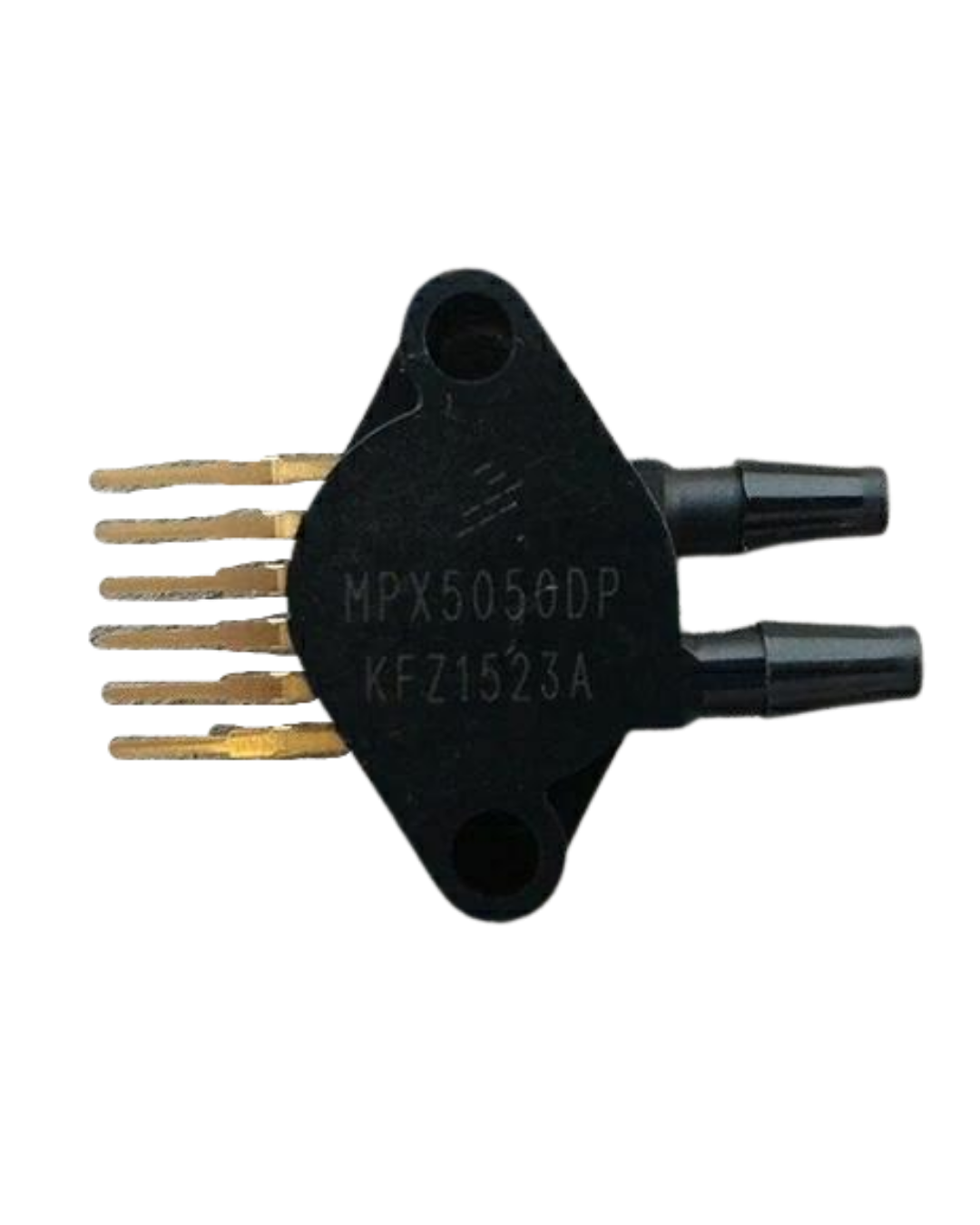
The MPX5050DP is a piezoresistive pressure sensor that delivers a linear voltage output proportional to the applied pressure. It is designed to measure pressures in the range of 0 to 50 kPa with high accuracy and reliability. This sensor is commonly used in automotive systems (e.g., manifold air pressure sensing), industrial equipment, and medical devices (e.g., respiratory systems). Its dual-port design allows for differential pressure measurements, making it versatile for a wide range of applications.
Explore Projects Built with MPX5050DP
 Open Project in Cirkit Designer
 Open Project in Cirkit Designer
 Open Project in Cirkit Designer
 Open Project in Cirkit Designer
Explore Projects Built with MPX5050DP
Open Project in Cirkit DesignerOpen Project in Cirkit DesignerOpen Project in Cirkit DesignerOpen Project in Cirkit DesignerTechnical Specifications
- Pressure Range: 0 to 50 kPa
- Output Voltage: 0.2 V to 4.7 V (proportional to pressure)
- Supply Voltage: 4.75 V to 5.25 V
- Accuracy: ±2.5% Full Scale Span (FSS)
- Operating Temperature: -40°C to +125°C
- Response Time: 1 ms
- Port Configuration: Dual port (differential pressure measurement)
- Package Type: Standard plastic package with barbed ports
Pin Configuration and Descriptions
The MPX5050DP has a 6-pin configuration. The table below describes each pin:
| Pin Number | Pin Name | Description |
|---|---|---|
| 1 | Vout | Analog output voltage proportional to pressure |
| 2 | GND | Ground (0 V reference) |
| 3 | Vcc | Supply voltage (4.75 V to 5.25 V) |
| 4 | NC (No Connect) | Not connected (leave unconnected) |
| 5 | NC (No Connect) | Not connected (leave unconnected) |
| 6 | NC (No Connect) | Not connected (leave unconnected) |
Usage Instructions
How to Use the MPX5050DP in a Circuit
- Power Supply: Connect the Vcc pin to a regulated 5 V power supply and the GND pin to the ground of the circuit.
- Output Signal: The Vout pin provides an analog voltage output proportional to the applied pressure. This output can be read using an ADC (Analog-to-Digital Converter) on a microcontroller.
- Pressure Ports:
- The MPX5050DP has two ports: a high-pressure port (P1) and a low-pressure port (P2).
- For absolute pressure measurement, leave P2 open to the atmosphere and apply pressure to P1.
- For differential pressure measurement, apply pressure to both P1 and P2 as needed.
- Filtering: Add a decoupling capacitor (e.g., 0.1 µF) between Vcc and GND to reduce noise.
Important Considerations and Best Practices
- Ensure the supply voltage is stable and within the specified range (4.75 V to 5.25 V).
- Avoid exposing the sensor to pressures beyond its maximum rating (50 kPa) to prevent damage.
- Use proper tubing and fittings to connect the pressure ports securely.
- If using the sensor in a noisy environment, consider additional filtering on the output signal.
Example: Connecting MPX5050DP to an Arduino UNO
Below is an example of how to connect the MPX5050DP to an Arduino UNO and read the pressure data:
Circuit Connections:
- Vcc: Connect to the Arduino's 5V pin.
- GND: Connect to the Arduino's GND pin.
- Vout: Connect to an analog input pin on the Arduino (e.g., A0).
Arduino Code:
// Define the analog input pin connected to the MPX5050DP Vout
const int pressurePin = A0;

// Define the supply voltage and sensor output range
const float Vcc = 5.0; // Arduino supply voltage (5V)
const float VoutMin = 0.2; // Minimum output voltage of MPX5050DP (0.2V)
const float VoutMax = 4.7; // Maximum output voltage of MPX5050DP (4.7V)
const float pressureMax = 50.0; // Maximum pressure in kPa

void setup() {
  Serial.begin(9600); // Initialize serial communication
}

void loop() {
  // Read the analog value from the sensor
  int sensorValue = analogRead(pressurePin);

  // Convert the analog value to a voltage
  float voltage = (sensorValue / 1023.0) * Vcc;

  // Calculate the pressure in kPa
  float pressure = ((voltage - VoutMin) / (VoutMax - VoutMin)) * pressureMax;

  // Print the pressure value to the Serial Monitor
  Serial.print("Pressure: ");
  Serial.print(pressure);
  Serial.println(" kPa");

  delay(500); // Wait for 500 ms before the next reading
}
Troubleshooting and FAQs
Common Issues and Solutions
No Output Voltage:
- Ensure the sensor is powered correctly (check Vcc and GND connections).
- Verify that the pressure ports are not blocked or improperly connected.
Inaccurate Readings:
- Check for noise in the power supply and add a decoupling capacitor if necessary.
- Ensure the sensor is not exposed to temperatures or pressures outside its operating range.
Fluctuating Output:
- Verify that the tubing and fittings are secure and free of leaks.
- Add additional filtering to the output signal if the environment is noisy.
FAQs
Q: Can the MPX5050DP measure negative pressures?
A: Yes, the MPX5050DP can measure negative differential pressures when the pressure at P2 is higher than the pressure at P1.
Q: What type of tubing should I use with the MPX5050DP?
A: Use flexible tubing with an inner diameter that matches the barbed ports of the sensor for a secure fit.
Q: Can I use the MPX5050DP with a 3.3V microcontroller?
A: The MPX5050DP requires a 5V supply for proper operation. If using a 3.3V microcontroller, you may need a level shifter to interface with the sensor's output.