
How to Use sound sensor: Examples, Pinouts, and Specs
 Design with sound sensor in Cirkit Designer
Introduction
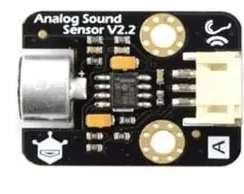
The DFRobot Sound Sensor is a compact and efficient module designed to detect sound levels and convert them into an electrical signal. This sensor is ideal for applications such as sound detection, voice recognition, and noise monitoring. It is widely used in projects that require audio-based input, such as interactive systems, smart devices, and environmental monitoring.
The sensor is easy to integrate into microcontroller-based systems, including Arduino, Raspberry Pi, and other development platforms. Its adjustable sensitivity and simple interface make it suitable for both beginners and advanced users.
Explore Projects Built with sound sensor
 Open Project in Cirkit Designer
 Open Project in Cirkit Designer
 Open Project in Cirkit Designer
 Open Project in Cirkit Designer
Explore Projects Built with sound sensor
Open Project in Cirkit DesignerOpen Project in Cirkit DesignerOpen Project in Cirkit DesignerOpen Project in Cirkit DesignerTechnical Specifications
- Manufacturer: DFRobot
- Operating Voltage: 3.3V to 5V
- Output Type: Analog and Digital
- Sensitivity Adjustment: Potentiometer
- Dimensions: 22mm x 30mm
- Weight: ~5g
Pin Configuration and Descriptions
The DFRobot Sound Sensor has a 3-pin interface for easy connection to microcontrollers. Below is the pin configuration:
| Pin | Name | Description |
|---|---|---|
| 1 | VCC | Power supply pin. Connect to 3.3V or 5V. |
| 2 | GND | Ground pin. Connect to the ground of the circuit. |
| 3 | OUT | Signal output pin. Outputs an analog voltage proportional to the sound level. |
Usage Instructions
Connecting the Sound Sensor
- Power the Sensor: Connect the
VCCpin to a 3.3V or 5V power source and theGNDpin to the ground. - Signal Output: Connect the
OUTpin to an analog input pin on your microcontroller (e.g., Arduino A0). - Adjust Sensitivity: Use the onboard potentiometer to adjust the sensitivity of the sensor. Turn clockwise to increase sensitivity and counterclockwise to decrease it.
Example Circuit with Arduino UNO
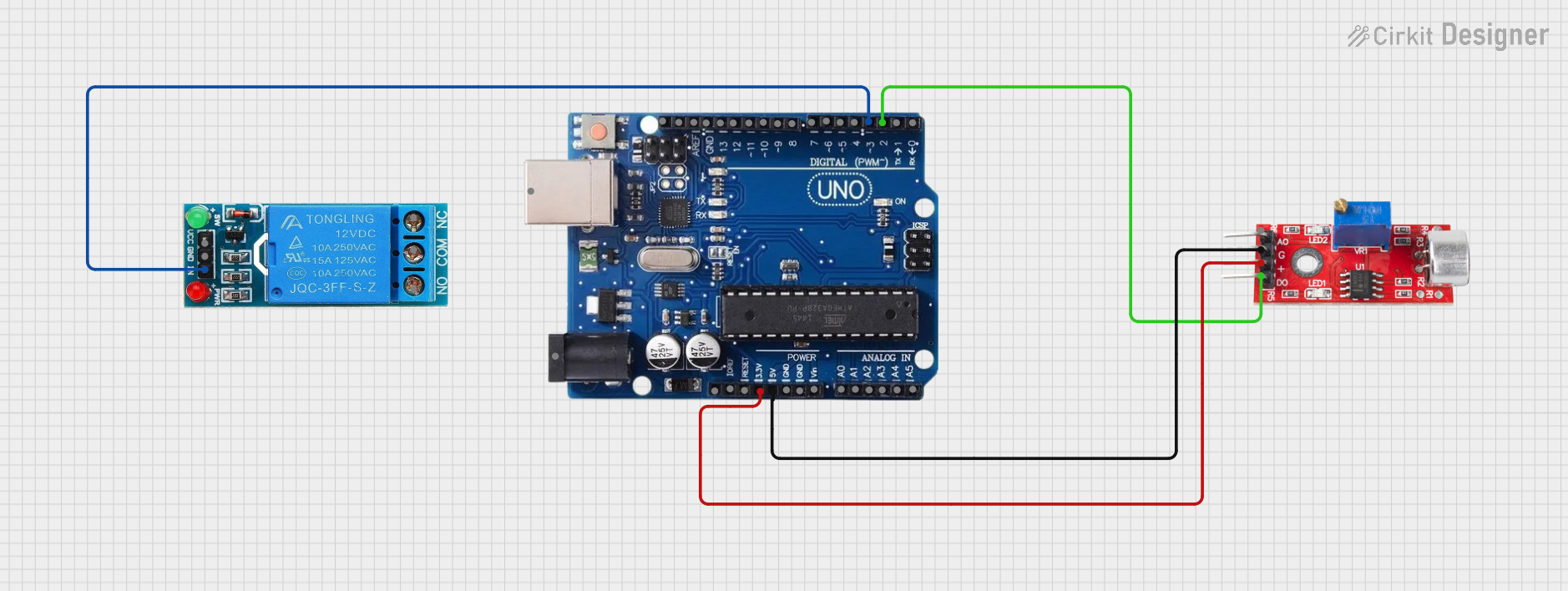
Below is an example of how to connect the DFRobot Sound Sensor to an Arduino UNO:
VCC→ Arduino5VGND→ ArduinoGNDOUT→ ArduinoA0
Example Code for Arduino UNO
The following code reads the analog signal from the sound sensor and prints the sound level to the Serial Monitor.
// Define the analog pin connected to the sound sensor
const int soundSensorPin = A0;

void setup() {
  // Initialize the serial communication at 9600 baud rate
  Serial.begin(9600);
}

void loop() {
  // Read the analog value from the sound sensor
  int soundLevel = analogRead(soundSensorPin);

  // Print the sound level to the Serial Monitor
  Serial.print("Sound Level: ");
  Serial.println(soundLevel);

  // Add a small delay to avoid flooding the Serial Monitor
  delay(100);
}
Best Practices
- Avoid placing the sensor near high-frequency noise sources, as this may interfere with its readings.
- Use a stable power supply to ensure accurate measurements.
- Adjust the sensitivity carefully to match the requirements of your application.
Troubleshooting and FAQs
Common Issues
No Output Signal
- Cause: Incorrect wiring or insufficient power supply.
- Solution: Double-check the connections and ensure the sensor is powered with 3.3V or 5V.
Inconsistent Readings
- Cause: Environmental noise or unstable power supply.
- Solution: Place the sensor in a quieter environment and use a decoupling capacitor across the power pins.
Sensor Not Sensitive Enough
- Cause: Sensitivity not adjusted properly.
- Solution: Use the onboard potentiometer to increase the sensitivity.
FAQs
Q: Can this sensor detect specific sounds like clapping or voice commands?
A: The sensor detects general sound levels and cannot differentiate between specific sounds. For specific sound recognition, additional signal processing or machine learning algorithms are required.
Q: Can I use this sensor with a Raspberry Pi?
A: Yes, the sensor can be connected to a Raspberry Pi. However, since the Raspberry Pi does not have analog input pins, you will need an ADC (Analog-to-Digital Converter) to read the analog output.
Q: What is the maximum distance for sound detection?
A: The detection range depends on the sensitivity setting and the loudness of the sound source. Typically, it works best within a few meters.
By following this documentation, you can effectively integrate the DFRobot Sound Sensor into your projects and troubleshoot common issues with ease.