
How to Use POWER SUPPLY 12V: Examples, Pinouts, and Specs
 Design with POWER SUPPLY 12V in Cirkit Designer
Introduction
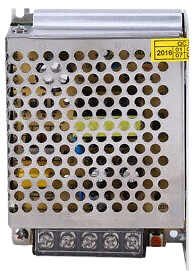
The POWER SUPPLY 12V is a device designed to convert electrical energy from an input source (such as AC mains or a DC source) into a stable 12V DC output. It is widely used in powering electronic circuits, modules, and devices that require a reliable 12V power source. This component is essential in applications ranging from hobbyist projects to industrial systems.
Explore Projects Built with POWER SUPPLY 12V
 Open Project in Cirkit Designer
 Open Project in Cirkit Designer
 Open Project in Cirkit Designer
 Open Project in Cirkit Designer
Explore Projects Built with POWER SUPPLY 12V
Open Project in Cirkit DesignerOpen Project in Cirkit DesignerOpen Project in Cirkit DesignerOpen Project in Cirkit DesignerCommon Applications and Use Cases
- Powering microcontrollers, sensors, and modules in embedded systems
- Driving DC motors, relays, and solenoids
- Supplying power to LED strips and lighting systems
- Providing a stable voltage for audio amplifiers and other analog circuits
- General-purpose power supply for prototyping and testing electronic circuits
Technical Specifications
The following table outlines the key technical details of the POWER SUPPLY 12V:
| Parameter | Specification |
|---|---|
| Input Voltage Range | 100-240V AC (for AC-DC models) |
| Output Voltage | 12V DC ± 5% |
| Maximum Output Current | 1A, 2A, 5A, or higher (varies by model) |
| Output Power | 12W, 24W, 60W, or higher |
| Efficiency | ≥ 85% |
| Ripple and Noise | ≤ 120mV |
| Operating Temperature | -10°C to +50°C |
| Protection Features | Overload, short circuit, overvoltage |
Pin Configuration and Descriptions
For a typical AC-DC POWER SUPPLY 12V module, the pin configuration is as follows:
| Pin Name | Description |
|---|---|
| AC-L | Live input from AC mains |
| AC-N | Neutral input from AC mains |
| GND | Ground connection for the DC output |
| +12V | Positive 12V DC output |
For DC-DC converters, the pin configuration may differ:
| Pin Name | Description |
|---|---|
| VIN | Positive input voltage (e.g., 24V DC) |
| GND | Ground connection for input and output |
| VOUT | Positive 12V DC output |
Usage Instructions
How to Use the POWER SUPPLY 12V in a Circuit
- Determine Input Requirements: Ensure the input voltage matches the specifications of the power supply (e.g., 100-240V AC for AC-DC models or a compatible DC input for DC-DC converters).
- Connect Input Terminals:
- For AC-DC models, connect the AC-L and AC-N terminals to the live and neutral wires of the AC mains.
- For DC-DC models, connect the VIN and GND terminals to the appropriate DC input source.
- Connect Output Terminals:
- Connect the +12V terminal to the positive rail of your circuit.
- Connect the GND terminal to the ground rail of your circuit.
- Verify Connections: Double-check all connections to ensure proper polarity and secure wiring.
- Power On: Turn on the input power source and measure the output voltage with a multimeter to confirm a stable 12V output before connecting sensitive components.
Important Considerations and Best Practices
- Load Requirements: Ensure the total current draw of your circuit does not exceed the maximum output current rating of the power supply.
- Heat Dissipation: If the power supply operates at high currents, ensure adequate ventilation or heat sinking to prevent overheating.
- Polarity: Always observe correct polarity when connecting the output terminals to avoid damaging your circuit.
- Protection Features: Take advantage of built-in protection features (e.g., overload and short-circuit protection) but avoid intentionally overloading the power supply.
Example: Using the POWER SUPPLY 12V with an Arduino UNO
The POWER SUPPLY 12V can be used to power an Arduino UNO via its barrel jack or VIN pin. Below is an example of connecting the power supply to an Arduino UNO:
- Connect the +12V output of the power supply to the barrel jack of the Arduino UNO.
- Alternatively, connect the +12V output to the VIN pin and the GND output to the GND pin of the Arduino UNO.
- Ensure the power supply is providing a stable 12V output before powering the Arduino.
Here is a simple Arduino sketch to blink an LED when powered by the 12V supply:
// Blink an LED connected to pin 13 of the Arduino UNO
// Ensure the Arduino is powered by the 12V power supply

void setup() {
  pinMode(13, OUTPUT); // Set pin 13 as an output
}

void loop() {
  digitalWrite(13, HIGH); // Turn the LED on
  delay(1000);            // Wait for 1 second
  digitalWrite(13, LOW);  // Turn the LED off
  delay(1000);            // Wait for 1 second
}
Troubleshooting and FAQs
Common Issues and Solutions
No Output Voltage:
- Check the input connections and ensure the power source is active.
- Verify that the input voltage is within the specified range.
- Inspect for blown fuses or tripped protection circuits.
Output Voltage is Unstable:
- Ensure the load does not exceed the maximum current rating.
- Check for loose or faulty connections on the input and output terminals.
- Verify that the power supply is not overheating.
Power Supply Overheats:
- Reduce the load to within the rated capacity.
- Improve ventilation or add a heat sink to dissipate heat.
Arduino Does Not Power On:
- Confirm that the output voltage is 12V and stable.
- Check the polarity of the connections to the Arduino.
- Ensure the Arduino's power regulator can handle the 12V input.
FAQs
Q: Can I use the POWER SUPPLY 12V to power multiple devices simultaneously?
A: Yes, as long as the total current draw of all devices does not exceed the maximum output current rating of the power supply.
Q: Is the POWER SUPPLY 12V suitable for outdoor use?
A: Most models are designed for indoor use. If outdoor use is required, ensure the power supply is housed in a weatherproof enclosure.
Q: Can I use this power supply with a 24V input?
A: Only DC-DC converter models designed for a 24V input can be used. Check the input voltage range in the specifications.
Q: What happens if I accidentally short the output terminals?
A: Most POWER SUPPLY 12V models include short-circuit protection, which will shut down the output to prevent damage. Remove the short and power cycle the supply to restore operation.