
How to Use NXT LEGO Motor: Examples, Pinouts, and Specs
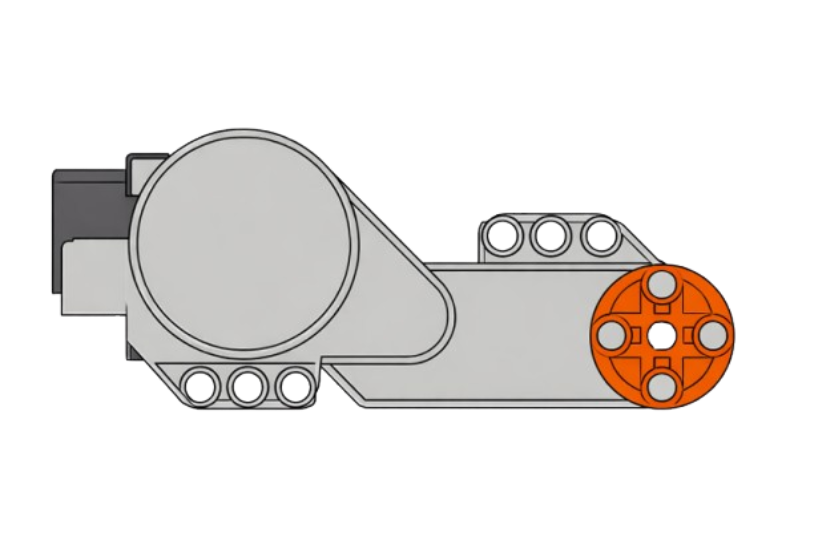
 Design with NXT LEGO Motor in Cirkit Designer
Introduction
The NXT LEGO Motor is a precision motor designed for use with LEGO NXT robotics kits. Manufactured by LEGO, this motor is ideal for building and controlling robotic systems, offering precise movement and speed control. It features an integrated encoder for accurate position and rotation feedback, making it suitable for a wide range of robotics applications.
Explore Projects Built with NXT LEGO Motor
 Open Project in Cirkit Designer
 Open Project in Cirkit Designer
 Open Project in Cirkit Designer
 Open Project in Cirkit Designer
Explore Projects Built with NXT LEGO Motor
Open Project in Cirkit DesignerOpen Project in Cirkit DesignerOpen Project in Cirkit DesignerOpen Project in Cirkit DesignerCommon Applications and Use Cases
- Robotics projects using LEGO NXT kits
- Educational STEM programs and workshops
- Prototyping robotic arms, vehicles, and other mechanical systems
- Projects requiring precise motor control and feedback
Technical Specifications
The following table outlines the key technical details of the NXT LEGO Motor:
| Specification | Value |
|---|---|
| Manufacturer | LEGO |
| Part ID | NXT LEGO Motor |
| Operating Voltage | 4.3V to 9V |
| Rated Current | 100mA (no load) |
| Stall Current | ~1.2A |
| Torque | ~4.5 N·cm |
| Encoder Resolution | 1-degree increments |
| Connector Type | 6-wire RJ12-style connector |
| Dimensions | 48mm x 40mm x 34mm |
| Weight | ~80g |
Pin Configuration and Descriptions
The NXT LEGO Motor uses a 6-wire RJ12-style connector. The pin configuration is as follows:
| Pin | Wire Color | Function |
|---|---|---|
| 1 | White | Motor power (positive) |
| 2 | Black | Motor power (negative) |
| 3 | Red | Encoder power (positive, 4.3V) |
| 4 | Green | Encoder power (ground) |
| 5 | Yellow | Encoder signal A |
| 6 | Blue | Encoder signal B |
Usage Instructions
How to Use the NXT LEGO Motor in a Circuit
Connect the Motor to an NXT Brick or Controller:
Plug the motor's RJ12 connector into one of the motor ports on the LEGO NXT brick or a compatible controller.Power Requirements:
Ensure the power supply to the NXT brick or controller is within the motor's operating voltage range (4.3V to 9V). Using a power source outside this range may damage the motor.Control the Motor:
Use the NXT programming environment (e.g., LEGO Mindstorms software) or a compatible microcontroller (e.g., Arduino) to control the motor's speed, direction, and position.Encoder Feedback:
The motor's built-in encoder provides precise feedback on rotation and position. Use this data to implement closed-loop control for accurate movement.
Important Considerations and Best Practices
- Avoid Overloading: Do not exceed the motor's torque or stall current to prevent overheating or damage.
- Use Proper Mounting: Secure the motor firmly to avoid vibrations or misalignment during operation.
- Cable Management: Ensure the motor cable is not bent or pinched to maintain signal integrity.
- Encoder Usage: When using the encoder, ensure your software reads both signal A and signal B for accurate position tracking.
Example: Using the NXT LEGO Motor with Arduino UNO
The NXT LEGO Motor can be controlled with an Arduino UNO using a motor driver (e.g., L298N) and encoder pins for feedback. Below is an example code snippet:
// Example: Controlling NXT LEGO Motor with Arduino UNO
// This code uses an L298N motor driver and reads encoder signals for feedback.

#define ENCODER_A 2  // Pin for encoder signal A
#define ENCODER_B 3  // Pin for encoder signal B
#define MOTOR_IN1 9  // Motor driver input 1
#define MOTOR_IN2 10 // Motor driver input 2
#define MOTOR_EN 11  // Motor driver enable pin

volatile int encoderPosition = 0; // Tracks motor position

void setup() {
  pinMode(ENCODER_A, INPUT);
  pinMode(ENCODER_B, INPUT);
  pinMode(MOTOR_IN1, OUTPUT);
  pinMode(MOTOR_IN2, OUTPUT);
  pinMode(MOTOR_EN, OUTPUT);

  // Attach interrupt for encoder signal A
  attachInterrupt(digitalPinToInterrupt(ENCODER_A), encoderISR, CHANGE);

  Serial.begin(9600); // Initialize serial communication
}

void loop() {
  // Example: Rotate motor forward
  analogWrite(MOTOR_EN, 150); // Set motor speed (0-255)
  digitalWrite(MOTOR_IN1, HIGH);
  digitalWrite(MOTOR_IN2, LOW);

  delay(2000); // Run motor for 2 seconds

  // Stop motor
  digitalWrite(MOTOR_IN1, LOW);
  digitalWrite(MOTOR_IN2, LOW);

  // Print encoder position
  Serial.print("Encoder Position: ");
  Serial.println(encoderPosition);

  delay(1000); // Pause before next loop
}

// Interrupt Service Routine for encoder signal A
void encoderISR() {
  // Read encoder signal B to determine direction
  if (digitalRead(ENCODER_B) == HIGH) {
    encoderPosition++;
  } else {
    encoderPosition--;
  }
}
Notes:
- Use a motor driver capable of handling the NXT LEGO Motor's current and voltage requirements.
- Ensure the encoder pins (A and B) are connected to interrupt-capable pins on the Arduino.
Troubleshooting and FAQs
Common Issues and Solutions
Motor Does Not Spin:
- Check the power supply to the NXT brick or motor driver.
- Verify the motor connections and ensure the RJ12 connector is securely plugged in.
Inconsistent Motor Movement:
- Ensure the motor is not overloaded or stalled.
- Check for loose connections or damaged cables.
Encoder Feedback Not Working:
- Verify the encoder pins (A and B) are connected correctly.
- Ensure the software is configured to read encoder signals properly.
Motor Overheating:
- Avoid running the motor at stall current for extended periods.
- Reduce the load on the motor or use a cooling mechanism if necessary.
FAQs
Q: Can the NXT LEGO Motor be used with non-LEGO controllers?
A: Yes, the motor can be used with other controllers (e.g., Arduino) by using a compatible motor driver and reading the encoder signals.
Q: What is the maximum speed of the motor?
A: The motor's maximum speed is approximately 170 RPM under no load.
Q: Can I use multiple NXT LEGO Motors in a single project?
A: Yes, multiple motors can be used, provided the controller or motor driver can handle the combined current draw.
Q: Is the motor waterproof?
A: No, the NXT LEGO Motor is not waterproof and should not be exposed to water or moisture.
This concludes the documentation for the NXT LEGO Motor. For further assistance, refer to the LEGO Mindstorms user manual or contact LEGO support.