The HC-SR04 is an ultrasonic distance sensor that uses sonar to measure the distance to an object. It emits ultrasonic waves and calculates the time it takes for the echo to return, providing accurate distance measurements. This sensor is widely used in robotics, automation, and obstacle detection systems due to its reliability and ease of use. It is capable of measuring distances ranging from 2 cm to 4 meters with a high degree of accuracy.
Explore Projects Built with Sensor - UltrassonicoHC - SR04
Use Cirkit Designer to design, explore, and prototype these projects online. Some projects support real-time simulation. Click "Open Project" to start designing instantly!
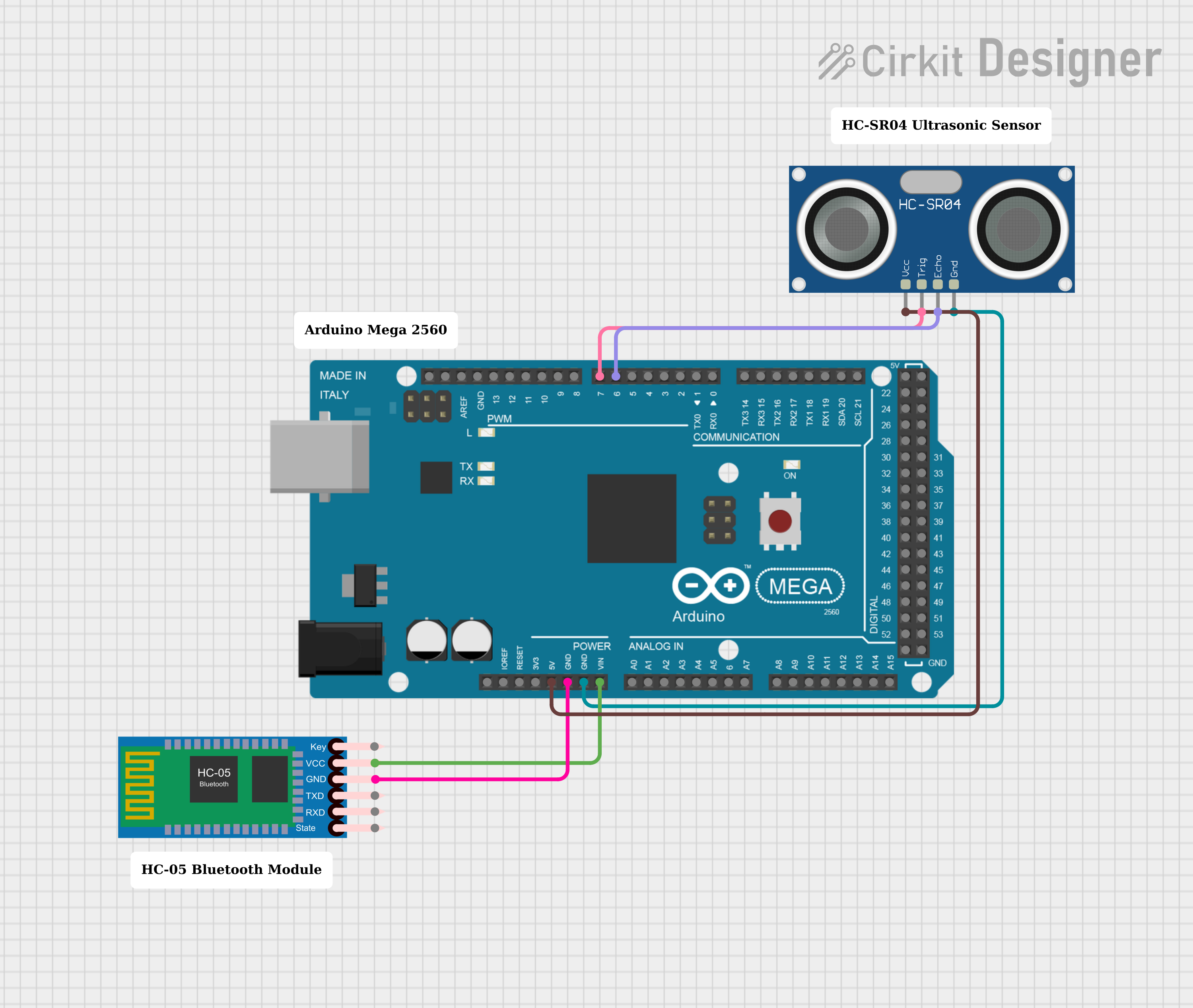
This circuit features an Arduino Mega 2560 microcontroller interfaced with an HC-05 Bluetooth Module and an HC-SR04 Ultrasonic Sensor. The HC-05 is powered by the Arduino's VIN pin and is grounded to the Arduino's GND, enabling wireless communication capabilities. The HC-SR04 is powered by the Arduino's 5V output and uses two digital PWM pins (D7 for TRIG and D6 for ECHO) to measure distances via ultrasonic waves.
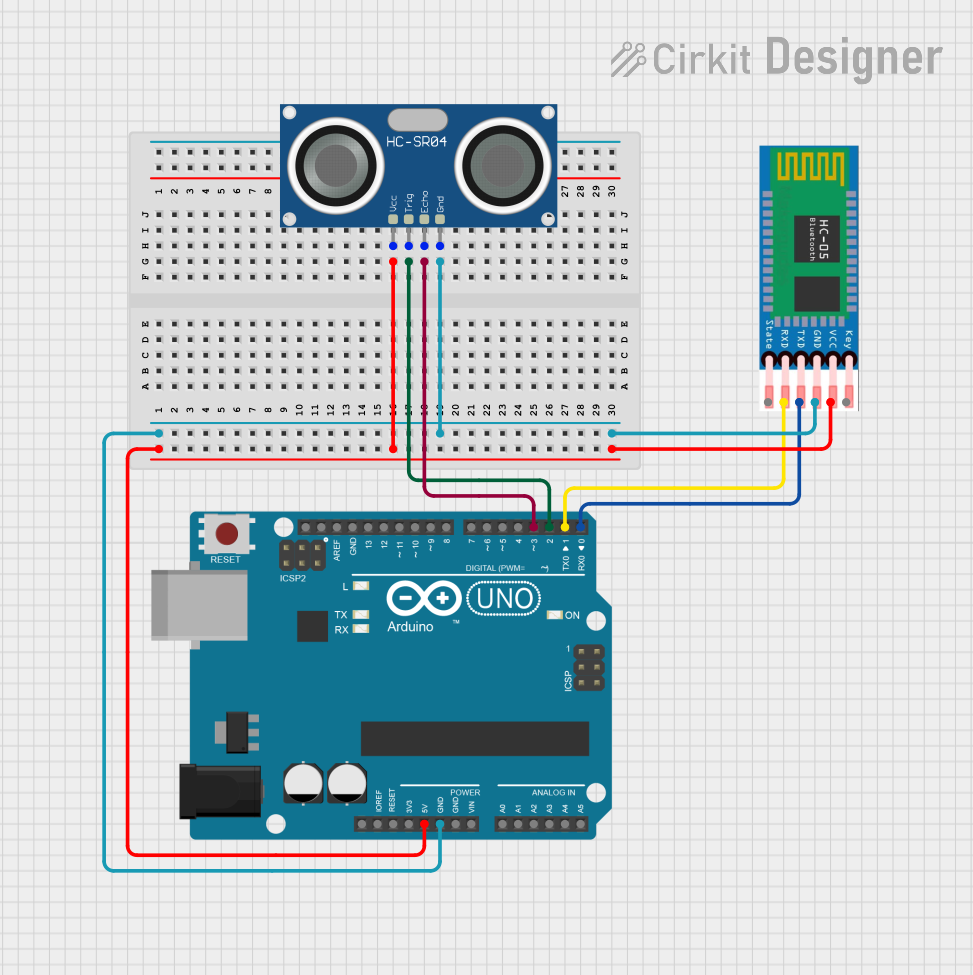
This circuit features an Arduino UNO microcontroller interfaced with an HC-SR04 Ultrasonic Sensor and an HC-05 Bluetooth module. The Arduino is configured to trigger the ultrasonic sensor to measure distance and communicate the data wirelessly via the HC-05 module. Power is supplied to both the sensor and the Bluetooth module from the Arduino's 5V output, and ground connections are shared among all components.
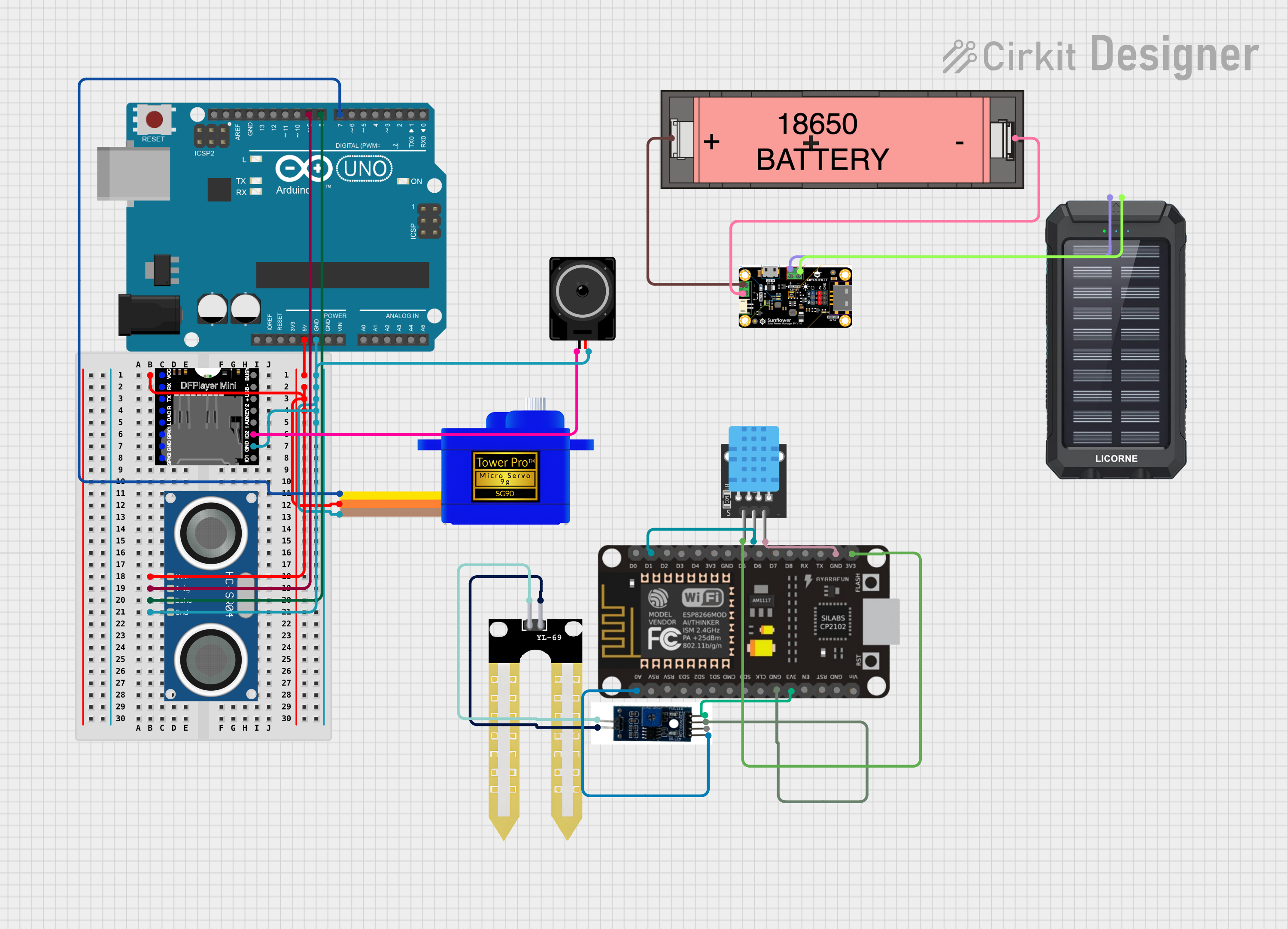
This circuit is designed for environmental monitoring and response, featuring sensors for temperature, humidity, distance, and soil moisture, with actuation through a servomotor and audio feedback. It is powered by a solar-charged battery system, indicating outdoor or remote deployment with renewable energy utilization.
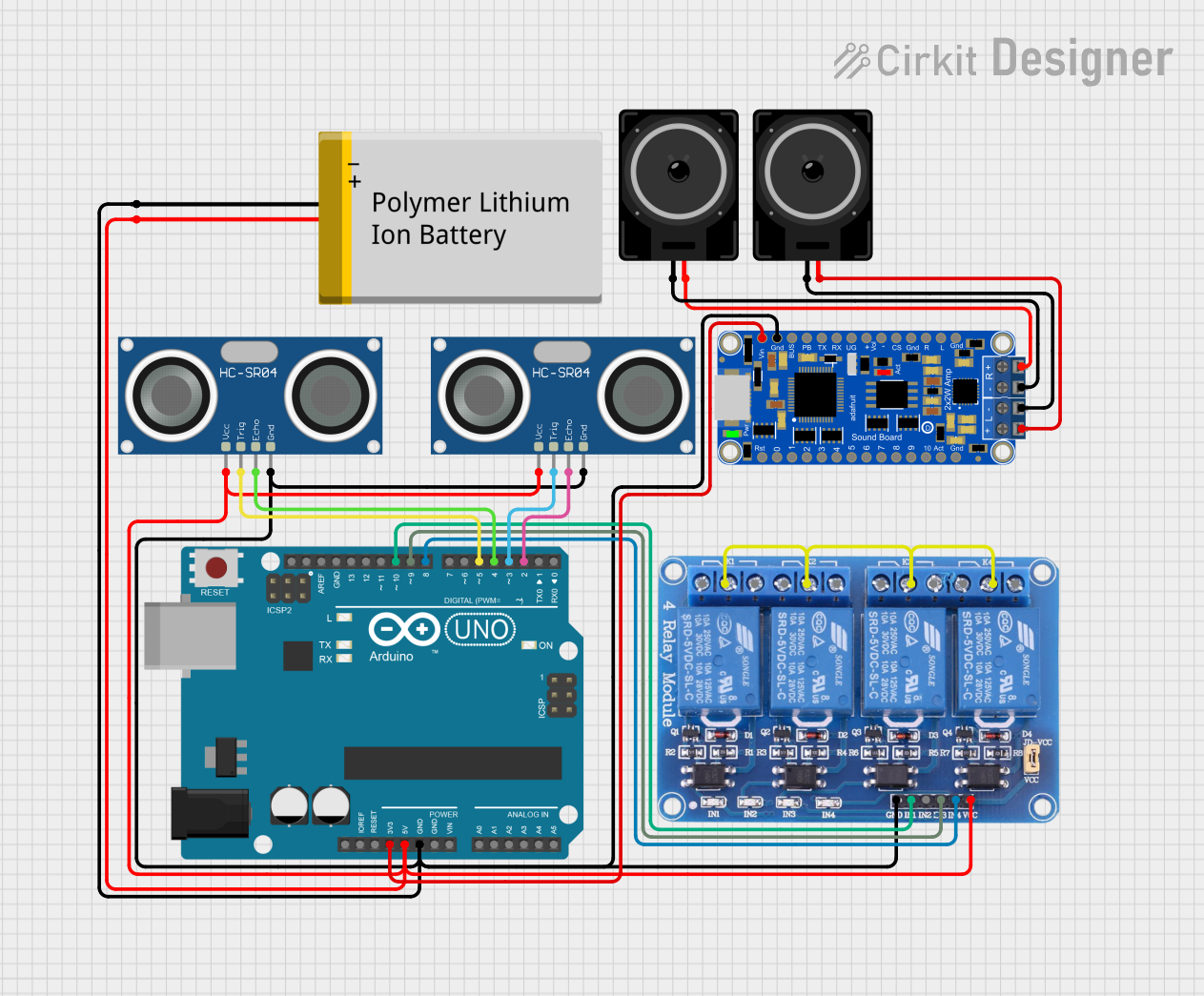
This circuit features an Arduino UNO microcontroller interfaced with two HC-SR04 ultrasonic sensors for distance measurement, a 4-channel relay module for controlling external devices, and an EZ-SFX amplifier connected to two loudspeakers for audio output. The system is powered by a Polymer Lithium Ion Battery and includes basic setup and loop code for the Arduino.
Echo Signal Output: TTL pulse proportional to distance
Ultrasonic Frequency: 40 kHz
Dimensions: 45 mm x 20 mm x 15 mm
Pin Configuration and Descriptions
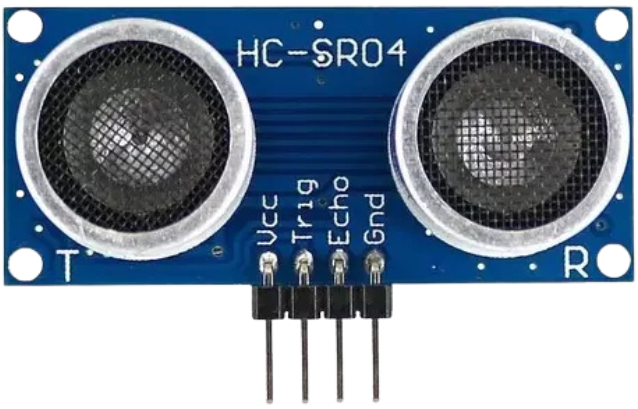
The HC-SR04 sensor has 4 pins, as described in the table below:
Pin Name
Pin Number
Description
VCC
1
Power supply pin. Connect to 5V DC.
Trig
2
Trigger pin. Send a 10 µs HIGH pulse to initiate distance measurement.
Echo
3
Echo pin. Outputs a pulse width proportional to the measured distance.
GND
4
Ground pin. Connect to the ground of the power supply.
Usage Instructions
How to Use the HC-SR04 in a Circuit
Power the Sensor: Connect the VCC pin to a 5V DC power source and the GND pin to ground.
Trigger the Sensor: Send a 10 µs HIGH pulse to the Trig pin to initiate a measurement.
Read the Echo: Measure the duration of the HIGH pulse on the Echo pin. The duration is proportional to the distance of the object.
Calculate Distance: Use the formula below to calculate the distance:
[
\text{Distance (cm)} = \frac{\text{Pulse Duration (µs)}}{58}
]
Alternatively, for distance in inches:
[
\text{Distance (in)} = \frac{\text{Pulse Duration (µs)}}{148}
]
Important Considerations and Best Practices
Ensure the sensor is mounted securely and aligned properly for accurate measurements.
Avoid placing the sensor near ultrasonic noise sources, as this may interfere with readings.
Use a capacitor (e.g., 10 µF) across the VCC and GND pins to stabilize the power supply.
The sensor has a minimum range of 2 cm. Objects closer than this may not be detected accurately.
For best results, use the sensor in an environment free of obstructions between the sensor and the target.
Example Code for Arduino UNO
Below is an example code to interface the HC-SR04 with an Arduino UNO:
// Define pins for the HC-SR04 sensor
const int trigPin = 9; // Trig pin connected to digital pin 9
const int echoPin = 10; // Echo pin connected to digital pin 10

void setup() {
  // Initialize serial communication for debugging
  Serial.begin(9600);

  // Set pin modes for Trig and Echo
  pinMode(trigPin, OUTPUT);
  pinMode(echoPin, INPUT);
}

void loop() {
  // Send a 10 µs HIGH pulse to the Trig pin
  digitalWrite(trigPin, LOW);
  delayMicroseconds(2);
  digitalWrite(trigPin, HIGH);
  delayMicroseconds(10);
  digitalWrite(trigPin, LOW);

  // Measure the duration of the HIGH pulse on the Echo pin
  long duration = pulseIn(echoPin, HIGH);

  // Calculate the distance in centimeters
  float distance = duration / 58.0;

  // Print the distance to the Serial Monitor
  Serial.print("Distance: ");
  Serial.print(distance);
  Serial.println(" cm");

  // Wait for a short period before the next measurement
  delay(500);
}
Troubleshooting and FAQs
Common Issues and Solutions
No Output or Incorrect Readings:
Ensure the sensor is powered with 5V and properly grounded.
Verify the connections to the Trig and Echo pins.
Check for loose wires or poor soldering.
Unstable or Fluctuating Measurements:
Add a capacitor (e.g., 10 µF) across the VCC and GND pins to stabilize the power supply.
Ensure there are no obstructions or reflective surfaces near the sensor.
Sensor Not Detecting Objects:
Ensure the object is within the sensor's range (2 cm to 400 cm).
Verify that the object is not too small or made of a material that poorly reflects ultrasonic waves.
FAQs
Q: Can the HC-SR04 measure distances below 2 cm?
A: No, the HC-SR04 has a minimum range of 2 cm. Objects closer than this may not be detected accurately.
Q: Can I use the HC-SR04 with a 3.3V microcontroller?
A: The HC-SR04 requires a 5V power supply. However, you can use a level shifter to safely interface the Echo pin with a 3.3V microcontroller.
Q: How can I improve measurement accuracy?
A: Use the sensor in a stable environment, avoid ultrasonic noise sources, and ensure proper alignment with the target object.

 Open Project in Cirkit Designer