
How to Use Switch Push On Off 16mm: Examples, Pinouts, and Specs
 Design with Switch Push On Off 16mm in Cirkit Designer
Introduction
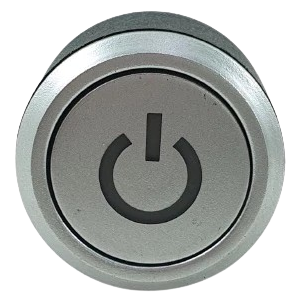
The Switch Push On Off 16mm is a compact push-button switch designed for toggling power in electronic circuits. With a 16mm diameter, this switch is ideal for applications requiring a small form factor and reliable on/off functionality. Manufactured by Glodok Supermarket, this switch is widely used in DIY electronics, home automation systems, and industrial control panels.
Explore Projects Built with Switch Push On Off 16mm
 Open Project in Cirkit Designer
 Open Project in Cirkit Designer
 Open Project in Cirkit Designer
 Open Project in Cirkit Designer
Explore Projects Built with Switch Push On Off 16mm
Open Project in Cirkit DesignerOpen Project in Cirkit DesignerOpen Project in Cirkit DesignerOpen Project in Cirkit DesignerCommon Applications
- Power control in electronic devices
- DIY projects and prototyping
- Home automation systems
- Industrial equipment and control panels
- Automotive electronics
Technical Specifications
Below are the key technical details for the Switch Push On Off 16mm:
| Parameter | Value |
|---|---|
| Manufacturer | Glodok Supermarket |
| Part ID | Not specified |
| Switch Type | Push-button (latching) |
| Mounting Hole Diameter | 16mm |
| Rated Voltage | 12V DC (typical) |
| Rated Current | 3A |
| Contact Resistance | ≤ 50 mΩ |
| Insulation Resistance | ≥ 100 MΩ |
| Mechanical Life | 50,000 cycles |
| Operating Temperature | -20°C to +55°C |
| Material | Metal housing, plastic base |
Pin Configuration and Descriptions
The Switch Push On Off 16mm typically has two or three pins, depending on the model. Below is the pin configuration:
| Pin | Description |
|---|---|
| Pin 1 | Input terminal for power or signal |
| Pin 2 | Output terminal for power or signal |
| Pin 3 | (Optional) Ground or LED indicator pin |
Note: If the switch includes an LED indicator, Pin 3 is used to connect the LED to ground or a control signal.
Usage Instructions
How to Use the Switch in a Circuit
Mounting the Switch:
- Drill a 16mm hole in the desired panel or enclosure.
- Insert the switch into the hole and secure it using the provided nut.
Wiring the Switch:
- Connect Pin 1 to the power source or input signal.
- Connect Pin 2 to the load or output signal.
- If the switch has an LED indicator, connect Pin 3 to ground or a control signal.
Testing the Switch:
- Press the button to toggle the switch between the ON and OFF states.
- Verify that the connected load or circuit responds as expected.
Important Considerations
- Ensure the switch's voltage and current ratings match your circuit requirements.
- Avoid exceeding the rated current (3A) to prevent damage to the switch.
- If using the LED indicator, check the LED's voltage and current requirements before connecting.
Example: Connecting to an Arduino UNO
The Switch Push On Off 16mm can be used with an Arduino UNO for simple input detection. Below is an example circuit and code:
Circuit Diagram
- Connect Pin 1 of the switch to a digital input pin on the Arduino (e.g., Pin 2).
- Connect Pin 2 of the switch to ground.
- Use a pull-up resistor (10kΩ) between the Arduino input pin and 5V to ensure stable readings.
Arduino Code
// Example code for using the Switch Push On Off 16mm with Arduino UNO
const int switchPin = 2;  // Pin connected to the switch
int switchState = 0;      // Variable to store the switch state

void setup() {
  pinMode(switchPin, INPUT_PULLUP); // Set the pin as input with internal pull-up
  Serial.begin(9600);              // Initialize serial communication
}

void loop() {
  switchState = digitalRead(switchPin); // Read the state of the switch

  if (switchState == LOW) {
    // Switch is pressed (active low)
    Serial.println("Switch is ON");
  } else {
    // Switch is not pressed
    Serial.println("Switch is OFF");
  }

  delay(500); // Delay for debounce and readability
}
Note: The switch is active low, meaning it connects the input pin to ground when pressed.
Troubleshooting and FAQs
Common Issues
Switch Does Not Toggle:
- Ensure the switch is properly wired and securely mounted.
- Check for loose connections or damaged wires.
LED Indicator Does Not Light Up:
- Verify the LED pin (Pin 3) is connected correctly.
- Check the LED's voltage and current requirements.
Switch Feels Stiff or Unresponsive:
- Inspect the switch for physical damage or debris.
- Replace the switch if the mechanical life has been exceeded.
Circuit Does Not Respond to Switch:
- Confirm the switch's voltage and current ratings match the circuit.
- Use a multimeter to test continuity between the pins when the switch is pressed.
FAQs
Q: Can this switch handle AC voltage?
A: The switch is primarily rated for DC voltage (12V, 3A). For AC applications, consult the manufacturer for compatibility.
Q: Is the switch waterproof?
A: No, this switch is not waterproof. Use it in dry environments or consider a waterproof variant.
Q: Can I use this switch for high-power devices?
A: No, the switch is rated for a maximum of 3A. For high-power applications, use a relay or a higher-rated switch.
Q: How do I clean the switch?
A: Use a dry cloth or compressed air to remove dust. Avoid using liquids or solvents.
This concludes the documentation for the Switch Push On Off 16mm. For further assistance, refer to the manufacturer's support resources.