
How to Use JST-RCY_F: Examples, Pinouts, and Specs
 Design with JST-RCY_F in Cirkit Designer
Introduction
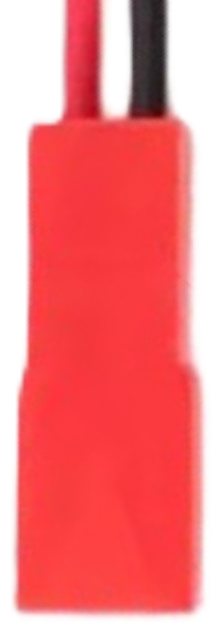
The JST-RCY_F is a compact and reliable electrical connector manufactured by JST. It is widely used in electronics for creating secure and durable connections between components. This connector features a robust locking mechanism, ensuring stable connections even in environments subject to vibration or movement. Its compact design makes it ideal for applications where space is limited.
Explore Projects Built with JST-RCY_F
 Open Project in Cirkit Designer
 Open Project in Cirkit Designer
 Open Project in Cirkit Designer
 Open Project in Cirkit Designer
Explore Projects Built with JST-RCY_F
Open Project in Cirkit DesignerOpen Project in Cirkit DesignerOpen Project in Cirkit DesignerOpen Project in Cirkit DesignerCommon Applications and Use Cases
- Battery connections in RC (remote control) vehicles, drones, and robotics
- Power delivery in small electronic devices
- Connections in LED lighting systems
- General-purpose low-voltage DC power applications
Technical Specifications
The JST-RCY_F connector is designed to provide a secure and efficient electrical connection. Below are its key technical specifications:
| Parameter | Specification |
|---|---|
| Manufacturer | JST |
| Part ID | JST-RCY_F |
| Connector Type | Wire-to-wire |
| Number of Contacts | 2 |
| Current Rating | Up to 3 Amps |
| Voltage Rating | Up to 250V DC |
| Wire Gauge Compatibility | 22 AWG to 28 AWG |
| Operating Temperature | -25°C to +85°C |
| Housing Material | Nylon 66 (UL94V-0 flame retardant) |
| Locking Mechanism | Snap-lock |
Pin Configuration and Descriptions
The JST-RCY_F connector consists of two pins, typically used for power and ground connections. Below is the pin configuration:
| Pin Number | Description | Notes |
|---|---|---|
| Pin 1 | Positive (+) Terminal | Connect to the positive voltage source |
| Pin 2 | Negative (-) Terminal | Connect to ground or negative terminal |
Usage Instructions
How to Use the JST-RCY_F in a Circuit
- Prepare the Wires: Strip the insulation from the ends of the wires you intend to connect. Ensure the stripped length matches the connector's crimp terminal specifications.
- Crimp the Terminals: Use a crimping tool compatible with JST connectors to attach the crimp terminals to the wires. Ensure a secure and proper crimp to avoid loose connections.
- Insert the Terminals: Insert the crimped terminals into the JST-RCY_F housing until they click into place. Verify that the terminals are locked securely.
- Connect the Mating Connector: Align the male and female connectors and push them together until the locking mechanism engages.
Important Considerations and Best Practices
- Wire Gauge: Use wires within the specified gauge range (22 AWG to 28 AWG) to ensure proper fit and electrical performance.
- Crimping Tool: Always use a crimping tool designed for JST connectors to achieve reliable connections.
- Polarity: Double-check the polarity of the connections to avoid damage to your circuit.
- Locking Mechanism: Ensure the connectors are fully engaged and the locking mechanism is secure to prevent accidental disconnection.
Example: Connecting to an Arduino UNO
The JST-RCY_F connector can be used to supply power to an Arduino UNO. Below is an example of how to connect a 7.4V LiPo battery with a JST-RCY_F connector to the Arduino's VIN and GND pins.
Circuit Diagram
- Pin 1 (Positive): Connect to the Arduino's VIN pin.
- Pin 2 (Negative): Connect to the Arduino's GND pin.
Sample Code
The following Arduino code demonstrates reading the battery voltage using an analog pin:
// Define the analog pin connected to the battery voltage divider
const int batteryPin = A0;

// Voltage divider resistor values (in ohms)
const float R1 = 10000.0; // Resistor connected to battery positive
const float R2 = 10000.0; // Resistor connected to ground

void setup() {
  Serial.begin(9600); // Initialize serial communication
}

void loop() {
  int rawValue = analogRead(batteryPin); // Read the analog value
  float voltage = (rawValue / 1023.0) * 5.0; // Convert to voltage (Arduino 5V ADC)
  float batteryVoltage = voltage * ((R1 + R2) / R2); // Calculate actual battery voltage

  Serial.print("Battery Voltage: ");
  Serial.print(batteryVoltage);
  Serial.println(" V");

  delay(1000); // Wait for 1 second before the next reading
}
Note: Use a voltage divider to ensure the battery voltage does not exceed the Arduino's analog input range (0-5V).
Troubleshooting and FAQs
Common Issues and Solutions
Loose Connections:
- Issue: The connector feels loose or disconnects easily.
- Solution: Ensure the crimp terminals are properly secured and fully inserted into the housing. Verify that the locking mechanism is engaged.
Overheating:
- Issue: The connector becomes warm during operation.
- Solution: Check that the current does not exceed the 3A rating. Use thicker wires (lower AWG) if necessary.
Polarity Reversal:
- Issue: The circuit does not function or components are damaged.
- Solution: Double-check the polarity of the connections before powering the circuit.
Crimping Issues:
- Issue: The wire slips out of the terminal.
- Solution: Use a proper crimping tool and ensure the wire is stripped to the correct length.
FAQs
Q: Can the JST-RCY_F handle AC voltage?
- A: No, the JST-RCY_F is designed for low-voltage DC applications only.
Q: Is the connector waterproof?
- A: No, the JST-RCY_F is not waterproof. Use additional sealing methods if moisture resistance is required.
Q: Can I reuse the connector housing?
- A: Yes, the housing can be reused, but the crimp terminals may need to be replaced if damaged.
Q: What is the maximum wire length I can use?
- A: The maximum wire length depends on the current and voltage drop requirements of your application. For best results, keep the wires as short as possible.