
How to Use BFD-1000 5 Channel: Examples, Pinouts, and Specs
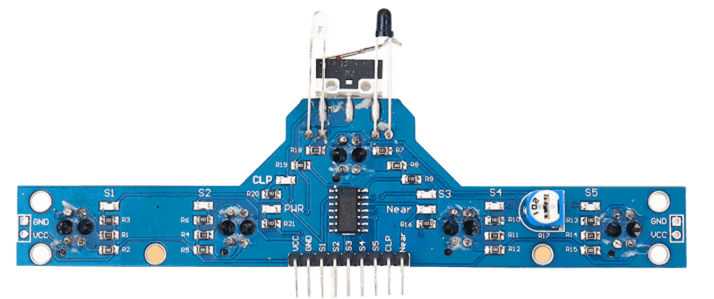
 Design with BFD-1000 5 Channel in Cirkit Designer
Introduction
The BFD-1000 5 Channel is a high-performance multi-channel audio signal processor designed to enhance sound quality in a variety of audio applications. With five independent channels, it provides precise control over audio output, making it an essential tool for professional audio setups, live sound reinforcement, and studio environments. Its robust design and advanced features ensure reliable performance and exceptional sound clarity.
Explore Projects Built with BFD-1000 5 Channel
 Open Project in Cirkit Designer
 Open Project in Cirkit Designer
 Open Project in Cirkit Designer
 Open Project in Cirkit Designer
Explore Projects Built with BFD-1000 5 Channel
Open Project in Cirkit DesignerOpen Project in Cirkit DesignerOpen Project in Cirkit DesignerOpen Project in Cirkit DesignerCommon Applications and Use Cases
- Professional audio systems for concerts and live events
- Studio environments for mixing and mastering
- Home theater systems for enhanced audio quality
- Public address (PA) systems
- Audio signal routing and processing in broadcasting setups
Technical Specifications
The following table outlines the key technical specifications of the BFD-1000 5 Channel:
| Parameter | Specification |
|---|---|
| Number of Channels | 5 |
| Input Voltage Range | 12V DC ±10% |
| Signal-to-Noise Ratio | ≥ 90 dB |
| Frequency Response | 20 Hz – 20 kHz |
| Total Harmonic Distortion | ≤ 0.01% |
| Maximum Output Level | +18 dBu |
| Input Impedance | 10 kΩ |
| Output Impedance | 600 Ω |
| Power Consumption | ≤ 10 W |
| Dimensions | 200 mm x 150 mm x 50 mm |
| Weight | 1.2 kg |
Pin Configuration and Descriptions
The BFD-1000 features a standard pin interface for power and audio signal connections. Below is the pin configuration:
| Pin Number | Pin Name | Description |
|---|---|---|
| 1 | VCC | Power input (12V DC) |
| 2 | GND | Ground connection |
| 3 | CH1_IN | Channel 1 audio input |
| 4 | CH1_OUT | Channel 1 audio output |
| 5 | CH2_IN | Channel 2 audio input |
| 6 | CH2_OUT | Channel 2 audio output |
| 7 | CH3_IN | Channel 3 audio input |
| 8 | CH3_OUT | Channel 3 audio output |
| 9 | CH4_IN | Channel 4 audio input |
| 10 | CH4_OUT | Channel 4 audio output |
| 11 | CH5_IN | Channel 5 audio input |
| 12 | CH5_OUT | Channel 5 audio output |
Usage Instructions
How to Use the BFD-1000 in a Circuit
- Power Connection: Connect the VCC pin to a stable 12V DC power supply and the GND pin to the ground.
- Audio Input: Feed audio signals into the respective input pins (CH1_IN to CH5_IN) using standard audio cables.
- Audio Output: Connect the output pins (CH1_OUT to CH5_OUT) to the desired audio output devices, such as amplifiers or speakers.
- Signal Processing: Use the onboard controls or external software (if supported) to adjust parameters like gain, equalization, and channel mixing.
Important Considerations and Best Practices
- Ensure the power supply voltage is within the specified range (12V DC ±10%) to avoid damage.
- Use shielded audio cables to minimize noise and interference.
- Avoid overloading the input or output channels to prevent distortion or damage.
- Keep the device in a well-ventilated area to prevent overheating during prolonged use.
- Regularly check and clean the connectors to maintain optimal performance.
Example: Connecting to an Arduino UNO
While the BFD-1000 is primarily an audio processor, it can be integrated with an Arduino UNO for automation or control purposes. Below is an example code snippet for controlling the BFD-1000's power using a relay module connected to the Arduino:
// Define the pin connected to the relay module
const int relayPin = 7;

void setup() {
  // Set the relay pin as an output
  pinMode(relayPin, OUTPUT);

  // Turn off the relay initially (no power to BFD-1000)
  digitalWrite(relayPin, LOW);
}

void loop() {
  // Example: Turn on the BFD-1000 for 10 seconds, then turn it off
  digitalWrite(relayPin, HIGH); // Power on the BFD-1000
  delay(10000);                // Wait for 10 seconds
  digitalWrite(relayPin, LOW); // Power off the BFD-1000
  delay(5000);                 // Wait for 5 seconds before repeating
}
Note: Ensure the relay module is rated for the BFD-1000's power requirements.
Troubleshooting and FAQs
Common Issues and Solutions
No Audio Output
- Cause: Incorrect wiring or loose connections.
- Solution: Verify all input and output connections. Ensure the power supply is stable and within the specified range.
Distorted Sound
- Cause: Overloaded input or output channels.
- Solution: Reduce the input signal level or check the output device's impedance compatibility.
Device Overheating
- Cause: Poor ventilation or excessive usage.
- Solution: Place the device in a well-ventilated area and avoid prolonged operation at maximum capacity.
Interference or Noise
- Cause: Unshielded cables or nearby electronic interference.
- Solution: Use shielded cables and keep the device away from sources of electromagnetic interference.
FAQs
Q1: Can the BFD-1000 process digital audio signals?
A1: No, the BFD-1000 is designed for analog audio signals only.
Q2: Is the BFD-1000 compatible with 24V power supplies?
A2: No, the BFD-1000 operates on a 12V DC power supply. Using a higher voltage may damage the device.
Q3: Can I use fewer than five channels?
A3: Yes, you can use any number of channels as needed. Unused channels can remain unconnected without affecting performance.
Q4: Does the BFD-1000 support remote control?
A4: The BFD-1000 does not natively support remote control, but it can be integrated with external controllers like Arduino for basic automation.
Q5: What is the maximum cable length for audio connections?
A5: For optimal performance, keep cable lengths under 10 meters to minimize signal degradation. Use high-quality cables for longer distances.