
How to Use Tps7a4001: Examples, Pinouts, and Specs
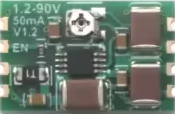
 Design with Tps7a4001 in Cirkit Designer
Introduction
The TPS7A4001 is a low-dropout (LDO) linear voltage regulator designed to deliver a stable output voltage with low noise and high power supply rejection. It is ideal for high-performance applications requiring precise voltage regulation and noise-sensitive environments. With its wide input voltage range and adjustable output voltage, the TPS7A4001 is versatile and suitable for a variety of use cases.
Explore Projects Built with Tps7a4001
 Open Project in Cirkit Designer
 Open Project in Cirkit Designer
 Open Project in Cirkit Designer
 Open Project in Cirkit Designer
Explore Projects Built with Tps7a4001
Open Project in Cirkit DesignerOpen Project in Cirkit DesignerOpen Project in Cirkit DesignerOpen Project in Cirkit DesignerCommon Applications and Use Cases
- Industrial automation and control systems
- Test and measurement equipment
- Communication infrastructure
- Medical devices
- High-performance analog circuits
- Noise-sensitive applications such as RF systems and audio equipment
Technical Specifications
Key Technical Details
| Parameter | Value |
|---|---|
| Input Voltage Range | 7 V to 100 V |
| Output Voltage Range | 1.2 V to 90 V (adjustable) |
| Output Current | Up to 50 mA |
| Dropout Voltage | 350 mV (typical at 50 mA load) |
| Output Voltage Accuracy | ±1% |
| Power Supply Rejection | 72 dB at 1 kHz |
| Quiescent Current | 25 µA (typical) |
| Operating Temperature Range | -40°C to +125°C |
| Package Options | SOT-223, TO-252 |
Pin Configuration and Descriptions
SOT-223 Package Pinout
| Pin Number | Pin Name | Description |
|---|---|---|
| 1 | IN | Input voltage pin. Connect to the power source. |
| 2 | GND | Ground pin. Connect to system ground. |
| 3 | OUT | Regulated output voltage pin. Connect to load. |
| Tab | GND | Thermal pad. Connect to ground for heat dissipation. |
TO-252 Package Pinout
| Pin Number | Pin Name | Description |
|---|---|---|
| 1 | IN | Input voltage pin. Connect to the power source. |
| 2 | GND | Ground pin. Connect to system ground. |
| 3 | OUT | Regulated output voltage pin. Connect to load. |
| Tab | GND | Thermal pad. Connect to ground for heat dissipation. |
Usage Instructions
How to Use the TPS7A4001 in a Circuit
- Input Capacitor: Connect a ceramic capacitor (typically 1 µF or higher) close to the IN pin to stabilize the input voltage and reduce noise.
- Output Capacitor: Use a ceramic capacitor (typically 2.2 µF or higher) at the OUT pin to ensure stable operation and minimize output voltage ripple.
- Adjustable Output Voltage:
- Use an external resistor divider network to set the desired output voltage.
- The output voltage is determined by the formula:
[ V_{OUT} = V_{REF} \times \left(1 + \frac{R_1}{R_2}\right) ] where ( V_{REF} ) is 1.2 V (reference voltage), and ( R_1 ) and ( R_2 ) are the resistors in the divider.
- Thermal Management: Ensure proper heat dissipation by connecting the thermal pad to a large ground plane.
Important Considerations and Best Practices
- Input Voltage: Ensure the input voltage is within the specified range (7 V to 100 V) to avoid damage to the regulator.
- Load Current: Do not exceed the maximum output current of 50 mA.
- Capacitor Selection: Use low-ESR ceramic capacitors for optimal performance.
- PCB Layout: Minimize trace lengths for the IN, OUT, and GND connections to reduce noise and improve stability.
- Thermal Dissipation: Use a heat sink or thermal vias if operating at high input voltages or ambient temperatures.
Example: Connecting TPS7A4001 to an Arduino UNO
The TPS7A4001 can be used to power an Arduino UNO by regulating a high input voltage (e.g., 24 V) down to 5 V. Below is an example circuit and Arduino code:
Circuit Setup
- Connect the input voltage (e.g., 24 V) to the IN pin of the TPS7A4001.
- Connect the OUT pin to the 5 V pin of the Arduino UNO.
- Add a 1 µF capacitor at the IN pin and a 2.2 µF capacitor at the OUT pin.
- Connect the GND pin to the Arduino's GND.
Arduino Code Example
// Example code to blink an LED using Arduino UNO powered by TPS7A4001
// Ensure the TPS7A4001 is providing a stable 5V output to the Arduino

const int ledPin = 13; // Pin connected to the onboard LED

void setup() {
  pinMode(ledPin, OUTPUT); // Set the LED pin as an output
}

void loop() {
  digitalWrite(ledPin, HIGH); // Turn the LED on
  delay(1000);                // Wait for 1 second
  digitalWrite(ledPin, LOW);  // Turn the LED off
  delay(1000);                // Wait for 1 second
}
Troubleshooting and FAQs
Common Issues and Solutions
No Output Voltage:
- Verify that the input voltage is within the specified range (7 V to 100 V).
- Check the connections and ensure the capacitors are properly placed.
- Ensure the resistor divider network is correctly configured for adjustable output.
Output Voltage Instability:
- Use low-ESR ceramic capacitors at the input and output pins.
- Check for excessive noise on the input voltage and add additional filtering if necessary.
- Ensure proper grounding and minimize trace lengths.
Overheating:
- Verify that the input voltage is not excessively high relative to the output voltage.
- Ensure the thermal pad is properly connected to a ground plane for heat dissipation.
- Reduce the load current if possible.
Output Voltage Too Low:
- Check the resistor divider network for incorrect resistor values.
- Verify that the load current does not exceed the regulator's maximum capacity.
FAQs
Q1: Can the TPS7A4001 be used with a battery as the input source?
A1: Yes, the TPS7A4001 can regulate voltage from a battery as long as the input voltage is within the specified range (7 V to 100 V).
Q2: What happens if the input voltage drops below 7 V?
A2: The regulator may stop functioning correctly, and the output voltage may become unstable or drop below the desired level.
Q3: Can I use electrolytic capacitors instead of ceramic capacitors?
A3: While electrolytic capacitors can be used, ceramic capacitors are recommended due to their low ESR and better performance in high-frequency applications.
Q4: Is the TPS7A4001 suitable for powering microcontrollers?
A4: Yes, the TPS7A4001 is suitable for powering microcontrollers, especially in noise-sensitive applications, as it provides a stable and low-noise output voltage.