
How to Use lipo 3000mah: Examples, Pinouts, and Specs
 Design with lipo 3000mah in Cirkit Designer
Introduction
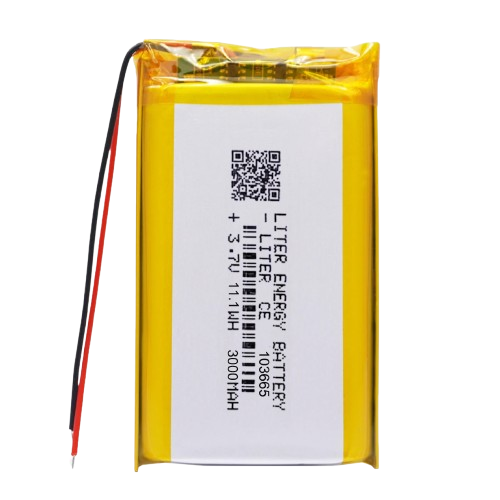
The LiPo 3000mAh is a lithium polymer battery with a capacity of 3000 milliampere-hours (mAh). Known for its lightweight design and high energy density, this battery is widely used in applications requiring compact and efficient power sources. Common use cases include remote-controlled (RC) vehicles, drones, robotics, and portable electronic devices. Its ability to deliver high discharge rates makes it ideal for demanding applications.
Explore Projects Built with lipo 3000mah
 Open Project in Cirkit Designer
 Open Project in Cirkit Designer
 Open Project in Cirkit Designer
 Open Project in Cirkit Designer
Explore Projects Built with lipo 3000mah
Open Project in Cirkit DesignerOpen Project in Cirkit DesignerOpen Project in Cirkit DesignerOpen Project in Cirkit DesignerTechnical Specifications
Below are the key technical details of the LiPo 3000mAh battery:
| Specification | Value |
|---|---|
| Battery Type | Lithium Polymer (LiPo) |
| Capacity | 3000mAh |
| Nominal Voltage | 3.7V (single cell) or 7.4V (2S) |
| Maximum Discharge Rate | 20C to 50C (varies by model) |
| Charging Voltage | 4.2V per cell |
| Charging Current | 1C (3A recommended) |
| Dimensions | Varies (e.g., 100mm x 35mm x 10mm) |
| Weight | ~80g to 120g |
| Connector Type | JST, XT60, or other (varies) |
Pin Configuration and Descriptions
The LiPo 3000mAh battery typically has two types of connectors: a power connector and a balance connector. Below is a description of each:
Power Connector (e.g., XT60 or JST)
| Pin | Description |
|---|---|
| + | Positive terminal |
| - | Negative terminal |
Balance Connector (for multi-cell batteries)
| Pin | Description |
|---|---|
| 1 | Negative terminal of Cell 1 |
| 2 | Positive terminal of Cell 1 |
| 3 | Positive terminal of Cell 2 (if 2S) |
Note: The exact pin configuration may vary depending on the manufacturer and the number of cells in the battery.
Usage Instructions
How to Use the LiPo 3000mAh in a Circuit
- Connect the Power Connector: Use the main power connector (e.g., XT60 or JST) to supply power to your circuit or device.
- Balance Charging: Always use a LiPo-compatible balance charger to charge the battery. Connect the balance connector to the charger to ensure all cells are charged evenly.
- Voltage Monitoring: Use a voltage monitor or alarm to prevent over-discharging. A typical cutoff voltage is 3.0V per cell.
Important Considerations and Best Practices
- Charging: Always charge the battery with a LiPo-compatible charger. Set the charging current to 1C (3A for a 3000mAh battery) for safe and efficient charging.
- Discharging: Avoid discharging the battery below 3.0V per cell to prevent damage and reduce lifespan.
- Storage: Store the battery at a voltage of 3.7V to 3.85V per cell for long-term storage. Keep it in a cool, dry place.
- Safety: Never puncture, short-circuit, or expose the battery to fire or water. Use a fireproof LiPo bag for charging and storage.
Example: Using the LiPo 3000mAh with an Arduino UNO
To power an Arduino UNO with a LiPo battery, you can use a voltage regulator or a DC-DC step-down converter to ensure the voltage is within the Arduino's operating range (5V). Below is an example circuit and code:
Circuit Setup
- Connect the LiPo battery to a DC-DC step-down converter.
- Set the output of the converter to 5V.
- Connect the output of the converter to the Arduino's VIN and GND pins.
Arduino Code Example
// Example code to read a sensor and print data to the Serial Monitor
// Ensure the LiPo battery is properly regulated to 5V for Arduino UNO

const int sensorPin = A0; // Analog pin connected to the sensor
int sensorValue = 0;      // Variable to store the sensor reading

void setup() {
  Serial.begin(9600); // Initialize serial communication at 9600 baud
}

void loop() {
  sensorValue = analogRead(sensorPin); // Read the sensor value
  Serial.print("Sensor Value: ");
  Serial.println(sensorValue); // Print the sensor value to the Serial Monitor
  delay(1000); // Wait for 1 second before the next reading
}
Warning: Ensure the LiPo battery voltage is regulated to avoid damaging the Arduino.
Troubleshooting and FAQs
Common Issues
Battery Not Charging
- Cause: Incorrect charger settings or damaged battery.
- Solution: Verify the charger is set to LiPo mode and the correct cell count. Inspect the battery for physical damage.
Battery Swelling
- Cause: Overcharging, over-discharging, or physical damage.
- Solution: Stop using the battery immediately. Dispose of it safely following local regulations.
Device Not Powering On
- Cause: Insufficient voltage or loose connections.
- Solution: Check the battery voltage with a multimeter and ensure all connections are secure.
Uneven Cell Voltages
- Cause: Imbalanced charging or aging cells.
- Solution: Use a balance charger to equalize the cell voltages.
FAQs
Q: Can I use a LiPo 3000mAh battery for high-current applications?
A: Yes, but ensure the battery's discharge rate (C rating) meets the current requirements of your application.Q: How long does it take to charge a 3000mAh LiPo battery?
A: At a 1C charging rate (3A), it takes approximately 1 hour to fully charge the battery.Q: Can I connect multiple LiPo batteries in series or parallel?
A: Yes, but ensure the batteries are of the same capacity, voltage, and charge level to avoid imbalances.Q: What happens if I over-discharge a LiPo battery?
A: Over-discharging can permanently damage the battery and reduce its capacity. Always use a voltage monitor to prevent this.
By following these guidelines and best practices, you can safely and effectively use the LiPo 3000mAh battery in your projects.