
How to Use MPXV60002DP: Examples, Pinouts, and Specs
 Design with MPXV60002DP in Cirkit Designer
Introduction
The MPXV6002DP is a differential pressure sensor designed to measure pressure ranges from -2 to 0 psi. It provides an analog output voltage that is proportional to the pressure difference between its two input ports. This sensor is highly reliable and accurate, making it suitable for a variety of applications, including HVAC systems, medical devices (e.g., respiratory monitoring), and industrial equipment requiring precise pressure measurements.
The MPXV6002DP is compact, easy to integrate into circuits, and offers a linear output, simplifying the process of converting pressure readings into meaningful data.
Explore Projects Built with MPXV60002DP
 Open Project in Cirkit Designer
 Open Project in Cirkit Designer
 Open Project in Cirkit Designer
 Open Project in Cirkit Designer
Explore Projects Built with MPXV60002DP
Open Project in Cirkit DesignerOpen Project in Cirkit DesignerOpen Project in Cirkit DesignerOpen Project in Cirkit DesignerTechnical Specifications
Below are the key technical details of the MPXV6002DP:
| Parameter | Value |
|---|---|
| Pressure Range | -2 to 0 psi |
| Supply Voltage (VCC) | 5 V ± 0.25 V |
| Output Voltage Range | 0.2 V to 4.7 V |
| Sensitivity | 2.5 V/psi |
| Accuracy | ±5% of full-scale span |
| Operating Temperature Range | -40°C to +125°C |
| Response Time | 1 ms |
| Package Type | Surface-mount (SMT) |
Pin Configuration and Descriptions
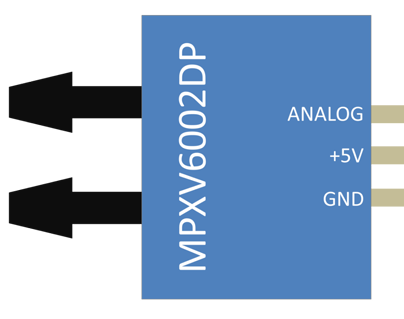
The MPXV6002DP has a standard 6-pin configuration. Below is the pinout and description:
| Pin Number | Pin Name | Description |
|---|---|---|
| 1 | VOUT | Analog output voltage proportional to pressure |
| 2 | GND | Ground connection |
| 3 | VCC | Supply voltage (5 V) |
| 4 | NC | Not connected (leave unconnected) |
| 5 | NC | Not connected (leave unconnected) |
| 6 | NC | Not connected (leave unconnected) |
Usage Instructions
How to Use the MPXV6002DP in a Circuit
- Power Supply: Connect the VCC pin to a stable 5 V power source and the GND pin to the ground of your circuit.
- Output Signal: The VOUT pin provides an analog voltage proportional to the pressure difference. This output can be read using an ADC (Analog-to-Digital Converter) on a microcontroller or data acquisition system.
- Pressure Ports: The sensor has two ports:
- P1 (High Pressure Port): Connect this port to the higher-pressure side.
- P2 (Low Pressure Port): Connect this port to the lower-pressure side.
- Signal Processing: Use the sensor's sensitivity (2.5 V/psi) to calculate the pressure difference from the output voltage: [ \text{Pressure Difference (psi)} = \frac{V_{\text{OUT}} - 0.2}{2.5} ]
Important Considerations and Best Practices
- Power Supply Stability: Ensure the supply voltage is stable and within the specified range (5 V ± 0.25 V) to avoid inaccurate readings.
- Avoid Overpressure: Do not expose the sensor to pressures beyond its rated range (-2 to 0 psi) to prevent damage.
- Temperature Effects: Be aware of temperature variations, as they may slightly affect the sensor's accuracy. Use temperature compensation if necessary.
- Port Orientation: Ensure the pressure ports are connected correctly (P1 for high pressure, P2 for low pressure) to avoid reversed readings.
- Filtering: Add a capacitor (e.g., 0.1 µF) between VCC and GND to filter out noise and stabilize the power supply.
Example: Connecting MPXV6002DP to an Arduino UNO
Below is an example of how to interface the MPXV6002DP with an Arduino UNO to read pressure values:
// Define the analog pin connected to the sensor's VOUT pin
const int sensorPin = A0;

// Sensor sensitivity (2.5 V/psi) and offset (0.2 V)
const float sensitivity = 2.5; // V/psi
const float offset = 0.2;      // V

void setup() {
  Serial.begin(9600); // Initialize serial communication
}

void loop() {
  // Read the analog value from the sensor
  int sensorValue = analogRead(sensorPin);

  // Convert the analog value to voltage (assuming 5V reference)
  float voltage = sensorValue * (5.0 / 1023.0);

  // Calculate the pressure difference in psi
  float pressure = (voltage - offset) / sensitivity;

  // Print the pressure value to the Serial Monitor
  Serial.print("Pressure Difference: ");
  Serial.print(pressure);
  Serial.println(" psi");

  delay(1000); // Wait for 1 second before the next reading
}
Troubleshooting and FAQs
Common Issues and Solutions
No Output Voltage or Incorrect Readings
- Cause: Incorrect wiring or unstable power supply.
- Solution: Double-check the connections, ensure VCC is 5 V, and verify the ground connection.
Fluctuating Output Voltage
- Cause: Electrical noise or insufficient filtering.
- Solution: Add a decoupling capacitor (e.g., 0.1 µF) between VCC and GND.
Output Voltage Stuck at Maximum or Minimum
- Cause: Pressure applied exceeds the sensor's range.
- Solution: Ensure the pressure difference is within the -2 to 0 psi range.
Reversed Pressure Readings
- Cause: P1 and P2 ports are swapped.
- Solution: Verify that P1 is connected to the higher-pressure side and P2 to the lower-pressure side.
FAQs
Q1: Can the MPXV6002DP measure positive pressure?
No, the MPXV6002DP is designed to measure differential pressure in the range of -2 to 0 psi only. It cannot measure positive pressure.
Q2: What happens if I apply pressure beyond the specified range?
Applying pressure beyond the -2 to 0 psi range may damage the sensor or result in inaccurate readings.
Q3: Can I use a 3.3 V power supply instead of 5 V?
No, the MPXV6002DP requires a 5 V ± 0.25 V supply for proper operation. Using a lower voltage may result in incorrect or no output.
Q4: How do I compensate for temperature variations?
For applications requiring high accuracy, use external temperature compensation techniques or calibrate the sensor output at different temperatures.
By following this documentation, you can effectively integrate the MPXV6002DP into your projects and ensure reliable pressure measurements.