
How to Use RS232 to TTL with MAX3232 CHIP: Examples, Pinouts, and Specs
 Design with RS232 to TTL with MAX3232 CHIP in Cirkit Designer
Introduction
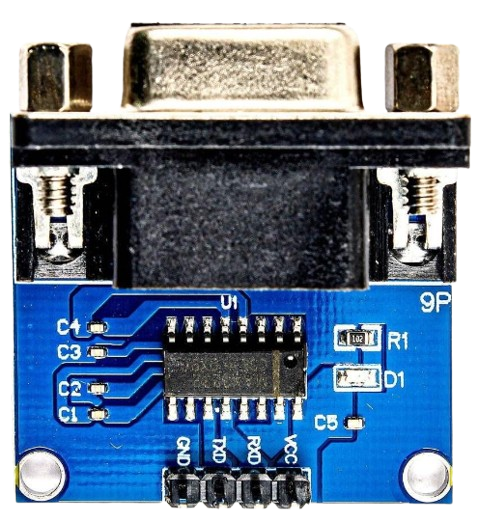
The RS232 to TTL with MAX3232 CHIP is a level shifter module designed to convert RS232 serial communication signals to TTL logic levels. It utilizes the MAX3232 chip from Maxim Integrated, which supports reliable communication between devices operating at different voltage levels. This module is widely used in applications where devices with RS232 interfaces (e.g., computers, modems) need to communicate with microcontrollers or other TTL-based devices.
Explore Projects Built with RS232 to TTL with MAX3232 CHIP
 Open Project in Cirkit Designer
 Open Project in Cirkit Designer
 Open Project in Cirkit Designer
 Open Project in Cirkit Designer
Explore Projects Built with RS232 to TTL with MAX3232 CHIP
Open Project in Cirkit DesignerOpen Project in Cirkit DesignerOpen Project in Cirkit DesignerOpen Project in Cirkit DesignerCommon Applications and Use Cases
- Interfacing microcontrollers (e.g., Arduino, Raspberry Pi) with RS232 devices.
- Serial communication between PCs and embedded systems.
- Debugging and testing RS232 communication.
- Connecting GPS modules, GSM modems, or other RS232 peripherals to TTL-based systems.
Technical Specifications
Below are the key technical details and pin configurations for the RS232 to TTL module with the MAX3232 chip:
Key Technical Details
- Chipset: MAX3232 by Maxim Integrated.
- Input Voltage (Vcc): 3.0V to 5.5V.
- RS232 Voltage Levels: ±3V to ±15V.
- TTL Voltage Levels: 0V to Vcc (3.3V or 5V logic).
- Baud Rate: Up to 120 kbps.
- Operating Temperature: -40°C to +85°C.
- Power Consumption: Low power, with automatic shutdown feature.
Pin Configuration and Descriptions
The module typically has a 6-pin header for TTL signals and power, and a DB9 connector for RS232 signals. Below is the pinout:
TTL Side (6-Pin Header)
| Pin | Name | Description |
|---|---|---|
| 1 | Vcc | Power supply input (3.0V to 5.5V). |
| 2 | GND | Ground connection. |
| 3 | TXD | TTL Transmit Data (output from module). |
| 4 | RXD | TTL Receive Data (input to module). |
| 5 | CTS | Clear to Send (optional, connect to GND if unused). |
| 6 | RTS | Request to Send (optional, connect to GND if unused). |
RS232 Side (DB9 Connector)
| Pin | Name | Description |
|---|---|---|
| 2 | RXD | RS232 Receive Data (input to module). |
| 3 | TXD | RS232 Transmit Data (output from module). |
| 5 | GND | Ground connection. |
| 7 | RTS | Request to Send (optional). |
| 8 | CTS | Clear to Send (optional). |
Usage Instructions
How to Use the Component in a Circuit
- Power the Module: Connect the Vcc pin to a 3.3V or 5V power source, and connect the GND pin to the ground of your circuit.
- Connect TTL Signals:
- Connect the TXD pin of the module to the RX pin of your microcontroller.
- Connect the RXD pin of the module to the TX pin of your microcontroller.
- Connect RS232 Signals:
- Use the DB9 connector to interface with an RS232 device (e.g., PC or modem).
- Optional Handshaking:
- If your application requires hardware flow control, connect the RTS and CTS pins as needed. Otherwise, tie them to GND.
Important Considerations and Best Practices
- Ensure the Vcc voltage matches the logic level of your microcontroller (3.3V or 5V).
- Use short, high-quality cables for RS232 connections to minimize signal degradation.
- If hardware flow control is not used, ensure RTS and CTS are properly grounded.
- Verify the baud rate and other serial communication parameters (e.g., parity, stop bits) match between the RS232 device and the microcontroller.
Example: Connecting to an Arduino UNO
Below is an example of how to connect the RS232 to TTL module to an Arduino UNO and send data:
Wiring Diagram
| RS232 to TTL Pin | Arduino UNO Pin |
|---|---|
| Vcc | 5V |
| GND | GND |
| TXD | RX (Pin 0) |
| RXD | TX (Pin 1) |
Arduino Code Example
// Example code to send and receive data using RS232 to TTL module
// Ensure the baud rate matches the RS232 device's settings

void setup() {
  Serial.begin(9600); // Initialize serial communication at 9600 baud
  Serial.println("RS232 to TTL Module Test"); // Send test message
}

void loop() {
  // Check if data is available from the RS232 device
  if (Serial.available() > 0) {
    char receivedChar = Serial.read(); // Read a character from RS232
    Serial.print("Received: ");        // Print received data to Serial Monitor
    Serial.println(receivedChar);
  }

  // Send a test message to the RS232 device every 2 seconds
  delay(2000);
  Serial.println("Hello from Arduino!");
}
Troubleshooting and FAQs
Common Issues and Solutions
No Communication Between Devices:
- Verify the TX and RX connections are not swapped.
- Ensure the baud rate and other serial settings match on both devices.
- Check that the Vcc voltage is within the acceptable range (3.0V to 5.5V).
Data Corruption or Noise:
- Use shorter cables for RS232 connections.
- Ensure proper grounding between devices.
- Check for electromagnetic interference (EMI) in the environment.
Module Not Powering On:
- Confirm the Vcc pin is connected to a stable power source.
- Check for loose or damaged connections.
RS232 Handshaking Issues:
- If not using RTS/CTS, ensure these pins are tied to GND.
- Verify the RS232 device does not require hardware flow control.
FAQs
Q1: Can this module work with 3.3V microcontrollers?
Yes, the MAX3232 chip supports operation at 3.3V, making it compatible with 3.3V logic devices.
Q2: What is the maximum cable length for RS232 communication?
RS232 supports cable lengths up to 15 meters (50 feet) at lower baud rates. For higher baud rates, shorter cables are recommended.
Q3: Can I use this module for bidirectional communication?
Yes, the module supports full-duplex communication, allowing simultaneous transmission and reception of data.
Q4: Is the module compatible with USB-to-RS232 adapters?
Yes, the module can interface with USB-to-RS232 adapters, provided the adapter adheres to RS232 voltage standards.