Cirkit Designer Logo
Cirkit Designer
Your all-in-one circuit design IDE
Home / 
Component Documentation

How to Use CURRENT SENSOR: Examples, Pinouts, and Specs
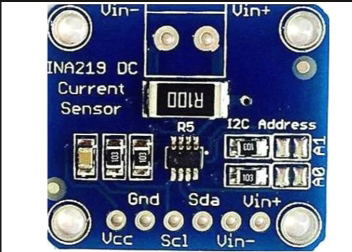

Image of CURRENT SENSOR
Cirkit Designer LogoDesign with CURRENT SENSOR in Cirkit Designer

Introduction

The 1NA219 Current Sensor by Texas Instruments (TI) is a precision device designed to measure the flow of electric current in a circuit. It provides an output signal proportional to the current level, enabling accurate monitoring and control of electrical systems. This sensor is ideal for applications requiring high accuracy and low power consumption.

Explore Projects Built with CURRENT SENSOR
Use Cirkit Designer to design, explore, and prototype these projects online. Some projects support real-time simulation. Click "Open Project" to start designing instantly!
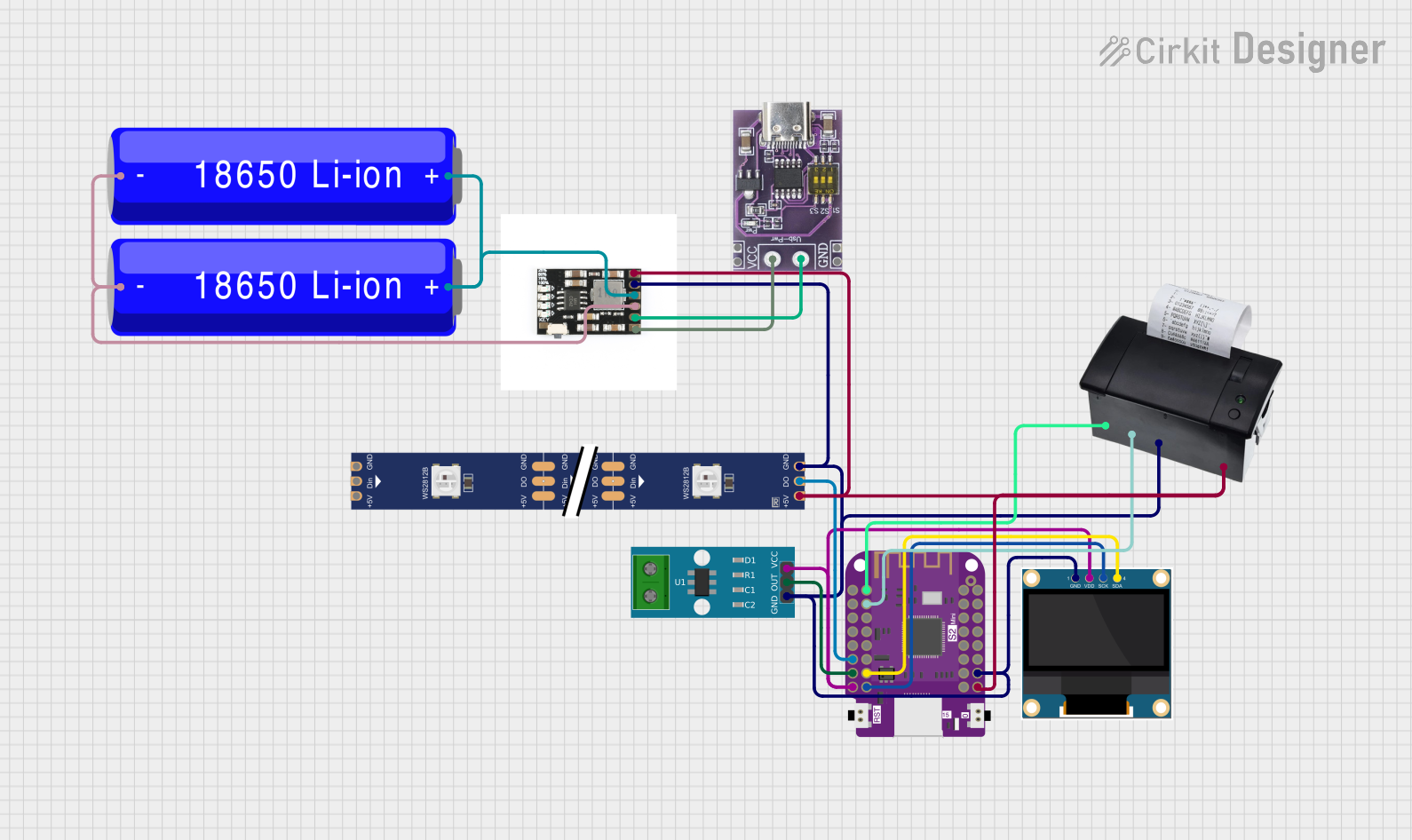
Wemos S2 Mini Controlled Smart Device with OLED Display, Thermal Printing, and RGB LED Strip
Image of DT NEA - Noah Patel: A project utilizing CURRENT SENSOR in a practical application
This circuit features a Wemos S2 Mini microcontroller that controls a WS2812 RGB LED strip and communicates with a 0.96" OLED display and a 58mm mini thermal printer. The ACS712 Current Sensor is interfaced with the microcontroller to monitor current, and power is managed by a CD42 BMS connected to two 18650 Li-ion batteries, with a USB-C PD Trigger Board for power delivery. The circuit is designed for visual output (LED strip, OLED display), printing capabilities, and current sensing, likely for a portable, battery-powered monitoring and display device.
Cirkit Designer LogoOpen Project in Cirkit Designer
ESP32-Controlled Smart Lighting System with Power Monitoring
Image of Energy Monitoring System: A project utilizing CURRENT SENSOR in a practical application
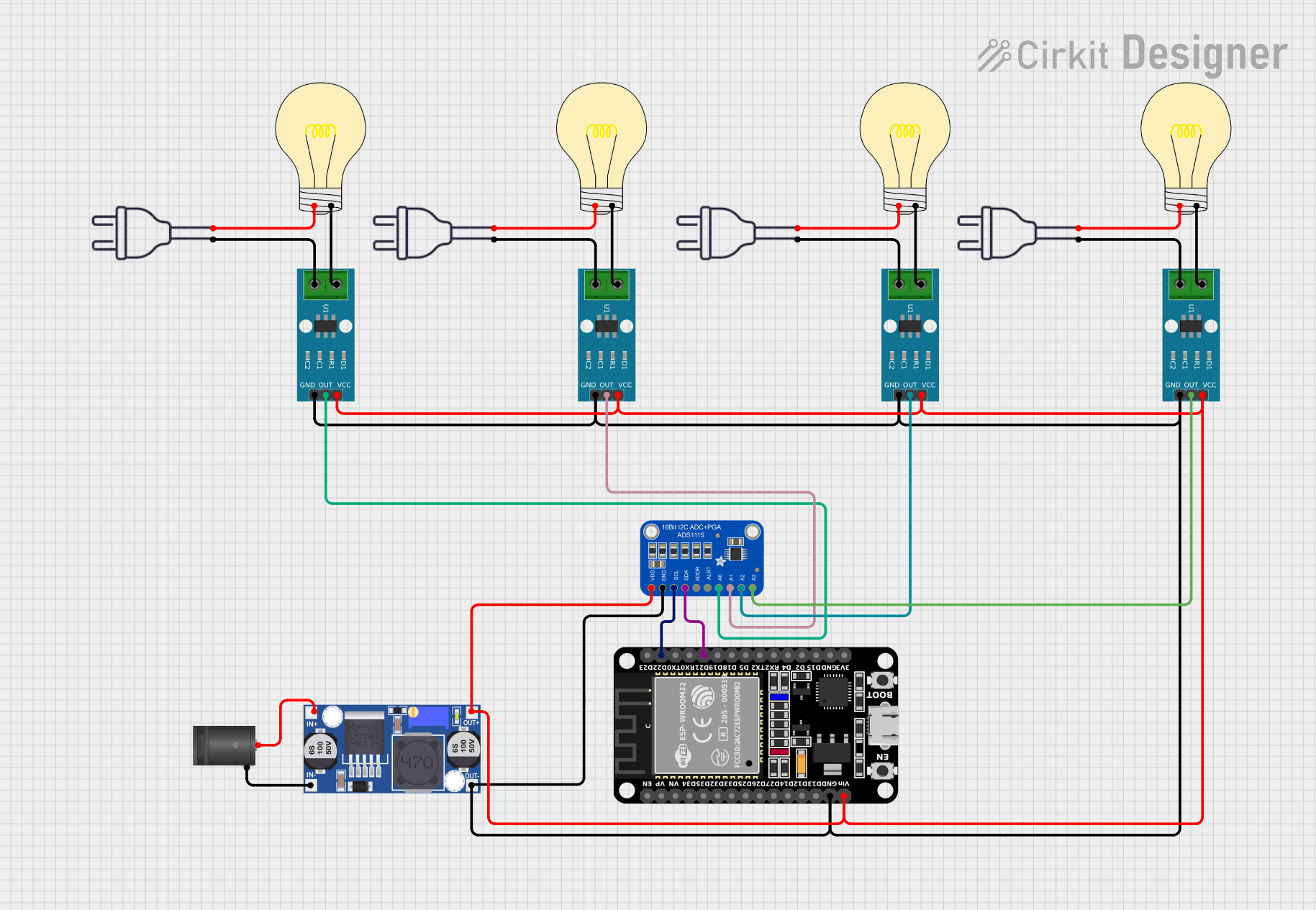
This circuit appears to be a multi-channel current monitoring system using several ACS712 current sensors to measure the current through different loads, likely bulbs connected to a 220V power source. The current readings from the sensors are digitized by an Adafruit ADS1115 16-bit ADC, which interfaces with an ESP32 microcontroller via I2C communication for further processing or telemetry. A buck converter is used to step down the voltage to power the ESP32 and the sensors, and the system is powered through a 2.1mm DC barrel jack, indicating it is designed for external power supply.
Cirkit Designer LogoOpen Project in Cirkit Designer
ESP32-Based Current Monitoring and Temperature Sensing System
Image of SISTEMA DE MONITOREO: A project utilizing CURRENT SENSOR in a practical application
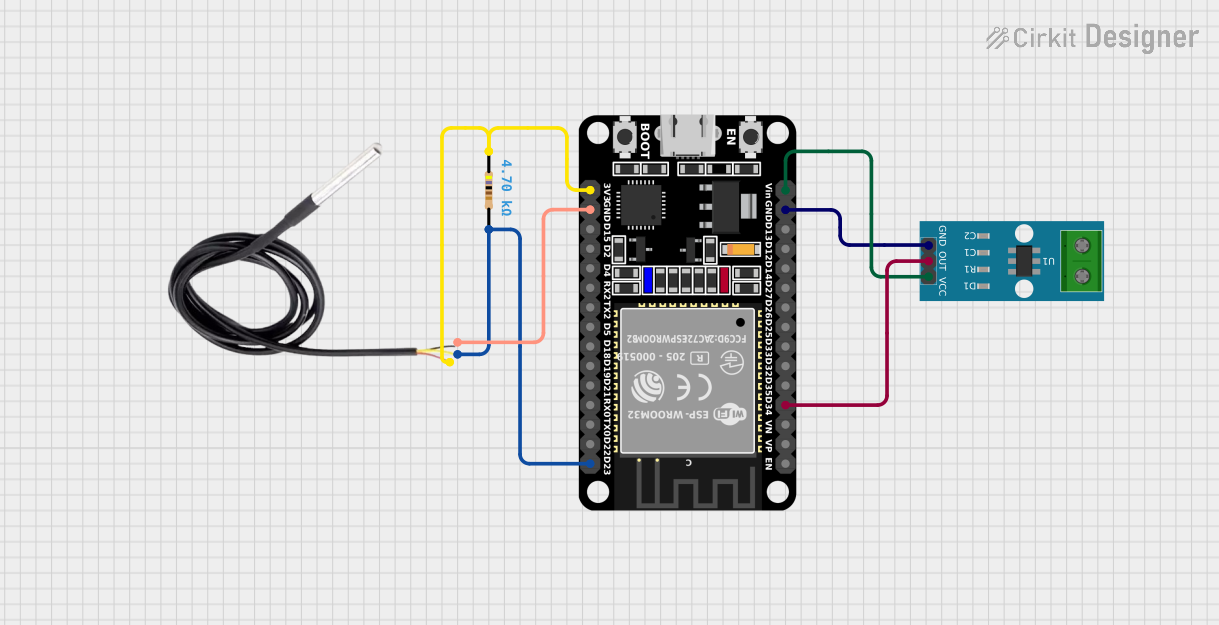
This circuit is designed to measure current using an ACS712 Current Sensor and temperature using a DS18B20 sensor, with an ESP32 microcontroller to process and possibly communicate the sensor data. The ACS712 sensor output is connected to one of the ESP32's analog input pins (D34), while the DS18B20's signal line is interfaced with a digital input pin (D23) through a pull-up resistor (4.7k Ohms). The ESP32 is powered through its Vin pin, and both sensors share a common ground with the ESP32.
Cirkit Designer LogoOpen Project in Cirkit Designer
ESP32-Based Smart Power Monitoring System with OLED Display and Wi-Fi Connectivity
Image of Circle4Life test: A project utilizing CURRENT SENSOR in a practical application
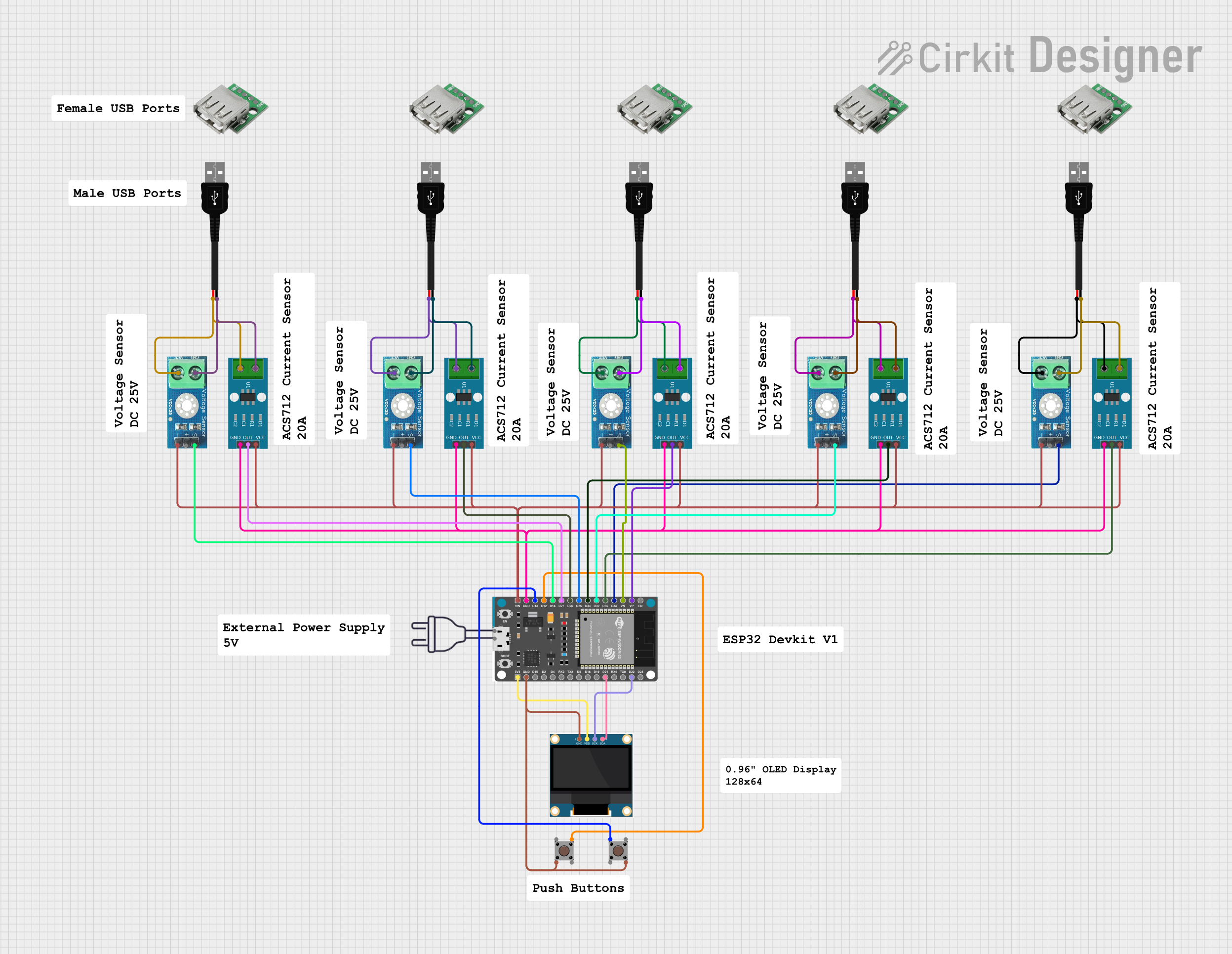
This circuit is a monitoring system using an ESP32 microcontroller to read data from multiple ACS712 current sensors and DC voltage sensors, displaying the information on a 0.96" OLED screen. The system also includes pushbuttons for user interaction and connects to WiFi for data transmission.
Cirkit Designer LogoOpen Project in Cirkit Designer

Explore Projects Built with CURRENT SENSOR

Use Cirkit Designer to design, explore, and prototype these projects online. Some projects support real-time simulation. Click "Open Project" to start designing instantly!
Image of DT NEA - Noah Patel: A project utilizing CURRENT SENSOR in a practical application
Wemos S2 Mini Controlled Smart Device with OLED Display, Thermal Printing, and RGB LED Strip
This circuit features a Wemos S2 Mini microcontroller that controls a WS2812 RGB LED strip and communicates with a 0.96" OLED display and a 58mm mini thermal printer. The ACS712 Current Sensor is interfaced with the microcontroller to monitor current, and power is managed by a CD42 BMS connected to two 18650 Li-ion batteries, with a USB-C PD Trigger Board for power delivery. The circuit is designed for visual output (LED strip, OLED display), printing capabilities, and current sensing, likely for a portable, battery-powered monitoring and display device.
Cirkit Designer LogoOpen Project in Cirkit Designer
Image of Energy Monitoring System: A project utilizing CURRENT SENSOR in a practical application
ESP32-Controlled Smart Lighting System with Power Monitoring
This circuit appears to be a multi-channel current monitoring system using several ACS712 current sensors to measure the current through different loads, likely bulbs connected to a 220V power source. The current readings from the sensors are digitized by an Adafruit ADS1115 16-bit ADC, which interfaces with an ESP32 microcontroller via I2C communication for further processing or telemetry. A buck converter is used to step down the voltage to power the ESP32 and the sensors, and the system is powered through a 2.1mm DC barrel jack, indicating it is designed for external power supply.
Cirkit Designer LogoOpen Project in Cirkit Designer
Image of SISTEMA DE MONITOREO: A project utilizing CURRENT SENSOR in a practical application
ESP32-Based Current Monitoring and Temperature Sensing System
This circuit is designed to measure current using an ACS712 Current Sensor and temperature using a DS18B20 sensor, with an ESP32 microcontroller to process and possibly communicate the sensor data. The ACS712 sensor output is connected to one of the ESP32's analog input pins (D34), while the DS18B20's signal line is interfaced with a digital input pin (D23) through a pull-up resistor (4.7k Ohms). The ESP32 is powered through its Vin pin, and both sensors share a common ground with the ESP32.
Cirkit Designer LogoOpen Project in Cirkit Designer
Image of Circle4Life test: A project utilizing CURRENT SENSOR in a practical application
ESP32-Based Smart Power Monitoring System with OLED Display and Wi-Fi Connectivity
This circuit is a monitoring system using an ESP32 microcontroller to read data from multiple ACS712 current sensors and DC voltage sensors, displaying the information on a 0.96" OLED screen. The system also includes pushbuttons for user interaction and connects to WiFi for data transmission.
Cirkit Designer LogoOpen Project in Cirkit Designer

Common Applications and Use Cases

  • Battery management systems (BMS) for electric vehicles
  • Power monitoring in industrial equipment
  • Solar power systems for current tracking
  • IoT devices requiring energy consumption monitoring
  • Overcurrent protection in electronic circuits

Technical Specifications

The following table outlines the key technical details of the 1NA219 Current Sensor:

Parameter Value
Supply Voltage (Vcc) 3.0V to 5.5V
Operating Current 0.7 mA (typical)
Current Measurement Range ±3.2A (with default shunt resistor)
Output Signal Type I²C digital output
Accuracy ±1% (typical)
Communication Protocol I²C (7-bit address)
Operating Temperature -40°C to +125°C
Package Type SOIC-8

Pin Configuration and Descriptions

The 1NA219 Current Sensor has an 8-pin configuration. The table below describes each pin:

Pin Number Pin Name Description
1 VCC Power supply input (3.0V to 5.5V).
2 GND Ground connection.
3 SDA Serial Data Line for I²C communication.
4 SCL Serial Clock Line for I²C communication.
5 A0 Address selection pin (used to set the I²C address).
6 A1 Address selection pin (used to set the I²C address).
7 VIN+ Positive input for current sensing (connect to the high side of the load).
8 VIN- Negative input for current sensing (connect to the low side of the load).

Usage Instructions

How to Use the 1NA219 in a Circuit

  1. Power Supply: Connect the VCC pin to a 3.0V to 5.5V power source and the GND pin to the ground.
  2. Current Sensing: Connect the VIN+ pin to the positive side of the load and the VIN- pin to the negative side. Ensure the current flows through the shunt resistor for accurate measurement.
  3. I²C Communication: Connect the SDA and SCL pins to the corresponding I²C pins on your microcontroller (e.g., Arduino UNO). Use pull-up resistors (typically 4.7kΩ) on the SDA and SCL lines.
  4. Address Configuration: Use the A0 and A1 pins to set the I²C address. These pins can be connected to VCC, GND, or left floating to select one of the available addresses.

Important Considerations and Best Practices

  • Ensure the current through the shunt resistor does not exceed the sensor's rated range.
  • Use decoupling capacitors (e.g., 0.1µF) near the VCC pin to reduce noise.
  • Avoid long wires for the I²C lines to minimize signal degradation.
  • Verify the I²C address configuration to prevent conflicts with other devices on the bus.

Example Code for Arduino UNO

Below is an example of how to interface the 1NA219 Current Sensor with an Arduino UNO:

#include <Wire.h>
#include <Adafruit_INA219.h>

// Create an instance of the INA219 sensor
Adafruit_INA219 ina219;

void setup() {
  Serial.begin(9600); // Initialize serial communication at 9600 baud
  while (!Serial) {
    // Wait for the serial port to connect (for native USB devices)
  }

  if (!ina219.begin()) {
    Serial.println("Failed to find INA219 chip");
    while (1) {
      delay(10); // Halt execution if the sensor is not detected
    }
  }
  Serial.println("INA219 Current Sensor Initialized");
}

void loop() {
  float current_mA = ina219.getCurrent_mA(); // Read current in milliamps
  Serial.print("Current: ");
  Serial.print(current_mA);
  Serial.println(" mA");

  delay(1000); // Wait for 1 second before the next reading
}

Troubleshooting and FAQs

Common Issues and Solutions

  1. No Output or Incorrect Readings:

    • Verify the wiring connections, especially the VIN+ and VIN- pins.
    • Ensure the I²C address matches the configuration of the A0 and A1 pins.
    • Check the power supply voltage (VCC) to ensure it is within the specified range.
  2. I²C Communication Errors:

    • Confirm the pull-up resistors (4.7kΩ) are correctly connected to the SDA and SCL lines.
    • Check for address conflicts with other I²C devices on the same bus.
  3. High Noise in Readings:

    • Add decoupling capacitors near the VCC pin to filter out noise.
    • Use shorter wires for the I²C lines and current sensing connections.

FAQs

Q1: Can the 1NA219 measure negative currents?
Yes, the 1NA219 can measure both positive and negative currents, making it suitable for bidirectional current sensing.

Q2: What is the maximum current the sensor can measure?
The default configuration supports a range of ±3.2A. However, this can be adjusted by changing the shunt resistor.

Q3: Can I use the 1NA219 with a 3.3V microcontroller?
Yes, the 1NA219 is compatible with both 3.3V and 5V logic levels, making it suitable for a wide range of microcontrollers.

Q4: How do I calculate power consumption using the 1NA219?
The 1NA219 can calculate power by multiplying the measured current and voltage. Use the appropriate library functions to retrieve these values.

By following this documentation, users can effectively integrate the 1NA219 Current Sensor into their projects for precise current measurement and monitoring.