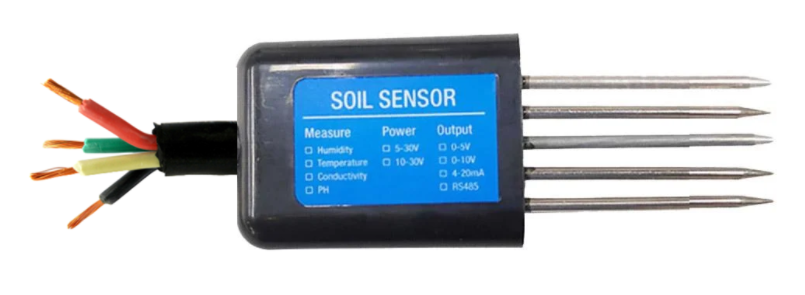
The 7 in One NPK Sensor, manufactured by Arduino (Part ID: UNO), is a versatile soil sensor designed to measure key soil parameters, including nitrogen (N), phosphorus (P), potassium (K), moisture, temperature, and pH levels. This sensor provides comprehensive data for monitoring soil health, making it an essential tool for precision agriculture, gardening, and environmental research.
Explore Projects Built with 7 in One NPK Sensor
Use Cirkit Designer to design, explore, and prototype these projects online. Some projects support real-time simulation. Click "Open Project" to start designing instantly!
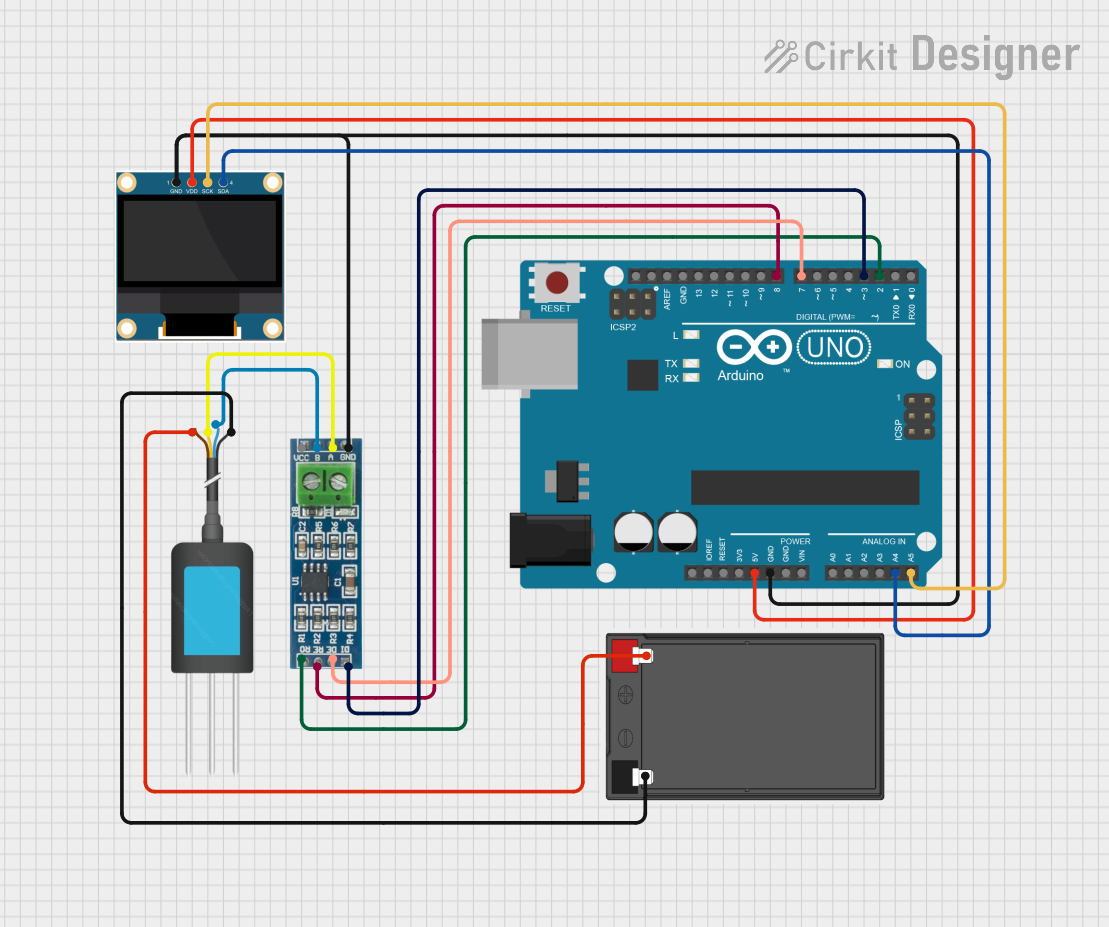
This circuit is designed to measure soil nutrient levels using an NPK soil sensor and display the results on an OLED screen. An Arduino UNO microcontroller reads data from the soil sensor via an RS-485 module and processes the information to display nitrogen, phosphorus, and potassium levels on the OLED display.
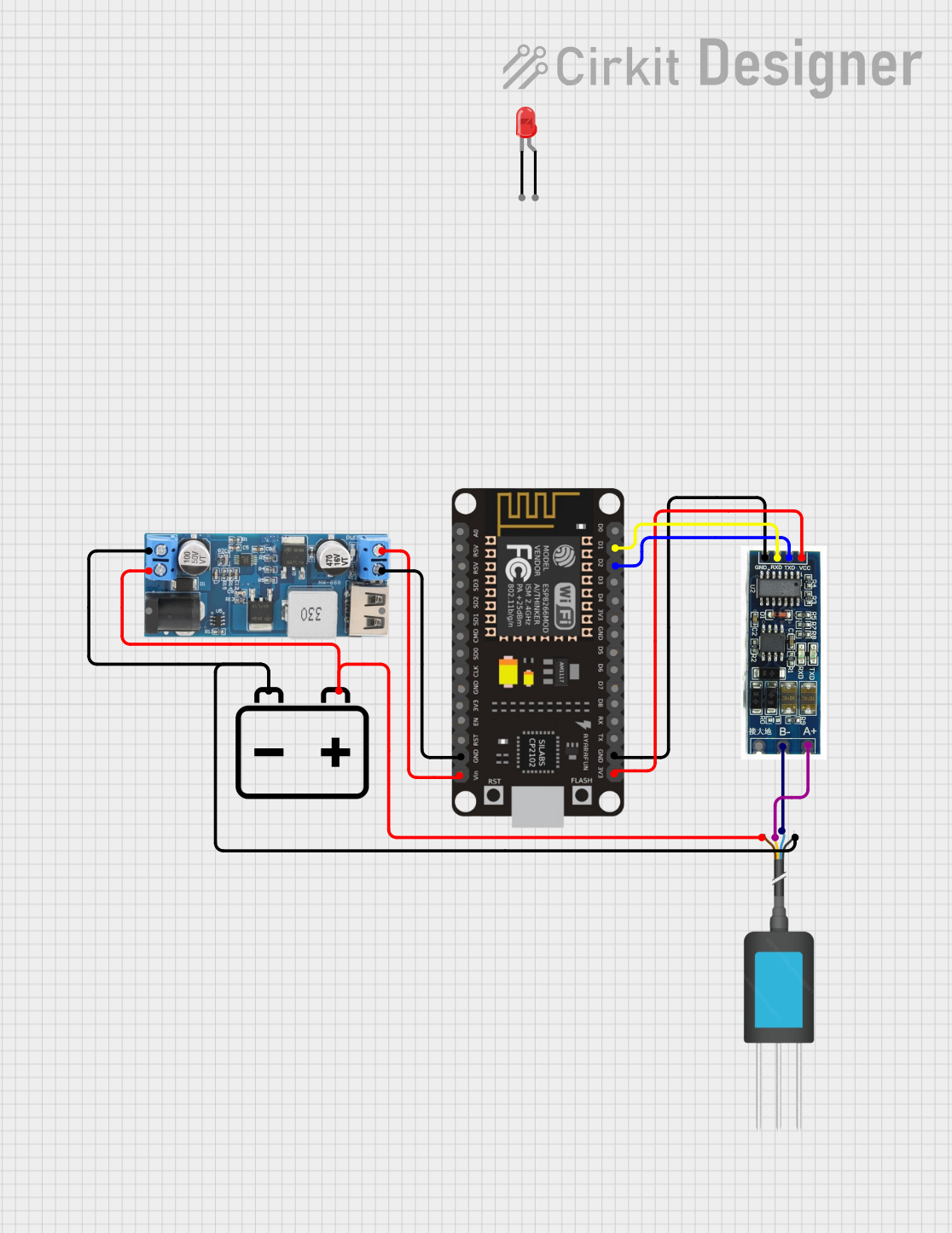
This circuit is a soil monitoring system that uses an NPK soil sensor to measure soil nutrients and an ESP8266 NodeMCU to process and display the data. The system includes a 12V battery, a step-down converter to provide 5V power, and an RS485 to TTL converter for communication between the sensor and the microcontroller. The ESP8266 also controls LEDs to indicate system status and cycles through various soil parameters on an OLED display.
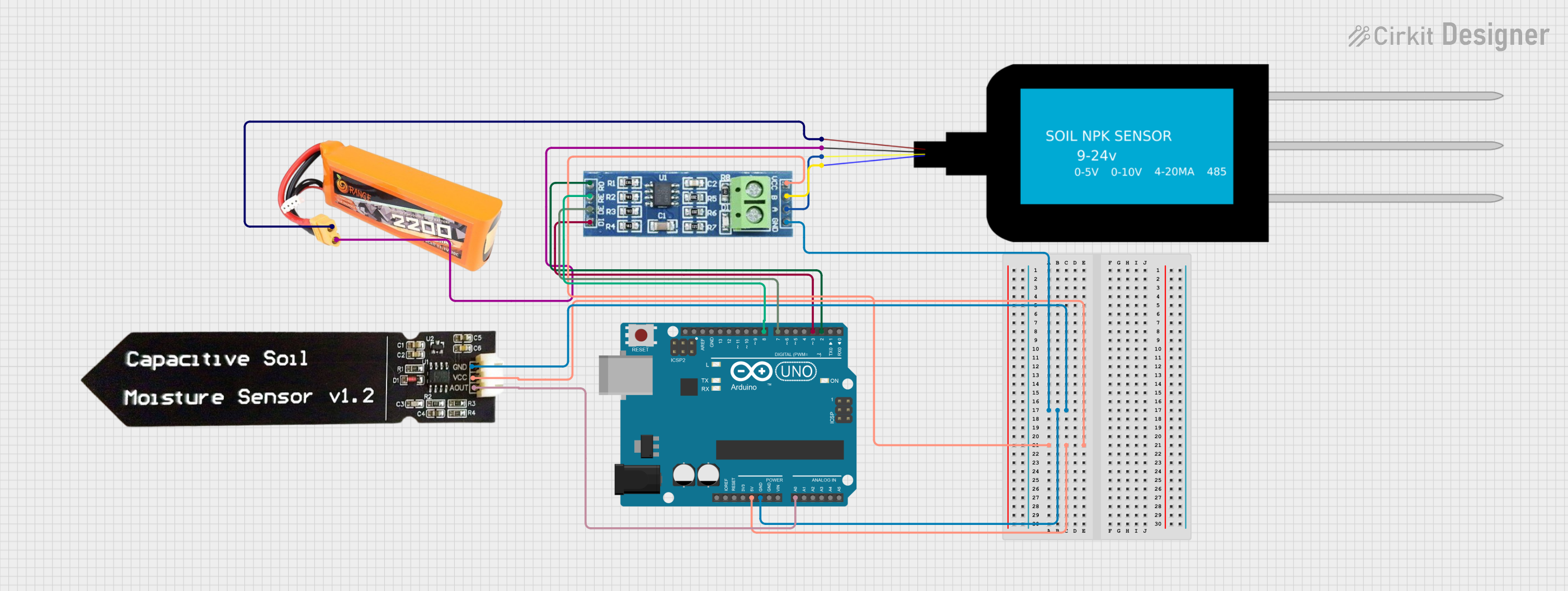
This circuit uses an Arduino UNO to read soil nutrient levels (Nitrogen, Phosphorous, and Potassium) from an NPK Soil Sensor via an RS485 module and soil moisture levels from a Capacitive Soil Moisture Sensor. The data is then printed to the Serial Monitor for monitoring purposes.
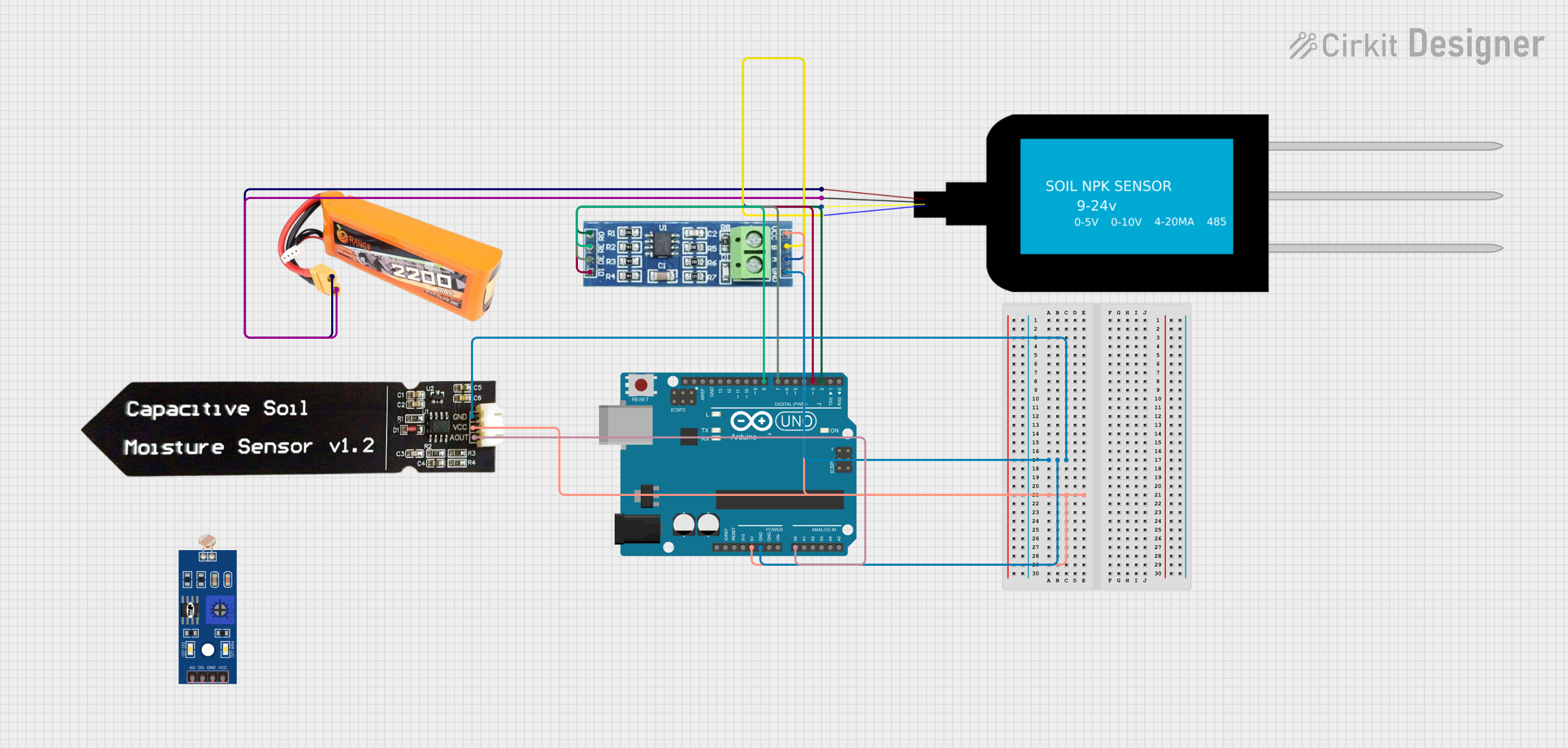
This circuit uses an Arduino UNO to read soil nutrient levels (Nitrogen, Phosphorous, and Potassium) via an NPK Soil Sensor connected through an RS485 module, and soil moisture levels via a Capacitive Soil Moisture Sensor. The data is then printed to the Serial Monitor for analysis.
Precision agriculture for optimizing fertilizer use
Home gardening to monitor soil health
Research in soil science and environmental studies
Automated irrigation systems
Greenhouse monitoring and control
Technical Specifications
The following table outlines the key technical details of the 7 in One NPK Sensor:
Parameter
Specification
Operating Voltage
5V DC
Operating Current
≤ 50mA
Measurement Range (N)
0–1999 mg/kg
Measurement Range (P)
0–1999 mg/kg
Measurement Range (K)
0–1999 mg/kg
Moisture Range
0–100%
Temperature Range
-40°C to 80°C
pH Range
3.5–9.0
Communication Protocol
UART (Serial)
Output Data Format
Digital
Cable Length
1 meter
Pin Configuration and Descriptions
The sensor has a 4-pin interface for connecting to a microcontroller, such as the Arduino UNO. The pin configuration is as follows:
Pin
Name
Description
1
VCC
Power supply input (5V DC)
2
GND
Ground connection
3
TX
UART Transmit pin for sending data to the microcontroller
4
RX
UART Receive pin for receiving data from the microcontroller
Usage Instructions
How to Use the Component in a Circuit
Wiring the Sensor:
Connect the VCC pin of the sensor to the 5V pin on the Arduino UNO.
Connect the GND pin of the sensor to the GND pin on the Arduino UNO.
Connect the TX pin of the sensor to the RX pin (pin 0) on the Arduino UNO.
Connect the RX pin of the sensor to the TX pin (pin 1) on the Arduino UNO.
Powering the Sensor:
Ensure the Arduino UNO is powered via USB or an external power source.
Reading Data:
Use the Arduino IDE to upload a sketch that reads and processes the sensor data via UART communication.
Important Considerations and Best Practices
Calibration: The sensor may require calibration for accurate pH and NPK measurements. Refer to the manufacturer's calibration procedure.
Placement: Insert the sensor probes fully into the soil for accurate readings. Avoid rocky or extremely dry soil.
Moisture Sensitivity: Ensure the sensor is not submerged in water, as it is designed for soil use only.
Data Filtering: Implement software filtering to smooth out noise in the sensor readings.
Sample Arduino Code
Below is an example Arduino sketch to read data from the 7 in One NPK Sensor:
#include <SoftwareSerial.h>

// Define RX and TX pins for SoftwareSerial
SoftwareSerial npkSensor(10, 11); // RX = pin 10, TX = pin 11

void setup() {
  Serial.begin(9600); // Initialize Serial Monitor
  npkSensor.begin(9600); // Initialize sensor communication

  Serial.println("7 in One NPK Sensor Initialized");
}

void loop() {
  if (npkSensor.available()) {
    // Read data from the sensor
    String sensorData = "";
    while (npkSensor.available()) {
      char c = npkSensor.read();
      sensorData += c;
    }

    // Print the received data to the Serial Monitor
    Serial.println("Sensor Data: " + sensorData);
  }

  delay(1000); // Wait 1 second before the next reading
}
Notes on the Code
Replace 10 and 11 with the appropriate pins if using different connections.
Ensure the baud rate matches the sensor's default communication speed (9600 in this case).
The sensor data format may vary; refer to the manufacturer's protocol for parsing the data.
Troubleshooting and FAQs
Common Issues and Solutions
No Data Received:
Cause: Incorrect wiring or baud rate mismatch.
Solution: Double-check the connections and ensure the baud rate in the code matches the sensor's default.
Inaccurate Readings:
Cause: Sensor not properly calibrated or inserted into the soil.
Solution: Perform calibration as per the manufacturer's instructions and ensure proper placement in the soil.
Intermittent Data Loss:
Cause: Electrical noise or loose connections.
Solution: Use shorter cables, secure connections, and consider adding capacitors for noise filtering.
Sensor Not Responding:
Cause: Insufficient power supply or damaged sensor.
Solution: Verify the power supply voltage and current. Replace the sensor if necessary.
FAQs
Q1: Can this sensor be used in hydroponics?
A1: No, this sensor is designed for soil use only and may not provide accurate readings in water-based environments.
Q2: How often should the sensor be calibrated?
A2: Calibration frequency depends on usage. For critical applications, calibrate monthly or as recommended by the manufacturer.
Q3: Is the sensor waterproof?
A3: The sensor is water-resistant but not fully waterproof. Avoid submerging it in water.
Q4: Can I use this sensor with other microcontrollers?
A4: Yes, the sensor can be used with any microcontroller that supports UART communication, such as ESP32 or Raspberry Pi.
By following this documentation, users can effectively integrate and utilize the 7 in One NPK Sensor for their soil monitoring needs.

 Open Project in Cirkit Designer