
How to Use Terminal Block: Examples, Pinouts, and Specs
 Design with Terminal Block in Cirkit Designer
Introduction
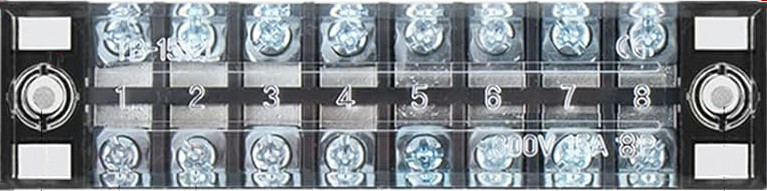
A terminal block is a modular, insulated block designed to secure two or more wires together. It provides a convenient and reliable way to connect and disconnect electrical circuits without the need for soldering. Terminal blocks are widely used in industrial, commercial, and residential applications due to their ease of use, durability, and flexibility.
Explore Projects Built with Terminal Block
 Open Project in Cirkit Designer
 Open Project in Cirkit Designer
 Open Project in Cirkit Designer
 Open Project in Cirkit Designer
Explore Projects Built with Terminal Block
Open Project in Cirkit DesignerOpen Project in Cirkit DesignerOpen Project in Cirkit DesignerOpen Project in Cirkit DesignerCommon Applications and Use Cases
- Industrial Control Panels: Used to organize and connect wiring in control systems.
- Power Distribution: Facilitates the distribution of electrical power to multiple devices.
- PCB Connections: Provides a secure interface for connecting external wires to printed circuit boards.
- Home Automation: Simplifies wiring for smart home devices and systems.
- Test and Measurement Equipment: Allows for quick and temporary connections during testing.
Technical Specifications
Terminal blocks come in various types and configurations. Below are the general technical specifications for a standard screw-type terminal block:
General Specifications
| Parameter | Value |
|---|---|
| Voltage Rating | Up to 600V (varies by model) |
| Current Rating | 10A to 150A (depending on size) |
| Wire Size Compatibility | 22 AWG to 2 AWG |
| Insulation Material | Polyamide, PVC, or similar |
| Operating Temperature | -40°C to +105°C |
| Mounting Type | DIN rail, PCB, or panel-mounted |
Pin Configuration and Descriptions
For PCB-mounted terminal blocks, the pin configuration typically includes the following:
| Pin Number | Description |
|---|---|
| 1 | Wire connection point (input/output) |
| 2 | Wire connection point (input/output) |
| 3+ | Additional connection points (if applicable) |
Note: The number of pins depends on the terminal block type (e.g., 2-pin, 3-pin, or multi-pin).
Usage Instructions
How to Use a Terminal Block in a Circuit
Select the Appropriate Terminal Block:
- Choose a terminal block that matches the voltage, current, and wire size requirements of your circuit.
- Ensure the mounting type (DIN rail, PCB, or panel) is compatible with your setup.
Prepare the Wires:
- Strip the insulation from the wire ends (typically 5-10mm, depending on the terminal block size).
- Ensure the wire ends are clean and free of frayed strands.
Connect the Wires:
- Insert the stripped wire ends into the terminal block's connection points.
- Tighten the screws (for screw-type terminal blocks) or use the appropriate mechanism (e.g., spring clamp) to secure the wires.
Verify the Connections:
- Gently tug on the wires to ensure they are securely fastened.
- Double-check the polarity and wiring configuration before powering the circuit.
Important Considerations and Best Practices
- Avoid Over-Tightening: Over-tightening screws can damage the terminal block or the wire.
- Use Ferrules for Stranded Wires: Ferrules help prevent fraying and ensure a secure connection.
- Check for Compatibility: Ensure the terminal block's voltage and current ratings meet or exceed the circuit's requirements.
- Label Connections: Use labels or markers to identify wires and connections for easier troubleshooting.
Example: Connecting a Terminal Block to an Arduino UNO
Terminal blocks can be used to connect external components (e.g., sensors, motors) to an Arduino UNO. Below is an example of wiring a terminal block to control an LED:
Circuit Setup
- Connect the positive terminal of the LED to one pin of the terminal block.
- Connect the negative terminal of the LED to the other pin of the terminal block.
- Use jumper wires to connect the terminal block to the Arduino UNO:
- Positive terminal to Arduino digital pin 9.
- Negative terminal to Arduino GND.
Arduino Code
// Arduino code to control an LED connected via a terminal block

const int ledPin = 9; // Pin connected to the LED via the terminal block

void setup() {
  pinMode(ledPin, OUTPUT); // Set the LED pin as an output
}

void loop() {
  digitalWrite(ledPin, HIGH); // Turn the LED on
  delay(1000);                // Wait for 1 second
  digitalWrite(ledPin, LOW);  // Turn the LED off
  delay(1000);                // Wait for 1 second
}
Troubleshooting and FAQs
Common Issues and Solutions
Loose Connections:
- Issue: Wires are not securely fastened, leading to intermittent connections.
- Solution: Ensure screws are tightened properly or the spring clamp is fully engaged.
Overheating:
- Issue: Terminal block becomes hot during operation.
- Solution: Verify that the current does not exceed the terminal block's rating. Use a larger terminal block if necessary.
Wire Fraying:
- Issue: Stranded wires fray when inserted into the terminal block.
- Solution: Use ferrules or tin the wire ends with solder before insertion.
Incorrect Polarity:
- Issue: Components do not function as expected due to reversed polarity.
- Solution: Double-check the wiring and ensure correct polarity before powering the circuit.
FAQs
Q: Can terminal blocks handle high-frequency signals?
A: Yes, but ensure the terminal block is designed for low-resistance and low-inductance connections to minimize signal degradation.Q: Are terminal blocks reusable?
A: Yes, terminal blocks can be reused as long as they are not damaged or worn out.Q: Can I use a terminal block for AC and DC circuits?
A: Yes, terminal blocks can be used for both AC and DC circuits, provided their voltage and current ratings are not exceeded.Q: How do I choose the right terminal block for my project?
A: Consider the voltage, current, wire size, and mounting type requirements of your project. Always select a terminal block with ratings that exceed your circuit's maximum specifications.