
How to Use USB Host Shield Mini V2: Examples, Pinouts, and Specs
 Design with USB Host Shield Mini V2 in Cirkit Designer
Introduction
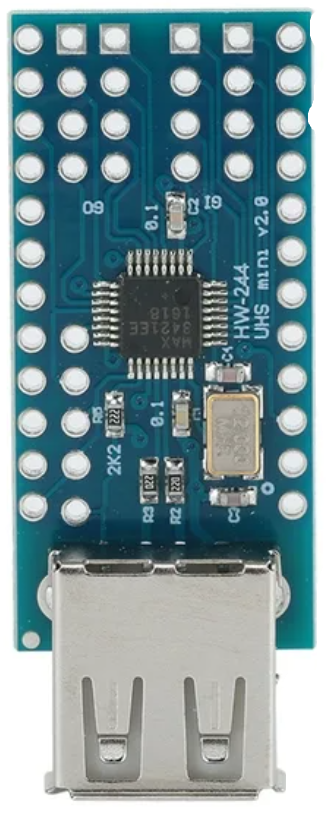
The USB Host Shield Mini V2 (Manufacturer Part ID: HW-244) is a compact and versatile shield designed by Arduino. It enables microcontrollers, such as the Arduino UNO, to interface with USB devices. This shield allows communication with peripherals like keyboards, mice, game controllers, USB storage devices, and more. It is particularly useful in projects requiring USB host functionality, such as custom HID (Human Interface Device) controllers or data logging systems.
Explore Projects Built with USB Host Shield Mini V2
 Open Project in Cirkit Designer
 Open Project in Cirkit Designer
 Open Project in Cirkit Designer
 Open Project in Cirkit Designer
Explore Projects Built with USB Host Shield Mini V2
Open Project in Cirkit DesignerOpen Project in Cirkit DesignerOpen Project in Cirkit DesignerOpen Project in Cirkit DesignerCommon Applications and Use Cases
- Connecting USB keyboards or mice to microcontrollers
- Interfacing with USB game controllers for robotics or gaming projects
- Reading data from USB flash drives
- Custom USB HID device development
- USB-based data acquisition systems
Technical Specifications
The USB Host Shield Mini V2 is built around the MAX3421E USB peripheral/host controller IC. Below are its key technical details:
Key Technical Details
- Operating Voltage: 5V (from Arduino board)
- Communication Interface: SPI (Serial Peripheral Interface)
- USB Port: Standard Type-A female connector
- Controller IC: MAX3421E
- Clock Speed: 12 MHz (crystal oscillator)
- Current Consumption: ~50mA (excluding connected USB device)
- Dimensions: 61mm x 26mm
- Compatibility: Arduino UNO, Mega, Leonardo, and other 5V logic boards
Pin Configuration and Descriptions
The USB Host Shield Mini V2 connects to the Arduino via SPI and additional control pins. Below is the pinout:
| Pin | Arduino Pin | Description |
|---|---|---|
MISO |
D12 | SPI Master-In-Slave-Out (data from shield to MCU) |
MOSI |
D11 | SPI Master-Out-Slave-In (data from MCU to shield) |
SCK |
D13 | SPI Clock |
SS |
D10 | SPI Slave Select (chip select for MAX3421E) |
INT |
D9 | Interrupt pin (used for USB event notifications) |
GND |
GND | Ground connection |
5V |
5V | Power supply from Arduino |
RST |
RESET | Reset pin for the shield |
Usage Instructions
How to Use the USB Host Shield Mini V2 in a Circuit
Hardware Setup:
- Mount the USB Host Shield Mini V2 onto your Arduino board.
- Connect a USB device (e.g., keyboard, mouse, or flash drive) to the shield's USB Type-A port.
- Ensure the Arduino is powered via USB or an external power source.
Install Required Libraries:
- Download and install the USB Host Shield Library 2.0 from the Arduino Library Manager:
- Open the Arduino IDE.
- Go to Sketch > Include Library > Manage Libraries.
- Search for "USB Host Shield Library 2.0" and click Install.
- Download and install the USB Host Shield Library 2.0 from the Arduino Library Manager:
Write and Upload Code:
- Use the library's example sketches to test the shield. Below is a sample code snippet to detect a USB device:
#include <Usb.h>
#include <usbhub.h>

// Create USB and USBHub objects
USB Usb;
USBHub Hub(&Usb);

void setup() {
  Serial.begin(9600); // Initialize serial communication
  if (Usb.Init() == -1) {
    Serial.println("USB Host Shield initialization failed!");
    while (1); // Halt if initialization fails
  }
  Serial.println("USB Host Shield initialized successfully.");
}

void loop() {
  Usb.Task(); // Process USB events
}
- Run the Code:
- Open the Serial Monitor in the Arduino IDE (set baud rate to 9600).
- Plug in a USB device and observe the output for connection status or errors.
Important Considerations and Best Practices
- Power Supply: Ensure the Arduino board provides sufficient power for the USB device. For high-power devices, use an external power source.
- Library Compatibility: Always use the latest version of the USB Host Shield Library 2.0 for optimal performance.
- Device Support: Not all USB devices are supported. Check the library documentation for a list of compatible devices.
- Interrupt Pin: Ensure the
INTpin is correctly connected to the Arduino's D9 pin for proper operation.
Troubleshooting and FAQs
Common Issues and Solutions
USB Host Shield Initialization Fails:
- Cause: Incorrect wiring or insufficient power.
- Solution: Verify all connections and ensure the Arduino is powered properly.
USB Device Not Detected:
- Cause: Unsupported USB device or faulty cable.
- Solution: Test with a different USB device or cable. Check the library documentation for compatibility.
Serial Monitor Shows No Output:
- Cause: Incorrect baud rate or code issue.
- Solution: Ensure the Serial Monitor is set to 9600 baud. Verify the uploaded code.
High Power USB Device Not Working:
- Cause: Insufficient power from the Arduino board.
- Solution: Use an external power supply or powered USB hub.
FAQs
Q1: Can I use this shield with a 3.3V Arduino board?
A1: No, the USB Host Shield Mini V2 is designed for 5V logic boards. Using it with a 3.3V board may damage the shield or the Arduino.
Q2: Does the shield support USB 3.0 devices?
A2: The shield supports USB 2.0 devices. USB 3.0 devices may work if they are backward compatible with USB 2.0.
Q3: Can I connect multiple USB devices simultaneously?
A3: Yes, but you will need a powered USB hub to connect multiple devices.
Q4: Is it possible to use this shield with non-Arduino microcontrollers?
A4: Yes, as long as the microcontroller supports SPI communication and 5V logic levels.
By following this documentation, you can effectively integrate the USB Host Shield Mini V2 into your projects and troubleshoot common issues.