
How to Use DC motor with Gear: Examples, Pinouts, and Specs
 Design with DC motor with Gear in Cirkit Designer
Introduction
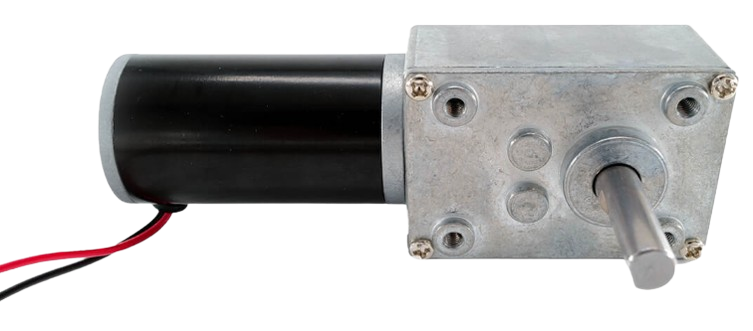
A DC motor with a gear mechanism is an electromechanical device that converts electrical energy into mechanical energy. The integrated gear system modifies the motor's output by increasing torque and reducing speed, making it ideal for applications requiring precise control and high torque at low speeds.
Explore Projects Built with DC motor with Gear
 Open Project in Cirkit Designer
 Open Project in Cirkit Designer
 Open Project in Cirkit Designer
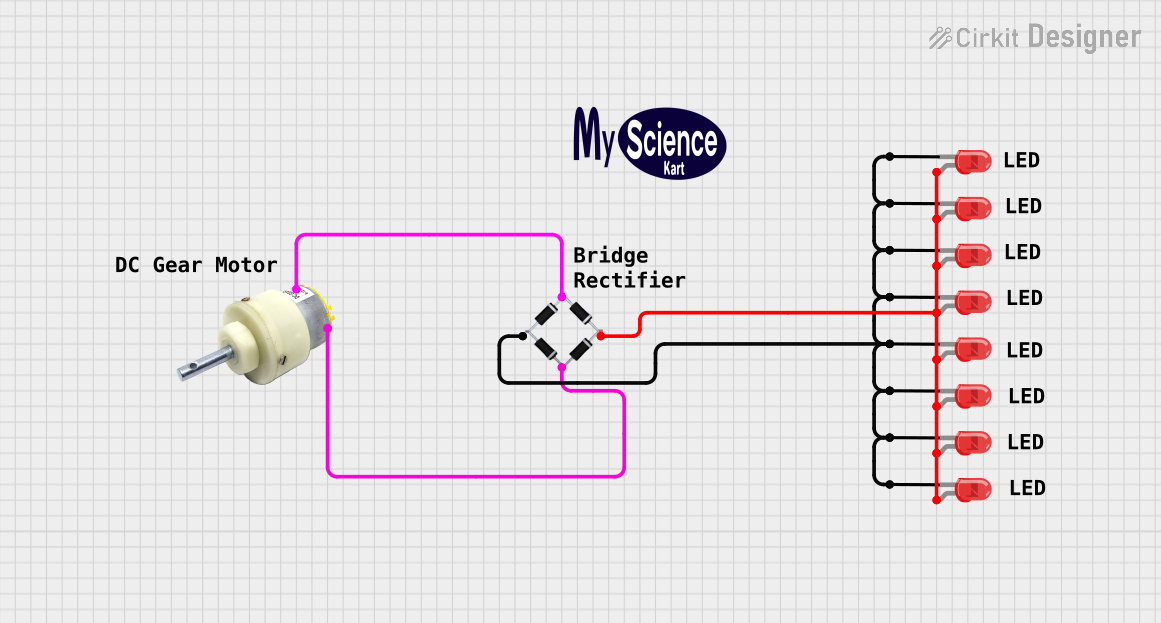 Open Project in Cirkit Designer
Explore Projects Built with DC motor with Gear
Open Project in Cirkit DesignerOpen Project in Cirkit DesignerOpen Project in Cirkit DesignerOpen Project in Cirkit DesignerCommon Applications and Use Cases
- Robotics: For driving wheels or robotic arms with controlled motion.
- Conveyor systems: To move objects at a consistent speed with high torque.
- Automated systems: Used in applications like door openers, camera pan-tilt mechanisms, and more.
- Toys and hobby projects: For creating motion in small-scale models or DIY projects.
Technical Specifications
Below are the typical specifications for a DC motor with a gear mechanism. Note that actual values may vary depending on the specific model.
| Parameter | Value |
|---|---|
| Operating Voltage | 6V to 12V |
| Rated Current | 100mA to 1A (depending on load) |
| Stall Current | Up to 2A |
| Gear Ratio | 10:1 to 100:1 (varies by model) |
| Output Shaft Speed | 10 RPM to 500 RPM (varies by model) |
| Torque | Up to 10 kg·cm (varies by model) |
| Shaft Diameter | 6mm (typical) |
| Motor Type | Brushed DC Motor |
Pin Configuration and Descriptions
DC motors with gears typically have two terminals for electrical connections. These terminals are used to control the motor's direction and speed.
| Pin | Description |
|---|---|
| + | Positive terminal: Connect to the positive voltage supply. |
| - | Negative terminal: Connect to ground or the negative voltage supply. |
Usage Instructions
How to Use the Component in a Circuit
- Power Supply: Ensure the motor is powered within its operating voltage range (e.g., 6V to 12V). Exceeding this range may damage the motor.
- Direction Control: To change the motor's rotation direction, reverse the polarity of the voltage applied to the terminals.
- Speed Control: Use a Pulse Width Modulation (PWM) signal to control the motor's speed. This can be achieved using a microcontroller like an Arduino.
- Motor Driver: Use an H-bridge motor driver (e.g., L298N or L293D) to safely control the motor's speed and direction.
Important Considerations and Best Practices
- Current Handling: Ensure your power supply and motor driver can handle the motor's stall current to avoid damage.
- Heat Dissipation: Prolonged operation at high torque may cause the motor to heat up. Allow for proper ventilation or cooling.
- Load Matching: Use a motor with an appropriate gear ratio and torque rating for your application to avoid overloading.
- Noise Suppression: Add capacitors (e.g., 0.1µF) across the motor terminals to reduce electrical noise.
Example: Connecting to an Arduino UNO
Below is an example of how to control a DC motor with a gear using an Arduino UNO and an L298N motor driver.
Circuit Connections
- Connect the motor terminals to the
OUT1andOUT2pins of the L298N driver. - Connect the
IN1andIN2pins of the L298N to Arduino digital pins 9 and 10, respectively. - Connect the
ENApin of the L298N to Arduino digital pin 3 (for PWM speed control). - Provide a suitable power supply to the motor driver (e.g., 12V).
Arduino Code
// Define motor control pins
const int IN1 = 9;  // Motor direction control pin 1
const int IN2 = 10; // Motor direction control pin 2
const int ENA = 3;  // Motor speed control (PWM) pin

void setup() {
  // Set motor control pins as outputs
  pinMode(IN1, OUTPUT);
  pinMode(IN2, OUTPUT);
  pinMode(ENA, OUTPUT);
}

void loop() {
  // Rotate motor in one direction
  digitalWrite(IN1, HIGH); // Set IN1 high
  digitalWrite(IN2, LOW);  // Set IN2 low
  analogWrite(ENA, 128);   // Set speed to 50% (PWM value: 128 out of 255)
  delay(2000);             // Run for 2 seconds

  // Stop the motor
  analogWrite(ENA, 0);     // Set speed to 0
  delay(1000);             // Wait for 1 second

  // Rotate motor in the opposite direction
  digitalWrite(IN1, LOW);  // Set IN1 low
  digitalWrite(IN2, HIGH); // Set IN2 high
  analogWrite(ENA, 200);   // Set speed to ~78% (PWM value: 200 out of 255)
  delay(2000);             // Run for 2 seconds

  // Stop the motor
  analogWrite(ENA, 0);     // Set speed to 0
  delay(1000);             // Wait for 1 second
}
Troubleshooting and FAQs
Common Issues and Solutions
Motor Does Not Spin:
- Check the power supply voltage and ensure it matches the motor's operating range.
- Verify all connections, especially the motor driver and Arduino pins.
- Ensure the motor driver is receiving the correct control signals.
Motor Spins in the Wrong Direction:
- Reverse the polarity of the motor terminals or swap the
IN1andIN2signals in the code.
- Reverse the polarity of the motor terminals or swap the
Motor Overheats:
- Reduce the load on the motor or use a motor with a higher torque rating.
- Ensure proper ventilation or cooling.
Noisy Operation:
- Add capacitors (e.g., 0.1µF) across the motor terminals to suppress electrical noise.
- Check for mechanical issues in the gear system.
FAQs
Can I run the motor directly from an Arduino pin? No, the Arduino cannot supply enough current to drive the motor. Always use a motor driver or external power supply.
What happens if I exceed the motor's voltage rating? Exceeding the voltage rating can damage the motor or reduce its lifespan. Always operate within the specified range.
How do I choose the right gear ratio? Select a gear ratio based on the required torque and speed for your application. Higher gear ratios provide more torque but reduce speed.
This documentation provides a comprehensive guide to using a DC motor with a gear mechanism effectively.