The Modul Powerbank 1 USB by PB is a compact and efficient power management module designed to provide a stable 5V output via a USB port. It is commonly used in DIY electronics projects, portable power solutions, and as a power source for microcontrollers like Arduino. This module integrates a boost converter to step up the input voltage (e.g., from a single lithium-ion battery) to a regulated 5V output, making it ideal for powering USB devices.
Explore Projects Built with modul powerbank 1 usb
Use Cirkit Designer to design, explore, and prototype these projects online. Some projects support real-time simulation. Click "Open Project" to start designing instantly!
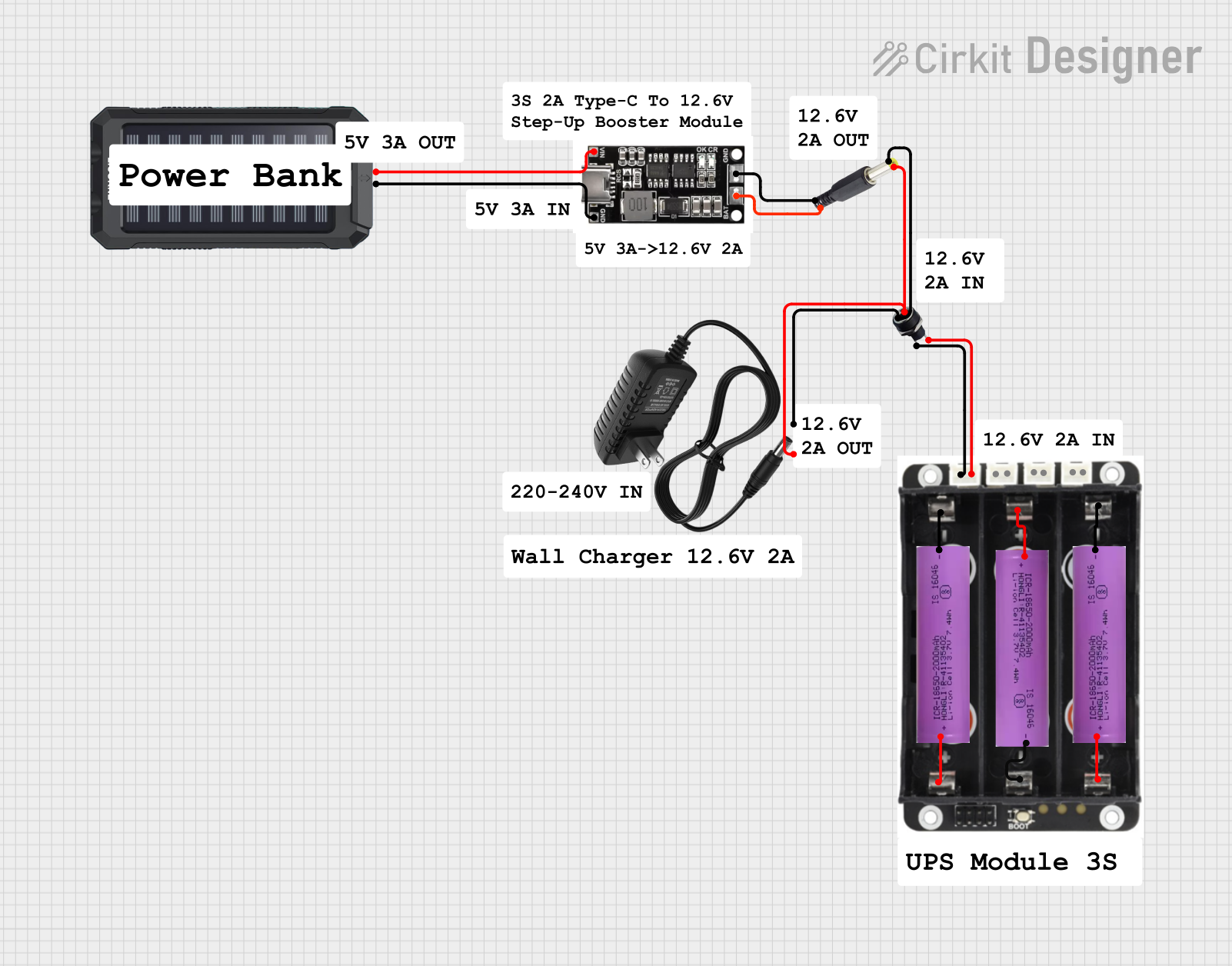
This circuit is a power management system that integrates a 12V power supply, a solar charger power bank, and multiple Li-ion batteries to provide a stable power output. The Waveshare UPS 3S manages the input from the power sources and batteries, ensuring continuous power delivery. The MRB045 module is used to interface the solar charger with the rest of the system.
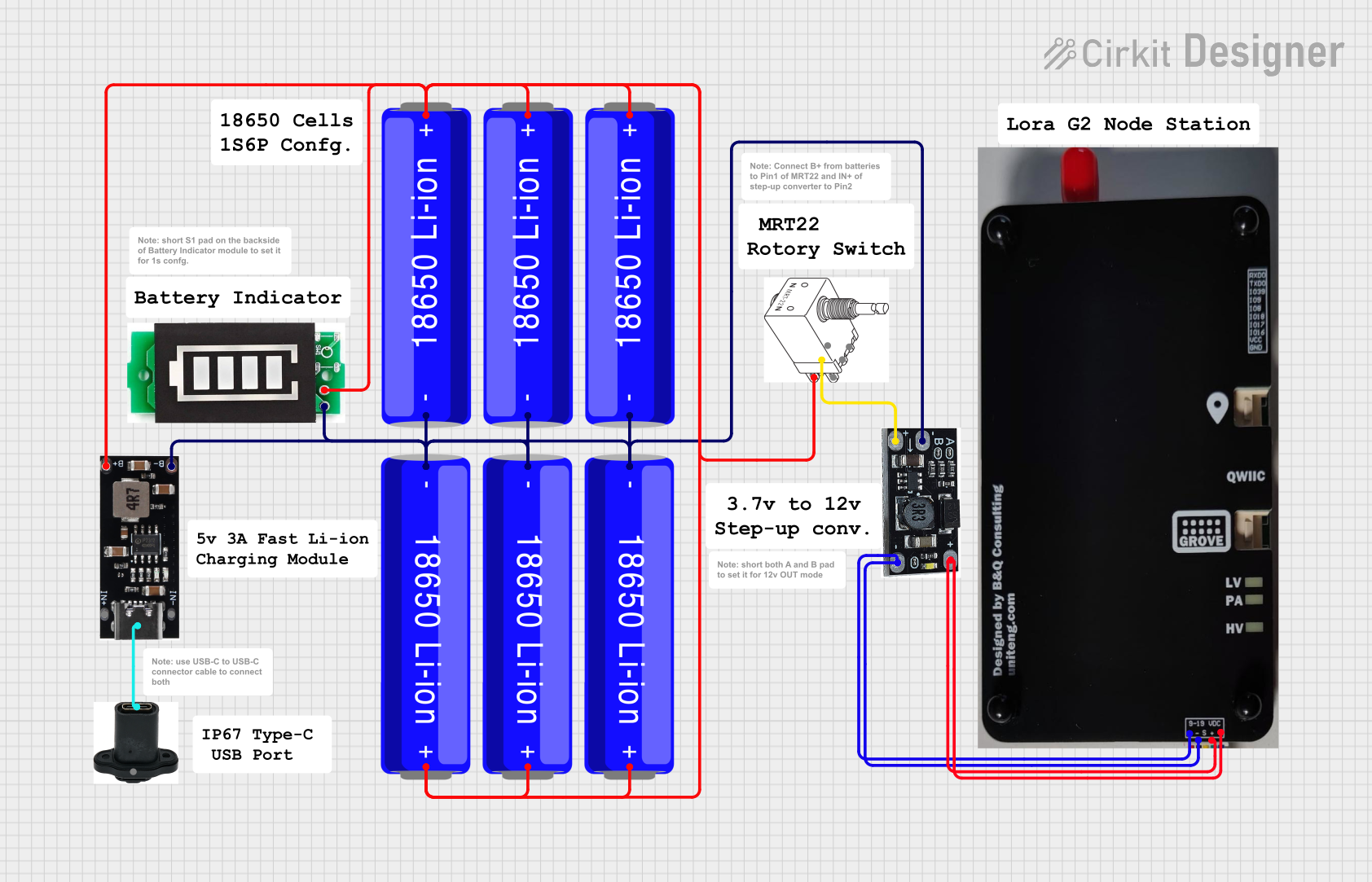
This circuit is a portable power supply system that uses multiple 18650 Li-ion batteries to provide a stable 5V output through a boost converter. It includes a fast charging module with a USB-C input for recharging the batteries and a battery indicator for monitoring the battery status. The system powers a Lora G2 Node Station, making it suitable for wireless communication applications.
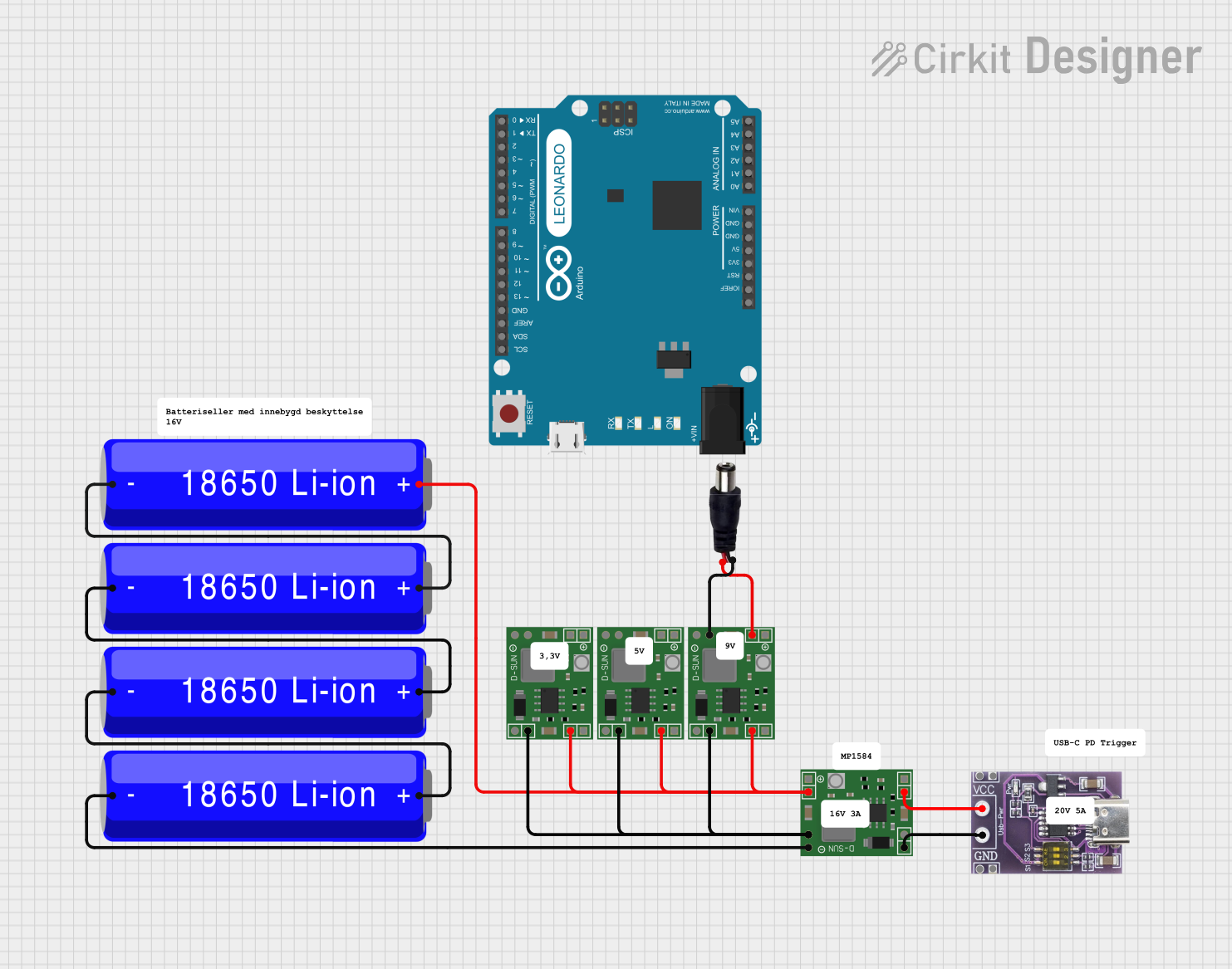
This circuit is a power management system that uses multiple 18650 Li-ion batteries connected in series to provide a stable power output. The batteries are regulated by MP1584EN power regulator boards, which step down the voltage to a suitable level for the connected USB-C PD trigger board and a power jack. The system ensures a consistent power supply for devices connected to the USB-C port and the power jack.
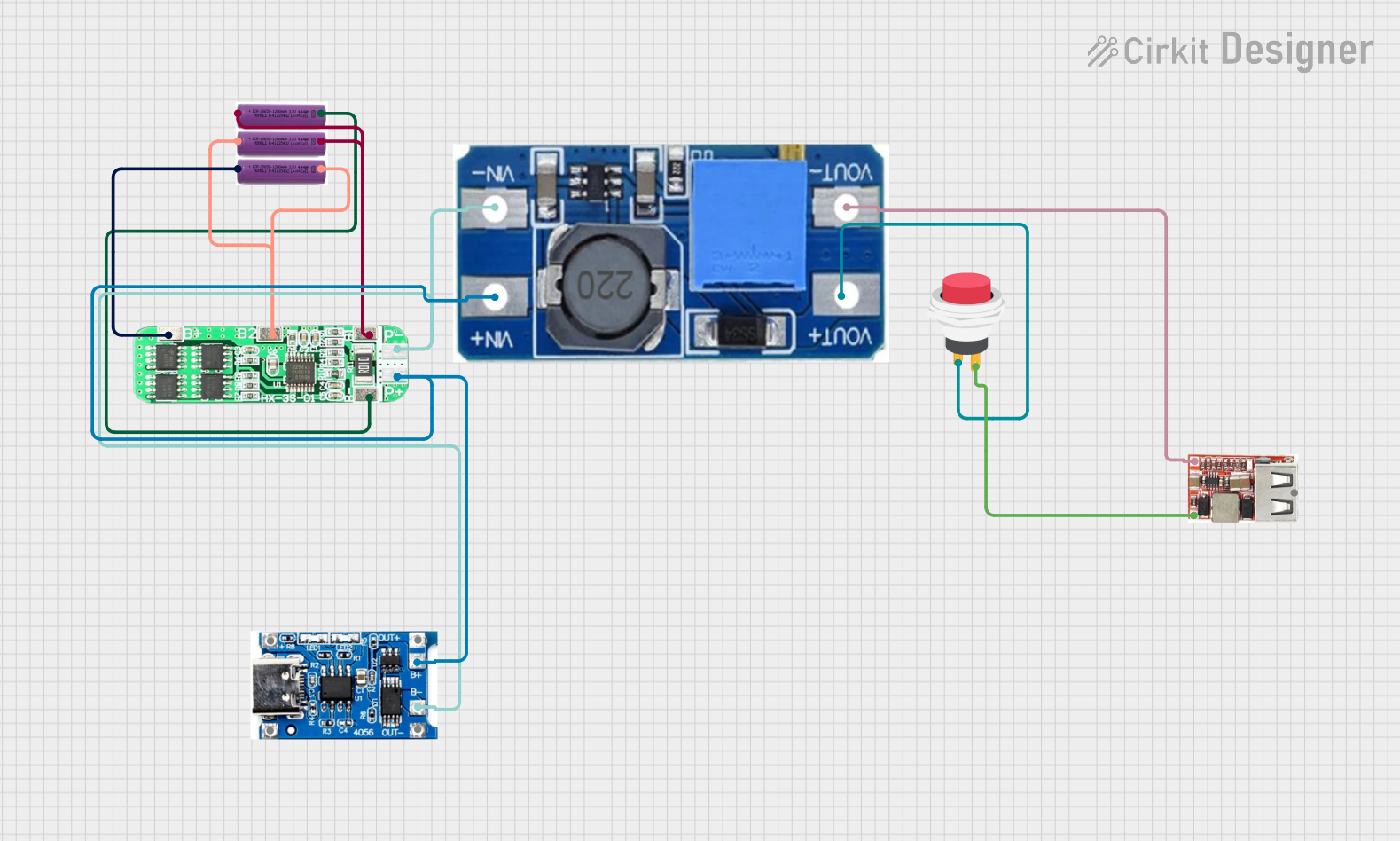
This circuit is a battery management and power supply system that uses three 3.7V batteries connected to a 3S 10A Li-ion 18650 Charger Protection Board Module for balanced charging and protection. The system includes a TP4056 Battery Charging Protection Module for additional charging safety, a Step Up Boost Power Converter to regulate and boost the voltage, and a USB regulator to provide a stable 5V output, controlled by a push switch.
DIY power banks for charging smartphones, tablets, or other USB devices.
Portable power solutions for microcontroller-based projects (e.g., Arduino, Raspberry Pi).
Emergency backup power for small electronic devices.
Battery-powered IoT devices.
Technical Specifications
Below are the key technical details of the Modul Powerbank 1 USB:
Parameter
Value
Input Voltage Range
2.5V - 4.2V (single lithium cell)
Output Voltage
5V (regulated)
Output Current
Up to 1A
Efficiency
Up to 92%
USB Port Type
Standard USB-A
Dimensions
25mm x 15mm x 5mm
Protection Features
Overcurrent, short circuit, and thermal protection
Pin Configuration and Descriptions
The module has a simple pinout for easy integration into circuits:
Pin Name
Description
VIN+
Positive input terminal (connect to the positive terminal of the battery).
VIN-
Negative input terminal (connect to the negative terminal of the battery).
USB-A Port
Standard USB output port for powering or charging USB devices.
Usage Instructions
How to Use the Modul Powerbank 1 USB in a Circuit
Connect the Input Voltage:
Attach a single lithium-ion battery (e.g., 18650 cell) to the VIN+ and VIN- terminals.
Ensure the battery voltage is within the range of 2.5V to 4.2V.
Connect the Load:
Plug the USB device or circuit into the USB-A port of the module.
The module will automatically regulate the input voltage to provide a stable 5V output.
Power On:
Once the battery is connected, the module will begin supplying power to the USB port.
Important Considerations and Best Practices
Battery Selection: Use a high-quality lithium-ion battery with a capacity of at least 1000mAh for optimal performance.
Heat Management: Avoid drawing more than 1A continuously to prevent overheating. If higher currents are required, consider adding a heatsink or using a module with a higher current rating.
Polarity Check: Double-check the polarity of the input connections (VIN+ and VIN-) to avoid damaging the module.
Arduino Compatibility: This module can be used to power an Arduino UNO via its USB port. Ensure the total current draw of the Arduino and connected peripherals does not exceed 1A.
Example: Powering an Arduino UNO
To use the Modul Powerbank 1 USB with an Arduino UNO:
Connect a fully charged lithium-ion battery to the module's input terminals.
Plug the USB-A port of the module into the Arduino UNO's USB port using a USB cable.
The Arduino UNO will power on and operate as usual.
Sample Arduino Code
Here is an example of a simple Arduino sketch to test the setup:
// Blink an LED connected to pin 13 on the Arduino UNO
// Ensure the Modul Powerbank 1 USB is providing stable 5V power

void setup() {
  pinMode(13, OUTPUT); // Set pin 13 as an output
}

void loop() {
  digitalWrite(13, HIGH); // Turn the LED on
  delay(1000);            // Wait for 1 second
  digitalWrite(13, LOW);  // Turn the LED off
  delay(1000);            // Wait for 1 second
}
Troubleshooting and FAQs
Common Issues and Solutions
No Output Voltage:
Cause: The input voltage is too low or the battery is discharged.
Solution: Check the battery voltage and ensure it is within the 2.5V to 4.2V range.
Overheating:
Cause: Excessive current draw or poor ventilation.
Solution: Reduce the load current or improve airflow around the module.
Device Not Charging:
Cause: The connected device requires more than 1A of current.
Solution: Use a device with lower power requirements or a higher-capacity power module.
Module Not Powering On:
Cause: Incorrect polarity or loose connections.
Solution: Verify the polarity of the input connections and ensure all connections are secure.
FAQs
Q: Can I use this module with a 3.7V lithium-polymer battery?
A: Yes, the module is compatible with 3.7V lithium-polymer batteries, as their voltage range (typically 3.0V to 4.2V) falls within the module's input range.
Q: Is it safe to charge the battery while using the module?
A: No, this module does not include a built-in charging circuit. Use a separate lithium-ion battery charger to safely charge the battery.
Q: Can I use this module to power a Raspberry Pi?
A: While the module can provide 5V, the current output (1A) may not be sufficient for all Raspberry Pi models, especially when peripherals are connected.
Q: What happens if I reverse the input polarity?
A: The module may be damaged if the input polarity is reversed. Always double-check the connections before powering on.
This concludes the documentation for the Modul Powerbank 1 USB.


 Open Project in Cirkit Designer