
How to Use PLC OMRON CP1E: Examples, Pinouts, and Specs
 Design with PLC OMRON CP1E in Cirkit Designer
Introduction
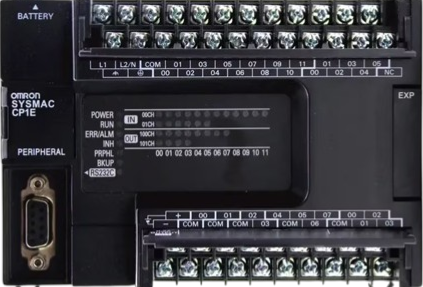
The OMRON CP1E is a compact and versatile programmable logic controller (PLC) designed for small to medium automation applications. It offers a user-friendly programming environment, built-in input/output (I/O) options, and support for various communication protocols. The CP1E is ideal for controlling machinery, industrial processes, and other automation tasks where reliability and efficiency are critical.
Explore Projects Built with PLC OMRON CP1E
 Open Project in Cirkit Designer
 Open Project in Cirkit Designer
 Open Project in Cirkit Designer
 Open Project in Cirkit Designer
Explore Projects Built with PLC OMRON CP1E
Open Project in Cirkit DesignerOpen Project in Cirkit DesignerOpen Project in Cirkit DesignerOpen Project in Cirkit DesignerCommon Applications
- Industrial machinery control
- Conveyor systems
- Packaging machines
- HVAC systems
- Small-scale process automation
- Building automation
Technical Specifications
Key Technical Details
| Parameter | Specification |
|---|---|
| Manufacturer | OMRON |
| Part Number | CP1E |
| Power Supply Voltage | 24 VDC or 100-240 VAC (model-dependent) |
| Input Voltage Range | 24 VDC (for digital inputs) |
| Output Type | Relay or transistor (model-dependent) |
| Number of I/O Points | 10 to 60 (depending on model) |
| Communication Interfaces | RS-232C, RS-485, USB, and optional Ethernet |
| Programming Language | Ladder Logic (IEC 61131-3 compliant) |
| Memory Capacity | 2 KB to 8 KB (depending on model) |
| Operating Temperature | 0°C to 55°C |
| Dimensions | Varies by model (e.g., 90 x 50 x 85 mm for CP1E-N) |
| Certifications | CE, UL, cUL |
Pin Configuration and Descriptions
The CP1E PLC has multiple models with varying I/O configurations. Below is an example of the pin configuration for a CP1E-N20 model (20 I/O points):
Input Terminals
| Pin Number | Description | Voltage Level | Notes |
|---|---|---|---|
| 0.00 | Digital Input 0 | 24 VDC | Connect to input device |
| 0.01 | Digital Input 1 | 24 VDC | Connect to input device |
| 0.02 | Digital Input 2 | 24 VDC | Connect to input device |
| 0.03 | Digital Input 3 | 24 VDC | Connect to input device |
| 0.04 | Digital Input 4 | 24 VDC | Connect to input device |
Output Terminals
| Pin Number | Description | Output Type | Notes |
|---|---|---|---|
| 100.00 | Digital Output 0 | Relay/Transistor | Connect to output device |
| 100.01 | Digital Output 1 | Relay/Transistor | Connect to output device |
| 100.02 | Digital Output 2 | Relay/Transistor | Connect to output device |
| 100.03 | Digital Output 3 | Relay/Transistor | Connect to output device |
Power and Communication Terminals
| Pin Number | Description | Notes |
|---|---|---|
| L/+ | Power Supply (Live) | Connect to 24 VDC or 100-240 VAC (model-dependent) |
| N/- | Power Supply (Neutral) | Connect to ground or neutral line |
| RS-232C TX | Transmit Data | For RS-232C communication |
| RS-232C RX | Receive Data | For RS-232C communication |
Usage Instructions
How to Use the CP1E in a Circuit
- Power Supply Connection:
- Connect the power supply to the L/+ and N/- terminals. Ensure the voltage matches the model's requirements (24 VDC or 100-240 VAC).
- Input Device Connection:
- Connect sensors, switches, or other input devices to the input terminals (e.g., 0.00, 0.01).
- Output Device Connection:
- Connect actuators, relays, or other output devices to the output terminals (e.g., 100.00, 100.01).
- Programming:
- Use OMRON's CX-Programmer software to write and upload ladder logic programs to the CP1E via USB or RS-232C.
- Communication Setup:
- Configure communication settings (e.g., baud rate, parity) for RS-232C, RS-485, or Ethernet (if applicable).
Important Considerations and Best Practices
- Power Supply: Use a regulated power supply to avoid voltage fluctuations.
- Wiring: Ensure proper insulation and secure connections to prevent short circuits.
- Grounding: Properly ground the PLC to reduce electrical noise and improve reliability.
- Programming: Test ladder logic programs in simulation mode before uploading to the PLC.
- Maintenance: Periodically check connections and clean the PLC to ensure long-term performance.
Example Code for Arduino UNO Communication
The CP1E can communicate with an Arduino UNO via RS-232C. Below is an example of Arduino code to send data to the CP1E:
#include <SoftwareSerial.h>

// Define RX and TX pins for SoftwareSerial
SoftwareSerial plcSerial(10, 11); // RX = pin 10, TX = pin 11

void setup() {
  // Initialize serial communication with the PLC
  plcSerial.begin(9600); // Set baud rate to match CP1E settings
  Serial.begin(9600);    // For debugging via Serial Monitor

  // Send initialization message to PLC
  plcSerial.println("START"); // Replace with actual command for CP1E
  Serial.println("Communication with CP1E started.");
}

void loop() {
  // Example: Send a command to the PLC every 5 seconds
  plcSerial.println("COMMAND"); // Replace with actual command for CP1E
  Serial.println("Command sent to CP1E.");
  delay(5000); // Wait 5 seconds
}
Note: Ensure the RS-232C-to-TTL converter is used between the Arduino and CP1E to match voltage levels.
Troubleshooting and FAQs
Common Issues and Solutions
PLC Not Powering On:
- Cause: Incorrect power supply voltage or loose connections.
- Solution: Verify the power supply voltage and check all connections.
Inputs Not Detected:
- Cause: Faulty wiring or incorrect input voltage.
- Solution: Check the wiring and ensure the input voltage matches the PLC's requirements.
Outputs Not Activating:
- Cause: Incorrect ladder logic program or faulty output device.
- Solution: Review the ladder logic program and test the output device separately.
Communication Failure:
- Cause: Incorrect communication settings or damaged cables.
- Solution: Verify baud rate, parity, and other settings. Replace damaged cables.
FAQs
Can the CP1E be expanded with additional I/O modules?
- Yes, the CP1E supports expansion modules for additional I/O points.
What software is required to program the CP1E?
- OMRON's CX-Programmer software is used for programming the CP1E.
Does the CP1E support Ethernet communication?
- Some models support Ethernet via optional modules.
What is the maximum cable length for RS-232C communication?
- The maximum recommended length is 15 meters.
Can the CP1E be used in harsh environments?
- The CP1E is designed for industrial use but should be protected from extreme temperatures, moisture, and dust.