The DFPlayer Pro, manufactured by DFRobot, is a compact and versatile MP3 player module designed for audio playback applications. It supports audio files stored on a micro SD card and features a built-in amplifier for direct speaker output. The module is compatible with various audio formats, such as MP3, WAV, and WMA, and can be easily controlled via serial communication, making it an excellent choice for projects involving microcontrollers like Arduino.
Explore Projects Built with DFPlayer Pro
Use Cirkit Designer to design, explore, and prototype these projects online. Some projects support real-time simulation. Click "Open Project" to start designing instantly!
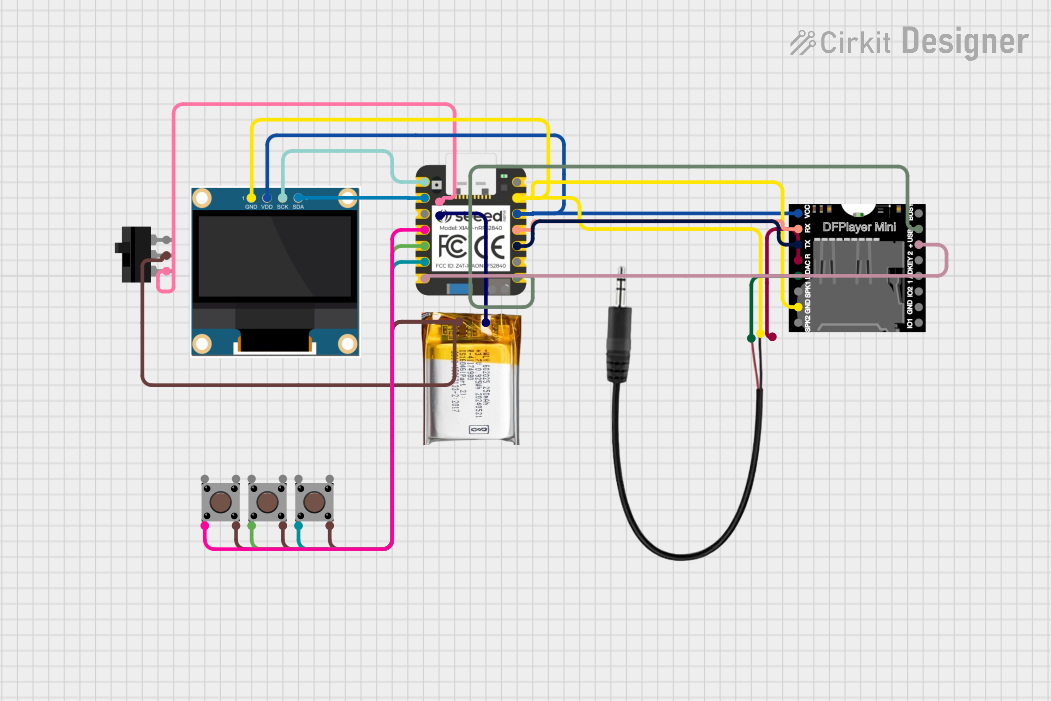
This circuit is an MP3 player system controlled by a Seeed Studio nRF52840 microcontroller. It includes a DFPlayer MINI for audio playback, a 0.96" OLED display for visual feedback, and multiple pushbuttons for user interaction. The system is powered by a 3.7V LiPo battery and outputs audio through a 3.5mm audio jack.
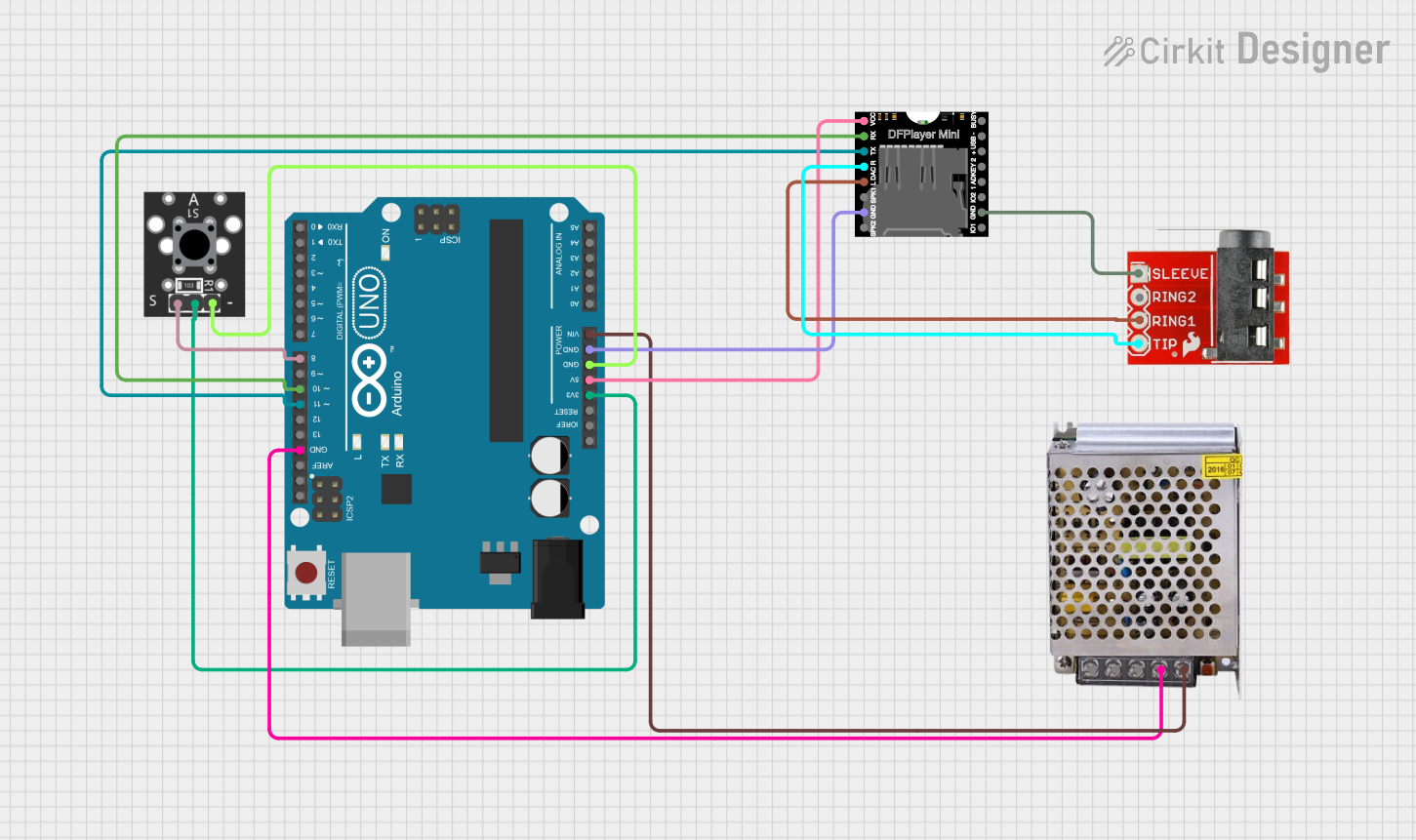
This circuit is a simple audio playback system controlled by an Arduino UNO. It uses a DFPlayer Mini to play audio files from an SD card, which are output through a TRRS 3.5mm jack. A button connected to the Arduino triggers the playback of the first audio file when pressed.
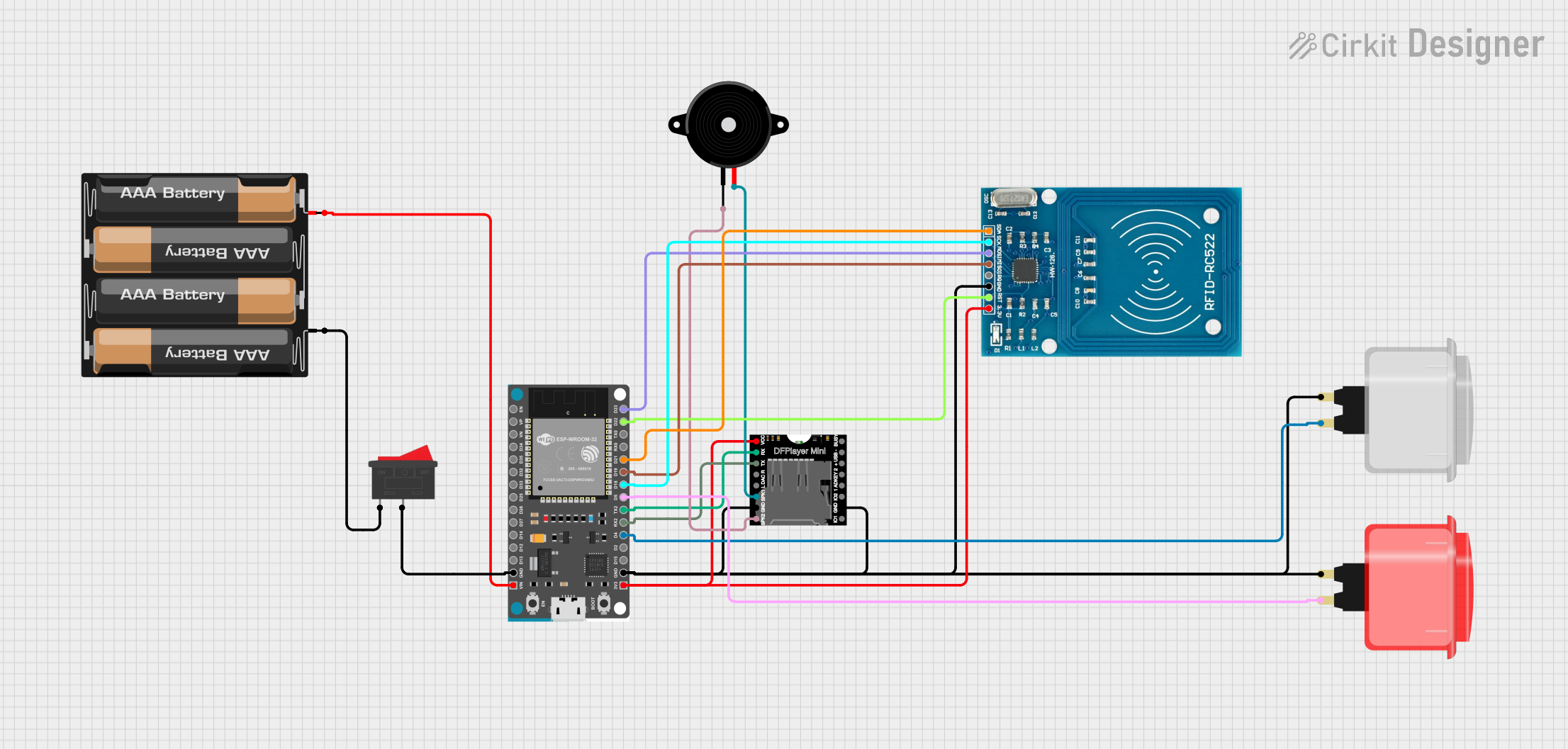
This circuit features an ESP32 Devkit V1 microcontroller interfaced with a DFPlayer Mini MP3 player module, an RFID-RC522 reader, a piezo speaker, and two arcade buttons. The ESP32 controls audio playback through the DFPlayer Mini, which is connected to the speaker, and uses the RFID reader to trigger specific audio tracks based on RFID tag data. The arcade buttons are used to control playback and adjust volume, while a rocker switch and battery mount provide power management.
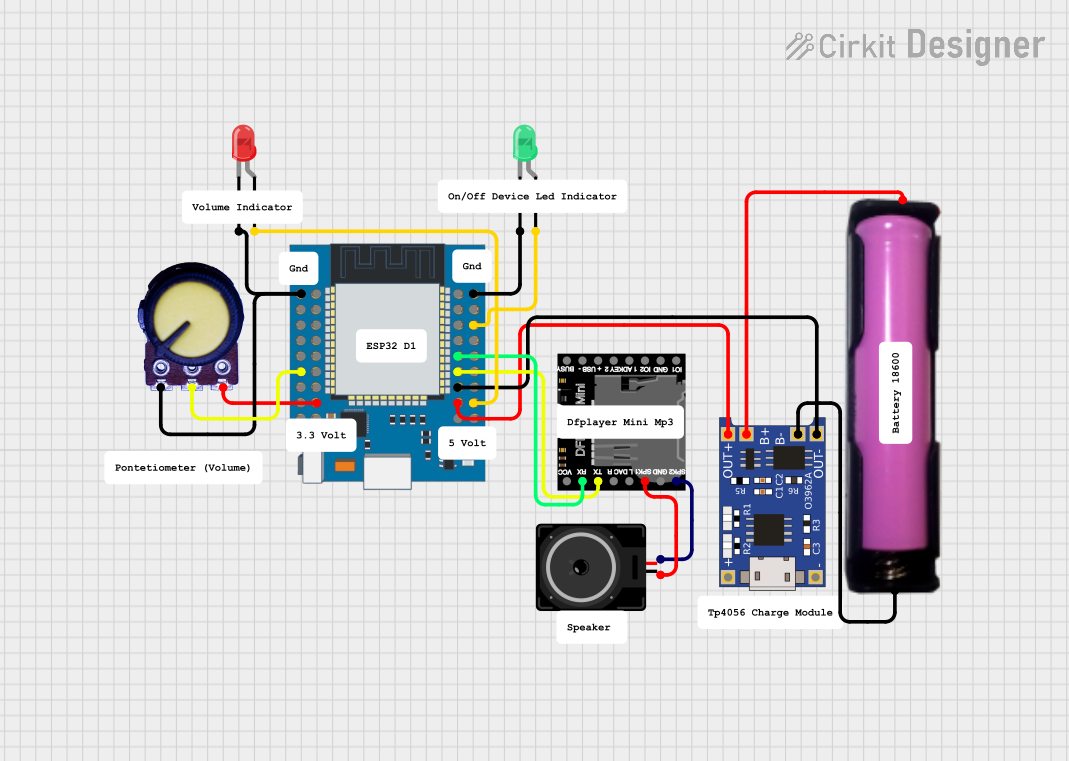
This circuit features an ESP32 Mini microcontroller connected to a DFPlayer Mini MP3 module for audio playback, with a loudspeaker attached for sound output. The ESP32 controls two LEDs (green and red) and reads an analog value from a potentiometer. Power management is handled by a TP4056 charging module connected to an 18650 battery, providing power to the ESP32 and other components.
Below are the key technical details of the DFPlayer Pro:
Parameter
Specification
Operating Voltage
3.3V - 5.0V
Operating Current
20mA (idle), up to 200mA (playback)
Audio Formats Supported
MP3, WAV, WMA
Storage Media
Micro SD card (up to 32GB)
Communication Interface
UART (Serial)
Built-in Amplifier
Yes (3W for 4Ω speakers)
Output Modes
Speaker output, headphone output
Dimensions
22mm x 22mm
Pin Configuration and Descriptions
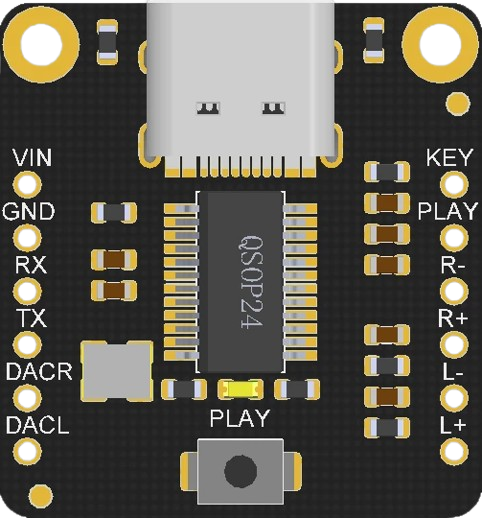
The DFPlayer Pro has a total of 16 pins. Below is the pinout and description:
Pin
Name
Description
1
VCC
Power supply input (3.3V - 5.0V)
2
GND
Ground connection
3
RX
UART receive pin (connect to microcontroller TX)
4
TX
UART transmit pin (connect to microcontroller RX)
5
SPK_1
Speaker output (positive terminal)
6
SPK_2
Speaker output (negative terminal)
7
DAC_R
Right channel audio output (for external amplifier or headphones)
8
DAC_L
Left channel audio output (for external amplifier or headphones)
9
BUSY
Indicates playback status (LOW = playing, HIGH = idle)
10
IO_1
General-purpose input/output pin
11
IO_2
General-purpose input/output pin
12
ADKEY1
Analog input for key control (e.g., buttons)
13
ADKEY2
Analog input for key control (e.g., buttons)
14
USB+
USB data positive (for USB communication)
15
USB-
USB data negative (for USB communication)
16
RESET
Reset pin (active LOW)
Usage Instructions
How to Use the DFPlayer Pro in a Circuit
Power Supply: Connect the VCC pin to a 3.3V or 5.0V power source and GND to ground.
Audio Output:
For speaker output, connect a 4Ω or 8Ω speaker to the SPK_1 and SPK_2 pins.
For headphone or external amplifier output, use the DAC_R and DAC_L pins.
Microcontroller Connection:
Connect the RX pin of the DFPlayer Pro to the TX pin of the microcontroller.
Connect the TX pin of the DFPlayer Pro to the RX pin of the microcontroller.
Storage Media: Insert a micro SD card with audio files into the module's SD card slot.
Control: Use UART commands to control playback, volume, and other functions.
Important Considerations and Best Practices
Ensure the micro SD card is formatted as FAT16 or FAT32 for compatibility.
Use decoupling capacitors near the power supply pins to reduce noise.
Avoid exceeding the maximum current rating of the module to prevent damage.
Use a logic level shifter if your microcontroller operates at 3.3V and the DFPlayer Pro is powered at 5.0V.
Example: Using DFPlayer Pro with Arduino UNO
Below is an example of how to control the DFPlayer Pro using an Arduino UNO:
#include "SoftwareSerial.h"

// Define RX and TX pins for SoftwareSerial
SoftwareSerial mySerial(10, 11); // RX = pin 10, TX = pin 11

void setup() {
  mySerial.begin(9600); // Initialize SoftwareSerial at 9600 baud
  Serial.begin(9600);   // Initialize hardware serial for debugging

  delay(1000); // Wait for the DFPlayer Pro to initialize

  // Send initialization command to DFPlayer Pro
  mySerial.write(0x7E); // Start byte
  mySerial.write(0xFF); // Version
  mySerial.write(0x06); // Length
  mySerial.write(0x09); // Command: Select device
  mySerial.write(0x00); // Feedback
  mySerial.write(0x02); // Parameter 1: SD card
  mySerial.write(0x00); // Parameter 2
  mySerial.write(0xFE); // Checksum (high byte)
  mySerial.write(0xED); // Checksum (low byte)
  mySerial.write(0xEF); // End byte

  Serial.println("DFPlayer Pro initialized.");
}

void loop() {
  // Example: Play the first audio file
  mySerial.write(0x7E); // Start byte
  mySerial.write(0xFF); // Version
  mySerial.write(0x06); // Length
  mySerial.write(0x03); // Command: Play track
  mySerial.write(0x00); // Feedback
  mySerial.write(0x00); // Parameter 1: High byte of track number
  mySerial.write(0x01); // Parameter 2: Low byte of track number
  mySerial.write(0xFE); // Checksum (high byte)
  mySerial.write(0xF7); // Checksum (low byte)
  mySerial.write(0xEF); // End byte

  delay(5000); // Wait for 5 seconds before repeating
}
Troubleshooting and FAQs
Common Issues and Solutions
No Sound Output:
Ensure the speaker or headphones are properly connected to the correct pins.
Verify that the audio file format is supported (e.g., MP3, WAV, WMA).
Check the micro SD card for proper formatting (FAT16 or FAT32).
Module Not Responding:
Confirm that the RX and TX pins are correctly connected to the microcontroller.
Ensure the baud rate in the code matches the module's default (9600 bps).
Check the power supply voltage and current to ensure it meets the module's requirements.
Playback Stops Unexpectedly:
Verify the micro SD card is securely inserted and not corrupted.
Check for loose connections in the circuit.
FAQs
Q1: Can I use the DFPlayer Pro without a microcontroller?
A1: Yes, the DFPlayer Pro can be controlled using buttons connected to the ADKEY1 and ADKEY2 pins.
Q2: What is the maximum speaker power supported?
A2: The built-in amplifier supports up to 3W for 4Ω speakers.
Q3: How do I adjust the volume?
A3: Volume can be adjusted via UART commands or by using external buttons connected to the ADKEY pins.
Q4: Can I use a USB drive instead of a micro SD card?
A4: Yes, the DFPlayer Pro supports USB drives via the USB+ and USB- pins.

 Open Project in Cirkit Designer