
How to Use Fuse: Examples, Pinouts, and Specs
 Design with Fuse in Cirkit Designer
Introduction
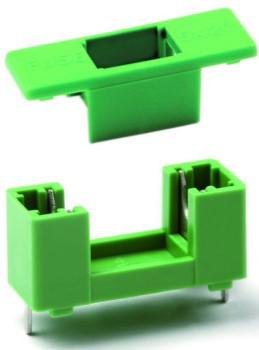
The Stelvio Kontek PTF78 is a fuse designed to protect electrical circuits by melting and breaking the circuit when excessive current flows through it. This safety device is crucial in preventing damage to electronic components and reducing the risk of fire. Fuses are commonly used in a variety of applications, including automotive, industrial, and consumer electronics.
Explore Projects Built with Fuse
 Open Project in Cirkit Designer
 Open Project in Cirkit Designer
 Open Project in Cirkit Designer
 Open Project in Cirkit Designer
Explore Projects Built with Fuse
Open Project in Cirkit DesignerOpen Project in Cirkit DesignerOpen Project in Cirkit DesignerOpen Project in Cirkit DesignerTechnical Specifications
Key Technical Details
| Parameter | Value |
|---|---|
| Manufacturer | Stelvio Kontek |
| Part ID | PTF78 |
| Rated Voltage | 250V AC |
| Rated Current | 1A, 2A, 3A, 5A, 10A (varies) |
| Breaking Capacity | 100A @ 250V AC |
| Fuse Type | Time-Lag (Slow Blow) |
| Body Material | Ceramic |
| Operating Temp | -55°C to +125°C |
Pin Configuration and Descriptions
The PTF78 fuse does not have pins in the traditional sense, as it is a cylindrical component with metal end caps. However, for the sake of clarity, we will describe the two ends:
| Pin Number | Description |
|---|---|
| 1 | Fuse End Cap (Input) |
| 2 | Fuse End Cap (Output) |
Usage Instructions
How to Use the PTF78 Fuse in a Circuit
Identify the Fuse Rating: Determine the appropriate current rating for your application. The PTF78 is available in various current ratings (1A, 2A, 3A, 5A, 10A). Choose a fuse with a current rating slightly higher than the normal operating current of your circuit.
Insert the Fuse: Place the fuse in a fuse holder or directly solder it into the circuit. Ensure that the fuse is securely connected to both the input and output terminals.
Power On the Circuit: Once the fuse is in place, power on the circuit. The fuse will protect the circuit by breaking the connection if the current exceeds the rated value.
Important Considerations and Best Practices
- Correct Rating: Always use a fuse with the correct current rating for your application. Using a fuse with a higher rating can result in insufficient protection, while a lower rating can cause unnecessary interruptions.
- Secure Connections: Ensure that the fuse is securely connected to prevent loose connections, which can lead to overheating and potential failure.
- Regular Inspection: Periodically inspect the fuse for signs of wear or damage. Replace the fuse if it shows any signs of deterioration.
Troubleshooting and FAQs
Common Issues Users Might Face
Fuse Blows Frequently:
- Cause: The fuse rating may be too low for the application.
- Solution: Verify the normal operating current of your circuit and select a fuse with a slightly higher rating.
Fuse Does Not Blow When Expected:
- Cause: The fuse rating may be too high, or there may be a fault in the circuit.
- Solution: Check the circuit for faults and ensure the fuse rating is appropriate for the application.
Overheating Fuse:
- Cause: Loose connections or an underrated fuse.
- Solution: Ensure secure connections and verify that the fuse rating matches the circuit requirements.
FAQs
Q: Can I use the PTF78 fuse in an automotive application? A: Yes, the PTF78 fuse can be used in automotive applications, provided the voltage and current ratings are suitable for the specific use case.
Q: How do I know if the fuse has blown? A: A blown fuse will have a visible break in the fuse element or may show signs of discoloration. You can also use a multimeter to check for continuity.
Q: Can I replace a blown PTF78 fuse with a different type of fuse? A: It is recommended to replace a blown PTF78 fuse with the same type and rating to ensure proper protection. Using a different type of fuse may not provide the same level of protection.
Conclusion
The Stelvio Kontek PTF78 fuse is an essential component for protecting electrical circuits from excessive current. By following the usage instructions and best practices outlined in this documentation, you can ensure the safe and effective operation of your electronic devices. Regular inspection and proper selection of fuse ratings will help maintain the longevity and reliability of your circuits.