
How to Use PiSugar 3: Examples, Pinouts, and Specs
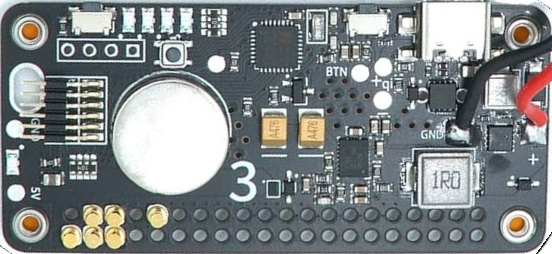
 Design with PiSugar 3 in Cirkit Designer
Introduction
PiSugar 3, manufactured by RPi (Part ID: 3), is a compact and versatile power bank designed specifically for Raspberry Pi projects. It provides a rechargeable battery solution, enabling portable operation of Raspberry Pi devices without the need for external power sources. With its seamless integration and robust design, PiSugar 3 is ideal for applications requiring mobility, such as IoT devices, robotics, and portable computing projects.
Explore Projects Built with PiSugar 3
 Open Project in Cirkit Designer
 Open Project in Cirkit Designer
 Open Project in Cirkit Designer
 Open Project in Cirkit Designer
Explore Projects Built with PiSugar 3
Open Project in Cirkit DesignerOpen Project in Cirkit DesignerOpen Project in Cirkit DesignerOpen Project in Cirkit DesignerCommon Applications and Use Cases
- Portable Raspberry Pi projects (e.g., handheld gaming consoles, portable media centers)
- IoT devices requiring uninterrupted power
- Robotics and automation systems
- Educational and prototyping projects
- Field data collection and monitoring systems
Technical Specifications
Below are the key technical details and pin configuration for the PiSugar 3:
Key Technical Details
| Parameter | Specification |
|---|---|
| Input Voltage | 5V (via USB-C port) |
| Output Voltage | 5V (regulated for Raspberry Pi) |
| Battery Capacity | 5000mAh (varies by model) |
| Charging Current | Up to 2A |
| Output Current | Up to 3A |
| Dimensions | 65mm x 56mm x 15mm |
| Weight | ~50g |
| Battery Type | Lithium Polymer (LiPo) |
| Protection Features | Overcharge, over-discharge, short-circuit protection |
Pin Configuration and Descriptions
The PiSugar 3 connects directly to the GPIO pins of the Raspberry Pi. Below is the pin configuration:
| Pin Number | Pin Name | Description |
|---|---|---|
| 2 | 5V Power Out | Supplies 5V regulated power to the Raspberry Pi |
| 6 | Ground (GND) | Common ground connection |
| 8 | UART TX | Optional UART communication (for advanced use) |
| 10 | UART RX | Optional UART communication (for advanced use) |
Usage Instructions
How to Use the PiSugar 3 in a Circuit
- Attach to Raspberry Pi: Align the PiSugar 3 with the GPIO pins of your Raspberry Pi and gently press it into place. Ensure proper alignment to avoid damage.
- Charge the Battery: Use a USB-C cable to connect the PiSugar 3 to a power source. The onboard LED will indicate the charging status.
- Power On: Once charged, press the power button on the PiSugar 3 to supply power to the Raspberry Pi.
- Monitor Battery Status: Use the PiSugar software (available for download from the official website) to monitor battery levels and configure advanced settings.
Important Considerations and Best Practices
- Battery Safety: Avoid exposing the PiSugar 3 to extreme temperatures or physical damage to prevent battery hazards.
- Power Requirements: Ensure the connected Raspberry Pi and peripherals do not exceed the 3A output current limit.
- Software Configuration: Install the PiSugar software for advanced features like power scheduling and battery monitoring.
- Shutdown Procedure: Use the software or the power button to safely shut down the Raspberry Pi before disconnecting the PiSugar 3.
Example Code for Battery Monitoring with Raspberry Pi
The PiSugar 3 can communicate with the Raspberry Pi via UART for battery status monitoring. Below is an example Python script:
import serial
Initialize UART communication on the Raspberry Pi
Replace '/dev/ttyS0' with the correct UART port if necessary
ser = serial.Serial('/dev/ttyS0', 9600, timeout=1)
try: while True: # Send a command to request battery status ser.write(b'BATTERY_STATUS\n')
    # Read the response from PiSugar 3
    response = ser.readline().decode('utf-8').strip()

    if response:
        print(f"Battery Status: {response}")
    else:
        print("No response from PiSugar 3. Check connections.")
except KeyboardInterrupt: print("Exiting program.") finally: ser.close()
Notes:
- Ensure the UART pins (TX and RX) are properly connected if using UART communication.
- Install the
pyseriallibrary usingpip install pyserialbefore running the script.
Troubleshooting and FAQs
Common Issues and Solutions
Raspberry Pi Does Not Power On
- Cause: The PiSugar 3 battery may be depleted.
- Solution: Connect the PiSugar 3 to a power source via USB-C and charge the battery.
Battery Drains Quickly
- Cause: High power consumption from connected peripherals.
- Solution: Disconnect unnecessary peripherals or use a higher-capacity PiSugar 3 model.
No UART Communication
- Cause: Incorrect UART pin connections or configuration.
- Solution: Verify the TX and RX connections and ensure UART is enabled in the Raspberry Pi configuration.
Overheating
- Cause: Excessive current draw or poor ventilation.
- Solution: Reduce the load on the PiSugar 3 and ensure proper airflow around the device.
FAQs
Q: Can I use the PiSugar 3 with Raspberry Pi Zero?
A: Yes, the PiSugar 3 is compatible with Raspberry Pi Zero and other Raspberry Pi models.
Q: How long does it take to fully charge the PiSugar 3?
A: Charging time depends on the input current but typically takes 2-3 hours with a 2A charger.
Q: Can I use the PiSugar 3 while charging?
A: Yes, the PiSugar 3 supports pass-through charging, allowing you to power the Raspberry Pi while charging the battery.
Q: Is the PiSugar 3 compatible with non-Raspberry Pi devices?
A: While designed for Raspberry Pi, the PiSugar 3 can power other 5V devices with similar power requirements. However, GPIO integration may not be supported.
Q: How do I update the PiSugar software?
A: Visit the official PiSugar website for the latest software updates and installation instructions.