
How to Use EC200U 4G LTE GNSS Industrial Modem: Examples, Pinouts, and Specs
 Design with EC200U 4G LTE GNSS Industrial Modem in Cirkit Designer
Introduction
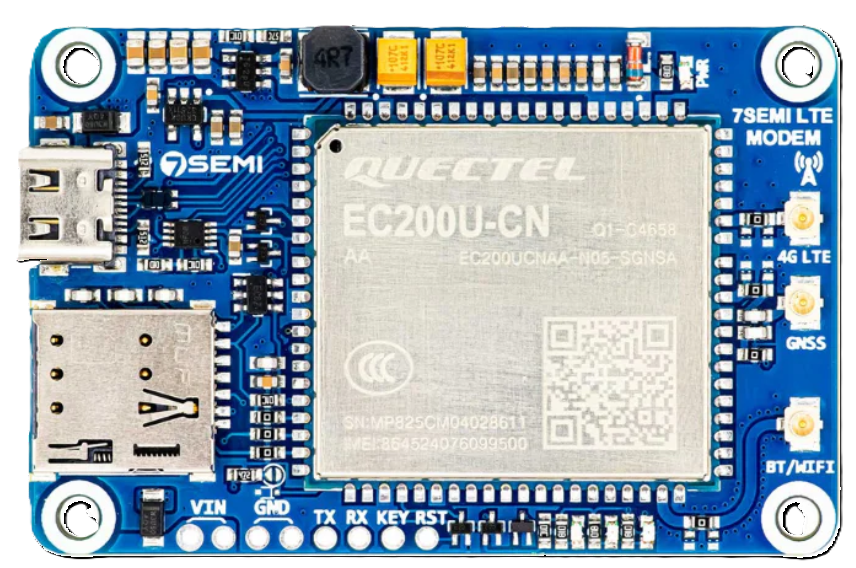
The EC200U is a compact industrial modem manufactured by 7Semi (Part ID: TIFCC0227) that combines 4G LTE connectivity with GNSS (Global Navigation Satellite System) capabilities. Designed for IoT applications, this modem ensures reliable data transmission and precise location tracking, even in harsh environments. Its robust design and versatile features make it ideal for industrial automation, fleet management, smart agriculture, and remote monitoring systems.
Explore Projects Built with EC200U 4G LTE GNSS Industrial Modem
 Open Project in Cirkit Designer
 Open Project in Cirkit Designer
 Open Project in Cirkit Designer
 Open Project in Cirkit Designer
Explore Projects Built with EC200U 4G LTE GNSS Industrial Modem
Open Project in Cirkit DesignerOpen Project in Cirkit DesignerOpen Project in Cirkit DesignerOpen Project in Cirkit DesignerCommon Applications
- Industrial IoT: Real-time data transmission for sensors and devices in factories.
- Fleet Management: Vehicle tracking and telematics for logistics and transportation.
- Smart Agriculture: Remote monitoring of environmental conditions and equipment.
- Remote Monitoring: Data collection and control in off-grid or hard-to-reach locations.
Technical Specifications
Key Technical Details
| Parameter | Specification |
|---|---|
| Manufacturer | 7Semi |
| Part ID | TIFCC0227 |
| Cellular Connectivity | 4G LTE (Cat 4) |
| GNSS Support | GPS, GLONASS, BeiDou, Galileo |
| Operating Voltage | 3.3V to 4.3V |
| Power Consumption | Idle: ~15mA, Active: ~500mA (peak during transmission) |
| Operating Temperature | -40°C to +85°C |
| Data Rate | Up to 150 Mbps (downlink), 50 Mbps (uplink) |
| Interface | UART, USB 2.0, GPIO |
| Antenna Interfaces | 1x LTE antenna port, 1x GNSS antenna port |
| Dimensions | 30mm x 30mm x 2.8mm |
| Certifications | CE, FCC, RoHS |
Pin Configuration and Descriptions
| Pin Number | Pin Name | Description |
|---|---|---|
| 1 | VCC | Power supply input (3.3V to 4.3V). |
| 2 | GND | Ground connection. |
| 3 | TXD | UART Transmit Data (connect to RXD of host). |
| 4 | RXD | UART Receive Data (connect to TXD of host). |
| 5 | USB_D+ | USB 2.0 Data Positive. |
| 6 | USB_D- | USB 2.0 Data Negative. |
| 7 | GNSS_TX | GNSS UART Transmit Data. |
| 8 | GNSS_RX | GNSS UART Receive Data. |
| 9 | RESET | Active-low reset pin. |
| 10 | PWR_KEY | Power-on key (active low, hold for 1 second to power on/off). |
| 11 | GPIO1 | General-purpose input/output pin. |
| 12 | GPIO2 | General-purpose input/output pin. |
Usage Instructions
How to Use the EC200U in a Circuit
- Power Supply: Connect the VCC pin to a regulated 3.3V-4.3V power source and the GND pin to ground.
- UART Communication: Connect the TXD and RXD pins to the corresponding RXD and TXD pins of your microcontroller or host device.
- USB Interface: For USB communication, connect the USB_D+ and USB_D- pins to the USB data lines of your host device.
- GNSS Antenna: Attach a compatible GNSS antenna to the GNSS antenna port for location tracking.
- LTE Antenna: Connect an LTE antenna to the LTE antenna port for cellular connectivity.
- Power On: Pull the PWR_KEY pin low for at least 1 second to power on the modem.
Important Considerations
- Antenna Placement: Ensure that the LTE and GNSS antennas are placed in locations with minimal interference for optimal performance.
- Power Supply: Use a stable power source capable of handling peak current demands (~500mA).
- Heat Dissipation: If operating in high-temperature environments, ensure proper ventilation or heat sinking to prevent overheating.
- Firmware Updates: Periodically check for firmware updates from 7Semi to ensure compatibility and performance.
Example: Connecting EC200U to Arduino UNO
Below is an example of how to interface the EC200U with an Arduino UNO for basic UART communication.
Circuit Connections
| EC200U Pin | Arduino UNO Pin |
|---|---|
| VCC | 3.3V |
| GND | GND |
| TXD | Pin 10 (RX) |
| RXD | Pin 11 (TX) |
| PWR_KEY | Digital Pin 9 |
Arduino Code Example
#include <SoftwareSerial.h>

// Define software serial pins for EC200U communication
SoftwareSerial ec200uSerial(10, 11); // RX = Pin 10, TX = Pin 11

#define PWR_KEY 9 // Power key pin

void setup() {
  // Initialize serial communication
  Serial.begin(9600); // For debugging via Serial Monitor
  ec200uSerial.begin(9600); // Communication with EC200U

  // Configure PWR_KEY pin
  pinMode(PWR_KEY, OUTPUT);
  digitalWrite(PWR_KEY, HIGH); // Set PWR_KEY high initially

  // Power on the EC200U
  Serial.println("Powering on EC200U...");
  digitalWrite(PWR_KEY, LOW); // Pull PWR_KEY low
  delay(1000); // Hold for 1 second
  digitalWrite(PWR_KEY, HIGH); // Release PWR_KEY
  delay(5000); // Wait for the modem to initialize
  Serial.println("EC200U powered on.");
}

void loop() {
  // Send AT command to EC200U
  ec200uSerial.println("AT");
  delay(1000); // Wait for response

  // Read and print response from EC200U
  while (ec200uSerial.available()) {
    char c = ec200uSerial.read();
    Serial.print(c); // Print response to Serial Monitor
  }
}
Troubleshooting and FAQs
Common Issues and Solutions
Modem Not Powering On
- Ensure the PWR_KEY pin is held low for at least 1 second during power-on.
- Verify that the power supply provides sufficient current (500mA peak).
No Response to AT Commands
- Check the UART connections (TXD and RXD) between the modem and the host device.
- Ensure the baud rate matches (default: 9600 bps).
- Confirm that the modem is powered on (check the status LED, if available).
Poor GNSS Signal
- Verify that the GNSS antenna is connected and placed in an open area with a clear view of the sky.
- Avoid placing the antenna near sources of RF interference.
LTE Connectivity Issues
- Ensure the LTE antenna is securely connected and positioned for optimal signal reception.
- Check the SIM card for proper insertion and activation.
FAQs
Q: Can the EC200U operate on 2G or 3G networks?
A: No, the EC200U is designed specifically for 4G LTE networks.Q: What is the maximum cable length for the antennas?
A: It is recommended to use cables shorter than 3 meters to minimize signal loss.Q: Does the modem support SMS functionality?
A: Yes, the EC200U supports SMS sending and receiving via AT commands.Q: Can I use the EC200U with a Raspberry Pi?
A: Yes, the EC200U can be connected to a Raspberry Pi via UART or USB.
This concludes the documentation for the EC200U 4G LTE GNSS Industrial Modem. For further assistance, refer to the official datasheet or contact 7Semi support.