
How to Use A02YYUW: Examples, Pinouts, and Specs
 Design with A02YYUW in Cirkit Designer
Introduction
The A02YYUW, manufactured by ESP32 S3, is a versatile electronic component commonly used in signal processing and power management applications. Its robust design and adaptability make it suitable for a wide range of electronic circuits, from consumer electronics to industrial systems. The exact functionality of the A02YYUW depends on the specific circuit design and application context, making it a valuable component for engineers and hobbyists alike.
Explore Projects Built with A02YYUW
 Open Project in Cirkit Designer
 Open Project in Cirkit Designer
 Open Project in Cirkit Designer
 Open Project in Cirkit Designer
Explore Projects Built with A02YYUW
Open Project in Cirkit DesignerOpen Project in Cirkit DesignerOpen Project in Cirkit DesignerOpen Project in Cirkit DesignerCommon Applications
- Signal processing in communication systems
- Power management in embedded devices
- Voltage regulation in microcontroller-based circuits
- General-purpose use in prototyping and development boards
Technical Specifications
The A02YYUW is designed to operate efficiently under a variety of conditions. Below are its key technical specifications:
| Parameter | Value |
|---|---|
| Manufacturer | ESP32 S3 |
| Part ID | A02 |
| Operating Voltage | 3.3V to 5V |
| Maximum Current | 500mA |
| Power Dissipation | 1W |
| Operating Temperature | -40°C to +85°C |
| Package Type | Surface Mount (SMD) |
| Communication Protocol | I2C, SPI (if applicable) |
Pin Configuration
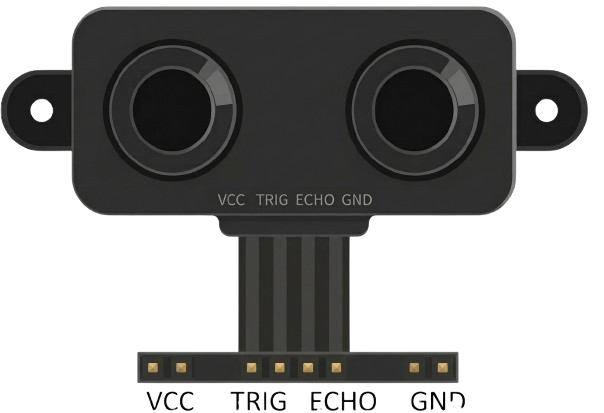
The A02YYUW features a standard pinout for easy integration into circuits. Below is the pin configuration:
| Pin Number | Pin Name | Description |
|---|---|---|
| 1 | VCC | Power supply input (3.3V to 5V) |
| 2 | GND | Ground connection |
| 3 | IN | Input signal or voltage |
| 4 | OUT | Output signal or regulated voltage |
| 5 | SCL | Serial Clock Line (for I2C, if used) |
| 6 | SDA | Serial Data Line (for I2C, if used) |
Usage Instructions
To use the A02YYUW in a circuit, follow these steps:
- Power Supply: Connect the VCC pin to a stable power source (3.3V to 5V) and the GND pin to the ground of your circuit.
- Input Signal: Provide the input signal or voltage to the IN pin. Ensure the input does not exceed the component's maximum ratings.
- Output Signal: The OUT pin will provide the processed or regulated output signal. Connect this pin to the desired load or circuit.
- Communication (Optional): If using I2C communication, connect the SCL and SDA pins to the corresponding pins on your microcontroller (e.g., Arduino UNO).
Example: Using A02YYUW with Arduino UNO
Below is an example of how to connect and use the A02YYUW with an Arduino UNO for signal processing:
Circuit Connections
- Connect the VCC pin of the A02YYUW to the 5V pin on the Arduino.
- Connect the GND pin of the A02YYUW to the GND pin on the Arduino.
- Connect the IN pin to an input signal source (e.g., a sensor).
- Connect the OUT pin to an analog input pin on the Arduino (e.g., A0).
- If using I2C, connect the SCL pin to A5 and the SDA pin to A4 on the Arduino UNO.
Arduino Code Example
// Example code for using A02YYUW with Arduino UNO
// This code reads the output signal from the A02YYUW and prints it to the Serial Monitor.

const int outputPin = A0; // Connect OUT pin of A02YYUW to A0 on Arduino

void setup() {
  Serial.begin(9600); // Initialize serial communication at 9600 baud
  pinMode(outputPin, INPUT); // Set the output pin as input
}

void loop() {
  int signalValue = analogRead(outputPin); // Read the signal from A02YYUW
  float voltage = (signalValue / 1023.0) * 5.0; // Convert to voltage (assuming 5V reference)

  // Print the signal value and voltage to the Serial Monitor
  Serial.print("Signal Value: ");
  Serial.print(signalValue);
  Serial.print(" | Voltage: ");
  Serial.println(voltage);

  delay(500); // Wait for 500ms before the next reading
}
Best Practices
- Ensure the input voltage and current do not exceed the component's maximum ratings to avoid damage.
- Use decoupling capacitors near the VCC and GND pins to stabilize the power supply.
- If using I2C, ensure proper pull-up resistors are connected to the SCL and SDA lines.
Troubleshooting and FAQs
Common Issues
No Output Signal:
- Check the power supply connections (VCC and GND).
- Verify that the input signal is within the specified range.
Erratic Output:
- Ensure proper grounding in the circuit.
- Add decoupling capacitors to filter noise from the power supply.
I2C Communication Failure:
- Verify the SCL and SDA connections.
- Check if pull-up resistors are correctly installed on the I2C lines.
FAQs
Q: Can the A02YYUW operate at 3.3V?
A: Yes, the A02YYUW supports an operating voltage range of 3.3V to 5V.
Q: Is the A02YYUW compatible with Arduino boards?
A: Yes, the A02YYUW can be easily interfaced with Arduino boards using analog or I2C connections.
Q: What is the maximum input signal the A02YYUW can handle?
A: Refer to the datasheet for the exact input signal range, but ensure it does not exceed the component's maximum ratings.
Q: How do I know if the component is damaged?
A: If the component does not produce an output signal despite correct connections and input, it may be damaged. Verify with a multimeter or oscilloscope.
By following this documentation, users can effectively integrate the A02YYUW into their projects and troubleshoot common issues.