
How to Use TCRT-5000 IR sensor: Examples, Pinouts, and Specs
 Design with TCRT-5000 IR sensor in Cirkit Designer
Introduction
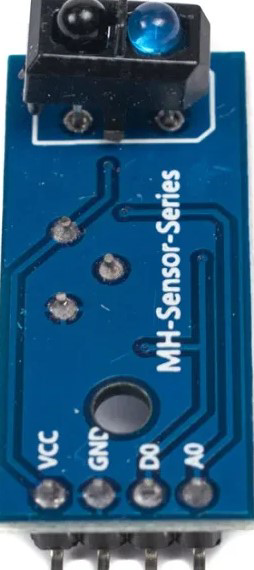
The TCRT-5000 is an infrared (IR) sensor module manufactured by ARDUINO with the part ID UNO. It consists of an IR LED and a phototransistor housed in a compact package. This sensor is widely used for object detection and proximity sensing due to its ability to detect the reflection of infrared light from nearby objects. The TCRT-5000 is particularly popular in robotics, line-following robots, and industrial automation systems.
Explore Projects Built with TCRT-5000 IR sensor
 Open Project in Cirkit Designer
 Open Project in Cirkit Designer
 Open Project in Cirkit Designer
 Open Project in Cirkit Designer
Explore Projects Built with TCRT-5000 IR sensor
Open Project in Cirkit DesignerOpen Project in Cirkit DesignerOpen Project in Cirkit DesignerOpen Project in Cirkit DesignerCommon Applications and Use Cases
- Line-following robots
- Obstacle detection in robotics
- Proximity sensing in industrial automation
- Optical encoders for motor speed measurement
- Edge detection in conveyor systems
Technical Specifications
The TCRT-5000 IR sensor has the following key technical specifications:
| Parameter | Value |
|---|---|
| Operating Voltage | 3.3V to 5V |
| Operating Current | 10 mA (typical) |
| Detection Range | 2 mm to 15 mm (depending on object reflectivity) |
| IR Wavelength | 950 nm |
| Output Type | Analog or Digital (depending on circuit) |
| Dimensions | 10.2 mm x 5.8 mm x 7 mm |
| Operating Temperature | -25°C to +85°C |
Pin Configuration and Descriptions
The TCRT-5000 module typically has 3 or 4 pins, depending on the specific breakout board. Below is the pin configuration for a common 4-pin module:
| Pin | Name | Description |
|---|---|---|
| 1 | VCC | Power supply pin (3.3V to 5V) |
| 2 | GND | Ground pin |
| 3 | OUT | Output pin (provides analog or digital signal based on the detected reflection) |
| 4 | EN (optional) | Enable pin (used to enable or disable the sensor module) |
Usage Instructions
How to Use the TCRT-5000 in a Circuit
- Power the Sensor: Connect the VCC pin to a 3.3V or 5V power source and the GND pin to the ground of your circuit.
- Connect the Output: Connect the OUT pin to an analog or digital input pin of your microcontroller (e.g., Arduino UNO).
- Adjust Sensitivity: If your module has a potentiometer, adjust it to set the desired sensitivity for object detection.
- Place the Sensor: Position the sensor so that the IR LED faces the object or surface to be detected. Ensure the distance is within the detection range (2 mm to 15 mm).
Important Considerations and Best Practices
- Reflective Surfaces: The sensor works best with reflective surfaces. Matte or dark surfaces may reduce detection accuracy.
- Ambient Light: Avoid placing the sensor in direct sunlight or near strong IR sources, as this can interfere with its operation.
- Distance Calibration: Test and calibrate the sensor for the specific distance and object type in your application.
- Pull-up Resistor: If using the digital output, ensure a pull-up resistor is connected if not already included on the module.
Example Code for Arduino UNO
Below is an example of how to use the TCRT-5000 with an Arduino UNO to detect objects:
// TCRT-5000 IR Sensor Example Code
// Connect the OUT pin of the sensor to Arduino pin A0 (analog input)

#define SENSOR_PIN A0  // Define the analog pin connected to the sensor

void setup() {
  Serial.begin(9600);  // Initialize serial communication at 9600 baud
  pinMode(SENSOR_PIN, INPUT);  // Set the sensor pin as input
}

void loop() {
  int sensorValue = analogRead(SENSOR_PIN);  // Read the analog value from the sensor
  Serial.print("Sensor Value: ");
  Serial.println(sensorValue);  // Print the sensor value to the Serial Monitor

  // Check if an object is detected (threshold value may vary based on calibration)
  if (sensorValue > 500) {
    Serial.println("Object Detected!");
  } else {
    Serial.println("No Object Detected.");
  }

  delay(100);  // Small delay for stability
}
Troubleshooting and FAQs
Common Issues and Solutions
No Output or Incorrect Readings
- Cause: Incorrect wiring or loose connections.
- Solution: Double-check all connections, ensuring VCC, GND, and OUT are properly connected.
Sensor Not Detecting Objects
- Cause: Object is outside the detection range or has low reflectivity.
- Solution: Ensure the object is within 2 mm to 15 mm of the sensor and has a reflective surface.
Fluctuating Readings
- Cause: Ambient light interference or unstable power supply.
- Solution: Shield the sensor from ambient light and use a stable power source.
Output Always High or Low
- Cause: Sensitivity not calibrated or faulty sensor.
- Solution: Adjust the potentiometer (if available) or replace the sensor if it is damaged.
FAQs
Q1: Can the TCRT-5000 detect transparent objects?
A1: The sensor may struggle to detect transparent objects due to low IR reflection. Use a different sensor for such applications.
Q2: How do I increase the detection range?
A2: The detection range is limited by the sensor's design. However, you can improve performance by using highly reflective surfaces or adjusting the sensitivity potentiometer.
Q3: Can I use the TCRT-5000 with a 3.3V microcontroller?
A3: Yes, the sensor operates at both 3.3V and 5V, making it compatible with 3.3V microcontrollers.
Q4: What is the difference between analog and digital output?
A4: Analog output provides a continuous voltage proportional to the detected reflection, while digital output gives a binary HIGH or LOW signal based on a threshold.