
How to Use 12v napajanje: Examples, Pinouts, and Specs
 Design with 12v napajanje in Cirkit Designer
Introduction
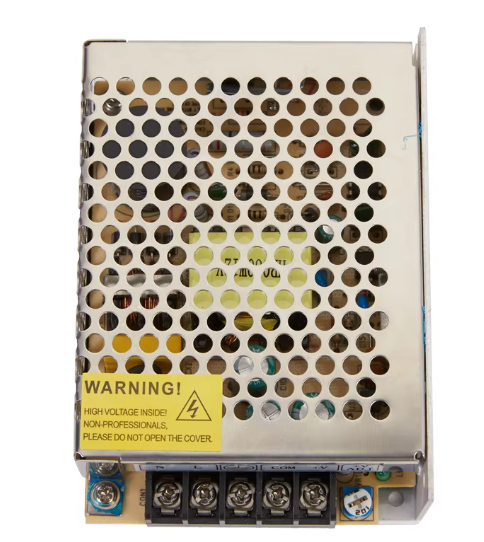
A 12V power supply is an essential electronic component that converts electrical energy from an input source (such as an AC mains supply or a DC source) into a stable 12-volt DC output. It is widely used to power various electronic devices, circuits, and systems that require a consistent 12V input. These power supplies are available in different forms, including linear, switching, and regulated designs, to suit diverse applications.
Explore Projects Built with 12v napajanje
 Open Project in Cirkit Designer
 Open Project in Cirkit Designer
 Open Project in Cirkit Designer
 Open Project in Cirkit Designer
Explore Projects Built with 12v napajanje
Open Project in Cirkit DesignerOpen Project in Cirkit DesignerOpen Project in Cirkit DesignerOpen Project in Cirkit DesignerCommon Applications and Use Cases
- Powering microcontrollers, sensors, and modules in embedded systems
- Supplying power to LED strips, fans, and small motors
- Charging 12V batteries
- Providing power to routers, modems, and other networking equipment
- Supporting hobbyist and DIY electronics projects
Technical Specifications
Below are the general technical specifications for a standard 12V power supply. Specific models may vary slightly, so always refer to the datasheet of your specific unit.
Key Specifications
- Input Voltage: 100-240V AC (for AC-DC power supplies) or 12-24V DC (for DC-DC converters)
- Output Voltage: 12V DC ± 5% (regulated)
- Output Current: Typically ranges from 0.5A to 10A, depending on the model
- Power Rating: Varies, e.g., 12W, 24W, 60W, etc.
- Efficiency: 80% to 95% (for switching power supplies)
- Ripple and Noise: < 50mV (regulated models)
- Operating Temperature: -20°C to +70°C (typical)
Pin Configuration and Descriptions
The pin configuration for a 12V power supply depends on its type (e.g., barrel jack, terminal block, or wire leads). Below is a general description for common configurations:
Barrel Jack Connector
| Pin Name | Description |
|---|---|
| Center (+) | Positive 12V DC output |
| Outer (-) | Ground (GND) or negative terminal |
Terminal Block Connector
| Pin Name | Description |
|---|---|
| V+ | Positive 12V DC output |
| V- | Ground (GND) or negative terminal |
Wire Leads
| Wire Color | Description |
|---|---|
| Red | Positive 12V DC output |
| Black | Ground (GND) or negative terminal |
Usage Instructions
How to Use the Component in a Circuit
- Connect the Input:
- For AC-DC power supplies, connect the input terminals to the AC mains (100-240V AC). Ensure proper insulation and safety precautions.
- For DC-DC converters, connect the input terminals to a DC source within the specified input voltage range.
- Connect the Output:
- Identify the positive (V+) and negative (V-) output terminals.
- Connect the output terminals to the load (e.g., a microcontroller, LED strip, or motor).
- Verify Connections:
- Double-check all connections to ensure proper polarity and avoid short circuits.
- Power On:
- Turn on the input power source. Measure the output voltage with a multimeter to confirm a stable 12V output before connecting sensitive devices.
Important Considerations and Best Practices
- Polarity: Always ensure correct polarity when connecting the power supply to your circuit. Reversed connections can damage your components.
- Current Rating: Ensure the power supply's current rating meets or exceeds the requirements of your load.
- Heat Dissipation: For high-power applications, ensure adequate ventilation or heat sinking to prevent overheating.
- Safety: When working with AC-DC power supplies, take necessary precautions to avoid electric shock. Use insulated tools and avoid touching live wires.
- Filtering: If your circuit is sensitive to noise, consider adding capacitors or filters to reduce ripple and noise.
Example: Using a 12V Power Supply with an Arduino UNO
The Arduino UNO can be powered using a 12V power supply through its barrel jack. Below is an example of how to connect and use it:
- Connect the positive terminal of the 12V power supply to the center pin of the Arduino's barrel jack.
- Connect the negative terminal of the power supply to the outer pin of the barrel jack.
- Ensure the power supply provides a stable 12V output and does not exceed the Arduino's input voltage range (7-12V recommended).
Sample Code for Arduino UNO
// Example: Blinking an LED using a 12V power supply with Arduino UNO
// Ensure the Arduino is powered via the 12V barrel jack

const int ledPin = 13; // Built-in LED pin on Arduino UNO

void setup() {
  pinMode(ledPin, OUTPUT); // Set the LED pin as an output
}

void loop() {
  digitalWrite(ledPin, HIGH); // Turn the LED on
  delay(1000);                // Wait for 1 second
  digitalWrite(ledPin, LOW);  // Turn the LED off
  delay(1000);                // Wait for 1 second
}
Troubleshooting and FAQs
Common Issues and Solutions
No Output Voltage:
- Cause: Input power is not connected or is outside the specified range.
- Solution: Verify the input connections and ensure the input voltage is within the specified range.
Output Voltage is Not 12V:
- Cause: Overloaded power supply or faulty unit.
- Solution: Reduce the load to within the power supply's rated current. If the issue persists, test with a multimeter and replace the unit if necessary.
Overheating:
- Cause: Insufficient ventilation or excessive load.
- Solution: Ensure proper airflow around the power supply and reduce the load if it exceeds the rated power.
Noise or Ripple in Output:
- Cause: Poor filtering or interference.
- Solution: Add external capacitors or use a regulated power supply with low ripple specifications.
FAQs
Q1: Can I use a 12V power supply to charge a 12V battery?
A1: Yes, but ensure the power supply is designed for battery charging and includes current-limiting and overcharge protection features.
Q2: What happens if I connect a load that requires more current than the power supply can provide?
A2: The power supply may shut down, overheat, or become damaged. Always use a power supply with a current rating higher than the load's requirement.
Q3: Can I use a 12V power supply to power a 5V device?
A3: No, you will need a voltage regulator or DC-DC converter to step down the voltage to 5V.
Q4: How do I know if my power supply is regulated?
A4: Check the specifications or datasheet. Regulated power supplies maintain a constant output voltage regardless of load variations.