
How to Use ECX FLAT: Examples, Pinouts, and Specs
 Design with ECX FLAT in Cirkit Designer
Introduction
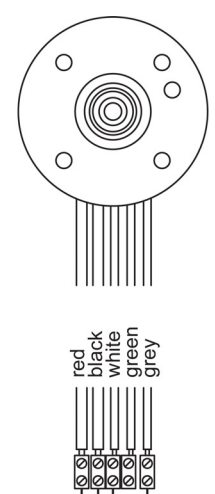
The ECX FLAT is a type of flat connector designed for use in electronic circuits. It is commonly employed to connect wires or components in a compact and efficient manner, making it ideal for applications where space is limited. Its flat design ensures a secure and reliable connection while minimizing bulk, making it a popular choice in modern electronic devices.
Explore Projects Built with ECX FLAT
 Open Project in Cirkit Designer
 Open Project in Cirkit Designer
 Open Project in Cirkit Designer
 Open Project in Cirkit Designer
Explore Projects Built with ECX FLAT
Open Project in Cirkit DesignerOpen Project in Cirkit DesignerOpen Project in Cirkit DesignerOpen Project in Cirkit DesignerCommon Applications and Use Cases
- Consumer electronics, such as smartphones and tablets
- Compact circuit boards in IoT devices
- Automotive electronics for space-constrained wiring
- Robotics and automation systems
- Prototyping and testing environments
Technical Specifications
Key Technical Details
| Parameter | Value |
|---|---|
| Connector Type | Flat |
| Material | Copper alloy with tin plating |
| Current Rating | Up to 3A |
| Voltage Rating | Up to 250V |
| Operating Temperature | -40°C to +105°C |
| Contact Resistance | ≤ 20 mΩ |
| Insulation Resistance | ≥ 1000 MΩ |
| Durability | 500 mating cycles |
Pin Configuration and Descriptions
The ECX FLAT connector typically comes in multiple pin configurations, ranging from 2 to 20 pins. Below is an example of a 4-pin configuration:
| Pin Number | Description |
|---|---|
| 1 | Power (VCC) |
| 2 | Ground (GND) |
| 3 | Signal/Data Line 1 |
| 4 | Signal/Data Line 2 |
Usage Instructions
How to Use the ECX FLAT in a Circuit
- Identify the Pinout: Refer to the pin configuration table to ensure proper connections.
- Prepare the Wires: Strip the insulation from the wires to expose the conductive core. Ensure the exposed length matches the connector's specifications.
- Insert the Wires: Align the wires with the corresponding pins and insert them into the connector.
- Secure the Connection: Use a crimping tool or soldering (if applicable) to secure the wires to the connector.
- Connect to the Circuit: Plug the ECX FLAT connector into the corresponding socket or PCB header.
Important Considerations and Best Practices
- Avoid Overcurrent: Ensure the current passing through the connector does not exceed its 3A rating to prevent overheating or damage.
- Proper Alignment: Always align the connector properly with the mating socket to avoid bent pins or poor connections.
- Environmental Conditions: Use the connector within its specified operating temperature range (-40°C to +105°C).
- Durability: While the connector is rated for 500 mating cycles, avoid excessive plugging/unplugging to extend its lifespan.
Example: Connecting ECX FLAT to an Arduino UNO
The ECX FLAT connector can be used to connect sensors or modules to an Arduino UNO. Below is an example of connecting a 4-pin ECX FLAT connector to an Arduino:
// Example: Reading data from a sensor connected via ECX FLAT connector
// Pin 1: VCC (5V), Pin 2: GND, Pin 3: Data Line 1, Pin 4: Data Line 2

const int dataPin1 = 2; // Connect Pin 3 of ECX FLAT to Arduino digital pin 2
const int dataPin2 = 3; // Connect Pin 4 of ECX FLAT to Arduino digital pin 3

void setup() {
  pinMode(dataPin1, INPUT); // Set dataPin1 as input
  pinMode(dataPin2, INPUT); // Set dataPin2 as input
  Serial.begin(9600);       // Initialize serial communication
}

void loop() {
  int sensorValue1 = digitalRead(dataPin1); // Read data from Pin 3
  int sensorValue2 = digitalRead(dataPin2); // Read data from Pin 4

  // Print the sensor values to the Serial Monitor
  Serial.print("Sensor 1: ");
  Serial.println(sensorValue1);
  Serial.print("Sensor 2: ");
  Serial.println(sensorValue2);

  delay(1000); // Wait for 1 second before reading again
}
Troubleshooting and FAQs
Common Issues and Solutions
Loose Connections:
- Issue: The connector feels loose or the circuit is intermittent.
- Solution: Ensure the wires are properly crimped or soldered. Check for bent pins or debris in the connector.
Overheating:
- Issue: The connector becomes hot during operation.
- Solution: Verify that the current does not exceed the 3A rating. Use thicker wires if necessary.
Signal Interference:
- Issue: Data transmission is unreliable or noisy.
- Solution: Use shielded cables for data lines and ensure proper grounding.
Connector Misalignment:
- Issue: The connector does not fit properly into the socket.
- Solution: Double-check the orientation and alignment before inserting the connector.
FAQs
Q1: Can the ECX FLAT connector be used outdoors?
A1: The ECX FLAT connector is not inherently weatherproof. For outdoor use, ensure it is housed in a protective enclosure.
Q2: What tools are required for crimping the ECX FLAT connector?
A2: A standard crimping tool compatible with flat connectors is recommended. Ensure the tool matches the connector's specifications.
Q3: Can the ECX FLAT handle high-frequency signals?
A3: Yes, the ECX FLAT is suitable for high-frequency signals, but proper shielding and grounding are recommended to minimize interference.
Q4: Is the ECX FLAT connector RoHS compliant?
A4: Yes, the ECX FLAT connector is typically manufactured to meet RoHS compliance standards. Check the specific product datasheet for confirmation.