
How to Use MCB C16: Examples, Pinouts, and Specs
 Design with MCB C16 in Cirkit Designer
Introduction
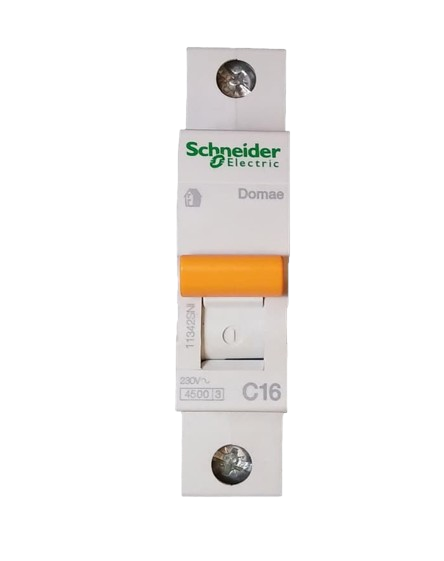
The MCB C16, manufactured by Schneider, is a Miniature Circuit Breaker rated at 16 Amperes. It is designed to protect electrical circuits from overload and short-circuit conditions by automatically disconnecting the circuit when abnormal current flow is detected. This ensures the safety of electrical systems and prevents damage to connected devices.
Explore Projects Built with MCB C16
 Open Project in Cirkit Designer
 Open Project in Cirkit Designer
 Open Project in Cirkit Designer
 Open Project in Cirkit Designer
Explore Projects Built with MCB C16
Open Project in Cirkit DesignerOpen Project in Cirkit DesignerOpen Project in Cirkit DesignerOpen Project in Cirkit DesignerCommon Applications and Use Cases
- Residential and commercial electrical installations
- Protection of lighting circuits, power outlets, and small appliances
- Industrial control panels and distribution boards
- Circuit protection in renewable energy systems (e.g., solar installations)
Technical Specifications
The following table outlines the key technical details of the Schneider MCB C16:
| Parameter | Specification |
|---|---|
| Rated Current (In) | 16 A |
| Rated Voltage (Un) | 230/400 V AC |
| Breaking Capacity (Icn) | 6 kA |
| Tripping Curve | Type C (moderate inrush current) |
| Frequency | 50/60 Hz |
| Number of Poles | 1P (Single Pole) |
| Mounting Type | DIN Rail (35 mm) |
| Operating Temperature | -5°C to +55°C |
| Standards Compliance | IEC/EN 60898-1 |
Pin Configuration and Descriptions
The MCB C16 does not have traditional pins but instead features terminal connections for input and output wiring. The table below describes these terminals:
| Terminal Name | Description |
|---|---|
| Line (Input) | Connects to the incoming power supply |
| Load (Output) | Connects to the circuit or device to protect |
Usage Instructions
How to Use the MCB C16 in a Circuit
Mounting the MCB:
- Install the MCB C16 on a standard 35 mm DIN rail in the distribution board.
- Ensure the MCB is securely locked into place.
Wiring the MCB:
- Connect the incoming power supply to the Line (Input) terminal.
- Connect the circuit or load to the Load (Output) terminal.
- Use appropriately rated wires for the connections to handle the 16 A current.
Testing the MCB:
- After installation, switch on the MCB and verify that the connected circuit operates correctly.
- Use the test button (if available) to ensure the MCB trips as expected.
Resetting the MCB:
- In case of a trip due to overload or short circuit, identify and resolve the issue.
- Flip the MCB switch to the "OFF" position and then back to the "ON" position to reset it.
Important Considerations and Best Practices
- Ensure the MCB's rated current (16 A) matches the requirements of the circuit it protects.
- Avoid overloading the circuit by connecting devices that exceed the MCB's capacity.
- Regularly inspect the MCB for signs of wear, damage, or loose connections.
- Do not bypass or tamper with the MCB, as this compromises its protective function.
- For circuits with high inrush currents (e.g., motors), ensure the Type C tripping curve is suitable.
Arduino UNO Compatibility
The MCB C16 is not directly connected to microcontrollers like the Arduino UNO. However, it can be used in circuits that power Arduino-based systems to ensure protection against electrical faults.
Troubleshooting and FAQs
Common Issues and Solutions
| Issue | Possible Cause | Solution |
|---|---|---|
| MCB trips frequently | Overloaded circuit | Reduce the load or redistribute devices |
| Short circuit in the wiring | Inspect and repair faulty wiring | |
| Faulty MCB | Replace the MCB | |
| MCB does not trip during a fault | Incorrect wiring | Verify input and output connections |
| Faulty MCB | Replace the MCB | |
| MCB cannot be reset | Persistent fault in the circuit | Identify and resolve the fault |
| Damaged MCB mechanism | Replace the MCB |
FAQs
Can the MCB C16 be used for DC circuits?
No, the MCB C16 is designed for AC circuits with a rated voltage of 230/400 V.What does the Type C tripping curve mean?
The Type C curve allows the MCB to handle moderate inrush currents (5-10 times the rated current) without tripping, making it suitable for circuits with inductive loads like motors.How do I know if the MCB is faulty?
If the MCB fails to trip during a fault or cannot be reset after resolving a fault, it may be defective and should be replaced.Can I install the MCB C16 myself?
While basic installation is straightforward, it is recommended to have a qualified electrician perform the installation to ensure safety and compliance with local regulations.