
How to Use DFR0559 : Examples, Pinouts, and Specs
 Design with DFR0559 in Cirkit Designer
Introduction
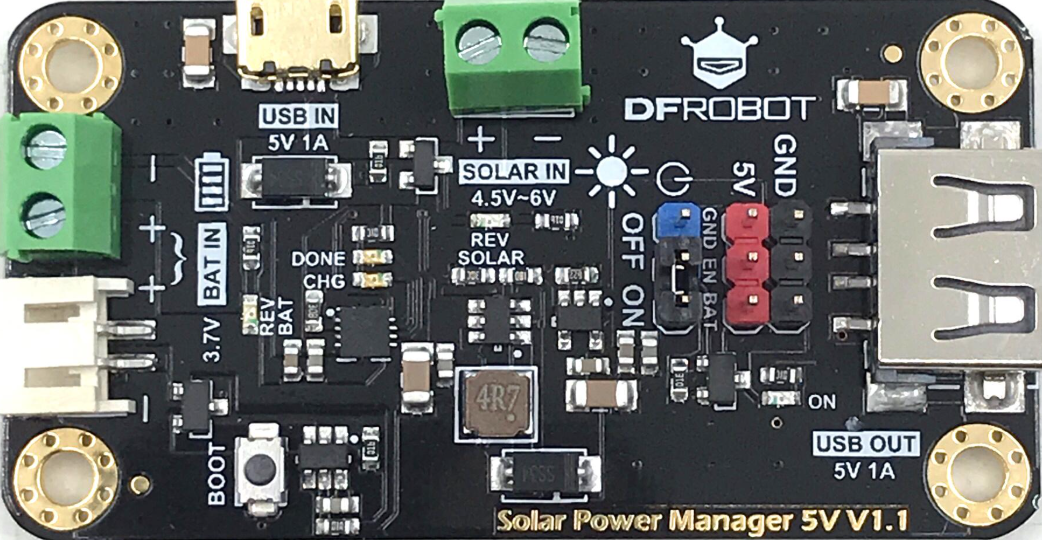
The DFR0559 is a versatile sensor module designed for a wide range of applications, particularly in robotics and automation projects. This module is commonly used for tasks such as distance measurement, obstacle detection, and environmental sensing. Its ability to interface seamlessly with microcontrollers, such as Arduino boards, makes it a popular choice for hobbyists and professionals alike. The DFR0559 is compact, reliable, and easy to integrate into various systems, making it an essential component for projects requiring precise sensing capabilities.
Explore Projects Built with DFR0559
 Open Project in Cirkit Designer
 Open Project in Cirkit Designer
 Open Project in Cirkit Designer
 Open Project in Cirkit Designer
Explore Projects Built with DFR0559
Open Project in Cirkit DesignerOpen Project in Cirkit DesignerOpen Project in Cirkit DesignerOpen Project in Cirkit DesignerCommon Applications
- Obstacle detection in robotics
- Distance measurement in automation systems
- Environmental monitoring
- Smart home devices
- Proximity sensing in industrial applications
Technical Specifications
The DFR0559 sensor module is equipped with the following technical features:
| Parameter | Specification |
|---|---|
| Operating Voltage | 3.3V to 5V |
| Operating Current | < 20mA |
| Measurement Range | 2cm to 400cm |
| Measurement Accuracy | ±3mm |
| Interface Type | Analog and Digital |
| Operating Temperature | -10°C to 70°C |
| Dimensions | 45mm x 20mm x 15mm |
Pin Configuration
The DFR0559 module has a simple pinout for easy integration:
| Pin | Name | Description |
|---|---|---|
| 1 | VCC | Power supply input (3.3V to 5V) |
| 2 | GND | Ground connection |
| 3 | SIG | Signal output (analog or digital, depending on mode) |
Usage Instructions
How to Use the DFR0559 in a Circuit
- Power the Module: Connect the
VCCpin to a 3.3V or 5V power source and theGNDpin to the ground of your circuit. - Connect the Signal Pin: The
SIGpin outputs the sensor's readings. Connect this pin to an analog or digital input pin on your microcontroller, depending on your application. - Configure the Microcontroller: Write code to read the sensor's output and process the data for your specific use case.
Important Considerations
- Ensure the operating voltage is within the specified range (3.3V to 5V) to avoid damaging the module.
- Avoid exposing the sensor to extreme temperatures or humidity, as this may affect its accuracy.
- Place the sensor in a stable position to minimize measurement errors caused by vibrations or movement.
- If using the sensor in a noisy environment, consider adding a capacitor between
VCCandGNDto stabilize the power supply.
Example: Using DFR0559 with Arduino UNO
Below is an example of how to use the DFR0559 sensor module with an Arduino UNO to measure distance:
// DFR0559 Sensor Example with Arduino UNO
// This code reads the analog signal from the DFR0559 sensor and calculates
// the distance in centimeters. The result is displayed in the Serial Monitor.

const int sensorPin = A0; // Connect SIG pin of DFR0559 to Arduino A0
int sensorValue = 0;      // Variable to store the analog reading
float distance = 0.0;     // Variable to store the calculated distance

void setup() {
  Serial.begin(9600); // Initialize serial communication at 9600 baud
  pinMode(sensorPin, INPUT); // Set the sensor pin as input
}

void loop() {
  sensorValue = analogRead(sensorPin); // Read the analog value from the sensor
  distance = sensorValue * 0.488; // Convert the reading to distance in cm
  // The conversion factor (0.488) may vary based on the sensor's calibration

  Serial.print("Distance: ");
  Serial.print(distance);
  Serial.println(" cm"); // Print the distance to the Serial Monitor

  delay(500); // Wait for 500ms before the next reading
}
Notes:
- The conversion factor (
0.488) in the code is an example. Refer to the sensor's datasheet or calibrate the sensor for accurate measurements. - Use a pull-up resistor on the
SIGpin if the signal is unstable.
Troubleshooting and FAQs
Common Issues
No Output or Incorrect Readings
- Cause: Incorrect wiring or insufficient power supply.
- Solution: Double-check the connections and ensure the power supply is within the specified range (3.3V to 5V).
Fluctuating or Unstable Readings
- Cause: Electrical noise or unstable power supply.
- Solution: Add a decoupling capacitor (e.g., 10µF) between
VCCandGNDto stabilize the power.
Sensor Not Responding
- Cause: Sensor may be damaged or exposed to extreme conditions.
- Solution: Inspect the sensor for physical damage and ensure it is used within the specified temperature range (-10°C to 70°C).
FAQs
Q: Can the DFR0559 be used outdoors?
A: While the DFR0559 can operate in a wide temperature range, it is not waterproof. Use a protective enclosure if deploying it outdoors.
Q: How do I switch between analog and digital modes?
A: The DFR0559 typically outputs an analog signal. If a digital signal is required, additional circuitry or a microcontroller can be used to process the analog output.
Q: What is the maximum distance the sensor can measure?
A: The DFR0559 can measure distances up to 400cm with an accuracy of ±3mm.
By following this documentation, you can effectively integrate and utilize the DFR0559 sensor module in your projects.