A Load Cell 500g is a type of transducer that converts a force or weight into an electrical signal. It is designed to measure loads up to 500 grams with high accuracy and reliability. The electrical signal produced by the load cell is proportional to the applied force, making it ideal for precise weight measurement applications.
Explore Projects Built with Load Cell 500g
Use Cirkit Designer to design, explore, and prototype these projects online. Some projects support real-time simulation. Click "Open Project" to start designing instantly!
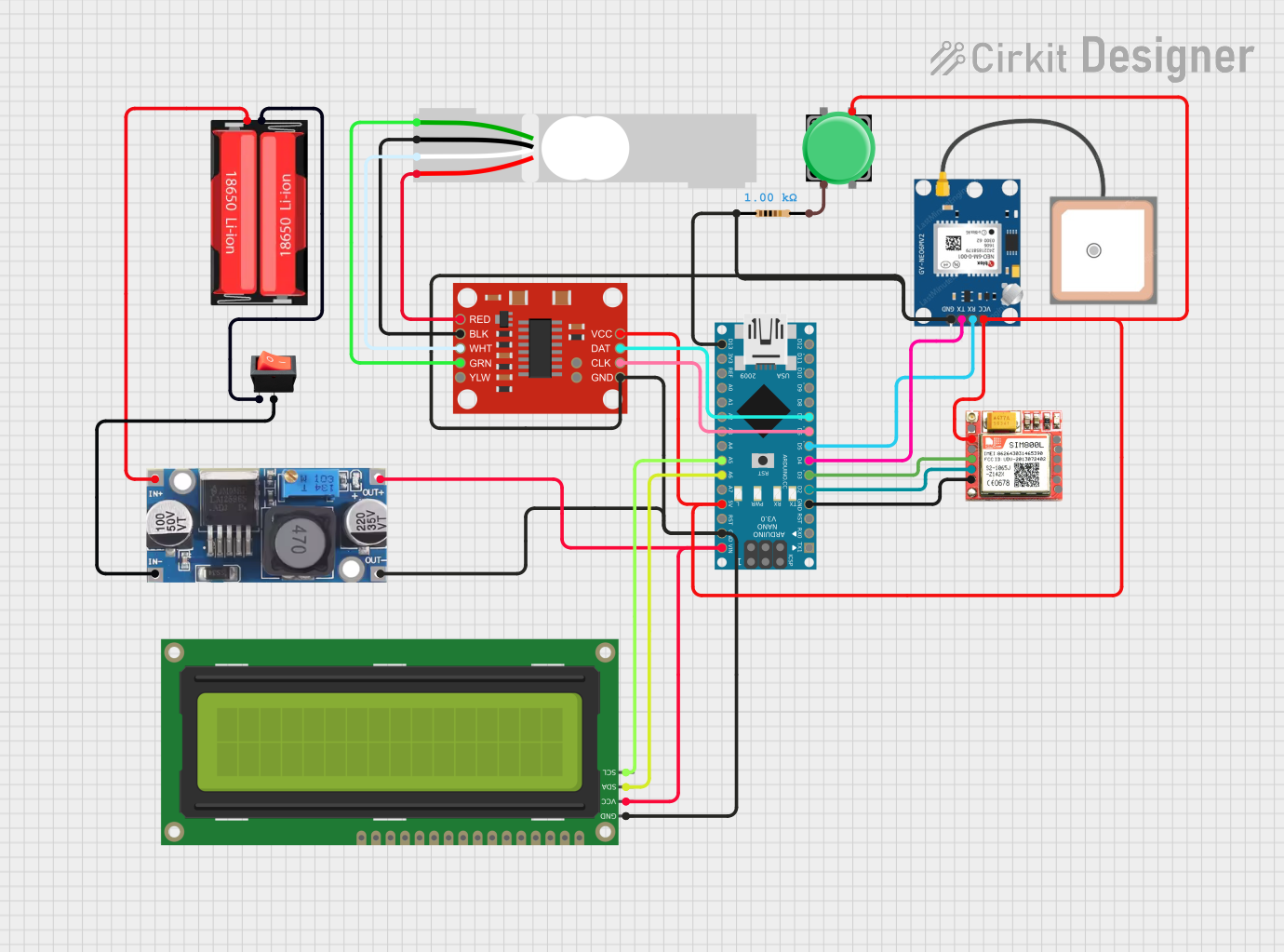
This is a multi-functional circuit designed for location tracking, cellular communication, and weight measurement. It uses an Arduino Nano to interface with a GPS module, a GSM module, and a load cell with an HX711 amplifier, displaying data on an I2C LCD screen. Power is supplied by a Li-Ion battery through a buck converter, with a rocker switch for power control and a pushbutton for user input.
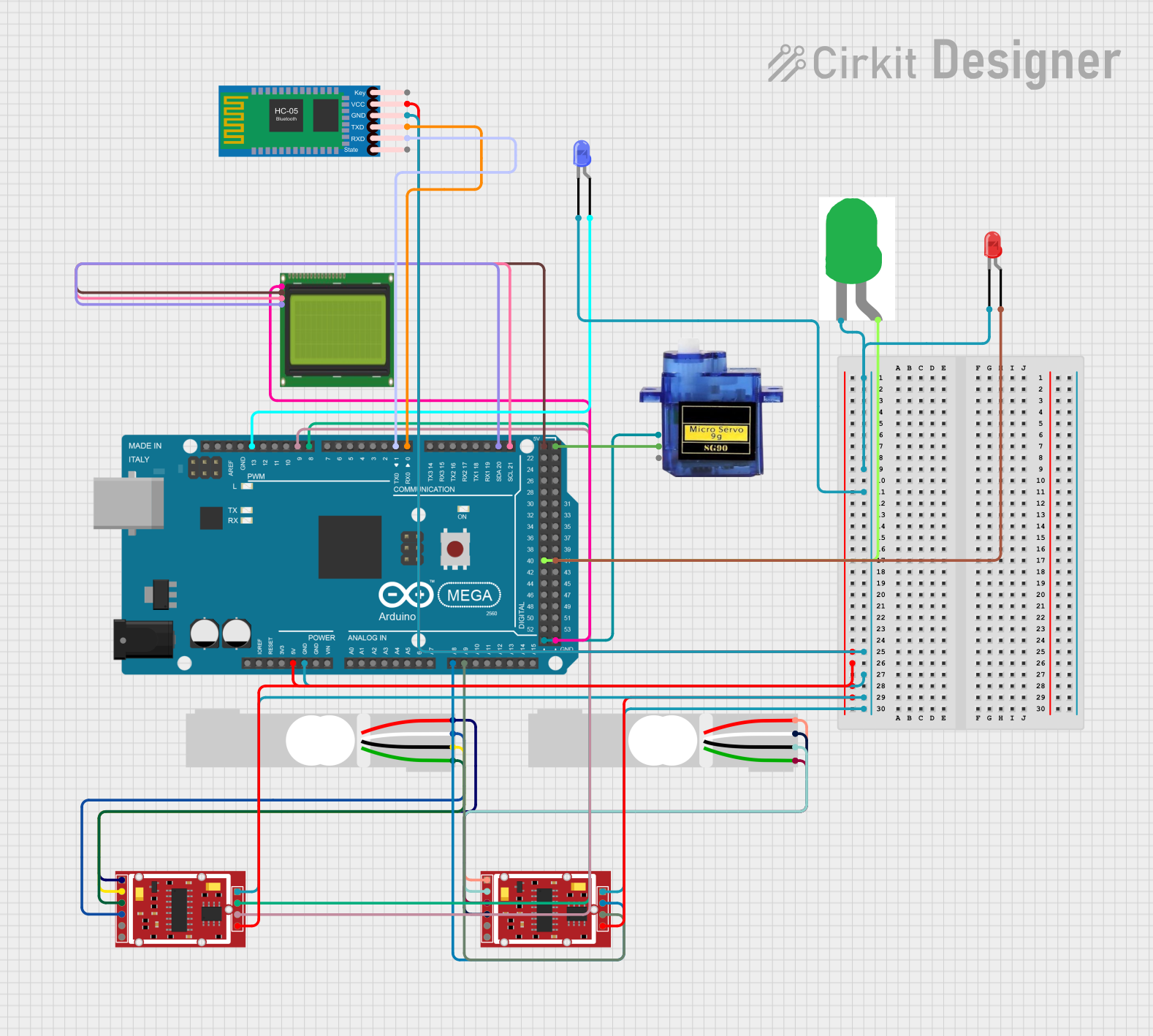
This circuit is a weighing system that uses two load cells connected to HX711 modules for weight measurement, interfaced with an Arduino Mega 2560. The system includes an LCD for displaying weight, a Bluetooth module for wireless communication, and LEDs for status indication, with a micro servo for additional mechanical control.
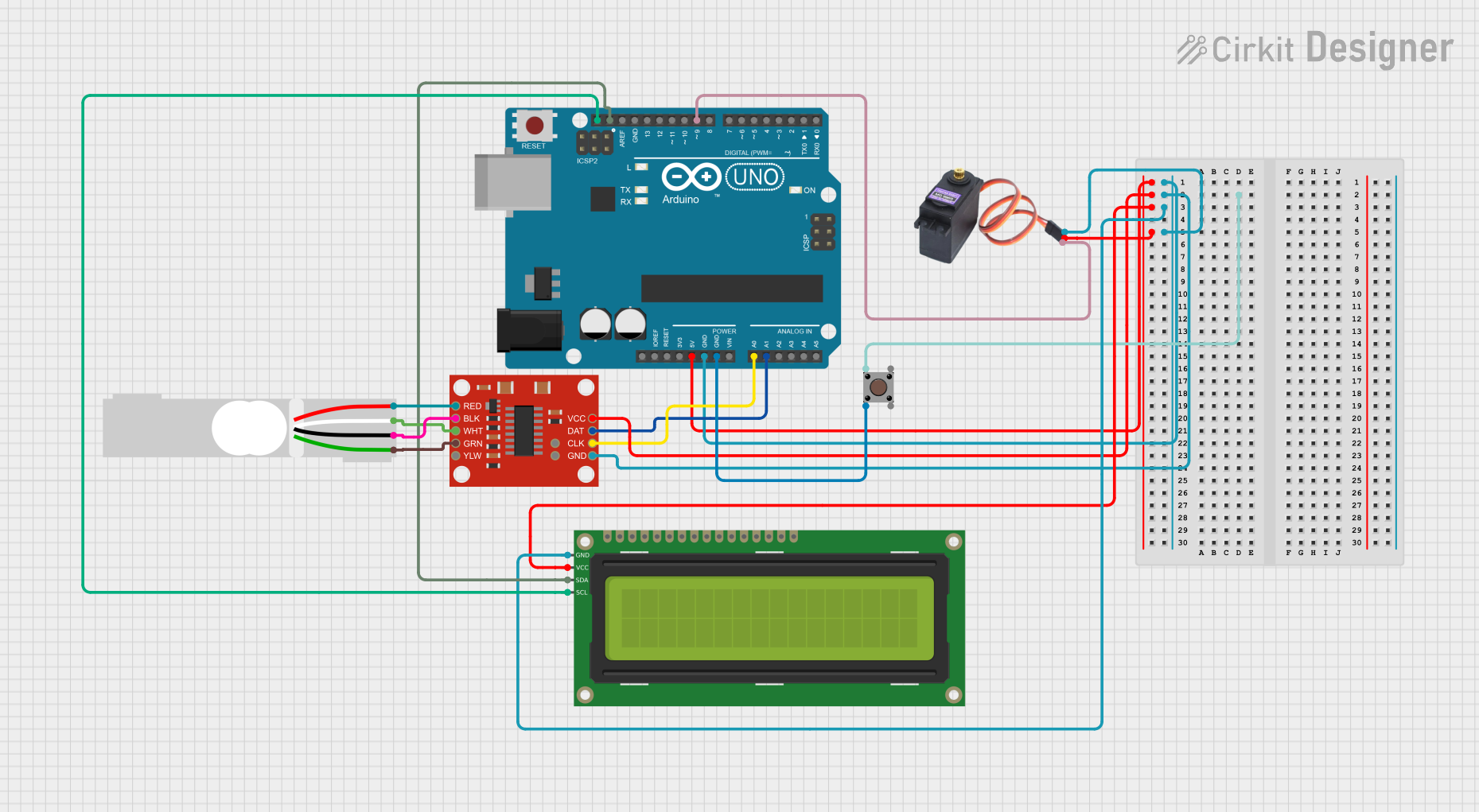
This circuit is a weight measurement and classification system using an Arduino UNO, a load cell with an HX711 amplifier, a pushbutton, an I2C LCD display, and a servo motor. The system measures the weight of an item, displays the weight on the LCD, and uses the servo to sort the item based on predefined weight limits, which can be toggled using the pushbutton.
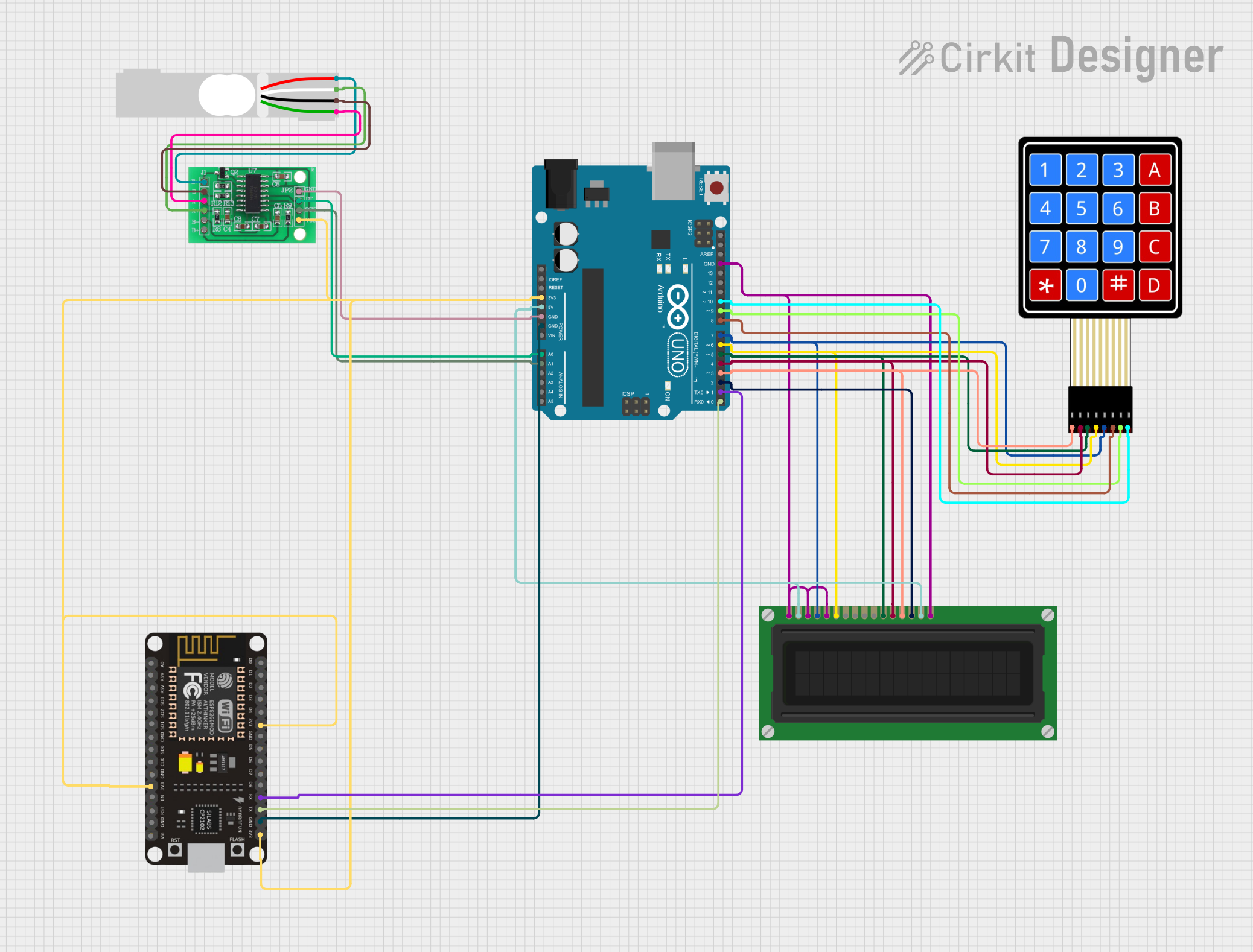
This circuit is a digital weighing scale system that uses an Arduino UNO to read data from a load cell via an HX711 interface, display the weight on an LCD, and send the data over WiFi using an ESP8266 module when a specific key on a 4x4 membrane keypad is pressed. The system integrates multiple components to measure, display, and transmit weight data.
Below are the key technical details of the Load Cell 500g:
Parameter
Specification
Rated Load
500 grams
Output Sensitivity
1.0 ± 0.1 mV/V
Excitation Voltage
5V to 12V DC (recommended 5V)
Input Resistance
1,000 ± 10 ohms
Output Resistance
1,000 ± 10 ohms
Non-linearity
±0.03% of full scale
Hysteresis
±0.03% of full scale
Operating Temperature
-10°C to +40°C
Safe Overload
120% of rated load
Material
Aluminum alloy
Dimensions
34mm x 12mm x 12mm
Pin Configuration and Descriptions
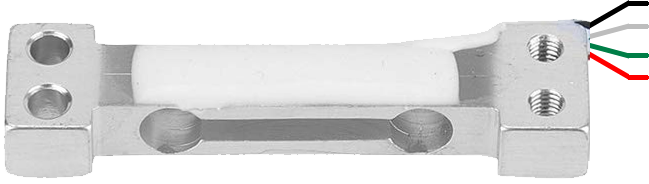
The Load Cell 500g typically has four wires for electrical connections. The pinout is as follows:
Wire Color
Function
Description
Red
Excitation+ (E+)
Positive power supply input
Black
Excitation- (E-)
Negative power supply input (ground)
White
Signal+ (S+)
Positive output signal
Green
Signal- (S-)
Negative output signal
Usage Instructions
How to Use the Load Cell in a Circuit
Wiring the Load Cell:
Connect the red wire (E+) to the positive terminal of the power supply (e.g., 5V).
Connect the black wire (E-) to the ground (GND) of the power supply.
Connect the white wire (S+) to the positive input of an amplifier or ADC (Analog-to-Digital Converter).
Connect the green wire (S-) to the negative input of the amplifier or ADC.
Amplification:
The output signal of the load cell is very small (in millivolts). Use an amplifier such as the HX711 module to amplify the signal for further processing.
Microcontroller Interface:
The amplified signal can be read by a microcontroller like an Arduino UNO for weight measurement and display.
Important Considerations and Best Practices
Calibration: Always calibrate the load cell before use to ensure accurate measurements.
Overload Protection: Avoid applying a load greater than 120% of the rated capacity (500g) to prevent damage.
Stable Power Supply: Use a stable and noise-free power supply to avoid fluctuations in the output signal.
Mounting: Ensure the load cell is securely mounted and free from external vibrations or forces that could affect accuracy.
Example Code for Arduino UNO
Below is an example of how to use the Load Cell 500g with an HX711 amplifier and Arduino UNO:
#include "HX711.h"

// Define pins for HX711 module
#define DT 3  // Data pin connected to Arduino pin 3
#define SCK 2 // Clock pin connected to Arduino pin 2

HX711 scale;

void setup() {
  Serial.begin(9600); // Initialize serial communication
  scale.begin(DT, SCK); // Initialize HX711 with defined pins

  Serial.println("Calibrating... Place a known weight on the load cell.");
  delay(5000); // Wait for user to place a weight
  scale.set_scale(); // Set the scale factor (calibration required)
  scale.tare(); // Reset the scale to 0
  Serial.println("Calibration complete.");
}

void loop() {
  // Read weight from the load cell
  float weight = scale.get_units(10); // Average of 10 readings
  Serial.print("Weight: ");
  Serial.print(weight);
  Serial.println(" g"); // Display weight in grams

  delay(500); // Delay for stability
}
Note: Replace scale.set_scale() with the appropriate calibration factor for your setup. This factor is determined during the calibration process.
Troubleshooting and FAQs
Common Issues and Solutions
No Output Signal:
Check all wire connections for proper contact.
Ensure the power supply voltage is within the recommended range (5V to 12V).
Inaccurate Measurements:
Perform a proper calibration using a known weight.
Verify that the load cell is mounted securely and not subject to external forces.
Fluctuating Readings:
Use a stable power supply to minimize noise.
Ensure the load cell is not exposed to vibrations or temperature fluctuations.
Arduino Not Reading Data:
Verify the connections between the HX711 module and the Arduino.
Ensure the HX711 library is correctly installed in the Arduino IDE.
FAQs
Q: Can I use the Load Cell 500g without an amplifier?
A: No, the output signal of the load cell is too small to be read directly by a microcontroller. An amplifier like the HX711 is required.
Q: How do I calibrate the load cell?
A: Use a known weight and adjust the scale factor in your code until the output matches the actual weight.
Q: Can the Load Cell 500g measure weights above 500g?
A: While it can handle up to 120% of its rated load (600g), doing so may reduce accuracy and damage the load cell over time. Always stay within the rated capacity for best results.

 Open Project in Cirkit Designer