
How to Use BBQ Blower Fan 12V: Examples, Pinouts, and Specs
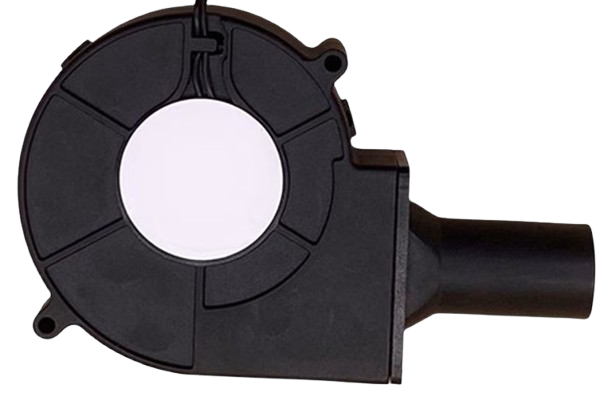
 Design with BBQ Blower Fan 12V in Cirkit Designer
Introduction
The BBQ Blower Fan 12V is a compact and efficient fan designed to enhance airflow in BBQ grills. By providing a steady stream of air, it improves combustion, resulting in better heat distribution and more consistent cooking temperatures. This fan is ideal for both professional and home grilling setups, ensuring optimal performance and convenience.
Explore Projects Built with BBQ Blower Fan 12V
 Open Project in Cirkit Designer
 Open Project in Cirkit Designer
 Open Project in Cirkit Designer
 Open Project in Cirkit Designer
Explore Projects Built with BBQ Blower Fan 12V
Open Project in Cirkit DesignerOpen Project in Cirkit DesignerOpen Project in Cirkit DesignerOpen Project in Cirkit DesignerCommon Applications and Use Cases
- Enhancing airflow in BBQ grills for better combustion.
- Maintaining consistent heat distribution during grilling or smoking.
- DIY projects requiring controlled airflow, such as small forges or ventilation systems.
- Temperature regulation in custom cooking or heating setups.
Technical Specifications
The BBQ Blower Fan 12V is built for durability and performance in high-temperature environments. Below are its key technical details:
| Parameter | Specification |
|---|---|
| Operating Voltage | 12V DC |
| Operating Current | 0.5A (typical), 1A (maximum) |
| Power Consumption | 6W (typical) |
| Airflow Rate | 20-30 CFM (Cubic Feet per Minute) |
| Noise Level | ≤ 40 dB |
| Operating Temperature | -10°C to 60°C |
| Dimensions | 80mm x 80mm x 25mm |
| Weight | 120g |
| Connector Type | 2-pin JST or bare wire leads |
Pin Configuration and Descriptions
The BBQ Blower Fan 12V typically comes with a 2-pin connector or bare wire leads. Below is the pin configuration:
| Pin/Lead | Description |
|---|---|
| Red | Positive terminal (+12V) |
| Black | Negative terminal (GND) |
Usage Instructions
How to Use the Component in a Circuit
- Power Supply: Connect the fan to a stable 12V DC power source. Ensure the power supply can provide at least 1A to handle peak current requirements.
- Polarity: Connect the red wire to the positive terminal (+12V) and the black wire to the ground (GND). Reversing the polarity may damage the fan.
- Control Options:
- For manual operation, connect the fan directly to the power supply.
- For automated control, use a microcontroller (e.g., Arduino UNO) with a transistor or MOSFET to switch the fan on/off or adjust speed using PWM (Pulse Width Modulation).
Important Considerations and Best Practices
- Heat Resistance: Ensure the fan is installed in a location where it is not exposed to direct flames or excessive heat beyond its operating temperature range.
- Airflow Direction: Install the fan so that the airflow is directed toward the desired area (e.g., into the grill or combustion chamber).
- Noise Reduction: Mount the fan securely to minimize vibrations and noise during operation.
- Power Supply: Use a regulated 12V DC power source to avoid voltage fluctuations that could damage the fan.
Example: Controlling the Fan with an Arduino UNO
Below is an example of how to control the BBQ Blower Fan 12V using an Arduino UNO and a PWM signal for speed control.
Circuit Diagram
- Connect the fan's red wire to the drain of an N-channel MOSFET (e.g., IRF540N).
- Connect the fan's black wire to the ground (GND).
- Connect the source of the MOSFET to GND.
- Connect the MOSFET's gate to Arduino pin 9 through a 220-ohm resistor.
- Add a flyback diode (e.g., 1N4007) across the fan terminals to protect against voltage spikes.
Arduino Code
// Arduino code to control the BBQ Blower Fan 12V using PWM
// Pin 9 is used to generate the PWM signal for fan speed control

const int fanPin = 9; // PWM pin connected to the MOSFET gate

void setup() {
  pinMode(fanPin, OUTPUT); // Set the fan pin as an output
}

void loop() {
  // Gradually increase fan speed
  for (int speed = 0; speed <= 255; speed += 5) {
    analogWrite(fanPin, speed); // Set PWM duty cycle (0-255)
    delay(50); // Wait 50ms before increasing speed
  }

  // Gradually decrease fan speed
  for (int speed = 255; speed >= 0; speed -= 5) {
    analogWrite(fanPin, speed); // Set PWM duty cycle (0-255)
    delay(50); // Wait 50ms before decreasing speed
  }
}
Troubleshooting and FAQs
Common Issues and Solutions
Fan Does Not Spin:
- Cause: Incorrect wiring or insufficient power supply.
- Solution: Verify the wiring and ensure the power supply provides 12V DC with sufficient current.
Fan Spins Slowly:
- Cause: Voltage drop or high resistance in the circuit.
- Solution: Check for loose connections or use thicker wires to reduce resistance.
Excessive Noise or Vibration:
- Cause: Loose mounting or misalignment.
- Solution: Securely mount the fan and ensure it is properly aligned.
Fan Overheats:
- Cause: Operating in a high-temperature environment or blocked airflow.
- Solution: Ensure proper ventilation and avoid exposing the fan to direct flames.
FAQs
Can I use a 9V battery to power the fan?
- No, a 9V battery cannot provide sufficient voltage or current to operate the fan effectively.
Can the fan speed be adjusted without a microcontroller?
- Yes, you can use a DC motor speed controller or a variable resistor (potentiometer) rated for the fan's power.
Is the fan waterproof?
- No, the BBQ Blower Fan 12V is not waterproof. Avoid exposing it to water or moisture.
Can I use the fan for other applications?
- Yes, the fan can be used in any project requiring controlled airflow, as long as the operating conditions are within its specifications.