Cirkit Designer Logo
Cirkit Designer
Your all-in-one circuit design IDE
Home / 
Component Documentation

How to Use Adafruit Mini Sparkle Motion: Examples, Pinouts, and Specs
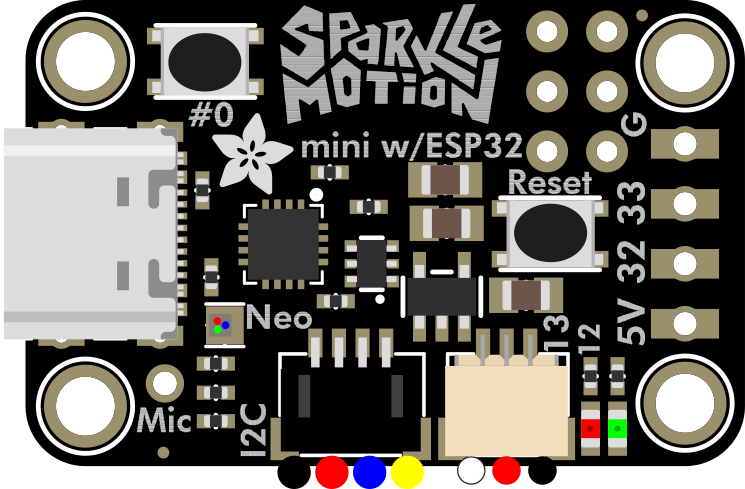

Image of Adafruit Mini Sparkle Motion
Cirkit Designer LogoDesign with Adafruit Mini Sparkle Motion in Cirkit Designer

Introduction

The Adafruit Mini Sparkle Motion (Manufacturer Part ID: 6160) is a compact, motion-activated LED light designed to create a dazzling sparkling effect. This component is ideal for decorative projects, visual displays, and interactive installations. Its small size and built-in motion sensor make it perfect for embedding into wearables, art pieces, or any project requiring dynamic lighting effects triggered by movement.

Explore Projects Built with Adafruit Mini Sparkle Motion
Use Cirkit Designer to design, explore, and prototype these projects online. Some projects support real-time simulation. Click "Open Project" to start designing instantly!
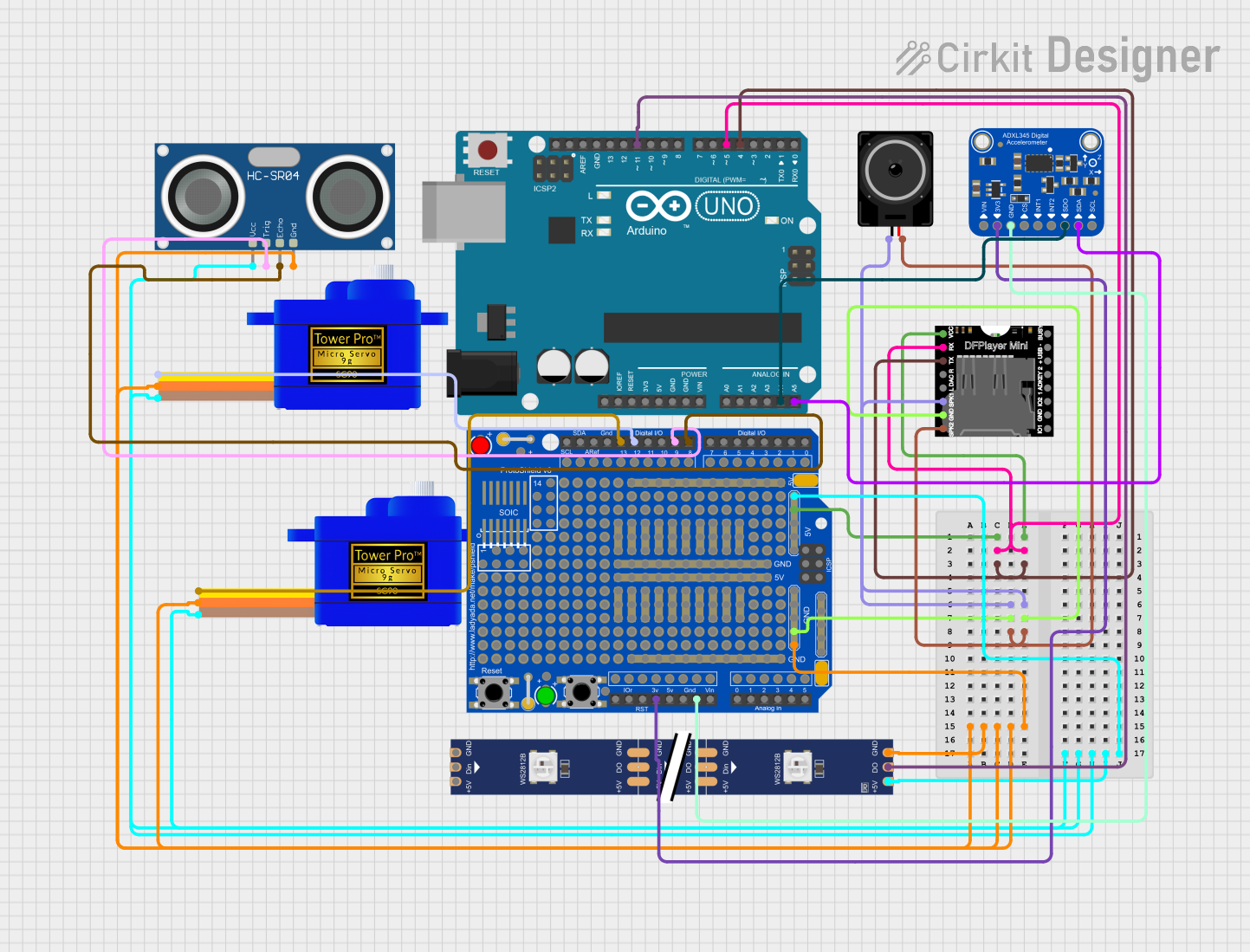
Arduino-Controlled Interactive LED and Sound System with Motion Detection
Image of project 1: A project utilizing Adafruit Mini Sparkle Motion in a practical application
This circuit features an Arduino UNO microcontroller interfaced with an Adafruit ADXL345 accelerometer, an HC-SR04 ultrasonic sensor, two SG90 servomotors, a DFPlayer Mini MP3 module, a WS2812 RGB LED strip, and a loudspeaker. The Arduino controls the LED strip and servomotors based on distance measurements from the ultrasonic sensor and plays sounds through the DFPlayer Mini when motion is detected by the accelerometer. The circuit is designed for interactive displays or installations where visual and auditory feedback is provided in response to object proximity and movement.
Cirkit Designer LogoOpen Project in Cirkit Designer
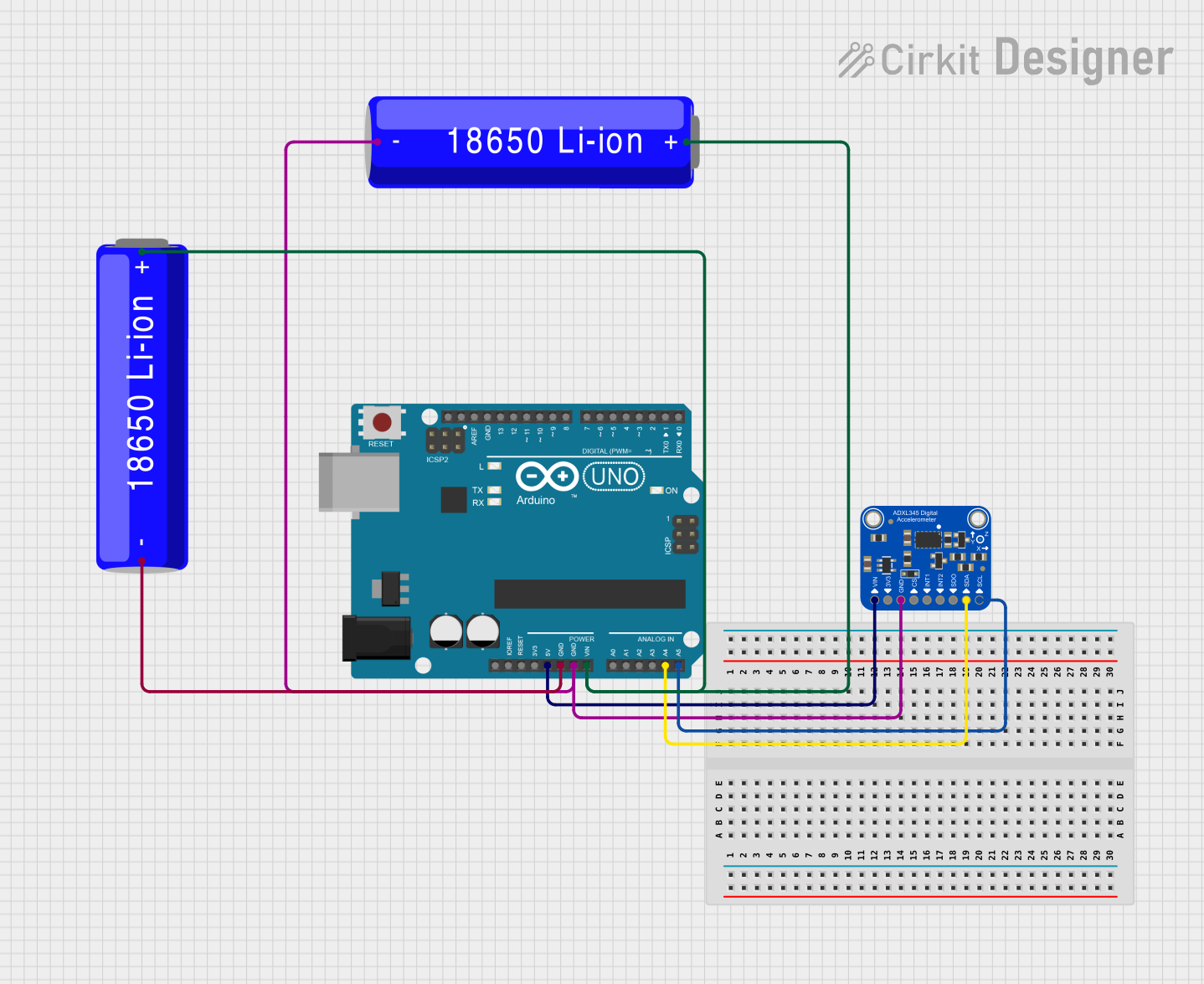
Arduino UNO and ADXL345 Accelerometer Data Logger
Image of Accelerometer ADXL345 Circuit Diagram: A project utilizing Adafruit Mini Sparkle Motion in a practical application
This circuit features an Arduino UNO microcontroller interfaced with an Adafruit ADXL345 accelerometer for motion detection, powered by two parallel-connected 18650 Li-ion batteries. The accelerometer communicates with the Arduino over I2C, and the system is designed for further code development to utilize the motion sensing capabilities.
Cirkit Designer LogoOpen Project in Cirkit Designer
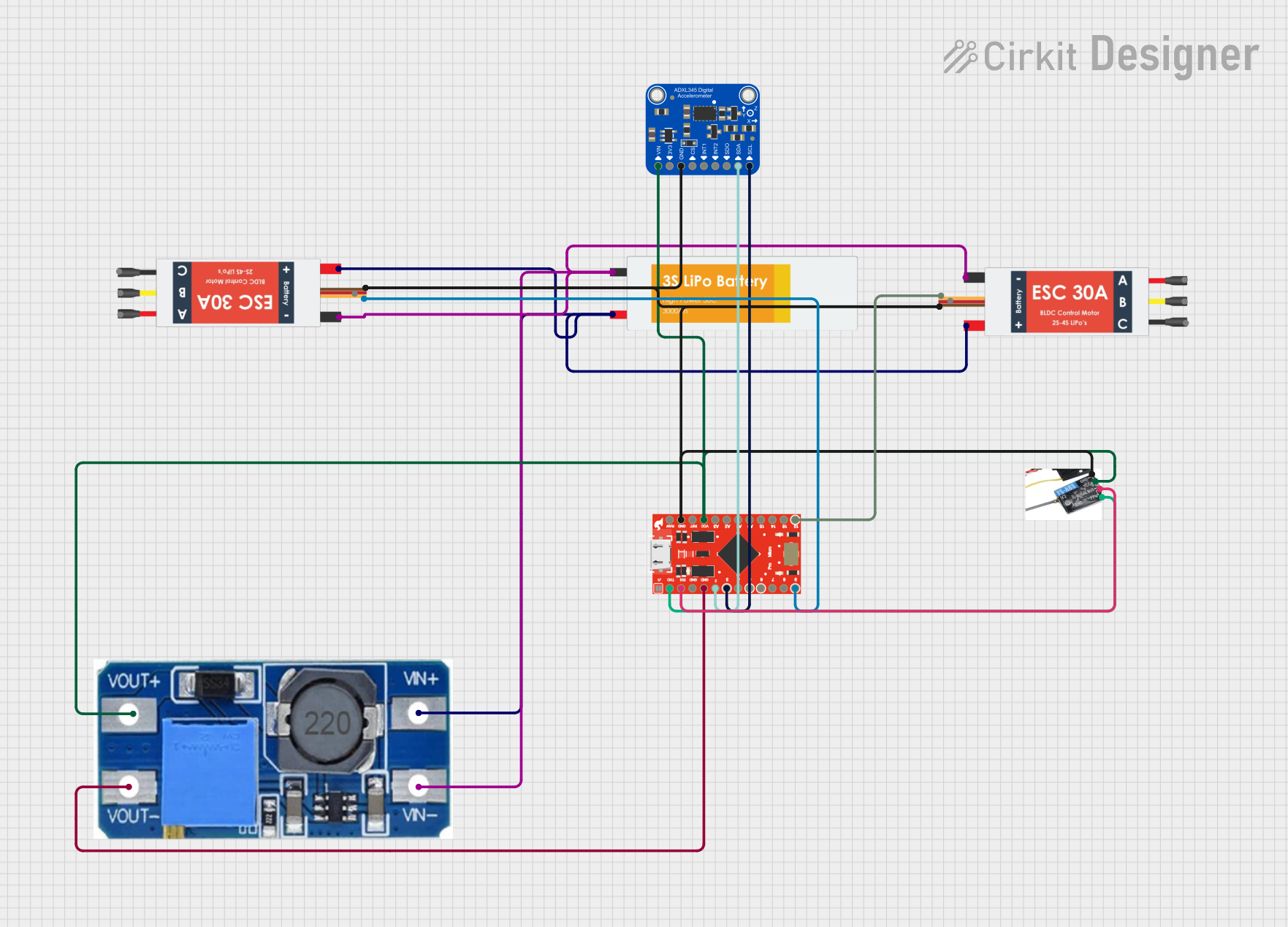
Remote-Controlled Drone with Motion Sensing Capabilities
Image of melty: A project utilizing Adafruit Mini Sparkle Motion in a practical application
This circuit is designed for motion control and telemetry in a small vehicle or drone. It includes an Adafruit ADXL345 accelerometer interfaced with a SparkFun Pro Micro microcontroller for motion sensing. The circuit also features two Electronic Speed Controllers (ESCs) to drive motors, a step-up voltage regulator to stabilize power supply from a Lipo battery, and a flysky mini receiver to receive control signals from a remote transmitter.
Cirkit Designer LogoOpen Project in Cirkit Designer
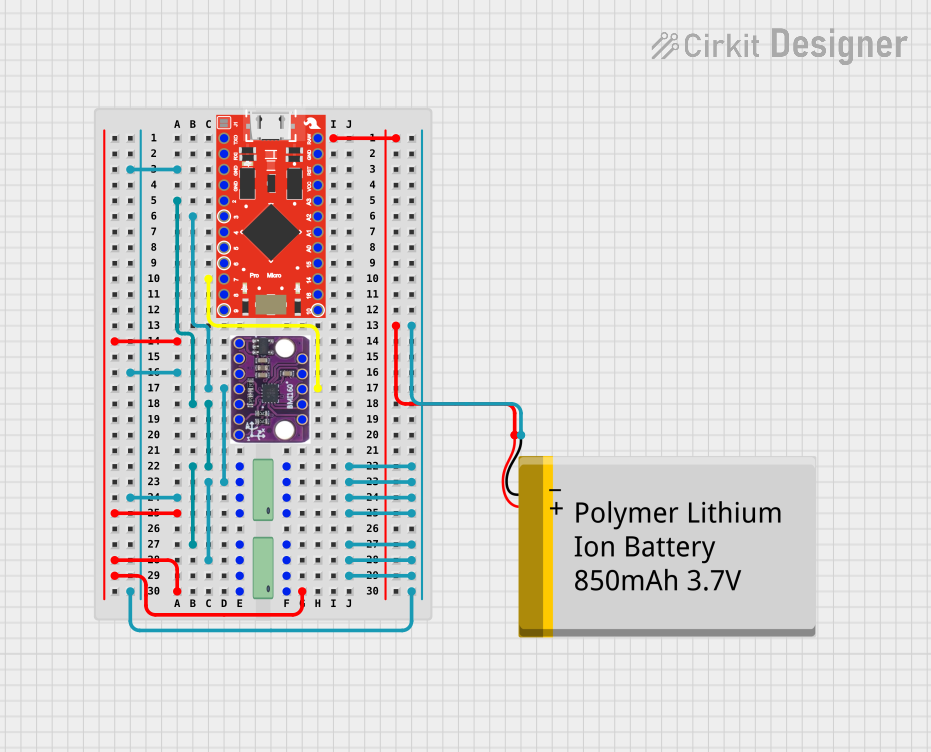
SparkFun Pro Micro Based Motion Tracking System with BMI160 and EEPROM Data Logging
Image of Basic Arduino Sparkfun Pro Micro + BMI160: A project utilizing Adafruit Mini Sparkle Motion in a practical application
This circuit is designed for motion sensing and data logging applications. It features a SparkFun Pro Micro microcontroller interfaced with a BMI160 6DOF sensor for motion detection and two 24LC512 EEPROM chips for extended data storage. The microcontroller reads gyroscopic and accelerometer data from the BMI160 sensor, processes it, and stores it in the EEPROM, with power supplied by a Polymer Lithium Ion Battery.
Cirkit Designer LogoOpen Project in Cirkit Designer

Explore Projects Built with Adafruit Mini Sparkle Motion

Use Cirkit Designer to design, explore, and prototype these projects online. Some projects support real-time simulation. Click "Open Project" to start designing instantly!
Image of project 1: A project utilizing Adafruit Mini Sparkle Motion in a practical application
Arduino-Controlled Interactive LED and Sound System with Motion Detection
This circuit features an Arduino UNO microcontroller interfaced with an Adafruit ADXL345 accelerometer, an HC-SR04 ultrasonic sensor, two SG90 servomotors, a DFPlayer Mini MP3 module, a WS2812 RGB LED strip, and a loudspeaker. The Arduino controls the LED strip and servomotors based on distance measurements from the ultrasonic sensor and plays sounds through the DFPlayer Mini when motion is detected by the accelerometer. The circuit is designed for interactive displays or installations where visual and auditory feedback is provided in response to object proximity and movement.
Cirkit Designer LogoOpen Project in Cirkit Designer
Image of Accelerometer ADXL345 Circuit Diagram: A project utilizing Adafruit Mini Sparkle Motion in a practical application
Arduino UNO and ADXL345 Accelerometer Data Logger
This circuit features an Arduino UNO microcontroller interfaced with an Adafruit ADXL345 accelerometer for motion detection, powered by two parallel-connected 18650 Li-ion batteries. The accelerometer communicates with the Arduino over I2C, and the system is designed for further code development to utilize the motion sensing capabilities.
Cirkit Designer LogoOpen Project in Cirkit Designer
Image of melty: A project utilizing Adafruit Mini Sparkle Motion in a practical application
Remote-Controlled Drone with Motion Sensing Capabilities
This circuit is designed for motion control and telemetry in a small vehicle or drone. It includes an Adafruit ADXL345 accelerometer interfaced with a SparkFun Pro Micro microcontroller for motion sensing. The circuit also features two Electronic Speed Controllers (ESCs) to drive motors, a step-up voltage regulator to stabilize power supply from a Lipo battery, and a flysky mini receiver to receive control signals from a remote transmitter.
Cirkit Designer LogoOpen Project in Cirkit Designer
Image of Basic Arduino Sparkfun Pro Micro + BMI160: A project utilizing Adafruit Mini Sparkle Motion in a practical application
SparkFun Pro Micro Based Motion Tracking System with BMI160 and EEPROM Data Logging
This circuit is designed for motion sensing and data logging applications. It features a SparkFun Pro Micro microcontroller interfaced with a BMI160 6DOF sensor for motion detection and two 24LC512 EEPROM chips for extended data storage. The microcontroller reads gyroscopic and accelerometer data from the BMI160 sensor, processes it, and stores it in the EEPROM, with power supplied by a Polymer Lithium Ion Battery.
Cirkit Designer LogoOpen Project in Cirkit Designer

Common Applications

  • Wearable electronics and costumes
  • Interactive art installations
  • Holiday decorations and ornaments
  • Motion-activated lighting for displays
  • DIY projects requiring compact, motion-triggered LEDs

Technical Specifications

The following table outlines the key technical details of the Adafruit Mini Sparkle Motion:

Parameter Value
Operating Voltage 3.3V to 5V DC
Current Consumption ~20mA (typical, depending on LED state)
LED Type RGB LED with sparkling effect
Motion Sensor Type Built-in accelerometer
Dimensions 20mm x 15mm x 5mm
Weight 2 grams

Pin Configuration and Descriptions

The Adafruit Mini Sparkle Motion has the following pinout:

Pin Name Description
1 VIN Power input (3.3V to 5V DC)
2 GND Ground connection
3 OUT Digital output pin (motion detection signal)
4 LED+ Positive terminal for the built-in LED
5 LED- Negative terminal for the built-in LED

Usage Instructions

How to Use the Component in a Circuit

  1. Powering the Component: Connect the VIN pin to a 3.3V or 5V DC power source and the GND pin to ground.
  2. Motion Detection Output: The OUT pin provides a digital signal that goes HIGH when motion is detected. This can be connected to a microcontroller or other logic circuitry.
  3. LED Control: The built-in RGB LED is pre-configured to create a sparkling effect when motion is detected. Connect the LED+ and LED- pins to power and ground, respectively, to activate the LED.

Important Considerations and Best Practices

  • Power Supply: Ensure a stable power supply within the specified voltage range to avoid damaging the component.
  • Placement: For optimal motion detection, place the component in a location where it can easily sense movement.
  • Microcontroller Integration: If using with a microcontroller (e.g., Arduino UNO), connect the OUT pin to a digital input pin to monitor motion events.
  • LED Brightness: The brightness of the built-in LED is fixed and cannot be adjusted.

Example Code for Arduino UNO

Below is an example Arduino sketch to use the Adafruit Mini Sparkle Motion with an Arduino UNO. The code reads the motion detection signal and prints the status to the Serial Monitor.

// Define the pin connected to the OUT pin of the Mini Sparkle Motion
const int motionPin = 2; // Digital pin 2

void setup() {
  pinMode(motionPin, INPUT); // Set motionPin as an input
  Serial.begin(9600); // Initialize serial communication at 9600 baud
}

void loop() {
  int motionState = digitalRead(motionPin); // Read the motion detection signal

  if (motionState == HIGH) {
    // Motion detected
    Serial.println("Motion detected! Sparkling LED activated.");
  } else {
    // No motion detected
    Serial.println("No motion detected.");
  }

  delay(500); // Add a small delay to avoid flooding the Serial Monitor
}

Troubleshooting and FAQs

Common Issues

  1. LED Not Lighting Up

    • Cause: Incorrect power connections or insufficient voltage.
    • Solution: Verify that the VIN and GND pins are properly connected to a 3.3V or 5V power source.
  2. Motion Not Detected

    • Cause: The component is not positioned correctly or the motion is too subtle.
    • Solution: Ensure the component is placed in a location where it can sense movement effectively. Test with more pronounced motion.
  3. Intermittent Operation

    • Cause: Unstable power supply or loose connections.
    • Solution: Check all connections and ensure the power supply is stable.

FAQs

Q: Can I adjust the sensitivity of the motion sensor?
A: No, the sensitivity of the built-in motion sensor is fixed and cannot be adjusted.

Q: Can I control the LED color or brightness?
A: The built-in RGB LED is pre-configured to create a sparkling effect, and its color/brightness cannot be customized.

Q: Is the component compatible with 3.3V logic microcontrollers?
A: Yes, the Adafruit Mini Sparkle Motion works with both 3.3V and 5V logic levels.

Q: Can I use this component outdoors?
A: The component is not weatherproof. If using outdoors, ensure it is enclosed in a protective, waterproof casing.

This concludes the documentation for the Adafruit Mini Sparkle Motion. For additional support, refer to the Adafruit website or community forums.